Omnigent: Databricks' Meta-Harness for Orchestrating Claude Code, Codex, and Custom Agents
TL;DR
Databricks open-sourced Omnigent, a meta-harness that sits above individual agent CLIs so your sessions, policies, and skills are not locked inside any single tool. Here is what it does, how to install it, and where it fits if you already run Claude Code and Codex.
If you run more than one coding agent, you have probably noticed the same thing: each one is its own island. Claude Code has its sessions, permissions, and skills. Codex has a separate set. Switching between them means switching mental models, re-explaining context, and re-configuring guardrails in each tool. There is no shared layer that travels with you.
On June 16, 2026, Databricks open-sourced Omnigent, an Apache-2.0 project it calls a "meta-harness." The pitch in the launch announcement is direct: instead of replacing the agent harnesses you already use, Omnigent sits one level above them and makes them interoperable. This post covers what that actually means, the three things it does, how to install it, and whether it earns a place in your stack.
Last updated: June 17, 2026
What a "Meta-Harness" Actually Means#
A harness is the runtime around a model: the loop that feeds it tools, manages context, enforces permissions, and renders output. Claude Code is a harness. Codex is a harness. Each one is, in Databricks' words, "its own silo, with its own context, its own controls."
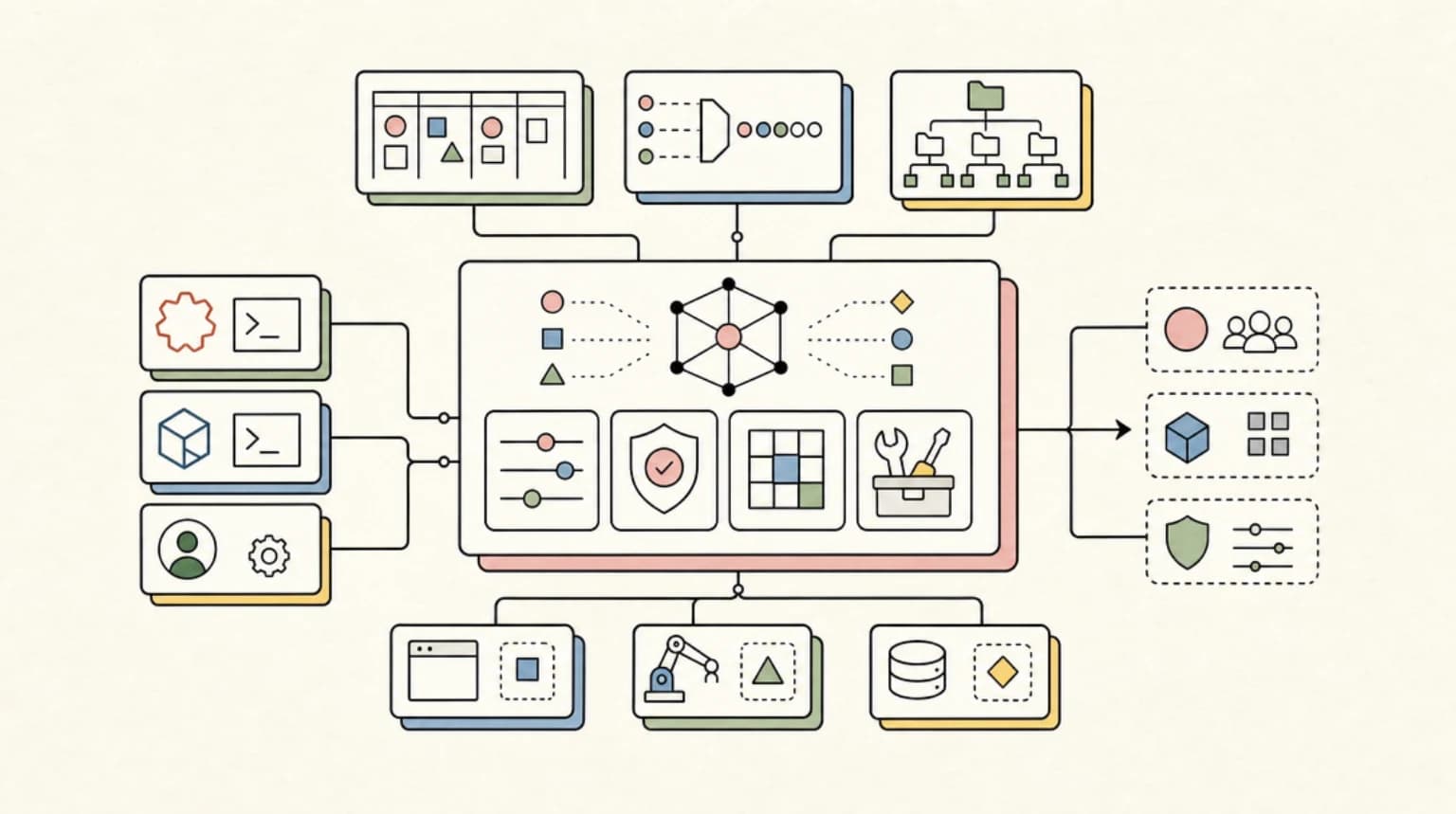
A meta-harness is a layer above those silos. Omnigent's framing is that it "lifts your work above any single harness, so your sessions, policies, and skills stay with you" rather than living inside one CLI. Practically, that means you start a session through Omnigent, and Omnigent decides which underlying harness and model actually runs the work. You can swap the harness underneath without rewriting the agent definition.
That is the whole bet: the orchestration, the guardrails, and the session state belong to you, not to whichever vendor's CLI you happened to open.
The Three Things Omnigent Does#
The announcement organizes the project around three capabilities.
1. Composition#
Omnigent lets you "combine multiple models, harnesses, and techniques without rewriting code." The supported harnesses today are Claude Code (claude-sdk), Codex, Pi, OpenAI Agents, and Open Responses, selectable per run with a --harness flag. You can point the same agent definition at a different model with --model, so a single YAML file can run on Claude one day and a Codex model the next.
This is the part most useful to people who already maintain prompts and tool definitions for one agent and do not want to fork them for another.
2. Control#
Omnigent enforces "stateful, contextual policies" at the meta-harness layer: cost budgets, permissions, and other guardrails that apply regardless of which underlying harness runs. The argument is that a guardrail you set in Claude Code does not follow you into Codex, but a guardrail set in Omnigent applies to both because it lives above them.
3. Collaboration#
You can "share live agent sessions via URL," letting a teammate watch a running agent and steer it in real time. This is the feature most clearly aimed at teams rather than solo developers, and it leans on Omnigent's server mode, which exposes a web UI on http://localhost:6767 by default.
From the archive
Codex Gets Computer Use in the EU - and a Clean Claude Code Import
Jun 17, 2026 • 7 min read
'The Orchestration Is the Product': What Perplexity's Aravind Srinivas Sees That the Model Labs Don't
Jun 17, 2026 • 11 min read
RFC 10008: The New HTTP QUERY Method Explained
Jun 17, 2026 • 6 min read
Self-Hosting Open-Weights Models: The Real Break-Even Math
Jun 17, 2026 • 11 min read
Installing It#
Omnigent is a Python CLI distributed on PyPI, with a Homebrew tap and an install script. The quickstart lists the prerequisites:
- Python 3.12 or newer
uv(recommended) orpip- Node.js 22 LTS or newer with
npm(needed for the Claude Code, Codex, and Pi harnesses, which are Node-based CLIs) tmux(used by the native harness wrappers)- On Linux only,
bubblewrap(bwrap) for sandboxing
The cleanest install path is uv, which isolates the tool from your system Python:
Terminal
uv tool install omnigent
Other supported routes from the README:
Terminal
# Homebrew
brew install omnigent-ai/tap/omnigent

# pip
pip install omnigent

# one-line installer
curl -fsSL https://omnigent.ai/install.sh | sh
Verify the install:
Terminal
omnigent --version
At the time of writing this returns omnigent 0.1.1. The project is explicitly in alpha, so expect rough edges and frequent updates (omnigent upgrade pulls the latest release).
Connecting Your Existing Agents#
The setup step worth understanding is how Omnigent gets credentials. Running the wizard:
Terminal
omnigent setup
detects credentials already present on your machine. If you have the claude and codex CLIs installed and authenticated, Omnigent picks them up as subscription-backed harnesses, meaning it rides your existing Claude Pro/Max and ChatGPT logins rather than requiring separate API keys. You can confirm what it found:
Terminal
omnigent config list
A machine with both CLIs logged in and a local Ollama install shows each harness with its detected credential source: subscription via the claude CLI, subscription via the codex CLI, and a local Ollama base URL for Pi and Codex. For raw API access instead, the setup flow also accepts Anthropic, OpenAI, and gateway keys (OpenRouter, Azure, LiteLLM, vLLM), plus Databricks workspaces if you install the omnigent[databricks] extra.
Running Something#
The fastest way to see orchestration work is one of the two bundled example agents.
debby is a two-headed brainstorming agent that "sends every question to both Claude and GPT and lets them debate," which is a clean demonstration of composition across two vendors in a single session:
Terminal
omnigent debby
polly is the bundled multi-agent coding orchestrator, and it is what a bare omnigent launches when a Claude credential is configured:
Terminal
omnigent polly
# or non-interactively:
omnigent polly -p "review the last commit"
You can also launch a harness directly, skipping the orchestrator:
Terminal
omnigent claude                       # Claude Code in an Omnigent terminal
omnigent codex                        # Codex TUI in an Omnigent terminal
omnigent run --harness codex -p "explain this repo"
Custom agents are YAML files declaring a prompt, tools, and optional sub-agents, run with omnigent run path/to/agent.yaml. The full schema is in the Agent YAML spec. For the collaboration features, omnigent server start runs a background server and omnigent host registers your machine, after which the web UI at http://localhost:6767 is the shared surface.
Where It Fits, and Where It Does Not#
Omnigent is interesting precisely because it does not compete with Claude Code or Codex. It wraps them. That makes the decision about adopting it different from the usual tool-versus-tool comparison.
It is a reasonable fit if you genuinely run multiple harnesses and feel the pain of duplicated config, or if you are on a team that wants shared session visibility and centralized cost and permission policy. The composition story is real: one agent definition that can target different models and harnesses is a maintenance win once you are past a single tool.
It is harder to justify if you live entirely inside one harness. If Claude Code is your whole world, a meta-harness adds a layer, a server process, and a tmux dependency to abstract over a problem you do not have yet. There is also the alpha caveat: at version 0.1.1 with an Apache-2.0 license and an active Discord, this is early software backed by a vendor (Databricks) whose own agent platform it conveniently plugs into.
The honest read: Omnigent is betting that the durable thing in agentic development is not any single harness but the orchestration, policy, and session layer that spans them. That is a credible bet as more teams run more than one agent. Whether the abstraction is worth the extra moving parts depends entirely on how many islands you are currently maintaining by hand. If the answer is one, wait. If it is three, this is worth an afternoon.
FAQ#
What is Omnigent?#
Omnigent is an Apache-2.0 "meta-harness" open-sourced by Databricks on June 16, 2026. It sits above individual agent CLIs like Claude Code and Codex so sessions, policies, and skills travel with you instead of staying locked inside one tool, as described in the launch announcement.
Which agent harnesses does Omnigent support?#
At launch it supports Claude Code (claude-sdk), Codex, Pi, OpenAI Agents, and Open Responses, selectable per run with a --harness flag. If you already compare these tools directly, see Claude Code vs Codex vs Cursor vs OpenCode.
Do I need separate API keys to use Omnigent?#
No. Running omnigent setup detects credentials already on your machine, so if the claude and codex CLIs are installed and authenticated, Omnigent rides your existing Claude Pro/Max and ChatGPT logins as subscription-backed harnesses. Raw API keys (Anthropic, OpenAI, gateway providers) and Databricks workspaces are also supported.
Is Omnigent a replacement for Claude Code or building multi-agent workflows myself?#
No. Omnigent wraps existing harnesses rather than competing with them, similar in spirit to how multi-agent workflows in Claude Code are composed from the tools you already run. It's most useful once you are maintaining more than one harness; if Claude Code is your whole world, it adds a layer you may not need yet.
Continue Reading#
- Antigravity CLI vs Claude Code vs Codex: The Terminal Agent Field Guide (July 2026)
- Multi-Agent CLI Orchestration Tools Compared: Agent-Manager, Pane, and Golutra in 2026
Sources#
Read next
Building Multi-Agent Workflows in Claude Code: A Practical Tutorial
How to use Claude Code's Task tool, custom sub-agents, and worktrees to run parallel development workflows. Real prompt examples, agent configurations, and workflow patterns from daily use.
11 min readClaude Code vs Codex vs Cursor vs OpenCode: Which Agent Ships More Code?
Four agents, same tasks. Honest trade-offs from a developer shipping production apps with all of them.
10 min readOpenAI Agents SDK Evolution: What Ships in Production
Configurable memory, sandbox-aware orchestration, Codex-like filesystem tools. Here is how the new Agents SDK actually behaves in prod.
10 min readShare
Developers Digest
Technical content at the intersection of AI and development. Building with AI agents, Claude Code, and modern dev tools - then showing you exactly how it works.
300+ videos30K+ GitHub stars850+ articles
Related Tools
ProductivityNew
A
AgentCanvas
A hosted infinite canvas your headless AI agents drive over MCP. Any MCP-speaking agent - Claude Code, Codex, Cursor, or...
View ToolAI Coding
C
Conductor
Mac app for running parallel Claude Code, Codex, and Cursor agents in isolated workspaces. Watch every agent work at onc...
View ToolAI CodingDaily Driver

Claude Code
Anthropic's agentic coding CLI. Runs in your terminal, edits files autonomously, spawns sub-agents, and maintains memory...
View ToolAI CodingAgent

OpenAI Codex
OpenAI's coding agent for terminal, cloud, IDE, GitHub, Slack, and Linear workflows. Reads repos, edits files, runs comm...
View ToolApps from Developers Digest
Related Guides
Guide
AGENTS.md - Claude Code
Define custom subagent types within your project's memory layer.
Claude CodeGuide
Claude Code Setup Guide
Configure Claude Code for maximum productivity -- CLAUDE.md, sub-agents, MCP servers, and autonomous workflows.
AI AgentsGuide
Keyboard Shortcuts - Claude Code
50+ customizable shortcuts for cancel, history, transcript, and more.
Claude CodeRelated Videos

Zed: The Open Source Agentic IDE - Use Claude Code, Codex & Gemini CLI in one place
Check out Zed here! https://zed.dev In this video, we dive into Zed, a robust open source code editor that has recently introduced the Agent Client Protocol. This new open standard allows...
Video·

Generate Videos in Codex + Claude Code with This...
Check out HeyGen! https://heygen.1stcollab.com/developersdigest The video introduces HeyGen, an AI video generation platform with a rich API and a CLI that lets developers create, fetch, and manipula...
Video·

10x Design in Claude Code and Codex
Try Higgsfield: https://higgsfield.ai/s/higgsfield-general-campaign-developersdigest-juDMTi AI coding agents can build entire websites in minutes, but the default results often still look generic and...
Video·
Related Posts
11 min read
Claude Code
Building Multi-Agent Workflows in Claude Code: A Practical Tutorial
How to use Claude Code's Task tool, custom sub-agents, and worktrees to run parallel development workflows. Real prompt...
10 min read
Claude Code
Claude Code vs Codex vs Cursor vs OpenCode: Which Agent Ships More Code?
Four agents, same tasks. Honest trade-offs from a developer shipping production apps with all of them.
10 min read
OpenAI
OpenAI Agents SDK Evolution: What Ships in Production
Configurable memory, sandbox-aware orchestration, Codex-like filesystem tools. Here is how the new Agents SDK actually b...
8 min read
Claude
Claude Managed Agents: Dreaming, Outcomes, and Multi-Agent Orchestration Explained
Anthropic added three new primitives to Claude Managed Agents in spring 2026 - dreaming, outcomes, and multi-agent orche...

10 min read
ai-coding
Multi-Agent CLI Orchestration Tools Compared: Agent-Manager, Pane, and Golutra in 2026
Agent-Manager, Pane, and Golutra let you run multiple CLI coding agents in parallel. Here is the comparison of architect...
10 min read
pi
pi vs Claude Code vs OpenCode: Picking Your Agentic CLI
A decision-intent comparison of pi, Claude Code, OpenCode and Codex CLI as your main agentic coding harness in late 2026...
Build with the member tools

Get Smarter About AI Dev
New tutorials, open-source projects, and deep dives on coding agents - delivered weekly.
One email per weekReal code, not theoryFree forever