Claude Code vs Codex vs Cursor vs OpenCode: Which Agent Ships More Code?

TL;DR
Four agents, same tasks: honest trade-offs between Claude Code, Codex CLI, Cursor Agent and OpenCode from a developer shipping production apps with all of them.
Official Sources#
I use all four of these daily. Not as demos. As the tools that close PRs, fix regressions, and push code to production on live apps. So when people ask which one "wins," the honest answer is: they each have a lane, and pretending otherwise wastes your subscription. If you are still separating autocomplete from real agent work, start with what an AI coding agent is before this shoot-out.
Here is the short version for anyone skimming, then the deeper cuts on install, what each agent is actually good at, where each one fumbles, and how to pick.
Last updated: September 30, 2026. Codex now spans local and delegated execution surfaces, Anthropic still shares Claude Code usage across Claude and terminal work, and Cursor continues to push usage-aware pricing rather than a simple unlimited-seat story. The model references below reflect the current flagships (Claude Opus 5.5 and Sonnet 5.5, the GPT-6 family including GPT-6.1 Sol) as of this update. Verify current plan limits, pricing, and model availability against the primary sources linked below before you buy a one-year subscription.
Shoot-out Table#
| Agent | Runtime | Model Surface | Pricing Model | Where It Wins |
|---|---|---|---|---|
| Claude Code | Local CLI + subagents | Claude plan or API models | Subscription (Pro / Max) or API | Long coherent sessions, refactors, skill-driven workflows |
| Codex CLI | Local clients + delegated tasks | Codex model mix with plan credits | ChatGPT plan, business credits, or API | Parallel agent fleets, flexible execution, reviewable delegated work |
| Cursor Agent | IDE-integrated + background agents | Cursor Auto plus selectable frontier models | Usage-aware individual or team plans | Tight edit loops inside an IDE, model switching |
| OpenCode | Local CLI, open source | Bring-your-own provider stack | Free app plus your model spend | Self-hosted, model-agnostic, no vendor lock-in |
For the OpenAI side of the agent stack, read Claude Code Agent Teams, Subagents, and MCP: The 2026 Playbook with Why Skills Beat Prompts for Coding Agents in 2026; that gives the product and workflow context behind this update.
Pricing context changes fast. If you are budget-planning, use the AI API pricing tracker for a cross-provider snapshot and validate any subscription plan details against the official pricing pages before you standardize on a stack.
Source Trail and Companion Reads#
Use this post as the opinionated field guide, then verify the moving parts against the primary sources:
| Topic | Primary source | DevDigest context |
|---|---|---|
| Claude Code capabilities | Claude Code overview | Claude Code complete guide, skills guide |
| Codex changes | Codex changelog | Codex vs Claude Code, Codex April changelog, Codex guide |
| Cursor plan shape | Cursor pricing | Cursor vs Claude Code, Cursor 2.0 deep dive |
| Budget planning | OpenAI Codex plan docs | AI coding tools pricing comparison, Q2 pricing update |
| Cross-provider API costs | OpenAI pricing, Anthropic pricing | AI API pricing tracker, AI coding tools pricing 2026 |
That gives the reader three paths out of this comparison: validate official plan details, go deeper on a specific tool, or jump sideways into the broader pricing matrix.
Now the honest breakdown.
Claude Code#
Install#
curl -fsSL https://claude.ai/install.sh | bash
claude
Sign in with your Anthropic account or set ANTHROPIC_API_KEY. A Pro or Max plan routes through subscription quota instead of per-token API billing, which matters at volume.
What it's great at#
Long-horizon sessions. Claude Code is the only agent in this lineup where I can run a multi-hour refactor across 40 files and trust the context to stay coherent. Subagents, hooks, and project-level CLAUDE.md rules let me shape behavior without retraining the model. The skill system (~/.claude/skills/) lets me drop in reusable workflows like /handoff, /qa, or /devdigest:ship-product that fire the right sequence of tools without re-prompting.
The tool use discipline is the differentiator. Claude reads before it writes, proposes before it edits, and will stop to ask rather than hallucinate a file path. That's boring in a demo and priceless at 2am debugging a deploy.
What it fumbles#
Parallelism. Subagents and background agents now let Claude Code run several sessions at once, but fanning out ten independent agents each building a separate feature is still more natural in Codex. Also: rate limits on Max plans are real. Shipping heavy on Opus 5.5 will eventually hit a reset window and you'll be stuck.
Model switching is also awkward. You can swap between Opus and Sonnet, but you can't easily swap in GPT-6.1 or Gemini for a second opinion without a wrapper.
Pricing#
Pro is still the lower-friction entry point, Max plans are the higher-capacity option, and API billing remains the explicit metered path. The operational detail that matters most is shared usage: heavy Claude Code sessions eat into the same plan capacity as Claude chat unless you deliberately switch to API auth.
Best use case#
Serious builders doing deep work on a single complex codebase. If you're refactoring, architecting, or running a "one human, one codebase, ship daily" workflow, this is the pick.
Codex CLI#
Install#
curl -fsSL https://chatgpt.com/codex/install.sh | sh
codex
Sign in with your ChatGPT account. Codex is now documented across Free, Go, Plus, Pro, Business, Edu, and Enterprise plans, and API or workspace credit setups still matter when you need deterministic spend controls.
What it's great at#
Parallel fleets. Codex was built from the jump around the idea that the bottleneck isn't model capability, it's human supervision of many concurrent agents. Worktree isolation, cloud runners, and the codex exec headless mode make it the best option when you want to fan out work across branches or machines. The April Codex changelog matters because it pushes that same idea into goals, browser verification, and safer approval workflows.
Codex also benefits from tighter product integration than a lot of older comparisons assume. Local CLI work, app and IDE surfaces, plan-based access, and delegated execution now fit into one family instead of separate experiments.
What it fumbles#
Depth on long sessions. Codex is better than it was a few months ago, but it still feels strongest when the task is well-scoped and the review boundary is clear. For surgery on a 50k-line app with lots of local context, Claude Code is still the steadier primary loop.
The delegated-environment story is also uneven. When it works, it's excellent. When it doesn't, debugging environment parity can become its own side quest.
Pricing#
Codex pricing is now a mix of included plan access, business credit controls, and token-based rate-card math. That is more flexible than the old preview-era story, but it also means you should validate both the plan surface and the rate card before using Codex as a budgeting anchor.
Best use case#
Parallel work. If your workflow is "spawn five agents, each takes a ticket, I review PRs," Codex is built for that.
Cursor Agent#
Install#
Download the IDE from cursor.com, or use the CLI:
curl https://cursor.com/install -fsS | bash
agent -p "your prompt"
What it's great at#
The IDE loop. Cursor's advantage is not the agent itself, it's that the agent lives inside the editor where you're already reading the code. Tab completion, inline diffs, and "agent mode" in the sidebar mean you're never copy-pasting between a terminal and a file. For front-end work especially, this is the tightest feedback loop in the lineup, which is why the dedicated Cursor vs Claude Code comparison is more useful than a pure model benchmark.
Model switching is the other win. You can choose the workflow-appropriate model more directly than in the single-vendor agents, and Cursor's recent pricing shape keeps that choice tied to visible usage instead of only marketing language about "unlimited" capacity.
What it fumbles#
Agent depth. Cursor's agent mode is improving fast, but it still behaves more like "smart autocomplete with a plan" than a true autonomous loop. It will ask for approval more often than Claude Code and lose context on longer runs. Headless CLI mode (agent -p) works but feels like an afterthought next to Claude or Codex native CLIs.
Pricing#
Cursor still starts at the lower-cost entry tiers, but the more important detail is that agent usage is tracked explicitly enough for teams to see who is actually consuming the expensive model budget. That makes it easier to justify premium seats for heavy users and keep lighter seats cheaper.
Best use case#
Editor-native work. If you live in your IDE and want an agent that augments your typing rather than replacing your session, Cursor is the fit.
OpenCode#
Install#
curl -fsSL https://opencode.ai/install | bash
opencode
Set OPENAI_API_KEY, ANTHROPIC_API_KEY, or any compatible endpoint in the config. It will pick up local Ollama, MiniMax, or OpenRouter without ceremony.
What it's great at#
No lock-in. OpenCode is open source, model-agnostic, and self-hosted. You point it at whatever provider you want. Running Claude Sonnet 5.5 one day, GLM-5.3 the next, Kimi K3 on the third. The TUI mirrors what you'd get from Claude Code or Codex without the subscription, and v2 adds a desktop app and IDE extension.
For teams with sensitive code that can't touch a vendor API, OpenCode plus a local model via Ollama is the only option in this lineup that runs fully offline. DGX Spark or a decent local GPU and you have an agent that never phones home.
What it fumbles#
Polish and ecosystem. OpenCode gives you the loop plus skills, agents, and MCP, but you still assemble more of the workflow yourself, and the third-party ecosystem around Claude Code skills and hooks is deeper. If you want "it just works," this isn't it. You're trading convenience for control.
Model quality is also your problem. Point it at a weak model and you'll get weak output, and no amount of prompt engineering fixes a 35-intelligence model trying to refactor a Next.js app.
Pricing#
The app is free. You pay for whichever provider or local hardware stack you connect. That can be cheaper than the closed tools, or much more expensive, depending on the models you choose and how aggressively you run them.
Best use case#
Tinkerers, self-hosters, and teams that refuse to be locked into a single vendor. Also a great third agent for when Claude and Codex are both rate-limited.
How to Pick#
If you're shipping one product and want the deepest single-agent experience, Claude Code with a Max plan.
If your bottleneck is parallelism, you want more tickets closed per day, Codex CLI.
If you live in an IDE and want the agent there with you, Cursor.
If you hate lock-in, want to run local models, or just want to see how the sausage is made, OpenCode.
The real pro move: run two of them. My daily setup is Claude Code as the primary loop and Codex CLI for parallel side-quests. They complement more than they compete.
Compare the Models Powering These Agents#
Every agent above is only as good as the model inside it. I built a comparison tool that tracks 210+ frontier models by quality score, speed, cost, and context window. Filter by "AI Coding" to see how Claude Opus 5.5, GPT-6.1 Sol, Gemini 3.8 Flash, and the open-weight alternatives actually stack up.
Head to subagent.developersdigest.tech for the live leaderboard, cost calculator, and task-based recommendations. Pick the model. Then pick the agent. In that order.
FAQ#
Which AI coding agent should I use as a beginner?#
Start with Claude Code. The tool use discipline - reading files before editing, proposing changes before applying them, stopping to ask clarifying questions - makes it the most forgiving for developers learning how to work with AI agents. The skill system also provides pre-built workflows so you spend less time prompting and more time shipping. Cursor is the second choice if you prefer staying inside an IDE rather than working in a terminal.
Can I use Claude Code, Codex, Cursor, and OpenCode together?#
Yes, and many developers do exactly this. A common pattern is running Claude Code as your primary agent for deep, context-heavy work on a single codebase, then using Codex CLI to parallelize side tasks across branches. OpenCode serves as a fallback when both are rate-limited. The agents don't conflict - they're separate processes with separate context windows. The cost adds up, but the productivity gain often justifies running two subscriptions.
What is the difference between Cursor and Claude Code?#
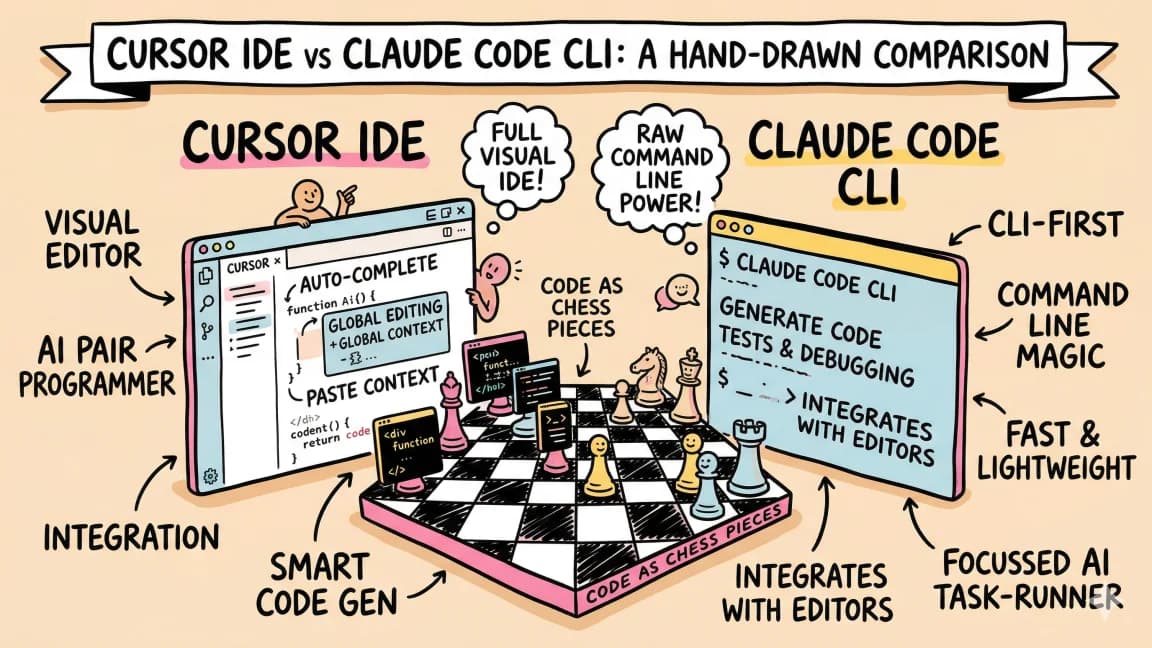
Cursor is an IDE with an integrated agent - the agent lives inside your editor and augments your typing with completions and diffs. Claude Code is a standalone CLI agent that runs in your terminal and operates more autonomously, making multi-file changes without constant approval. Cursor is tighter for single-file edit loops. Claude Code is deeper for refactors spanning dozens of files. Different tools for different workflows, not direct competitors.
How much does it cost to use AI coding agents?#
The usable answer is "it depends on workflow more than sticker price." Claude Code, Cursor, and Codex each expose different mixes of included usage, visible limits, and metered overflow. OpenCode shifts the whole problem to whichever provider or local model stack you choose. For a detailed breakdown, see our AI coding tools pricing comparison and the Q2 pricing update.
Which agent is best for parallel development with multiple tasks?#
Codex CLI. It was designed around parallel agent fleets from the beginning. Worktree isolation, cloud runners, and headless execution mode (codex exec) let you spin up multiple agents working on separate features simultaneously. Claude Code can run subagents and background agents concurrently, but its default loop is still one lead session per repo. Cursor and OpenCode are primarily single-session tools. If your workflow involves closing multiple tickets per day with parallel agents, Codex is purpose-built for it.
Is OpenCode as good as Claude Code or Codex?#
OpenCode provides the same core agent loop but with less polish. You get model-agnostic flexibility and full self-hosting capability, but the third-party ecosystem around skills and hooks is smaller and more of the workflow is yours to assemble. The quality of output depends entirely on which model you point it at. A strong model like Claude Sonnet 5.5 or GPT-6.1 through OpenCode performs comparably to the native agents. A weak local model will underperform significantly. OpenCode is best for tinkerers who value control over convenience.
Which AI coding agent is fastest?#
The answer changes by model, plan, and workload. Cursor feels fastest for interactive editing, Codex often feels fastest for delegated well-scoped work, and Claude Code usually wins when the task is long enough that coherence matters more than first-token speed. Treat workflow latency as the comparison metric, not raw token throughput claims.
Can I run AI coding agents locally without internet?#
Only OpenCode supports fully offline operation. Point it at a local model running through Ollama on a DGX Spark or capable GPU and you have an agent that never phones home. This is the only option in this lineup for teams with sensitive code that cannot touch vendor APIs. Claude Code, Codex, and Cursor all require cloud API connections to function.
Get the next comparison like this in your inbox
One email a week on Claude Code and the rest of the AI dev stack. Free.
Read next on Claude Code
Claude Code vs Cursor in 2026: Which Should You Use?
Claude Code vs Cursor in 2026: Claude Code for autonomous terminal-first multi-file work, Cursor for editor-native iteration. Pricing and a decision framework.
11 min readCodex vs Claude Code in 2026: Which AI Coding Agent Should You Use?
Codex vs Claude Code in 2026: pick Claude Code for ambiguous multi-file work with skills and MCP, or Codex for well-scoped tasks and strong defaults.
12 min readWhat Is Claude Code? The Complete Guide for 2026
Claude Code is Anthropic's AI coding agent for terminal, IDE, desktop and browser. What it does, how it works, setup, pricing, MCP, skills, hooks and subagents.
15 min readTechnical content at the intersection of AI and development. Building with AI agents, Claude Code, and modern dev tools - then showing you exactly how it works.