What Is MCP (Model Context Protocol)? The 2026 Developer Guide

TL;DR
MCP (Model Context Protocol) is the open standard connecting AI apps to tools and data. How the 2026-07-28 spec works and how to install or build a server.
MCP (Model Context Protocol) is an open standard that lets any AI application connect to external tools and data through one protocol. An MCP server exposes tools, resources, and prompts; an MCP client inside Claude Code, Cursor, Codex, or your own app discovers and calls them over JSON-RPC. Build a server once and every MCP-capable client can use it.
Last updated: September 28, 2026. Checked against the 2026-07-28 specification, the official TypeScript SDK, and the Claude Code and Cursor MCP docs on that date.
This is our single MCP explainer. It merges three earlier posts (a TypeScript guide, a protocol primer, and this beginner guide) into one page, and it reflects the biggest spec change since launch: as of 2026-07-28, MCP is stateless.
What MCP is, in the spec's own words#
The official introduction defines MCP as "an open-source standard for connecting AI applications to external systems," and compares it to a USB-C port for AI applications.
That is the whole idea. Before MCP, every AI tool that wanted to talk to your filesystem, database, or issue tracker shipped a bespoke integration, and every integration had to be rebuilt for every tool. MCP replaces that N-by-M mess with one protocol: one server, any client.
A short history:
- November 25, 2024: Anthropic introduced and open-sourced MCP.
- December 9, 2025: Anthropic donated MCP to the Agentic AI Foundation under the Linux Foundation, co-founded with Block and OpenAI.
- July 28, 2026: the 2026-07-28 specification removed sessions and the initialize handshake, making every request self-contained.
Today, MCP clients ship in Claude Code, Cursor, and OpenAI Codex (which lists MCP on every plan, including API-key sign-in), along with many other hosts. The MCP client support matrix shows which transports and features each one documents.
The architecture: hosts, clients, servers#
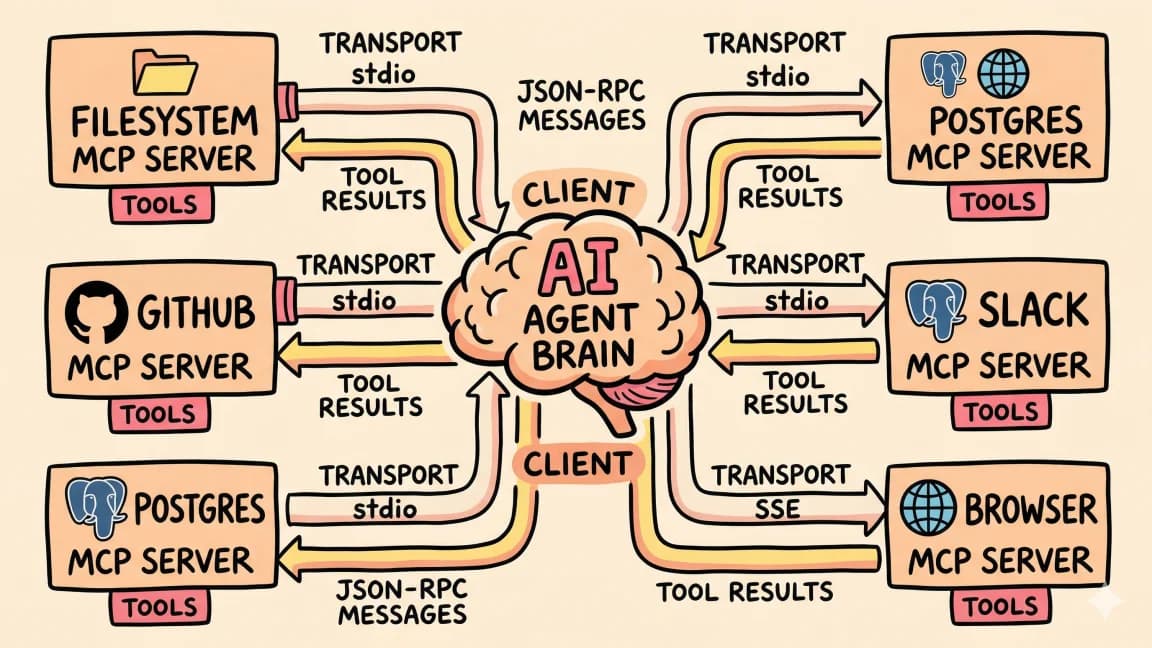
The spec defines three roles that communicate with JSON-RPC 2.0 messages:
- Host: the AI application you use. Claude Code, Cursor, Codex, or your own app. The host runs the model and owns the conversation.
- Client: the connector inside the host that talks to one server.
- Server: a program that exposes capabilities. It runs locally as a subprocess or remotely as an HTTP service, and it does not care which host is on the other end.
User prompt
    |
Host (Claude Code, Cursor, Codex, your app) + model
    |
MCP clients
    |
+-------------+-------------+-------------+
| MCP server  | MCP server  | MCP server  |
| (files)     | (git)       | (your API)  |
+-------------+-------------+-------------+
MCP sits between your model and your infrastructure. It does not replace your API layer; it wraps it. Your REST endpoints, databases, and file systems stay where they are, and MCP gives any agent a standard way to reach them.
The three server primitives#
Every MCP server exposes some combination of three primitives. They look similar but differ in who is in control.
Tools are model-controlled#
The tools spec says tools are "model-controlled": the model discovers them and decides when to call them. A server declares each tool with a name, a description, and an inputSchema (JSON Schema). The client lists them with tools/list and invokes one with tools/call.
{
  "name": "get_weather",
  "description": "Get current weather information for a location",
  "inputSchema": {
    "type": "object",
    "properties": {
      "location": { "type": "string", "description": "City name or zip code" }
    },
    "required": ["location"]
  }
}
The spec says there should always be a human in the loop with the ability to deny tool invocations. That is why Claude Code and Cursor ask before running a new tool.
Resources are application-driven#
Resources are context: files, database rows, API payloads, each identified by a URI. The host, or the user, decides when to attach one; the model does not pull them on its own. Clients call resources/list to discover what is available and resources/read to fetch contents. In the 2026-07-28 spec, change notifications moved to a single subscriptions/listen stream that clients opt into.
Prompts are user-controlled#
Prompts are named, argument-accepting templates. Most clients surface them as slash commands such as /review-code.
A useful mental model: tools are the model's hands, resources are its eyes, prompts are its phrasebook.
What changed in the 2026-07-28 spec#
If you learned MCP in 2025, several things you learned are now outdated. From the official changelog:
- No more sessions or handshake. The
initialize/notifications/initializedhandshake and theMcp-Session-Idheader are gone. Every request carries its protocol version and client capabilities in_meta. server/discoveris required. Servers advertise supported versions, capabilities, and identity through it.- Multi round-trip requests replace server-initiated requests. When a server needs more input (elicitation, for example), it returns an
input_requiredresult and the client retries the original request with the answers. - Roots, Sampling, and Logging are deprecated. They still work during the deprecation window, but new implementations should not add them. Pass directories as tool parameters, call LLM provider APIs directly instead of sampling, and log to
stderror OpenTelemetry. - Tasks moved to an extension. Long-running work now lives in the official
io.modelcontextprotocol/tasksextension, alongside extensions like MCP Apps for inline UI and Skills over MCP. - List results are cacheable.
tools/listand friends now returnttlMsandcacheScope, and servers should return tools in a deterministic order.
For the migration checklist, see our 2026-07-28 breaking changes breakdown and the stateless migration guide.
Transports: stdio and Streamable HTTP#
The transports overview defines two standard bindings:
- stdio: the client launches the server as a subprocess and exchanges newline-delimited JSON-RPC over stdin and stdout. Use it for local servers.
- Streamable HTTP: each message is an HTTP POST to a single MCP endpoint, and replies arrive as a JSON object or a request-scoped SSE stream. Use it for hosted servers.
The older HTTP+SSE transport is formally deprecated, and the Claude Code docs say the same: use HTTP servers instead of SSE where available. If a tutorial tells you to "set up an SSE server," it is out of date.
Installing your first server in Claude Code#
Claude Code manages servers with claude mcp add. Per the Claude Code MCP docs, there are three scopes: local (the default, only you, current project), project (shared with the team through a .mcp.json file), and user (you, across all projects).
A local stdio server, using the official filesystem reference server:
claude mcp add --transport stdio filesystem -- npx -y @modelcontextprotocol/server-filesystem ~/projects
A remote HTTP server, using Notion's example from the Claude Code docs:
claude mcp add --transport http notion https://mcp.notion.com/mcp
A remote server that needs a header:
claude mcp add --transport http secure-api https://api.example.com/mcp \
  --header "Authorization: Bearer your-token"
For stdio servers, put the whole launch command after -- so flags like -y reach the server command, and pass environment variables with --env after the server name. After installing, run claude mcp list or open the /mcp panel inside Claude Code to see each server's status.
Installing in Cursor#
Per Cursor's MCP docs, Cursor reads .cursor/mcp.json in your project or ~/.cursor/mcp.json globally, and supports stdio, SSE, and Streamable HTTP:
{
  "mcpServers": {
    "filesystem": {
      "command": "npx",
      "args": ["-y", "@modelcontextprotocol/server-filesystem", "/Users/you/projects"]
    },
    "notion": {
      "url": "https://mcp.notion.com/mcp"
    }
  }
}
Stdio servers take command, args, and env; remote servers take url and optional headers.
Servers worth starting with#
The official servers repo now keeps a short list of reference servers: Everything (a test server), Fetch, Filesystem, Git, Memory, Sequential Thinking, and Time. TypeScript ones run with npx (for example npx -y @modelcontextprotocol/server-memory) and Python ones with uvx (for example uvx mcp-server-git). Older reference servers such as GitHub, PostgreSQL, Slack, and SQLite are archived; a few now point to vendor-maintained replacements.
Start with one or two servers that fill a real gap. Every server adds tool definitions to your context, so more is not better. For opinionated picks, see best MCP servers in 2026, our top 5 that actually help Claude Code, and the MCP directory.
Build your own server with the TypeScript SDK#
The TypeScript SDK's main branch is now v2, which implements the 2026-07-28 spec and ships as split packages: @modelcontextprotocol/server and @modelcontextprotocol/client. v1 keeps getting bug and security fixes for at least six months after v2's release.
npm install @modelcontextprotocol/server zodA minimal server with one tool, following the SDK README:
import { McpServer } from "@modelcontextprotocol/server";
import { StdioServerTransport } from "@modelcontextprotocol/server/stdio";
import * as z from "zod/v4";

const server = new McpServer({ name: "hello-mcp", version: "1.0.0" });

server.registerTool(
  "greet",
  {
    description: "Return a friendly greeting",
    inputSchema: z.object({ name: z.string() }),
  },
  async ({ name }) => ({
    content: [{ type: "text", text: `Hello, ${name}.` }],
  })
);

async function main() {
  const transport = new StdioServerTransport();
  await server.connect(transport);
}

main();
Register it with Claude Code:
claude mcp add --transport stdio hello -- node /absolute/path/to/server.js
Run claude mcp list, confirm hello is connected, and ask the agent to greet you. Tool schemas use Standard Schema, so Zod v4, Valibot, or ArkType all work. For HTTP servers, the SDK publishes thin middleware packages for Node.js, Express, Fastify, and Hono. Our first MCP server guide walks through a fuller example.
Security: what the spec requires#
For Streamable HTTP, the transport spec is explicit: servers must validate the Origin header to prevent DNS rebinding, should bind only to 127.0.0.1 when running locally, and should authenticate all connections. The spec overview adds that tools represent arbitrary code execution, that tool descriptions should be treated as untrusted unless the server is trusted, and that hosts must get user consent before invoking a tool.
Practical rules:
- Install servers only from publishers you trust. A stdio server runs with your user permissions.
- Keep experimental servers in
localscope. Useprojectscope only for servers the whole team should get. - Put secrets in environment variables, never in committed config.
- Scope filesystem servers to specific directories.
MCP vs function calling, plugins, and skills#
- Function calling (the
toolsparameter in the Anthropic or OpenAI APIs) is a model capability: your app defines tools in-process and sends them with each request. MCP sits one layer above and standardizes how an app gets tool definitions from an external process. They compose. More in MCP vs function calling. - Vendor plugin formats lock an integration to one product. An MCP server works in any MCP client.
- Agent skills package instructions and scripts the agent loads on demand. They are often cheaper in context than a server full of tools. See MCP servers vs agent skills and skills over MCP.
What MCP is not#
- Not an agent framework. It does not plan, schedule, or orchestrate. It exposes capabilities.
- Not a model runtime. The host runs the model; the server exposes tools, resources, and prompts.
- Not secure by default. The spec defines mechanics and requirements; your deployment has to meet them.
FAQ#
What is MCP in AI?#
MCP (Model Context Protocol) is an open standard for connecting AI applications to external tools and data. A server exposes tools, resources, and prompts over JSON-RPC 2.0, and any MCP client, such as Claude Code, Cursor, or Codex, can discover and use them.
What is an MCP server?#
An MCP server is a program that exposes capabilities to AI applications through the protocol. It runs locally as a subprocess over stdio or remotely over Streamable HTTP. Examples include the official filesystem, git, and memory reference servers.
Who created MCP and who maintains it now?#
Anthropic introduced MCP on November 25, 2024. On December 9, 2025, Anthropic donated it to the Agentic AI Foundation under the Linux Foundation, co-founded with Block and OpenAI.
What are the three MCP primitives?#
Tools (functions the model can call), resources (context the host or user attaches, identified by URIs), and prompts (user-invoked templates, usually slash commands).
What changed in the 2026-07-28 MCP spec?#
MCP became stateless. The initialize handshake and Mcp-Session-Id header were removed, every request carries its own version and capabilities, servers must implement server/discover, server-initiated requests were replaced by multi round-trip requests, and Roots, Sampling, and Logging were deprecated. Our MCP client features explainer walks through sampling, elicitation and roots under the new pattern, with JSON-RPC examples.
Is the SSE transport deprecated?#
Yes. The old HTTP+SSE transport is deprecated. Use stdio for local servers and Streamable HTTP for remote ones.
Is MCP only for Claude?#
No. Claude Code, Cursor, and OpenAI Codex all support MCP, along with many other clients. OpenAI co-founded the foundation that now hosts the protocol.
How is MCP different from function calling?#
Function calling is how a model invokes tools your app defines in-process. MCP standardizes how an app acquires tool definitions from external servers so they are portable across clients. Most hosts use both.
How many MCP servers should I install?#
Start with one or two that fill real gaps. Each server adds tool definitions to the model's context, which costs tokens and can make tool selection worse.
Sources#
Fetched September 28, 2026:
- MCP introduction
- MCP specification 2026-07-28
- MCP 2026-07-28 changelog
- MCP transports overview and Streamable HTTP
- MCP tools spec
- MCP TypeScript SDK
- MCP reference servers
- Claude Code MCP docs
- Cursor MCP docs
- Codex pricing and feature availability
- Introducing the Model Context Protocol (Anthropic)
- Donating MCP to the Agentic AI Foundation (Anthropic)
Continue Reading#
- MCP 2026-07-28 breaking changes - what the stateless spec broke and how to fix it
- How to use MCP servers - day-to-day setup across clients
- Best MCP servers in 2026 - the shortlist worth installing
- MCP servers vs agent skills - when to build which
- Building your first MCP server - a guided build
- Codex MCP Server Removed: How to Migrate to the App Server - what replaces codex mcp-server after Codex CLI 0.154.0
Get the next deep dive like this in your inbox
One email a week on MCP and the rest of the AI dev stack. Free.
Read next on Claude Code
The MCP 2026-07-28 Rewrite: What Breaks and How to Migrate
MCP 2026-07-28 breaking changes: a stateless core, deprecated Roots, Sampling and Logging, and tougher OAuth, plus a migration checklist for server authors.
11 min readMCP Goes Stateless: The 2026-07-28 Migration Guide
MCP 2026-07-28 spec migration guide: sessions and the initialize handshake are gone. What changed, what breaks, and how to move your MCP servers to stateless.
9 min readBest MCP Servers in 2026: The Developer Shortlist
Best MCP servers in 2026, ranked for Claude Code, Cursor and other agents: GitHub, Filesystem, Context7, Playwright, Postgres, Sentry and starter stacks.
10 min readTechnical content at the intersection of AI and development. Building with AI agents, Claude Code, and modern dev tools - then showing you exactly how it works.