What Is MCP (Model Context Protocol)? A TypeScript Developer's Guide

TL;DR
MCP lets AI agents connect to databases, APIs, and tools. Here is what it is and how to use it in your TypeScript projects.
Official Sources#
| Resource | Description |
|---|---|
| Model Context Protocol Docs | Official MCP specification and guides |
| MCP TypeScript SDK | Official TypeScript/JavaScript SDK for building MCP clients and servers |
| MCP Servers Repository | Official collection of reference MCP server implementations |
| MCP Python SDK | Official Python SDK for MCP development |
| Anthropic MCP Announcement | Original announcement and overview of MCP |
| Claude Code MCP Docs | MCP integration documentation for Claude Code |
The Problem MCP Solves#
Every AI agent needs to interact with the outside world. Read a file. Query a database. Call an API. Without a standard way to do this, every integration is custom glue code. You write a different adapter for every tool, every model, every framework.
Model Context Protocol (MCP) fixes this. It is an open protocol, created by Anthropic, that standardizes how AI models connect to external data sources and tools. Think of it as USB-C for AI integrations. One interface. Any tool. Any model.
Before MCP, connecting Claude to your Postgres database meant writing custom code. Connecting it to GitHub meant more custom code. Every new integration was a fresh engineering effort. MCP replaces all of that with a single protocol that any client and any server can speak.
How MCP Works#
MCP uses a client-server architecture with three core concepts:
- Tools - functions the AI can call. "Read this file." "Run this SQL query." "Create a GitHub issue."
- Resources - data the AI can read. File contents. Database rows. API responses.
- Prompts - reusable templates for common interactions.
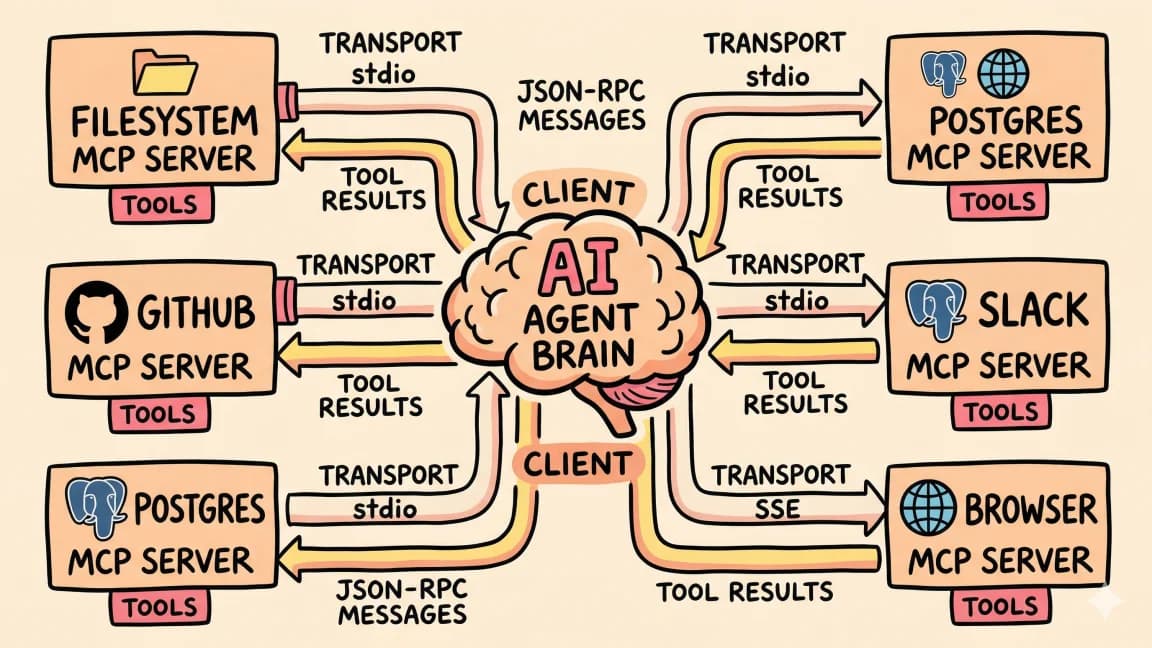
The flow is straightforward. Your AI application (the MCP client) connects to one or more MCP servers. Each server exposes tools and resources. The AI model decides which tools to call based on the user's request, and the client executes those calls against the server.
Code
User prompt
    ↓
AI Model (Claude, GPT, etc.)
    ↓
MCP Client
    ↓
┌─────────────┬─────────────┬─────────────┐
│ MCP Server  │ MCP Server  │ MCP Server  │
│ (Filesystem)│ (GitHub)    │ (Postgres)  │
└─────────────┴─────────────┴─────────────┘
The servers run locally or remotely. They communicate over stdio (local processes) or HTTP with Server-Sent Events (remote servers). The client handles discovery, capability negotiation, and message routing.
The TypeScript SDK#
Anthropic maintains an official TypeScript SDK: @modelcontextprotocol/sdk. It gives you everything needed to build both MCP clients and servers.
Install it:
Install
npm install @modelcontextprotocol/sdkBuilding an MCP Server#
Here is a minimal MCP server that exposes a single tool. It takes a city name and returns the current weather:
TypeScript
import { McpServer } from "@modelcontextprotocol/sdk/server/mcp.js";
import { StdioServerTransport } from "@modelcontextprotocol/sdk/server/stdio.js";
import { z } from "zod";

const server = new McpServer({
  name: "weather-server",
  version: "1.0.0",
});

server.tool(
  "get-weather",
  "Get current weather for a city",
  { city: z.string().describe("City name") },
  async ({ city }) => {
    const response = await fetch(
      `https://api.weatherapi.com/v1/current.json?key=${process.env.API_KEY}&q=${city}`
    );
    const data = await response.json();
    return {
      content: [
        {
          type: "text",
          text: `${data.location.name}: ${data.current.temp_c}°C, ${data.current.condition.text}`,
        },
      ],
    };
  }
);

const transport = new StdioServerTransport();
await server.connect(transport);
That is a complete, working MCP server. The server.tool() call registers the tool with a name, description, Zod schema for input validation, and a handler function. The transport layer handles communication. Run it, and any MCP client can discover and call get-weather.
Building an MCP Client#
Connecting to an MCP server from your own application:
TypeScript
import { Client } from "@modelcontextprotocol/sdk/client/index.js";
import { StdioClientTransport } from "@modelcontextprotocol/sdk/client/stdio.js";

const transport = new StdioClientTransport({
  command: "node",
  args: ["./weather-server.js"],
});

const client = new Client({
  name: "my-app",
  version: "1.0.0",
});

await client.connect(transport);

// List available tools
const { tools } = await client.listTools();
console.log("Available tools:", tools.map((t) => t.name));

// Call a tool
const result = await client.callTool({
  name: "get-weather",
  arguments: { city: "Toronto" },
});

console.log(result.content);
The client spawns the server as a child process, connects over stdio, discovers available tools, and calls them with typed arguments. Clean and predictable.
From the archive
What is RAG? Retrieval Augmented Generation Explained
Mar 19, 2026 • 8 min read
Windsurf vs Cursor: Which AI IDE for TypeScript Developers?
Mar 19, 2026 • 6 min read
NVIDIA's Nemotron 3 Super in 6 Minutes
Mar 13, 2026 • 5 min read
CLIs Over MCPs: Why the Best AI Agent Tools Already Exist
Mar 9, 2026 • 8 min read
Real MCP Servers You Can Use Today#
The ecosystem already has production-ready servers for common integrations. Here are a few that matter:
Filesystem - Read, write, search, and manage files. Your AI agent gets access to project directories with configurable permissions.
JSON
{
  "mcpServers": {
    "filesystem": {
      "command": "npx",
      "args": ["-y", "@modelcontextprotocol/server-filesystem", "/path/to/project"]
    }
  }
}
GitHub - Create issues, open PRs, search repos, manage branches. Uses your GitHub token for authentication.
JSON
{
  "mcpServers": {
    "github": {
      "command": "npx",
      "args": ["-y", "@modelcontextprotocol/server-github"],
      "env": { "GITHUB_PERSONAL_ACCESS_TOKEN": "ghp_..." }
    }
  }
}
Postgres - Query your database directly. The AI can inspect schemas, run SELECT queries, and analyze data.
JSON
{
  "mcpServers": {
    "postgres": {
      "command": "npx",
      "args": ["-y", "@modelcontextprotocol/server-postgres", "postgresql://localhost/mydb"]
    }
  }
}
These servers drop into any MCP-compatible client. Claude Desktop, Claude Code, Cursor, Windsurf, and others all support the same configuration format.
Building Your Own MCP Server#
The real power is building servers tailored to your stack. Here is a more complete example: an MCP server that wraps your application's API.
TypeScript
import { McpServer } from "@modelcontextprotocol/sdk/server/mcp.js";
import { StdioServerTransport } from "@modelcontextprotocol/sdk/server/stdio.js";
import { z } from "zod";

const server = new McpServer({
  name: "app-api-server",
  version: "1.0.0",
});

// Expose a tool for searching users
server.tool(
  "search-users",
  "Search users by name or email",
  {
    query: z.string().describe("Search term"),
    limit: z.number().optional().default(10).describe("Max results"),
  },
  async ({ query, limit }) => {
    const res = await fetch(
      `${process.env.API_URL}/users?q=${encodeURIComponent(query)}&limit=${limit}`,
      { headers: { Authorization: `Bearer ${process.env.API_TOKEN}` } }
    );
    const users = await res.json();
    return {
      content: [
        {
          type: "text",
          text: JSON.stringify(users, null, 2),
        },
      ],
    };
  }
);

// Expose a resource for reading app config
server.resource(
  "app-config",
  "config://app",
  async (uri) => {
    const config = await fetch(`${process.env.API_URL}/config`);
    const data = await config.json();
    return {
      contents: [
        {
          uri: uri.href,
          mimeType: "application/json",
          text: JSON.stringify(data, null, 2),
        },
      ],
    };
  }
);

const transport = new StdioServerTransport();
await server.connect(transport);
This server exposes both a tool (search users) and a resource (app config). Your AI agent can now search your user base and read your app configuration, all through MCP.
Where MCP Fits in Your Architecture#
MCP sits between your AI model and your infrastructure. It does not replace your API layer. It wraps it. Your existing REST endpoints, database connections, and file systems stay exactly where they are. MCP just gives your AI a standardized way to reach them.
For TypeScript developers, the pattern looks like this:
- Identify what your agent needs access to. Database? File system? Internal APIs? Third-party services?
- Pick existing MCP servers where available. Filesystem, GitHub, Postgres, Slack, and dozens more are already built.
- Build custom servers for your domain logic. Wrap your internal APIs. Expose your business-specific tools.
- Wire them into your MCP client. Claude Desktop, Claude Code, or your own application.
The protocol handles discovery, authentication, error handling, and message formatting. You focus on what the tools do, not how they communicate.
What to Build Next#
If you are working with AI agents in TypeScript, MCP is worth adopting now. The ecosystem is growing fast. Anthropic, OpenAI, Google, and Microsoft all support it. The TypeScript SDK is well-maintained and the API is stable.
Start with the official servers. Add filesystem and GitHub access to your Claude setup. Then build a custom server for your most common workflow. Once you see an AI agent calling your own tools through a clean protocol, the value becomes obvious. For a broader look at the tools that support MCP, see our roundup of the best AI coding tools in 2026.
For a hands-on, interactive breakdown of MCP and how to build with it, check out the full course at subagent.developersdigest.tech/mcp.
Frequently Asked Questions#
What is MCP in AI?#
MCP (Model Context Protocol) is an open protocol created by Anthropic that standardizes how AI models connect to external data sources and tools. It defines a client-server architecture where AI applications (clients) communicate with tool providers (servers) using a common interface, eliminating the need for custom integration code for each tool.
What tools support MCP?#
MCP is supported by Claude Code, Claude Desktop, Cursor, Windsurf, and a growing number of AI coding tools and agent frameworks. The Vercel AI SDK also supports MCP tool integration. Any application that implements the MCP client protocol can connect to any MCP server.
How do I configure MCP servers?#
MCP servers are configured in a JSON settings file. For Claude Code, add server entries to .claude/settings.json in your project directory. For Cursor, use ~/.cursor/mcp.json. Each entry specifies a command to run, arguments, and optional environment variables for API keys. Use the MCP Config Generator to build your configuration interactively.
Is MCP open source?#
Yes. MCP is an open protocol with an open-source specification and open-source SDKs. The official TypeScript SDK (@modelcontextprotocol/sdk) and many community-built MCP servers are available on GitHub. Anyone can build MCP clients and servers without licensing restrictions.
What is the difference between MCP and function calling?#
Function calling is a model-level feature where the AI decides to invoke a function you defined in your prompt. MCP is a protocol layer that standardizes how those functions are discovered, described, and executed across different tools and models. MCP servers expose tools that any compatible client can use, while function calling is specific to a single API call. MCP builds on top of function calling to create a reusable, interoperable tool ecosystem.
Read next
How to Use MCP Servers: The Complete Guide
MCP servers connect AI agents to databases, APIs, and tools through a standard protocol. Here is how to configure and use them with Claude Code and Cursor.
11 min readBest MCP Servers in 2026: The Developer Shortlist
A practical ranked list of MCP servers worth installing first for Claude Code, Cursor, Copilot, Codex, and OpenCode: GitHub, Filesystem, Context7, Playwright, Postgres, Sentry, Supabase, Notion, Slack, and more.
10 min readWhat Is Claude Code? The Complete Guide for 2026
Claude Code is Anthropic's AI coding agent for terminal, IDE, desktop, and browser workflows. Learn what it does, how it works, pricing, setup, MCP, skills, hooks, and subagents.
15 min readShare
Developers Digest
Technical content at the intersection of AI and development. Building with AI agents, Claude Code, and modern dev tools - then showing you exactly how it works.
300+ videos30K+ GitHub stars850+ articles
Try These Tools
Related Tools
AI Frameworks

Mastra
TypeScript-first AI agent framework. Agents, tools, memory, workflows, RAG, evals, tracing, MCP, and production deployme...
View ToolMCP Tools

MCP Inspector
Visual testing tool for Model Context Protocol servers. Like Postman for MCP - call tools, browse resources, and view...
View ToolAI FrameworksEssential

Vercel AI SDK
The TypeScript toolkit for building AI apps. Unified API across OpenAI, Anthropic, Google. Streaming, tool calling, stru...
View ToolAI FrameworksAgent UI

CopilotKit
Frontend stack for agent-native apps. React hooks, prebuilt copilot UI, AG-UI runtime, frontend tools, shared state, and...
View ToolApps from Developers Digest
Related Guides
Guide
Building Your First MCP Server
Step-by-step guide to building an MCP server in TypeScript - from project setup to tool definitions, resource handling, testing, and deployment.
AI AgentsGuide
Claude Code Setup Guide
Configure Claude Code for maximum productivity -- CLAUDE.md, sub-agents, MCP servers, and autonomous workflows.
AI AgentsGuide
MCP Servers Explained
What MCP servers are, how they work, and how to build your own in 5 minutes.
AI AgentsRelated Videos
Integrating Convex Components in Your TypeScript Backend
In this video, learn how to leverage convex components, independent modular TypeScript building blocks for your backend. This tutorial focuses on one of the latest integrations with the Resend...
Video·
OpenAI's New TypeScript Agents SDK
Getting Started with OpenAI's New TypeScript Agents SDK: A Comprehensive Guide OpenAI has recently unveiled their Agents SDK within TypeScript, and this video provides a detailed walkthrough...
Video·
Anthropic's New Model Context Protocol in 10 Minutes
Learn The Fundamentals Of Becoming An AI Engineer On Scrimba; https://v2.scrimba.com/the-ai-engineer-path-c02v?via=developersdigest Anthropic's New Model Context Protocol (MCP): AI Data Integratio...
Video·
Related Posts
11 min read
MCP
How to Use MCP Servers: The Complete Guide
MCP servers connect AI agents to databases, APIs, and tools through a standard protocol. Here is how to configure and us...

10 min read
MCP
Best MCP Servers in 2026: The Developer Shortlist
A practical ranked list of MCP servers worth installing first for Claude Code, Cursor, Copilot, Codex, and OpenCode: Git...

15 min read
Claude Code
What Is Claude Code? The Complete Guide for 2026
Claude Code is Anthropic's AI coding agent for terminal, IDE, desktop, and browser workflows. Learn what it does, how it...
12 min read
MCP
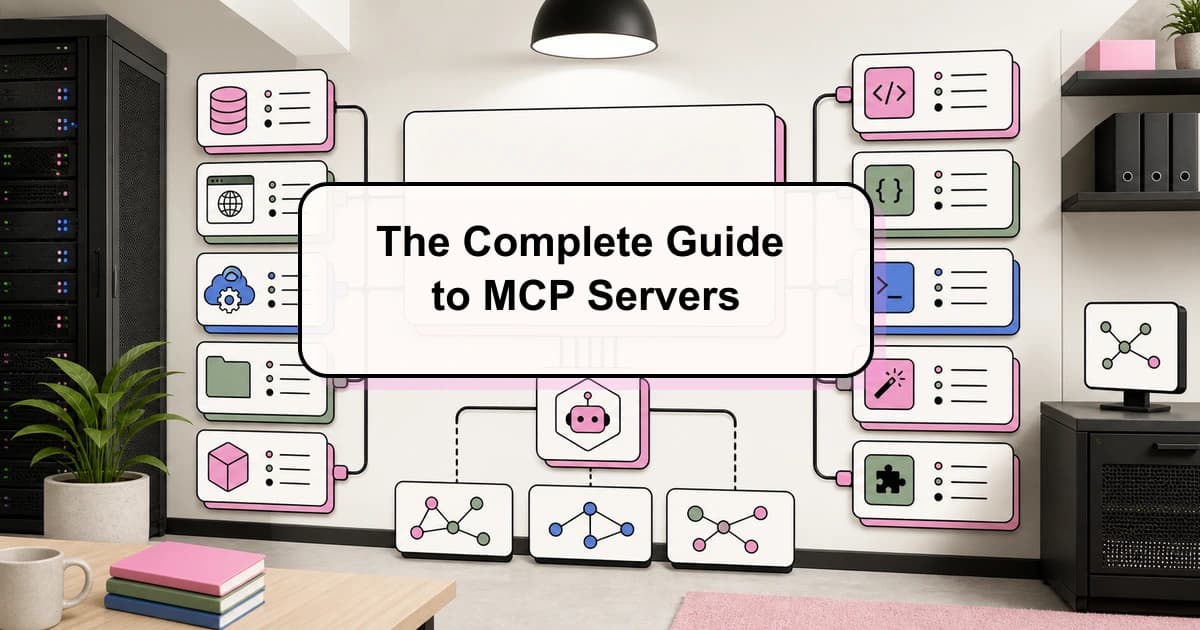
The Complete Guide to MCP Servers
Everything you need to know about Model Context Protocol - how it works, how to install servers, how to build your own,...
6 min read
AI Agents
AI Agents Explained: A TypeScript Developer's Guide
AI agents use LLMs to complete multi-step tasks autonomously. Here is how they work and how to build them in TypeScript.

10 min read
AI Agents
How to Build AI Agents in TypeScript
A practical guide to building AI agents with TypeScript using the Vercel AI SDK. Tool use, multi-step reasoning, and rea...
Build with the member tools

Get Smarter About AI Dev
New tutorials, open-source projects, and deep dives on coding agents - delivered weekly.
One email per weekReal code, not theoryFree forever