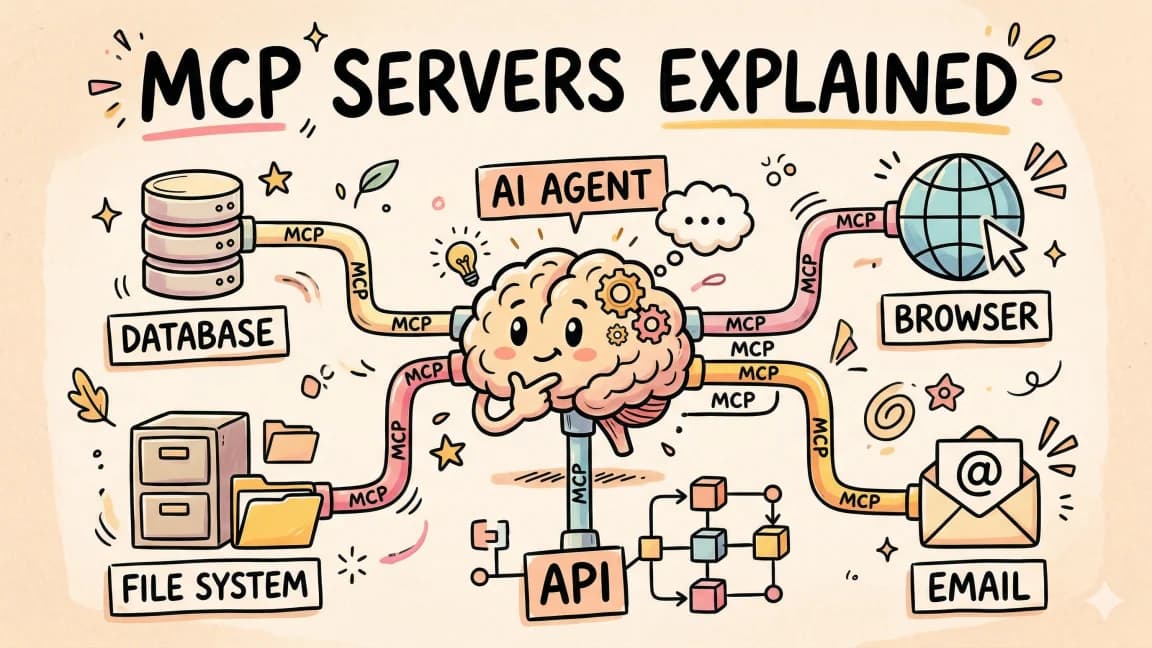
The Complete Guide to MCP Servers
TL;DR
Everything you need to know about Model Context Protocol - how it works, how to install servers, how to build your own, and the best ones.
Last updated: July 30, 2026. The MCP specification shipped its July 28 final release with the MCP Apps extension. See What Changed on July 30, 2026 for the details.
Why MCP Matters#
Every AI agent needs to interact with the outside world. Read a file. Query a database. Search the web. Call an API. Before Model Context Protocol existed, every one of these integrations was custom glue code. You wrote a different adapter for every tool, every model, every framework. Then you maintained all of it.
MCP is the standard that replaced that mess. Created by Anthropic and adopted across the industry, Model Context Protocol defines a universal interface between AI agents and external tools. One protocol. Any client. Any server. Configure a server once, and every MCP-compatible tool can use it - Claude Code, Cursor, Windsurf, the Claude desktop app, and a growing list of others.
Think of it as USB-C for AI integrations. Before USB-C, every device had its own charger. MCP does the same thing for AI tool connections - it standardizes the plug so you never write custom integration code again.
This guide covers everything: how the protocol works under the hood, how to install and configure servers, how to build your own, and which servers solve real problems in real workflows. If you already know the basics and just want a curated set for your stack, jump to the MCP picker.
Related MCP Map#
This is the deep technical reference. The neighboring MCP posts cover narrower jobs:
| Need | Read next |
|---|---|
| Five-minute conceptual intro | What is MCP |
| Setup walkthrough | How to use MCP servers |
| Ranked server shortlist | Best MCP servers 2026 |
| Larger ecosystem view | MCP server ecosystem developer guide |
| Build your own server | How to build MCP servers |
| Tool-choice context | AI coding tools comparison matrix |
The official Model Context Protocol docs define MCP as an open standard for connecting AI applications to external systems. Keep those docs open when you need protocol details, and use this guide for the coding-agent workflow layer.
Official Sources#
All sources verified July 30, 2026:
| Source | Description |
|---|---|
| Model Context Protocol Specification | Official MCP protocol specification and architecture |
| MCP Specification Changelog | Full changelog from release candidate to final spec |
| MCP TypeScript SDK | Build custom MCP servers in TypeScript |
| MCP Python SDK | Build custom MCP servers in Python |
| MCP Apps Extension | Interactive sandboxed UIs for MCP servers |
| Claude Code MCP Documentation | Configuring MCP servers in Claude Code |
| Anthropic MCP Servers | Official server implementations (Postgres, GitHub, Slack, etc.) |
| MCP Inspector | Debugging tool for MCP server development |
| MCP Server Directory | Searchable directory of 200+ community and official MCP servers |
What Changed on July 30, 2026#
The MCP landscape shifted significantly with the July 28 final specification:
- Release candidate period ended - the spec is now final with no further breaking changes expected. Servers targeting the
2025-03-26protocol version remain compatible, but new capabilities require the final spec. - MCP Apps extension - servers can now host interactive sandboxed UIs alongside tools. The MCP Apps framework declares UI resources via
_meta.ui.resourceUriin tool definitions and renders them in a sandboxed iframe with a postMessage bridge. Six clients support it at launch. - Streamable HTTP promoted to stable - HTTP-based server deployments are now a first-class transport alongside stdio, making team-shared and remote MCP servers production-ready.
- Deprecation of roots, sampling, and logging - these capabilities are formally marked as deprecated. Hosts should migrate to their own alternatives. The
initializeresponse still reports them for backward compatibility, but new servers should not depend on them. - SDK updates - both TypeScript and Python SDKs have released versions targeting the final spec. The configuration format and tool-calling API are unchanged, but servers should update their SDK dependency for continued compatibility.
- Cursor MCP config unified - Cursor now reads MCP configuration from
.cursor/mcp.json, the same format Claude Code uses in.claude/settings.json. The configuration surface across tools continues to converge.
For a focused breakdown of migration implications, see MCP Stateless Migration Guide 2026. For the interactive MCP Apps capability, see MCP Apps vs Tool Calling Comparison 2026.
How MCP Works#
The Architecture#
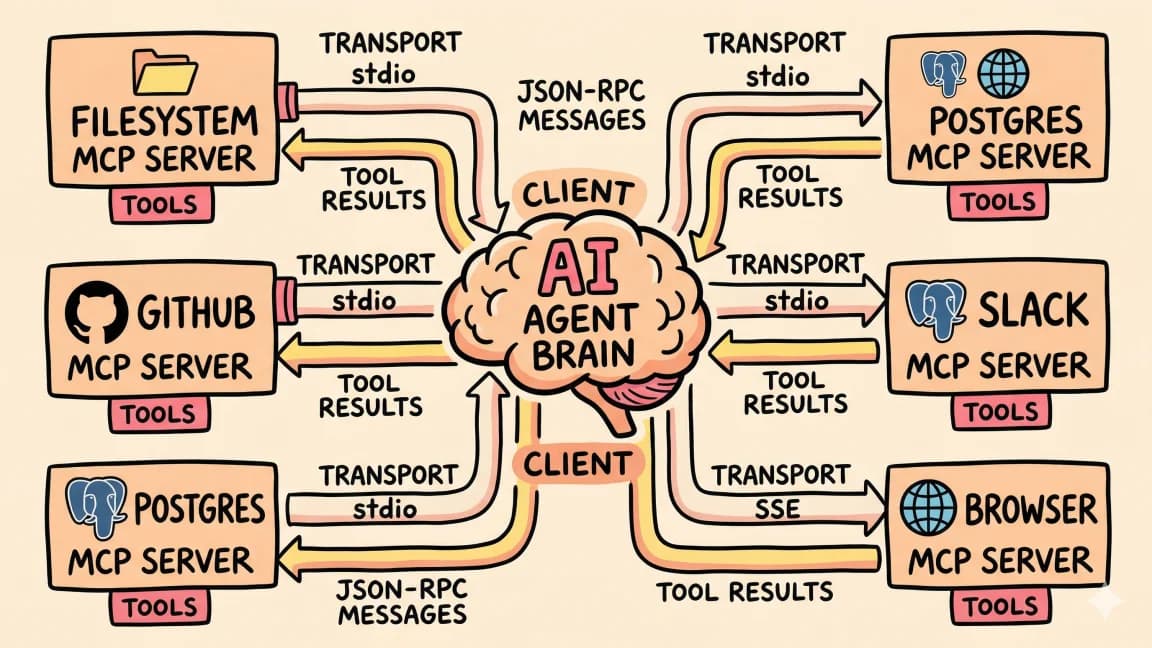
MCP uses a client-server model with three actors:
- Host - the application the user interacts with (Claude Code, Cursor, a custom app)
- Client - the MCP client embedded in the host, which manages server connections
- Server - a process that exposes tools, resources, and prompts over the MCP protocol
The host starts the client. The client connects to one or more servers. Each server exposes capabilities. The AI model sees those capabilities as available tools and decides when to use them.
User prompt: "What queries are causing slow performance?"
    |
    v
Host (Claude Code)
    |
    v
MCP Client
    |
    v
┌──────────────┬──────────────┬──────────────┐
│ Postgres MCP │ GitHub MCP   │ Datadog MCP  │
│  - query()   │  - search()  │  - metrics() │
│  - explain() │  - issues()  │  - logs()    │
│  - tables()  │  - prs()     │  - traces()  │
└──────────────┴──────────────┴──────────────┘
The model decides which servers and tools to call based on the user's request. You did not write any routing logic. The protocol handles discovery, and the model handles selection.
Three Core Primitives#
Every MCP server can expose three types of capabilities:
Tools - functions the AI can call. "Run this SQL query." "Create a GitHub issue." "Send a Slack message." Tools have typed parameters, descriptions the model reads, and execute functions that perform the action.
Resources - data the AI can read. File contents, database schemas, API documentation. Resources provide context without requiring the model to call a function.
Prompts - reusable templates for common interactions. "Summarize this PR" or "Review this SQL query" - pre-built prompt structures that users can invoke by name.
Most servers focus on tools. Resources and prompts are useful but less commonly implemented.
Transport Protocols#
MCP supports two communication transports:
stdio - the server runs as a local child process. The client spawns it, sends JSON-RPC messages over stdin, and reads responses from stdout. This is the most common setup. It is fast, secure (the server runs on your machine with your permissions), and requires no network configuration.
Streamable HTTP - the server runs as an HTTP endpoint. The client connects over the network using HTTP with optional Server-Sent Events for streaming. Used for shared servers, remote deployments, and multi-user setups.
Most development tools use stdio because it is simpler and keeps everything local. Remote servers over HTTP are becoming more common for team-shared integrations.
The Connection Lifecycle#
When your AI tool starts up, here is what happens:
- The client reads your MCP configuration
- For each configured server, the client spawns the process (stdio) or opens a connection (HTTP)
- The client sends an
initializerequest with its capabilities - The server responds with its capabilities - which tools, resources, and prompts it offers
- The client makes those capabilities available to the AI model
- When the model decides to use a tool, the client sends a
tools/callrequest to the appropriate server - The server executes the tool and returns the result
- The client feeds the result back to the model
This handshake happens once at startup. After that, tool calls are fast - just JSON-RPC messages between processes.
Installing MCP Servers#
Configuration for Claude Code#
Claude Code reads MCP configuration from two locations:
- Project-level:
.claude/settings.jsonin your project root - Global:
~/.claude/settings.jsonfor servers available in every project
The format uses a mcpServers key with named server entries:
{
  "mcpServers": {
    "filesystem": {
      "command": "npx",
      "args": [
        "-y",
        "@anthropic-ai/mcp-server-filesystem",
        "/Users/you/projects"
      ]
    },
    "github": {
      "command": "npx",
      "args": ["-y", "@anthropic-ai/mcp-server-github"],
      "env": {
        "GITHUB_TOKEN": "ghp_your_token"
      }
    }
  }
}
Each entry specifies the command to run, arguments, and optional environment variables. Claude Code spawns these processes on startup and discovers their tools automatically.
After adding or changing servers, restart Claude Code for the changes to take effect.
Configuration for Cursor#
Cursor reads MCP configuration from .cursor/mcp.json in your project root:
{
  "mcpServers": {
    "filesystem": {
      "command": "npx",
      "args": [
        "-y",
        "@anthropic-ai/mcp-server-filesystem",
        "/Users/you/projects"
      ]
    }
  }
}
The format is nearly identical to Claude Code. Most servers work with both tools without modification.
Installing from npm#
Most MCP servers are published to npm. The npx -y pattern in the configurations above handles installation automatically - it downloads and runs the package without requiring a global install.
For servers you use frequently, you can install them globally for faster startup:
npm install -g @anthropic-ai/mcp-server-filesystem
npm install -g @anthropic-ai/mcp-server-github
Then reference the command directly instead of using npx:
{
  "filesystem": {
    "command": "mcp-server-filesystem",
    "args": ["/Users/you/projects"]
  }
}
Installing from source#
Some servers are not on npm. Clone the repo and build:
git clone https://github.com/example/custom-mcp-server.git
cd custom-mcp-server
npm install && npm run build
Then point your configuration at the built entry point:
{
  "custom": {
    "command": "node",
    "args": ["/path/to/custom-mcp-server/dist/index.js"]
  }
}
Docker-based servers#
For servers that need specific system dependencies or isolation:
{
  "postgres": {
    "command": "docker",
    "args": [
      "run", "-i", "--rm",
      "-e", "DATABASE_URL=postgresql://user:pass@host:5432/db",
      "mcp/postgres-server"
    ]
  }
}
The -i flag is critical - it keeps stdin open for the JSON-RPC protocol. Without it, the container exits immediately.
Building a Custom MCP Server#
When no existing server fits your use case, you build your own. The TypeScript SDK makes this straightforward.
Setup#
mkdir my-mcp-server
cd my-mcp-server
npm init -y
npm install @modelcontextprotocol/sdk zod
npm install -D typescript @types/node
Create a tsconfig.json:
{
  "compilerOptions": {
    "target": "ES2022",
    "module": "Node16",
    "moduleResolution": "Node16",
    "outDir": "dist",
    "strict": true
  },
  "include": ["src"]
}
A Minimal Server#
Here is a complete MCP server that exposes tools for interacting with a project management system:
// src/index.ts
import { McpServer } from "@modelcontextprotocol/sdk/server/mcp.js";
import { StdioServerTransport } from "@modelcontextprotocol/sdk/server/stdio.js";
import { z } from "zod";

const server = new McpServer({
  name: "project-manager",
  version: "1.0.0",
});

// Define a tool for listing tasks
server.tool(
  "list_tasks",
  "List all tasks, optionally filtered by status",
  {
    status: z.enum(["open", "in_progress", "done"]).optional()
      .describe("Filter by task status"),
    limit: z.number().default(20)
      .describe("Maximum number of tasks to return"),
  },
  async ({ status, limit }) => {
    const tasks = await fetchTasks({ status, limit });
    return {
      content: [
        {
          type: "text",
          text: JSON.stringify(tasks, null, 2),
        },
      ],
    };
  }
);

// Define a tool for creating tasks
server.tool(
  "create_task",
  "Create a new task with a title and optional description",
  {
    title: z.string().describe("Task title"),
    description: z.string().optional().describe("Task description"),
    priority: z.enum(["low", "medium", "high"]).default("medium")
      .describe("Task priority level"),
    assignee: z.string().optional().describe("Email of the assignee"),
  },
  async ({ title, description, priority, assignee }) => {
    const task = await createTask({ title, description, priority, assignee });
    return {
      content: [
        {
          type: "text",
          text: `Created task ${task.id}: ${task.title}`,
        },
      ],
    };
  }
);

// Define a tool for updating task status
server.tool(
  "update_task_status",
  "Update the status of an existing task",
  {
    taskId: z.string().describe("The task ID"),
    status: z.enum(["open", "in_progress", "done"])
      .describe("New status"),
  },
  async ({ taskId, status }) => {
    const task = await updateTask(taskId, { status });
    return {
      content: [
        {
          type: "text",
          text: `Updated task ${task.id} to ${status}`,
        },
      ],
    };
  }
);

// Start the server
const transport = new StdioServerTransport();
await server.connect(transport);
Build and test:
npx tsc
echo '{"jsonrpc":"2.0","id":1,"method":"initialize","params":{"protocolVersion":"2025-03-26","capabilities":{},"clientInfo":{"name":"test","version":"1.0.0"}}}' | node dist/index.js
If you see a JSON response with the server's capabilities, it is working.
Adding Resources#
Resources let you expose read-only data that the model can access without calling a tool:
server.resource(
  "project-readme",
  "file:///project/README.md",
  async (uri) => {
    const content = await readFile("./README.md", "utf-8");
    return {
      contents: [
        {
          uri: uri.href,
          mimeType: "text/markdown",
          text: content,
        },
      ],
    };
  }
);
Error Handling#
Tools should return errors as content, not throw exceptions. This gives the model information it can reason about:
server.tool(
  "query_database",
  "Execute a read-only SQL query",
  { sql: z.string() },
  async ({ sql }) => {
    try {
      if (!sql.trim().toUpperCase().startsWith("SELECT")) {
        return {
          content: [{
            type: "text",
            text: "Error: Only SELECT queries are allowed.",
          }],
          isError: true,
        };
      }
      const result = await pool.query(sql);
      return {
        content: [{
          type: "text",
          text: JSON.stringify(result.rows, null, 2),
        }],
      };
    } catch (err) {
      return {
        content: [{
          type: "text",
          text: `Query failed: ${(err as Error).message}`,
        }],
        isError: true,
      };
    }
  }
);
The isError: true flag tells the client that this response represents a failure, which helps the model decide whether to retry or take a different approach.
Publishing Your Server#
Package it for npm:
{
  "name": "mcp-server-project-manager",
  "version": "1.0.0",
  "bin": {
    "mcp-server-project-manager": "dist/index.js"
  },
  "files": ["dist"]
}
Add a shebang to your entry point:
#!/usr/bin/env node
// src/index.ts
import { McpServer } from "@modelcontextprotocol/sdk/server/mcp.js";
// ...
Publish:
npm publish
Users can now configure it with:
{
  "project-manager": {
    "command": "npx",
    "args": ["-y", "mcp-server-project-manager"]
  }
}
Best MCP Servers by Category#
The ecosystem has hundreds of servers. These are the ones that solve real problems. For the full searchable directory with working configurations, visit mcp.developersdigest.tech.
Databases#
Postgres (@anthropic-ai/mcp-server-postgres) - the gold standard. Read-only by default, which is exactly right for AI agents writing SQL against your data. Supports query execution, schema inspection, and EXPLAIN ANALYZE.
SQLite (@anthropic-ai/mcp-server-sqlite) - same capabilities as Postgres, for SQLite databases. Good for local development and embedded applications.
Redis (mcp-server-redis) - key-value operations, pub/sub inspection, and cache management. Useful for debugging caching issues without switching to a Redis CLI.
Code and Version Control#
GitHub (@anthropic-ai/mcp-server-github) - the second server most developers install. Search repos, read and create issues, open PRs, comment on code reviews. Scope your token to minimum required permissions.
Git (mcp-server-git) - local git operations. Diff inspection, log browsing, branch management. Useful when your agent needs git context without shelling out to the CLI.
Web and Docs#
Fetch (mcp-server-fetch) - pull any URL into context as markdown. The simplest way to let an agent read a docs page or changelog.
Context7 (@upstash/context7-mcp) - current library documentation and code examples on demand, so the agent works from today's API instead of its training data.
Productivity#
Slack (mcp-server-slack) - read channels, send messages, search history. Useful for agents that need to pull context from team conversations.
Linear (mcp-server-linear) - issue tracking integration. Create, update, and search issues. Good for agents that manage engineering workflows.
Notion (mcp-server-notion) - read and write Notion pages and databases. Useful for agents that need to reference documentation or update project wikis.
Infrastructure#
Docker (mcp-server-docker) - list containers, read logs, manage images. Useful for debugging deployment issues without switching to a terminal.
Kubernetes (mcp-server-kubernetes) - pod management, log access, resource inspection. Read-only by default - do not give an AI agent write access to production clusters.
AWS (mcp-server-aws) - S3, Lambda, CloudWatch, and other AWS service interactions. Scope your IAM credentials tightly.
Files and Data#
Filesystem (@anthropic-ai/mcp-server-filesystem) - the most fundamental server. Read, write, search, and manage files. Restrict access to specific directories. This is the first server you should install.
Google Drive (mcp-server-google-drive) - read and search files in Google Drive. Useful for agents that need to reference documents, spreadsheets, or presentations.
Security Best Practices#
MCP servers run with the permissions of the user who starts them. This means they can potentially access anything on your machine. Follow these practices:
Principle of least privilege. Give each server only the access it needs. The filesystem server takes directory paths as arguments - pass only the directories the agent should read. GitHub tokens should use minimum required scopes.
Read-only defaults. When possible, configure servers for read-only access. The Postgres server is read-only by default. If your server supports write operations, make them opt-in rather than default.
No secrets in server configs. Use environment variables for API keys and tokens, not hardcoded values in configuration files. If your config is checked into version control, anyone with repo access can see your secrets.
{
  "github": {
    "command": "npx",
    "args": ["-y", "@anthropic-ai/mcp-server-github"],
    "env": {
      "GITHUB_TOKEN": "${GITHUB_TOKEN}"
    }
  }
}
Audit tool calls. Monitor what your agent is doing with MCP tools. Most hosts provide logging of tool calls and their results. Review these logs regularly, especially when first deploying a new server.
Sandbox destructive operations. If an MCP server can modify data (write files, update databases, create issues), add confirmation mechanisms. The agent should preview what it intends to do before executing destructive actions.
Debugging MCP Servers#
When a server is not working, the issue is usually in one of three places.
Server will not start#
Check that the command and arguments are correct. Test by running the command manually:
npx -y @anthropic-ai/mcp-server-filesystem /Users/you/projects
If it fails, the error message usually tells you what is wrong - missing dependency, invalid arguments, or permissions issue.
Server starts but tools are not visible#
The client and server might have a protocol version mismatch. Check the server's package version and update if needed:
npm info @anthropic-ai/mcp-server-filesystem version
Tools fail at runtime#
Add logging to your custom servers:
server.tool("my_tool", "description", { param: z.string() }, async ({ param }) => {
  console.error(`[my_tool] Called with param: ${param}`);
  try {
    const result = await doSomething(param);
    console.error(`[my_tool] Success: ${JSON.stringify(result)}`);
    return { content: [{ type: "text", text: JSON.stringify(result) }] };
  } catch (err) {
    console.error(`[my_tool] Error: ${err}`);
    return { content: [{ type: "text", text: `Error: ${err}` }], isError: true };
  }
});
Logs go to stderr (not stdout, which is reserved for the JSON-RPC protocol). In Claude Code, check the MCP server logs with /mcp to see server status and recent errors.
Frequently Asked Questions#
What is MCP?#
Model Context Protocol (MCP) is an open standard created by Anthropic that defines how AI agents connect to external tools and data sources. It provides a universal interface so that any MCP client (like Claude Code or Cursor) can work with any MCP server (like a database connector or GitHub integration) without custom code.
Do I need MCP to use Claude Code?#
No. Claude Code works without any MCP servers configured. MCP extends what the agent can access beyond the local filesystem and shell. Without MCP, Claude Code reads files and runs commands. With MCP, it can also query databases, search the web, manage GitHub issues, and interact with any service that has an MCP server.
How many MCP servers can I run at once?#
There is no hard limit, but each server is a running process that consumes memory. Most developers run 3-8 servers. Start with filesystem and one or two domain-specific servers, then add more as needed.
Are MCP servers secure?#
MCP servers run with your user permissions. They are as secure as you configure them to be. Follow the principle of least privilege - restrict filesystem access to specific directories, use read-only database connections, and scope API tokens to minimum required permissions. The protocol itself does not add security vulnerabilities, but misconfigured servers can expose sensitive data.
Can I use MCP servers with models other than Claude?#
Yes. MCP is model-agnostic. Any AI tool that implements the MCP client protocol can use MCP servers. Cursor (which uses multiple models), the Claude desktop app, and several open-source tools all support MCP. The protocol does not care which model is making the tool calls.
What is the difference between MCP tools and resources?#
Tools are functions the model can call - they perform actions and return results. Resources are data the model can read - they provide context passively. Use tools for operations (query a database, create an issue) and resources for reference data (project documentation, configuration files).
What is MCP Apps?#
MCP Apps is a new capability in the July 28 final spec that lets servers expose interactive sandboxed UIs alongside tools. Instead of returning text, a server can render a full web application inside the client. The server declares a UI resource in its tool definition, and the client renders it in a sandboxed iframe with a messaging bridge. This is useful for dashboards, data editors, and visualizations that are hard to represent as tool outputs. Six clients support MCP Apps at launch: Claude Desktop (beta), Cursor (experimental), 5ire, Sourcegraph Cody, Genkit, and the MCP Inspector.
How do I find MCP servers for a specific service?#
The MCP Server Directory catalogs 200+ servers with working configurations and category-based browsing. You can also search npm for mcp-server-* packages or browse the community repositories on GitHub.
Continue Reading#
- MCP Stateless Migration Guide 2026 - what the July 28 final spec means for existing servers
- MCP Apps vs Tool Calling Comparison 2026 - when to build an MCP App vs a standard tool
- Best MCP Servers 2026 - ranked picks with tested configurations
- How to Build MCP Servers - step-by-step custom server tutorial
- MCP Servers Directory 2026 - the full searchable directory of 200+ servers
Get the next deep dive like this in your inbox
One email a week on MCP and the rest of the AI dev stack. Free.
Read next on Claude Code
What Is MCP (Model Context Protocol)? The 2026 Developer Guide
MCP is the open standard for connecting AI apps to tools and data: servers expose tools, resources, and prompts over JSON-RPC, and any client can use them. What it is, how the stateless 2026-07-28 spec works, how to install a server in Claude Code or Cursor, and how to build one with the v2 TypeScript SDK.
14 min readHow to Use MCP Servers: The Complete Guide
MCP servers connect AI agents to databases, APIs, and tools through a standard protocol. Here is how to configure and use them with Claude Code and Cursor.
11 min readBest MCP Servers in 2026: The Developer Shortlist
A practical ranked list of MCP servers worth installing first for Claude Code, Cursor, Copilot, Codex, and OpenCode: GitHub, Filesystem, Context7, Playwright, Postgres, Sentry, Supabase, Notion, Slack, and more.
10 min readTechnical content at the intersection of AI and development. Building with AI agents, Claude Code, and modern dev tools - then showing you exactly how it works.