How to Build MCP Servers in TypeScript
TL;DR
A step-by-step guide to building Model Context Protocol servers in TypeScript. Project setup, tool registration, resources, testing with Claude Code, and production patterns.
Official Sources#
| Resource | Description |
|---|---|
| MCP TypeScript SDK | Official TypeScript/JavaScript SDK for building MCP servers and clients |
| Model Context Protocol Docs | Official MCP specification, concepts, and guides |
| MCP Server Quickstart | Official getting started guide for building MCP servers |
| MCP Servers Repository | Reference implementations and community MCP servers |
| MCP Inspector | Official debugging tool for testing MCP servers |
| Claude Code MCP Docs | MCP integration documentation for Claude Code |
You have used MCP servers. You have configured them for Claude Code and Cursor. Now it is time to build your own.
The Model Context Protocol lets AI agents connect to external tools and data through a standard interface. There are thousands of community-built servers, but sometimes you need something specific to your workflow. A server that talks to your internal API. One that queries your production database. A tool that wraps your company's deployment pipeline.
This guide walks you through building an MCP server from scratch in TypeScript. By the end, you will have a working server with tools, resources, and prompts that you can connect to Claude Code, Claude Desktop, or any MCP-compatible client.
What MCP Servers Do#
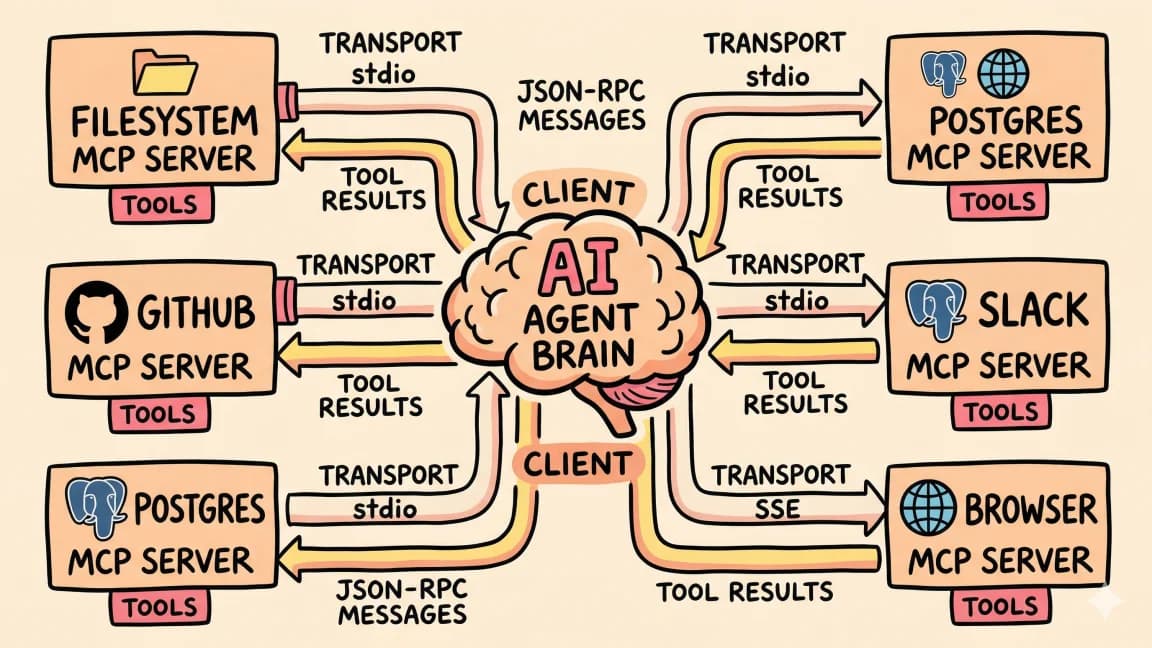
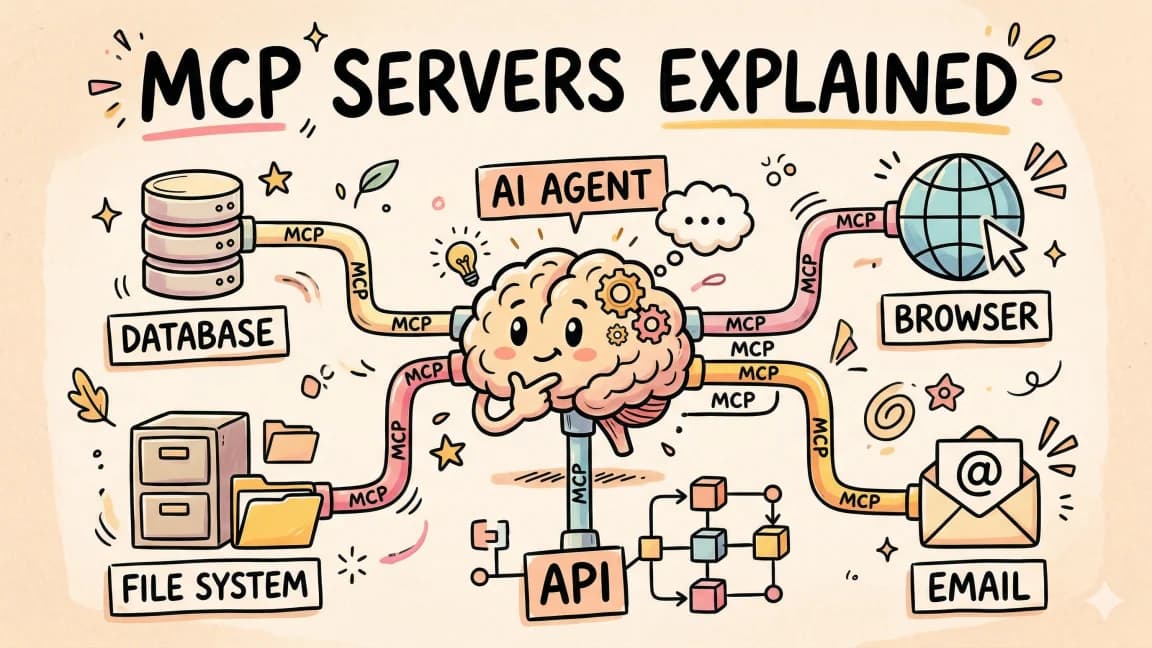
Quick refresher. MCP uses a client-server architecture. Your AI tool (Claude Code, Cursor, Claude Desktop) is the client. It connects to one or more MCP servers, each exposing capabilities through three primitives:
- Tools - actions the AI can execute. Create a file, run a query, call an API.
- Resources - read-only data the AI can access. Config files, database records, documentation.
- Prompts - reusable templates for specific workflows. Code review checklists, error analysis patterns.
The client discovers what your server offers through a handshake, then the AI model decides which tools to call based on the user's request. Communication happens over stdio (local processes) or HTTP (remote servers).
For the full protocol deep dive, read What is MCP, and if you are still deciding whether a server is even the right container, read MCP servers vs Agent Skills: which to build in 2026. Here we are building.
Prerequisites#
You need:
- Node.js 18+ (
node --versionto check) - Basic TypeScript knowledge
- A text editor (VS Code, Cursor, whatever you prefer)
- Claude Code or Claude Desktop for testing (optional - the MCP Inspector works too)
No prior MCP experience required.
Step 1: Project Setup#
Create a new directory and initialize the project:
mkdir my-mcp-server
cd my-mcp-server
npm init -y
Install the MCP SDK and dependencies:
npm install @modelcontextprotocol/sdk zod
npm install -D typescript @types/node
The @modelcontextprotocol/sdk package is the official TypeScript SDK for building MCP servers and clients. zod handles input validation. The SDK uses Zod schemas to define tool parameters, so you get automatic type checking and clear error messages out of the box.
Initialize TypeScript:
npx tsc --init
Replace the generated tsconfig.json with these settings:
{
  "compilerOptions": {
    "target": "ES2022",
    "module": "Node16",
    "moduleResolution": "Node16",
    "outDir": "./dist",
    "rootDir": "./src",
    "strict": true,
    "esModuleInterop": true,
    "skipLibCheck": true,
    "forceConsistentCasingInFileNames": true
  },
  "include": ["src/**/*"]
}
The module and moduleResolution must be Node16 (or NodeNext). The MCP SDK uses ES module exports with subpath imports, and this config makes TypeScript resolve them correctly.
Update package.json to add the module type and scripts:
{
  "type": "module",
  "scripts": {
    "build": "tsc",
    "start": "node dist/index.js"
  }
}
Create the source directory:
mkdir src
Your project structure:
my-mcp-server/
  src/
  package.json
  tsconfig.json
  node_modules/
Step 2: Build a Minimal Server#
Create src/index.ts with the simplest possible MCP server:
import { McpServer } from "@modelcontextprotocol/sdk/server/mcp.js";
import { StdioServerTransport } from "@modelcontextprotocol/sdk/server/stdio.js";
import { z } from "zod";

// Create the server
const server = new McpServer({
  name: "my-first-server",
  version: "1.0.0",
});

// Add a simple tool
server.tool(
  "greet",
  "Generate a greeting for someone",
  { name: z.string().describe("The person's name") },
  async ({ name }) => ({
    content: [{ type: "text", text: `Hello, ${name}! Welcome to MCP.` }],
  })
);

// Connect via stdio and start listening
const transport = new StdioServerTransport();
await server.connect(transport);
Four things happening here:
McpServeris the main class. Thenameandversionidentify your server to clients.server.tool()registers a tool. It takes the tool name, a description (the AI reads this to decide when to use it), a Zod schema for input validation, and an async handler.StdioServerTransportmeans the server communicates over stdin/stdout. This is the transport used by Claude Code, Claude Desktop, and Cursor.server.connect(transport)starts listening for JSON-RPC messages.
Build and verify:
npx tsc
No errors? You have a working MCP server. It just does not do much yet.
Step 3: Add Real Tools#
A useful server exposes multiple tools. Here is a more practical example. A server that manages bookmarks:
import { McpServer } from "@modelcontextprotocol/sdk/server/mcp.js";
import { StdioServerTransport } from "@modelcontextprotocol/sdk/server/stdio.js";
import { z } from "zod";
import { readFileSync, writeFileSync, existsSync } from "node:fs";
import { join } from "node:path";
import { randomUUID } from "node:crypto";

// --- Types ---

interface Bookmark {
  id: string;
  url: string;
  title: string;
  tags: string[];
  createdAt: string;
}

// --- Data Layer ---

const DATA_FILE = join(process.cwd(), "bookmarks.json");

function loadBookmarks(): Bookmark[] {
  if (!existsSync(DATA_FILE)) return [];
  try {
    return JSON.parse(readFileSync(DATA_FILE, "utf-8")) as Bookmark[];
  } catch {
    return [];
  }
}

function saveBookmarks(bookmarks: Bookmark[]): void {
  writeFileSync(DATA_FILE, JSON.stringify(bookmarks, null, 2), "utf-8");
}

// --- Server ---

const server = new McpServer({
  name: "bookmarks-server",
  version: "1.0.0",
});

// Tool: Add a bookmark
server.tool(
  "add_bookmark",
  "Save a new bookmark with a URL, title, and optional tags",
  {
    url: z.string().url().describe("The URL to bookmark"),
    title: z.string().describe("A short title for the bookmark"),
    tags: z
      .array(z.string())
      .optional()
      .describe("Optional tags for categorization, e.g. ['dev', 'reference']"),
  },
  async ({ url, title, tags }) => {
    const bookmarks = loadBookmarks();

    const bookmark: Bookmark = {
      id: randomUUID(),
      url,
      title,
      tags: tags ?? [],
      createdAt: new Date().toISOString(),
    };

    bookmarks.push(bookmark);
    saveBookmarks(bookmarks);

    return {
      content: [
        {
          type: "text",
          text: `Bookmark saved.\n\nID: ${bookmark.id}\nTitle: ${bookmark.title}\nURL: ${bookmark.url}\nTags: ${bookmark.tags.join(", ") || "none"}`,
        },
      ],
    };
  }
);

// Tool: Search bookmarks
server.tool(
  "search_bookmarks",
  "Search bookmarks by keyword in title or URL",
  {
    query: z.string().describe("Search keyword or phrase"),
  },
  async ({ query }) => {
    const bookmarks = loadBookmarks();
    const lower = query.toLowerCase();

    const matches = bookmarks.filter(
      (b) =>
        b.title.toLowerCase().includes(lower) ||
        b.url.toLowerCase().includes(lower) ||
        b.tags.some((t) => t.toLowerCase().includes(lower))
    );

    if (matches.length === 0) {
      return {
        content: [{ type: "text", text: `No bookmarks match "${query}".` }],
      };
    }

    const results = matches
      .map((b) => `- **${b.title}**\n  ${b.url}\n  Tags: ${b.tags.join(", ") || "none"}`)
      .join("\n\n");

    return {
      content: [
        {
          type: "text",
          text: `Found ${matches.length} bookmark(s):\n\n${results}`,
        },
      ],
    };
  }
);

// Tool: List all bookmarks
server.tool(
  "list_bookmarks",
  "List all saved bookmarks, optionally filtered by tag",
  {
    tag: z
      .string()
      .optional()
      .describe("Filter by tag. Omit to return all bookmarks."),
  },
  async ({ tag }) => {
    let bookmarks = loadBookmarks();

    if (tag) {
      bookmarks = bookmarks.filter((b) =>
        b.tags.some((t) => t.toLowerCase() === tag.toLowerCase())
      );
    }

    if (bookmarks.length === 0) {
      return {
        content: [
          {
            type: "text",
            text: tag
              ? `No bookmarks with tag "${tag}".`
              : "No bookmarks yet. Use add_bookmark to save one.",
          },
        ],
      };
    }

    const list = bookmarks
      .sort((a, b) => b.createdAt.localeCompare(a.createdAt))
      .map((b) => `- **${b.title}** - ${b.url} [${b.tags.join(", ")}]`)
      .join("\n");

    return {
      content: [
        { type: "text", text: `${bookmarks.length} bookmark(s):\n\n${list}` },
      ],
    };
  }
);

// Tool: Delete a bookmark
server.tool(
  "delete_bookmark",
  "Delete a bookmark by its ID",
  {
    id: z.string().describe("The UUID of the bookmark to delete"),
  },
  async ({ id }) => {
    const bookmarks = loadBookmarks();
    const index = bookmarks.findIndex((b) => b.id === id);

    if (index === -1) {
      return {
        content: [{ type: "text", text: `Bookmark "${id}" not found.` }],
        isError: true,
      };
    }

    const deleted = bookmarks.splice(index, 1)[0];
    saveBookmarks(bookmarks);

    return {
      content: [
        {
          type: "text",
          text: `Deleted: "${deleted.title}" (${deleted.url})`,
        },
      ],
    };
  }
);
Key patterns to notice:
- Zod validation -
z.string().url()validates that the input is actually a URL. The AI sees these constraints and provides valid input. - Error handling - when a delete fails, the response includes
isError: true. This tells the AI the operation did not succeed so it can report the failure or retry. - Descriptive parameters -
.describe()on every field. The AI reads these descriptions to decide what values to pass. Be specific. "The URL to bookmark" is better than "URL". - Focused tools - each tool does one thing.
add_bookmark,search_bookmarks,list_bookmarks,delete_bookmark. Not a singlemanage_bookmarkstool with a mode flag.
Step 4: Add Resources#
Resources expose read-only data to the AI. Unlike tools (which perform actions), resources provide context. Config files, documentation, status information.
Add these below your tools:
// Resource: All bookmarks as a readable document
server.resource(
  "all-bookmarks",
  "bookmarks://all",
  async (uri) => {
    const bookmarks = loadBookmarks();

    const document =
      bookmarks.length === 0
        ? "No bookmarks saved yet."
        : bookmarks
            .sort((a, b) => b.createdAt.localeCompare(a.createdAt))
            .map(
              (b) =>
                `## ${b.title}\n- URL: ${b.url}\n- Tags: ${b.tags.join(", ") || "none"}\n- Added: ${b.createdAt}`
            )
            .join("\n\n");

    return {
      contents: [
        {
          uri: uri.href,
          mimeType: "text/markdown",
          text: document,
        },
      ],
    };
  }
);

// Resource: Server stats
server.resource(
  "stats",
  "bookmarks://stats",
  async (uri) => {
    const bookmarks = loadBookmarks();
    const allTags = bookmarks.flatMap((b) => b.tags);
    const uniqueTags = [...new Set(allTags)];

    const stats = {
      totalBookmarks: bookmarks.length,
      totalTags: uniqueTags.length,
      topTags: uniqueTags
        .map((tag) => ({
          tag,
          count: allTags.filter((t) => t === tag).length,
        }))
        .sort((a, b) => b.count - a.count)
        .slice(0, 5),
    };

    return {
      contents: [
        {
          uri: uri.href,
          mimeType: "application/json",
          text: JSON.stringify(stats, null, 2),
        },
      ],
    };
  }
);
The first argument is a display name. The second is a URI that clients use to request the resource. The handler returns the data.
You can also create resource templates for dynamic data using URI template parameters:
// Dynamic resource - look up bookmarks by tag
server.resource(
  "bookmarks-by-tag",
  "bookmarks://tags/{tag}",
  async (uri, { tag }) => {
    const bookmarks = loadBookmarks().filter((b) =>
      b.tags.some((t) => t.toLowerCase() === (tag as string).toLowerCase())
    );

    return {
      contents: [
        {
          uri: uri.href,
          mimeType: "application/json",
          text: JSON.stringify(bookmarks, null, 2),
        },
      ],
    };
  }
);
Step 5: Add Prompts#
Prompts are reusable templates that guide the AI's behavior for specific workflows. Unlike tools (called by the AI model) and resources (read by the AI), prompts are typically selected by the user to start a structured interaction.
// Prompt: Organize bookmarks
server.prompt(
  "organize_bookmarks",
  "Analyze all bookmarks and suggest a better tagging system",
  {},
  () => {
    const bookmarks = loadBookmarks();
    const bookmarkList =
      bookmarks.length === 0
        ? "No bookmarks saved."
        : bookmarks
            .map((b) => `- ${b.title} (${b.url}) [tags: ${b.tags.join(", ") || "none"}]`)
            .join("\n");

    return {
      messages: [
        {
          role: "user" as const,
          content: {
            type: "text" as const,
            text: [
              "Here are all my bookmarks:",
              "",
              bookmarkList,
              "",
              "Please:",
              "1. Identify common themes",
              "2. Suggest a consistent tagging taxonomy",
              "3. Flag any duplicates or dead-looking URLs",
              "4. Recommend which bookmarks to re-tag using the new taxonomy",
            ].join("\n"),
          },
        },
      ],
    };
  }
);
Step 6: Wire Up the Transport and Build#
Add the transport connection at the bottom of your file:
// Start the server
const transport = new StdioServerTransport();
await server.connect(transport);
Build the project:
npx tsc
Your compiled server lives at dist/index.js. Time to connect it to something.
Step 7: Connect to Claude Code#
Claude Code reads MCP configuration from .claude/settings.json in your project directory (or ~/.claude/settings.json for global servers).
Add your server:
{
  "mcpServers": {
    "bookmarks": {
      "command": "node",
      "args": ["/absolute/path/to/my-mcp-server/dist/index.js"]
    }
  }
}
Replace /absolute/path/to/my-mcp-server/dist/index.js with the actual path to your compiled file.
Restart Claude Code. It will spawn your server process, perform the MCP handshake, and discover your tools. Now you can use them in conversation:
- "Save this article as a bookmark: https://example.com/great-article"
- "Show me all my bookmarks tagged with 'typescript'"
- "Search my bookmarks for anything about MCP"
- "Organize my bookmarks and suggest better tags"
Claude Code calls the right tool automatically based on your request.
Connecting to Claude Desktop#
The process is similar. Open your Claude Desktop config:
- macOS:
~/Library/Application Support/Claude/claude_desktop_config.json - Windows:
%APPDATA%\Claude\claude_desktop_config.json - Linux:
~/.config/Claude/claude_desktop_config.json
Add the same server entry:
{
  "mcpServers": {
    "bookmarks": {
      "command": "node",
      "args": ["/absolute/path/to/my-mcp-server/dist/index.js"]
    }
  }
}
Restart Claude Desktop. You will see a hammer icon in the chat input. Click it to see your tools.
Testing with the MCP Inspector#
You do not need Claude to test your server. The MCP project provides an official testing tool:
npx @modelcontextprotocol/inspector node dist/index.js
This opens a web UI (usually at http://localhost:5173) where you can:
- See all registered tools, resources, and prompts
- Call tools with custom inputs and inspect responses
- Read resources and view their contents
- Test prompts with different parameters
- Monitor the JSON-RPC messages flowing between client and server
Use the Inspector during development to verify schemas, test edge cases, and debug issues before connecting to Claude.
Debugging Tips#
Things not working? Check these:
-
Logs. Claude Desktop writes MCP logs to
~/Library/Logs/Claude/mcp*.log(macOS) or%APPDATA%\Claude\logs\mcp*.log(Windows). Claude Code logs appear in its terminal output. -
Absolute paths. The
argspath in your config must be absolute and point to the compiled.jsfile, not the.tssource. -
Module type. Make sure
"type": "module"is in yourpackage.json. Without it, Node.js cannot import the MCP SDK's ES modules. -
Manual test. Pipe a JSON-RPC initialize message directly to your server:
echo '{"jsonrpc":"2.0","id":1,"method":"initialize","params":{"protocolVersion":"2025-03-26","capabilities":{},"clientInfo":{"name":"test","version":"1.0.0"}}}' | node dist/index.js
If the server works, you will see a JSON-RPC response with its capabilities.
Production Patterns#
Once you have the basics working, here are patterns that make your server production-ready.
Structured Error Handling#
Always return isError: true on failure. Wrap handlers in try/catch:
server.tool("risky_operation", "Do something that might fail", {
  input: z.string(),
}, async ({ input }) => {
  try {
    const result = await doSomething(input);
    return { content: [{ type: "text", text: result }] };
  } catch (error) {
    return {
      content: [{ type: "text", text: `Error: ${(error as Error).message}` }],
      isError: true,
    };
  }
});
Write Good Descriptions#
The AI reads your descriptions to decide when and how to use tools. Be specific:
// Vague - the AI has to guess
{ date: z.string().describe("Date") }

// Specific - the AI knows exactly what to provide
{ date: z.string().describe("Date in YYYY-MM-DD format, e.g. 2026-04-02") }
Same goes for tool descriptions. "Query the database" is worse than "Run a read-only SQL query against the production PostgreSQL database. Returns up to 100 rows."
HTTP Transport for Remote Servers#
stdio is great for local development. For production or team deployments, use Streamable HTTP transport:
import { McpServer } from "@modelcontextprotocol/sdk/server/mcp.js";
import { StreamableHTTPServerTransport } from "@modelcontextprotocol/sdk/server/streamableHttp.js";
import express from "express";

const app = express();
app.use(express.json());

const server = new McpServer({
  name: "remote-bookmarks",
  version: "1.0.0",
});

// ... register tools, resources, prompts ...

app.post("/mcp", async (req, res) => {
  const transport = new StreamableHTTPServerTransport({
    sessionIdGenerator: undefined,
  });
  res.on("close", () => transport.close());
  await server.connect(transport);
  await transport.handleRequest(req, res);
});

app.listen(3001, () => {
  console.log("MCP server running at http://localhost:3001/mcp");
});
Clients connect to your server over HTTP instead of spawning a local process. This is how you deploy MCP servers for teams or as public services.
Keep Tools Focused#
One tool, one job. This makes it easier for the AI to pick the right tool and reduces the chance of invalid input combinations.
Instead of:
server.tool("manage_bookmarks", "Manage bookmarks", {
  action: z.enum(["add", "delete", "search", "list"]),
  // ... conditional params
});
Use separate tools:
server.tool("add_bookmark", "Save a new bookmark", { /* ... */ });
server.tool("delete_bookmark", "Delete a bookmark by ID", { /* ... */ });
server.tool("search_bookmarks", "Search bookmarks by keyword", { /* ... */ });
server.tool("list_bookmarks", "List all bookmarks", { /* ... */ });
The Complete Server#
Here is the full src/index.ts with everything wired together. Copy this, build it, and you have a working MCP bookmarks server:
import { McpServer } from "@modelcontextprotocol/sdk/server/mcp.js";
import { StdioServerTransport } from "@modelcontextprotocol/sdk/server/stdio.js";
import { z } from "zod";
import { readFileSync, writeFileSync, existsSync } from "node:fs";
import { join } from "node:path";
import { randomUUID } from "node:crypto";

interface Bookmark {
  id: string;
  url: string;
  title: string;
  tags: string[];
  createdAt: string;
}

const DATA_FILE = join(process.cwd(), "bookmarks.json");

function loadBookmarks(): Bookmark[] {
  if (!existsSync(DATA_FILE)) return [];
  try {
    return JSON.parse(readFileSync(DATA_FILE, "utf-8")) as Bookmark[];
  } catch {
    return [];
  }
}

function saveBookmarks(bookmarks: Bookmark[]): void {
  writeFileSync(DATA_FILE, JSON.stringify(bookmarks, null, 2), "utf-8");
}

const server = new McpServer({
  name: "bookmarks-server",
  version: "1.0.0",
});

server.tool(
  "add_bookmark",
  "Save a new bookmark with a URL, title, and optional tags",
  {
    url: z.string().url().describe("The URL to bookmark"),
    title: z.string().describe("A short title for the bookmark"),
    tags: z.array(z.string()).optional().describe("Optional tags, e.g. ['dev', 'reference']"),
  },
  async ({ url, title, tags }) => {
    const bookmarks = loadBookmarks();
    const bookmark: Bookmark = {
      id: randomUUID(),
      url,
      title,
      tags: tags ?? [],
      createdAt: new Date().toISOString(),
    };
    bookmarks.push(bookmark);
    saveBookmarks(bookmarks);
    return {
      content: [{
        type: "text",
        text: `Saved: ${bookmark.title} (${bookmark.url}) [${bookmark.tags.join(", ") || "none"}]`,
      }],
    };
  }
);

server.tool(
  "search_bookmarks",
  "Search bookmarks by keyword in title, URL, or tags",
  { query: z.string().describe("Search keyword or phrase") },
  async ({ query }) => {
    const lower = query.toLowerCase();
    const matches = loadBookmarks().filter(
      (b) =>
        b.title.toLowerCase().includes(lower) ||
        b.url.toLowerCase().includes(lower) ||
        b.tags.some((t) => t.toLowerCase().includes(lower))
    );
    if (matches.length === 0) {
      return { content: [{ type: "text", text: `No bookmarks match "${query}".` }] };
    }
    const results = matches
      .map((b) => `- **${b.title}**\n  ${b.url}\n  Tags: ${b.tags.join(", ") || "none"}`)
      .join("\n\n");
    return { content: [{ type: "text", text: `Found ${matches.length}:\n\n${results}` }] };
  }
);

server.tool(
  "list_bookmarks",
  "List all bookmarks, optionally filtered by tag",
  { tag: z.string().optional().describe("Filter by tag. Omit for all.") },
  async ({ tag }) => {
    let bookmarks = loadBookmarks();
    if (tag) {
      bookmarks = bookmarks.filter((b) =>
        b.tags.some((t) => t.toLowerCase() === tag.toLowerCase())
      );
    }
    if (bookmarks.length === 0) {
      return {
        content: [{
          type: "text",
          text: tag ? `No bookmarks tagged "${tag}".` : "No bookmarks yet.",
        }],
      };
    }
    const list = bookmarks
      .sort((a, b) => b.createdAt.localeCompare(a.createdAt))
      .map((b) => `- ${b.title} - ${b.url} [${b.tags.join(", ")}]`)
      .join("\n");
    return { content: [{ type: "text", text: `${bookmarks.length} bookmark(s):\n\n${list}` }] };
  }
);

server.tool(
  "delete_bookmark",
  "Delete a bookmark by its ID",
  { id: z.string().describe("The UUID of the bookmark to delete") },
  async ({ id }) => {
    const bookmarks = loadBookmarks();
    const index = bookmarks.findIndex((b) => b.id === id);
    if (index === -1) {
      return {
        content: [{ type: "text", text: `Bookmark "${id}" not found.` }],
        isError: true,
      };
    }
    const deleted = bookmarks.splice(index, 1)[0];
    saveBookmarks(bookmarks);
    return {
      content: [{ type: "text", text: `Deleted: "${deleted.title}" (${deleted.url})` }],
    };
  }
);

server.resource("all-bookmarks", "bookmarks://all", async (uri) => {
  const bookmarks = loadBookmarks();
  const doc = bookmarks.length === 0
    ? "No bookmarks."
    : bookmarks
        .map((b) => `## ${b.title}\n${b.url}\nTags: ${b.tags.join(", ") || "none"}`)
        .join("\n\n");
  return { contents: [{ uri: uri.href, mimeType: "text/markdown", text: doc }] };
});

server.resource("stats", "bookmarks://stats", async (uri) => {
  const bookmarks = loadBookmarks();
  const allTags = bookmarks.flatMap((b) => b.tags);
  const uniqueTags = [...new Set(allTags)];
  return {
    contents: [{
      uri: uri.href,
      mimeType: "application/json",
      text: JSON.stringify({
        total: bookmarks.length,
        tags: uniqueTags.length,
        topTags: uniqueTags
          .map((tag) => ({ tag, count: allTags.filter((t) => t === tag).length }))
          .sort((a, b) => b.count - a.count)
          .slice(0, 5),
      }, null, 2),
    }],
  };
});

server.prompt(
  "organize_bookmarks",
  "Analyze bookmarks and suggest a better tagging system",
  {},
  () => {
    const bookmarks = loadBookmarks();
    const list = bookmarks
      .map((b) => `- ${b.title} (${b.url}) [${b.tags.join(", ") || "none"}]`)
      .join("\n");
    return {
      messages: [{
        role: "user" as const,
        content: {
          type: "text" as const,
          text: `Here are my bookmarks:\n\n${list || "None yet."}\n\nPlease suggest a consistent tagging taxonomy, flag duplicates, and recommend re-tags.`,
        },
      }],
    };
  }
);

const transport = new StdioServerTransport();
await server.connect(transport);
Build and run:
npx tsc
npx @modelcontextprotocol/inspector node dist/index.js
FAQ#
How is MCP different from function calling?#
Function calling is a feature of individual AI models. You define functions in the API request, and the model can choose to call them. MCP is a protocol layer above that. It standardizes how servers expose tools so any MCP-compatible client can discover and use them. You build the server once. Every client (Claude Code, Cursor, Claude Desktop, VS Code Copilot) can use it.
Do I need to use TypeScript?#
No. MCP has official SDKs for TypeScript, Python, Java, Kotlin, and C#. There are also community SDKs for Rust, Go, Ruby, and others. This guide uses TypeScript because most web developers are already comfortable with it.
Can I use the new @modelcontextprotocol/server package?#
Yes. The SDK is being consolidated into a single @modelcontextprotocol/server package with a flatter import structure. If you are starting fresh and want the latest API, install @modelcontextprotocol/server instead and use import { McpServer, StdioServerTransport } from '@modelcontextprotocol/server'. The server.tool() API becomes server.registerTool() with a slightly different signature. Both packages work. This tutorial uses @modelcontextprotocol/sdk because it is the most widely documented and deployed version as of April 2026.
How do I publish my server for others to use?#
Package it as an npm module. Add a bin field to package.json pointing to your compiled entry file. Users install it globally (npm install -g your-mcp-server) and configure it in their MCP client. For discoverability, list it in the MCP Servers Directory or community registries.
What about authentication for remote servers?#
For HTTP-transport servers that need auth, add standard authentication middleware (API keys, OAuth, JWT) to your Express/Fastify server before the MCP handler. The MCP protocol itself does not define auth. It is up to your HTTP layer.
How do I handle long-running operations?#
For tools that take more than a few seconds, use progress reporting. The MCP SDK supports progress tokens that let clients show progress indicators. Return partial results when possible rather than blocking for minutes.
Can I expose a database directly?#
You can, but be careful. Always use read-only connections for resource access. For write operations through tools, add validation, rate limiting, and audit logging. Never expose raw SQL execution to the AI. Instead, create specific tools like run_saved_query or insert_record with constrained inputs.
What to Build Next#
Now that you know the pattern, here are practical servers worth building:
- Git server - expose commit history, diffs, and branch management as tools
- Database server - read-only queries, schema inspection, and explain plans
- Deployment server - trigger deploys, check status, roll back
- Monitoring server - query metrics, check alerts, pull logs
- Internal API server - wrap your company's REST API as MCP tools
The best MCP servers solve a specific problem you hit daily. Start there.
For more on using existing servers, read How to Use MCP Servers. For the protocol fundamentals, start with What is MCP.
Continue Reading#
Get the next deep dive like this in your inbox
One email a week on MCP and the rest of the AI dev stack. Free.
Read next on Claude Code
What Is MCP (Model Context Protocol)? The 2026 Developer Guide
MCP is the open standard for connecting AI apps to tools and data: servers expose tools, resources, and prompts over JSON-RPC, and any client can use them. What it is, how the stateless 2026-07-28 spec works, how to install a server in Claude Code or Cursor, and how to build one with the v2 TypeScript SDK.
14 min readWhat Is Claude Code? The Complete Guide for 2026
Claude Code is Anthropic's AI coding agent for terminal, IDE, desktop, and browser workflows. Learn what it does, how it works, pricing, setup, MCP, skills, hooks, and subagents.
15 min readHow to Use MCP Servers: The Complete Guide
MCP servers connect AI agents to databases, APIs, and tools through a standard protocol. Here is how to configure and use them with Claude Code and Cursor.
11 min readTechnical content at the intersection of AI and development. Building with AI agents, Claude Code, and modern dev tools - then showing you exactly how it works.