What is RAG? Retrieval Augmented Generation Explained
TL;DR
How RAG works, why it matters, and how to implement it in TypeScript. The technique that lets AI models use your data without fine-tuning.
Official Sources - Primary references for RAG concepts and implementation:
Resource Link RAG Paper (Lewis et al., 2020) arxiv.org/abs/2005.11401 Vercel AI SDK Documentation sdk.vercel.ai/docs OpenAI Embeddings Guide platform.openai.com/docs/guides/embeddings Anthropic Claude API docs.anthropic.com/en/api Supabase Vector Search supabase.com/docs/guides/ai Pinecone Documentation docs.pinecone.io
Large language models know a lot, but they do not know your data. They cannot answer questions about your company's internal docs, your product's knowledge base, or anything that happened after their training cutoff. Fine-tuning is expensive and produces a frozen snapshot. RAG solves this without touching the model at all.
Retrieval Augmented Generation (RAG) is a technique where you retrieve relevant context from a knowledge base at query time, then pass that context to the LLM alongside the user's question. The model generates its response grounded in your data. No training runs. No GPU clusters. Just search and prompt construction.
This is the single most practical technique for making AI models useful with private or dynamic data. If you have ever wanted an AI that can answer questions about your docs, your codebase, or your product catalog, RAG is how you build it.
How RAG Works#
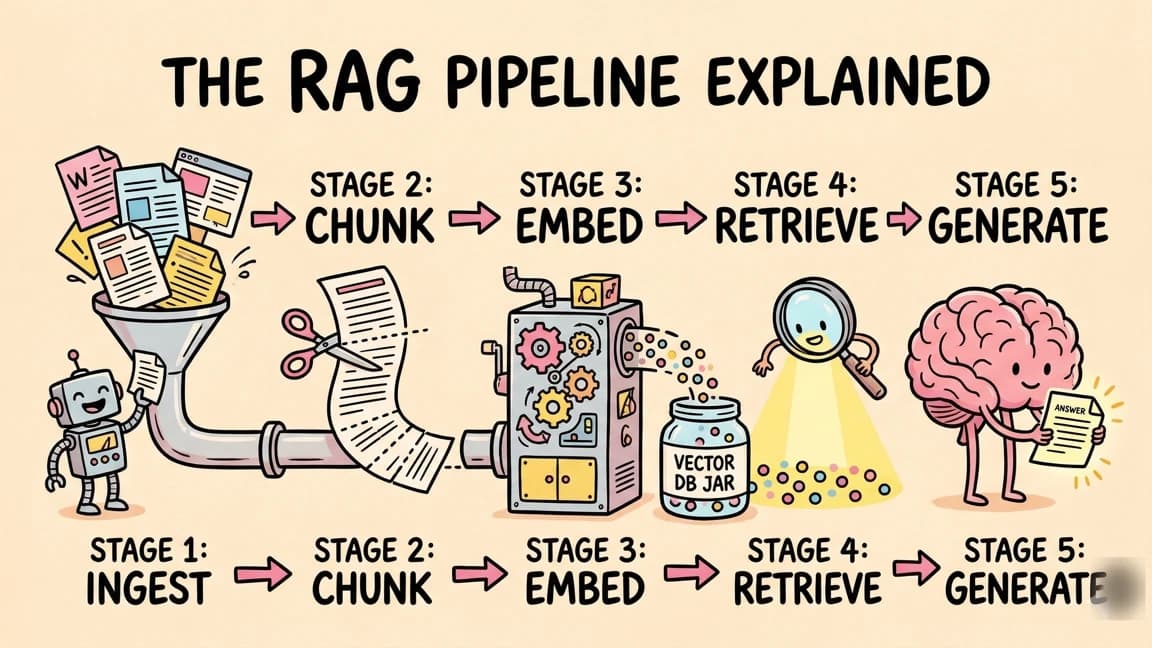
The RAG pipeline has three steps: embed, retrieve, generate. Every RAG system, from a weekend prototype to a production deployment, follows this pattern.
Code
User Question
     |
     v
[1. EMBED] Convert question to a vector embedding
     |
     v
[2. RETRIEVE] Search vector store for similar document chunks
     |
     v
[3. GENERATE] Pass retrieved chunks + question to the LLM
     |
     v
   Answer (grounded in your data)
Step 1: Embed#
Before RAG can work, your documents need to be converted into vector embeddings. An embedding is a numerical representation of text, a list of numbers (typically 1024 or 1536 dimensions) that captures the semantic meaning of a passage.
You split your documents into chunks, run each chunk through an embedding model, and store the resulting vectors in a database. At query time, you embed the user's question using the same model. This gives you a vector you can compare against your stored document vectors.
TypeScript
import { embed, embedMany } from "ai";
import { openai } from "@ai-sdk/openai";

const embeddingModel = openai.embedding("text-embedding-3-small");

// Embed your documents (do this once, at ingestion time)
const chunks = splitIntoChunks(documents, { maxTokens: 512 });
const { embeddings } = await embedMany({
  model: embeddingModel,
  values: chunks.map((c) => c.text),
});

// Store chunks + embeddings in your vector database
await vectorStore.upsert(
  chunks.map((chunk, i) => ({
    id: chunk.id,
    text: chunk.text,
    embedding: embeddings[i],
    metadata: { source: chunk.source, section: chunk.section },
  }))
);
Step 2: Retrieve#
When a user asks a question, you embed their query and search for the most similar document chunks. This is called similarity search, and it is the core of what makes RAG work. Chunks that are semantically close to the question score high. Chunks that are unrelated score low.
TypeScript
// Embed the user's query
const { embedding: queryEmbedding } = await embed({
  model: embeddingModel,
  value: "How do I configure authentication?",
});

// Find the top 5 most relevant chunks
const results = await vectorStore.search(queryEmbedding, {
  topK: 5,
  filter: { source: "documentation" },
});
The topK parameter controls how many chunks you retrieve. More chunks means more context for the model, but also more tokens and higher latency. Five to ten chunks is a good starting point for most use cases.
Step 3: Generate#
Pass the retrieved chunks to the LLM along with the user's question. The model generates a response grounded in the provided context instead of relying solely on its training data.
TypeScript
import { generateText } from "ai";
import { anthropic } from "@ai-sdk/anthropic";

const context = results
  .map((r) => `[Source: ${r.metadata.source}]\n${r.text}`)
  .join("\n\n");

const { text } = await generateText({
  model: anthropic("claude-sonnet-4-6"),
  system: `You are a helpful assistant. Answer questions based on the provided context.
If the context does not contain enough information to answer, say so.
Do not make up information that is not in the context.`,
  prompt: `Context:\n${context}\n\nQuestion: How do I configure authentication?`,
});
That is the entire pipeline. Embed your docs, search for relevant chunks, feed them to the model. Everything else in RAG is an optimization on top of these three steps.
When to Use RAG vs Fine-Tuning vs Prompt Engineering#
Three approaches exist for getting AI models to use specific knowledge. Each has different tradeoffs.
| Approach | Best For | Cost | Latency | Data Freshness |
|---|---|---|---|---|
| RAG | Dynamic knowledge bases, large document sets, data that changes | Low | Medium | Real-time |
| Fine-tuning | Changing model behavior, style, or domain-specific reasoning | High | Low | Frozen snapshot |
| Prompt engineering | Small context, task instructions, formatting rules | Free | Low | Per-request |
Use RAG when you have a large corpus of documents that changes over time. Product docs, knowledge bases, legal documents, research papers. The data is too large to fit in a single prompt, and it updates frequently enough that fine-tuning would be stale within weeks.
Use fine-tuning when you need the model to behave differently, not just know different things. If you want it to write in a specific voice, follow domain conventions, or handle a specialized format, fine-tuning changes the model itself. But it is expensive, slow, and produces a snapshot that does not update.
Use prompt engineering when the context fits in the prompt. If your entire knowledge base is a few pages of instructions, just put it in the system prompt. No infrastructure needed.
In practice, most production systems combine all three. Prompt engineering for behavior instructions, RAG for dynamic knowledge, and occasionally fine-tuning for domain adaptation.
Building a Complete RAG Pipeline in TypeScript#
Here is a production-ready RAG implementation using the Vercel AI SDK with a vector store. This example uses Supabase with pgvector, but the pattern works with any vector database.
TypeScript
import { generateText, embed, embedMany, tool } from "ai";
import { anthropic } from "@ai-sdk/anthropic";
import { openai } from "@ai-sdk/openai";
import { createClient } from "@supabase/supabase-js";
import { z } from "zod";

const supabase = createClient(
  process.env.SUPABASE_URL!,
  process.env.SUPABASE_KEY!
);

const embeddingModel = openai.embedding("text-embedding-3-small");

// --- Ingestion: run once when documents change ---

async function ingestDocuments(docs: { id: string; text: string; source: string }[]) {
  const chunks = docs.flatMap((doc) =>
    splitIntoChunks(doc.text, { maxTokens: 512 }).map((chunk, i) => ({
      id: `${doc.id}-${i}`,
      text: chunk,
      source: doc.source,
    }))
  );

  const { embeddings } = await embedMany({
    model: embeddingModel,
    values: chunks.map((c) => c.text),
  });

  const rows = chunks.map((chunk, i) => ({
    id: chunk.id,
    content: chunk.text,
    embedding: embeddings[i],
    metadata: { source: chunk.source },
  }));

  await supabase.from("documents").upsert(rows);
}

// --- Query: run on every user request ---

async function queryRAG(question: string): Promise<string> {
  // 1. Embed the question
  const { embedding } = await embed({
    model: embeddingModel,
    value: question,
  });

  // 2. Retrieve relevant chunks
  const { data: chunks } = await supabase.rpc("match_documents", {
    query_embedding: embedding,
    match_threshold: 0.7,
    match_count: 5,
  });

  if (!chunks || chunks.length === 0) {
    return "I could not find any relevant information to answer that question.";
  }

  // 3. Generate a grounded response
  const context = chunks
    .map((c: any) => c.content)
    .join("\n\n---\n\n");

  const { text } = await generateText({
    model: anthropic("claude-sonnet-4-6"),
    system: `Answer the user's question based only on the provided context.
Cite which section the information comes from when possible.
If the context does not contain the answer, say so clearly.`,
    prompt: `Context:\n${context}\n\nQuestion: ${question}`,
  });

  return text;
}
The match_documents function is a Postgres function that performs cosine similarity search using pgvector. You create it once in your database:
SQL
create or replace function match_documents(
  query_embedding vector(1536),
  match_threshold float,
  match_count int
) returns table (
  id text,
  content text,
  metadata jsonb,
  similarity float
) language sql stable as $$
  select
    id, content, metadata,
    1 - (embedding <=> query_embedding) as similarity
  from documents
  where 1 - (embedding <=> query_embedding) > match_threshold
  order by embedding <=> query_embedding
  limit match_count;
$$;
Vector Databases for RAG#
Your vector database is the retrieval engine. The choice matters less than you think for getting started, but it matters a lot at scale.
Supabase pgvector is the easiest path if you already use Postgres. Add the pgvector extension, create an embedding column, and query with cosine similarity. No new infrastructure. Works well up to a few million vectors.
Pinecone is a managed vector database built for this use case. Handles billions of vectors, supports metadata filtering, and scales without you thinking about it. Good for production workloads where you do not want to manage infrastructure.
Convex vector search integrates vector search directly into your Convex backend. If you are already using Convex for your app, this keeps everything in one place. Define a vector index on a table and query it with a single function call.
Weaviate is an open-source vector database with built-in vectorization. You can send it raw text and it handles the embedding step for you. Useful if you want the database to manage the embedding pipeline.
For most TypeScript projects, start with pgvector or Convex. You can always migrate to a dedicated vector database later if you outgrow it.
From the archive
Windsurf vs Cursor: Which AI IDE for TypeScript Developers?
Mar 19, 2026 • 6 min read
NVIDIA's Nemotron 3 Super in 6 Minutes
Mar 13, 2026 • 5 min read
CLIs Over MCPs: Why the Best AI Agent Tools Already Exist
Mar 9, 2026 • 8 min read
Composio 101: Give Your AI Agent Access to 500+ Apps
Mar 9, 2026 • 7 min read
RAG as an Agent Tool#
RAG gets more powerful when you combine it with AI agents. Instead of a fixed retrieve-then-generate pipeline, you give the agent a search tool and let it decide when and how to use it.
TypeScript
import { generateText, tool, embed } from "ai";
import { anthropic } from "@ai-sdk/anthropic";
import { z } from "zod";

const { text } = await generateText({
  model: anthropic("claude-sonnet-4-6"),
  maxSteps: 5,
  system: "You are a helpful assistant with access to a knowledge base. Search it when you need information to answer the user's question.",
  tools: {
    searchKnowledgeBase: tool({
      description: "Search the knowledge base for relevant information",
      parameters: z.object({
        query: z.string().describe("Search query"),
        filter: z
          .enum(["docs", "api-reference", "tutorials", "all"])
          .describe("Category to search in")
          .default("all"),
      }),
      execute: async ({ query, filter }) => {
        const { embedding } = await embed({
          model: openai.embedding("text-embedding-3-small"),
          value: query,
        });

        const { data } = await supabase.rpc("match_documents", {
          query_embedding: embedding,
          match_threshold: 0.7,
          match_count: 5,
        });

        return data?.map((d: any) => d.content) ?? [];
      },
    }),
  },
  prompt: userQuestion,
});
With maxSteps: 5, the model can search multiple times with different queries, refine its search based on initial results, and then synthesize a comprehensive answer. This is significantly more capable than a single-shot retrieve-and-generate pipeline because the model can reason about what information it still needs.
Common RAG Pitfalls#
RAG looks simple in diagrams but has real failure modes in production. Here are the ones that bite most teams.
Chunk Size#
If your chunks are too large, the retrieved context contains too much noise. The relevant sentence gets buried in paragraphs of unrelated text, and the model either misses it or gets confused by contradictory information. If chunks are too small, they lack the surrounding context needed to be useful. A sentence fragment about "the configuration file" is meaningless without knowing which configuration file.
Start with 300 to 500 tokens per chunk. Overlap consecutive chunks by 50 to 100 tokens so you do not split a concept across two chunks. Adjust based on your data. Technical documentation with dense information benefits from smaller chunks. Narrative content works better with larger ones.
Missing Metadata Filtering#
Similarity search alone is not enough. If you have documentation for multiple products or API versions, a query about "authentication" will return chunks from every product. Attach metadata to every chunk: product, version, date, section. Filter before or during similarity search.
TypeScript
const results = await vectorStore.search(embedding, {
  topK: 5,
  filter: {
    product: "my-api",
    version: "v3",
  },
});
This is the difference between a RAG system that kind of works and one that gives accurate answers.
Not Handling Empty Results#
When no chunks pass the similarity threshold, your system needs to say "I do not know" instead of hallucinating. Set a minimum similarity score and handle the case where nothing matches.
TypeScript
const relevantChunks = results.filter((r) => r.similarity > 0.7);

if (relevantChunks.length === 0) {
  return "I could not find relevant information to answer that question. Try rephrasing or ask about a different topic.";
}
Never pass an empty context to the model and hope for the best. The model will generate a plausible-sounding answer from its training data, and the user will think it came from your knowledge base.
Over-Relying on Similarity Scores#
Cosine similarity measures how close two vectors are in embedding space. It does not measure whether a chunk actually answers the question. A chunk about "how to configure authentication in Django" will score high for "how to configure authentication in Express" because the embeddings are semantically close. But the content is wrong for the user's stack.
Combine similarity search with keyword matching (hybrid search), metadata filtering, and a reranking step if accuracy matters. Some vector databases support hybrid search natively. For others, you can implement it in your retrieval function by merging results from vector search and full-text search.
Stale Embeddings#
If your documents change but your embeddings do not, the model answers questions using outdated information. Build an ingestion pipeline that re-embeds documents when they change. Track document versions and only re-embed modified chunks. This is unglamorous infrastructure work, but it determines whether your RAG system stays accurate over time.
What to Build Next#
RAG is the foundation. Once you have the basic pipeline working, you can layer on more sophisticated techniques: reranking retrieved chunks for better precision, using hybrid search that combines vector similarity with keyword matching, or building agentic RAG where the model iteratively searches and refines its results.
For the SDK used in this guide, see the full Vercel AI SDK guide. For vector storage that integrates with a reactive backend, check out Convex. And for building autonomous agents that use RAG as one of many tools, read How to Build AI Agents in TypeScript.
Start with a small document set, 10 to 20 pages of your own docs or a project README. Get the pipeline running end to end. Then scale from there. You will learn more about RAG's tradeoffs by building a working system than by reading about architectures you will never implement.
Frequently Asked Questions#
What does RAG stand for?#
RAG stands for Retrieval Augmented Generation. It is a technique where you retrieve relevant information from a knowledge base at query time, then pass that context to a language model so it can generate a response grounded in your data. The "retrieval" happens before "generation" - you search first, then the model answers.
How is RAG different from fine-tuning?#
Fine-tuning changes the model itself by training it on your data. RAG does not change the model at all - it just gives the model relevant context at query time. Fine-tuning produces a frozen snapshot that costs time and money to update. RAG can use data that changes hourly because you are searching a live database. Use fine-tuning when you need the model to behave differently. Use RAG when you need the model to know different things.
What embedding model should I use for RAG?#
For most RAG applications, OpenAI's text-embedding-3-small or text-embedding-3-large are good defaults. They are fast, accurate, and produce 1536-dimensional vectors that work with any vector database. If you need open-source alternatives, bge-base-en-v1.5 from BAAI and all-MiniLM-L6-v2 from Sentence Transformers are solid choices. The embedding model must match between ingestion and query time - you cannot embed documents with one model and search with another.
What is the best chunk size for RAG?#
Start with 300 to 500 tokens per chunk. Smaller chunks (100 to 200 tokens) work better for dense technical documentation where you want precise retrieval. Larger chunks (500 to 1000 tokens) work better for narrative content where context matters. Overlap chunks by 10 to 20 percent so you do not split concepts across boundaries. There is no universal answer - you need to experiment with your specific data.
Can RAG work without a vector database?#
Yes, but it is less effective. You can do RAG with keyword search (BM25) alone, which works surprisingly well for some use cases. Some teams use a hybrid approach: keyword search for exact matches combined with vector search for semantic similarity. If you are prototyping, you can even load all your documents into the system prompt and skip retrieval entirely - but this only works with small document sets that fit in the context window.
How do I know if my RAG system is working well?#
Measure retrieval quality separately from generation quality. For retrieval, check whether the correct chunks appear in your top 5 results for test queries. For generation, check whether the model's answers are accurate and cite the retrieved context. Common failure modes include: irrelevant chunks ranking high (fix with better chunking or metadata filtering), relevant information not being retrieved (fix with better embedding models or hybrid search), and the model ignoring the context (fix with prompt engineering or a different model).
What is the difference between RAG and semantic search?#
Semantic search is one part of RAG. Semantic search uses embeddings to find documents that are similar in meaning to a query. RAG adds a generation step: after retrieving relevant documents, you pass them to an LLM to synthesize an answer. Semantic search returns documents. RAG returns an answer based on those documents.
Read next
How to Build AI Agents in TypeScript
A practical guide to building AI agents with TypeScript using the Vercel AI SDK. Tool use, multi-step reasoning, and real patterns you can ship today.
10 min readVercel AI SDK: Build Streaming AI Apps in TypeScript
The AI SDK is the fastest way to add streaming AI responses to your Next.js app. Here is how to use it with Claude, GPT, and open source models.
5 min readAI Agents Explained: A TypeScript Developer's Guide
AI agents use LLMs to complete multi-step tasks autonomously. Here is how they work and how to build them in TypeScript.
6 min readShare
Developers Digest
Technical content at the intersection of AI and development. Building with AI agents, Claude Code, and modern dev tools - then showing you exactly how it works.
300+ videos30K+ GitHub stars850+ articles
Related Tools
AI FrameworksEssential

Vercel AI SDK
The TypeScript toolkit for building AI apps. Unified API across OpenAI, Anthropic, Google. Streaming, tool calling, stru...
View ToolAI Frameworks

Mastra
TypeScript-first AI agent framework. Agents, tools, memory, workflows, RAG, evals, tracing, MCP, and production deployme...
View ToolAI Frameworks

LlamaIndex
LLM data framework for connecting custom data sources to language models. Best-in-class RAG, data connectors, and query...
View ToolAI Coding68K views

Lovable
AI app builder - describe what you want, get a deployed full-stack app with React, Supabase, and auth. No coding requi...
View ToolApps from Developers Digest
SaaS Products
Cron
Schedule jobs in plain English. See what ran, what broke, what's next.
View AppSaaS Products
DD Canvas
AI app generator. Describe what you want and get a working app in minutes.
View AppDeveloper ToolsPlus $20/mo
Cost Tape Cloud
Know what each agent run cost before the bill arrives. Budgets and alerts included.
View AppRelated Guides
Guide
MCP Servers Explained
What MCP servers are, how they work, and how to build your own in 5 minutes.
AI AgentsGuide
Building Your First MCP Server
Step-by-step guide to building an MCP server in TypeScript - from project setup to tool definitions, resource handling, testing, and deployment.
AI AgentsGuide
Getting Started with DevDigest CLI
Install the dd CLI and scaffold your first AI-powered app in under a minute.
Getting StartedRelated Videos
OpenAI's New TypeScript Agents SDK
Getting Started with OpenAI's New TypeScript Agents SDK: A Comprehensive Guide OpenAI has recently unveiled their Agents SDK within TypeScript, and this video provides a detailed walkthrough...
Video·

OpenAI GPT 4o Image Generation in 7 Minutes
Unveiling GPT-4o Image Generation: A Game-Changing Multimodal AI OpenAI has released the revolutionary GPT-4o image generation capabilities, which can produce stunning visuals from text and...
Video·

OpenAI's Sora Video Generation Model in 6 Minutes
Exploring OpenAI's New Sora Video Generator: Subscription Tiers and Features In this video, I dive into OpenAI's newly released Sora, part of their third day of the '12 days of OpenAI'. Sora...
Video·
Related Posts

10 min read
AI Agents
How to Build AI Agents in TypeScript
A practical guide to building AI agents with TypeScript using the Vercel AI SDK. Tool use, multi-step reasoning, and rea...
5 min read
Vercel AI SDK
Vercel AI SDK: Build Streaming AI Apps in TypeScript
The AI SDK is the fastest way to add streaming AI responses to your Next.js app. Here is how to use it with Claude, GPT,...
6 min read
AI Agents
AI Agents Explained: A TypeScript Developer's Guide
AI agents use LLMs to complete multi-step tasks autonomously. Here is how they work and how to build them in TypeScript.
10 min read
TypeScript
10 TypeScript Patterns Every AI Developer Should Know
The TypeScript patterns that show up in every AI project. Streaming responses, type-safe tool definitions, structured ou...

8 min read
CLI
10 CLI Tools Reshaping AI Development in 2026
From Claude Code to Gladia, the ten CLIs every AI-native developer should know. Install commands, trade-offs, and when t...

8 min read
AI Coding
The 10 Best AI Coding Tools in 2026
From terminal agents to cloud IDEs - these are the AI coding tools worth using for TypeScript development in 2026.
Build with the member tools

Get Smarter About AI Dev
New tutorials, open-source projects, and deep dives on coding agents - delivered weekly.
One email per weekReal code, not theoryFree forever