Windsurf vs Cursor: Which AI IDE for TypeScript Developers?

TL;DR
Both fork VS Code and add AI. Windsurf (rebranded to Devin Desktop after the Cognition acquisition) has Cascade. Cursor has Composer 2.5. Here is how they compare for TypeScript.
Direct answer
Windsurf vs Cursor: Which AI IDE for TypeScript Developers?
Both fork VS Code and add AI. Windsurf (rebranded to Devin Desktop after the Cognition acquisition) has Cascade. Cursor has Composer 2.5. Here is how they compare for TypeScript.
Best for
Developers comparing real tool tradeoffs before choosing a stack.
Covers
Verdict, tradeoffs, pricing signals, workflow fit, and related alternatives.
Two AI IDEs. Both fork VS Code. Both add AI-powered editing, chat, and multi-file generation. But they make different bets on how AI should integrate with your workflow.
Windsurf is now Devin Desktop. Cognition acquired Windsurf in July 2025 and rebranded the editor in 2026 - windsurf.com now redirects to devin.ai, with plans, extensions, and settings carrying over automatically. Its core feature is still Cascade, an agentic flow system that chains actions across your project. Cursor is built by Anysphere. Its Composer workflow is backed by the official Composer 2 technical report and fast custom models - the current flagship is Composer 2.5, shipping alongside Cursor 3.7 (released June 5, 2026), with Grok 4.5 joining the model lineup in July.
If you write TypeScript, here is how to decide between them.
Official Sources#
Always verify current pricing and features against the official documentation:
| Tool | Docs | Pricing | Last Verified |
|---|---|---|---|
| Windsurf (Devin Desktop) | docs.devin.ai | devin.ai/pricing | August 2, 2026 |
| Cursor | docs.cursor.com | cursor.com/pricing | August 2, 2026 |
Pricing and model access change frequently. The official pages are the source of truth. The old windsurf.com docs and pricing URLs now permanently redirect to the Devin equivalents.
Cascade vs Composer 2#
Cascade is Windsurf's agentic workflow engine. You describe a task, and Cascade breaks it into steps: read files, edit code, run commands, check results. It operates as a flow, where each step feeds into the next. Think of it as a pipeline that understands your codebase. In Devin Desktop, Cascade sits alongside an Agent Command Center for managing local and cloud agents from one surface.
For broader context, pair this with Cursor vs Claude Code in 2026 - Which Should You Use? and Every AI Coding Tool Compared: The 2026 Matrix; those companion pieces show where this fits in the wider AI developer workflow.
Composer 2 is Cursor's multi-file editing system, now at version 2.5 (Composer 2 requests route to Composer 2.5 automatically). It rewrites across files simultaneously, shows inline diffs, and lets you accept or reject changes per hunk. It is backed by Cursor's own models that score at or near the top of SWE-Bench.
The difference matters in practice.
Cascade excels at sequential tasks. "Add a new API route, write tests for it, then update the client SDK." Each step depends on the previous one, and Cascade chains them naturally.
Composer 2 excels at parallel edits. "Rename this interface across 30 files." Composer rewrites everything at once and shows you every diff.
TypeScript Experience#
Both tools understand TypeScript deeply. They parse types, follow imports, and generate code that passes tsc. But the editing experience differs.
Cursor's inline completions are the best in the business for TypeScript. You start typing a function, and it predicts the implementation based on your types, your patterns, and the surrounding code. The tab-complete flow is fast enough that it feels like the IDE reads your mind.
TypeScript
// Start typing a Zod schema...
const projectSchema = z.object({
  // Cursor autocompletes fields based on your existing Project type
Windsurf has autocomplete too, powered by Windsurf Tab, which Devin Desktop extends with Supercomplete. It is good, but Cursor's completions are noticeably better for TypeScript. They pick up on generics, utility types, and conditional types more accurately.
Windsurf's Cascade is stronger for multi-step TypeScript workflows. "Scaffold a tRPC router with input validation, connect it to the database layer, and generate the client hooks." Cascade handles the chain without you re-prompting at each step.
Context and Codebase Awareness#
Both tools index your project for context. Cursor uses its own retrieval system to pull relevant files into the prompt. Windsurf adds Codemaps, a feature that builds a semantic graph of your codebase, plus a Fast Context engine in Devin Desktop for retrieving the exact files and lines an agent needs.
For a typical Next.js TypeScript project (100-300 files), both do a good job. You can ask either tool about a function in a different file, and it will find it.
Where they diverge:
- Cursor lets you manually tag files with
@fileto force them into context. This gives you precise control over what the model sees. - Windsurf leans on automatic context selection through Cascade. It decides what is relevant. Less control, but less work.
If you are the type of developer who wants to control every input to the model, Cursor's @file system is better. If you want the tool to figure it out, Windsurf's approach is less friction.
Pricing#
Cursor Pro: $20/month with included model usage across the Auto + Composer pool. Pro+ is $60/month with 3x Pro agent limits, and Ultra is $200/month with 20x Pro limits. Teams seats run $40/user/month (Standard) or $120/user/month (Premium, with 5x agent limits). Since July 28, a Cursor Start plan at ₹649/month (about $8) targets India with Grok 4.5 and Composer access. Verified August 2, 2026 via cursor.com/pricing.
Windsurf Pro, now Devin Pro: $20/month. Includes higher Cascade quotas, frontier models from OpenAI, Anthropic, and Google, free use of SWE-1.7, and Devin Cloud agents. A Max tier is $200/month, and Teams runs $80/month base plus $40/month per developer. Verified August 2, 2026 via devin.ai/pricing (windsurf.com/pricing redirects there).
Both have free tiers for individual developers. Both charge more for team and enterprise plans. Both now bill usage in plan allowances with extra usage at API pricing - Cursor's usage page reports tokens rather than dollars since July 31, so budget-minded users should watch their own tracking.
At these prices, the entry-level Pro plans are tied. Pick the tool that fits your workflow, not the one with the nicer pricing table.
From the archive
Models#
Cursor bets heavily on its own models. Composer 2.5 is the current flagship, and it sits alongside Grok 4.5, Claude, GPT-5.x, Gemini 3.x, and Kimi models in the picker. Auto mode is powered by the Cursor Router (July 22), which picks the model per request across three optimization modes - Intelligence, Balance, and Cost - with Grok 4.5 required as the price-efficient routing option. Cursor's models reference lists current availability and per-model pricing.
Windsurf ships SWE-1.7 (released July 8, 2026), trained from a Kimi K2.7 base with frontier-level coding benchmarks at a fraction of the cost of Opus-class models. Cognition reports 42.3% on FrontierCode 1.1 Main and 81.5% on Terminal-Bench 2.1, with a Cerebras-served variant running at up to 1000 tokens per second. SWE-1.7 is free to use on paid plans, alongside Claude and GPT options (model docs).
Bring-your-own-key has been de-emphasized on both sides. As of August 2026, neither tool's current pricing docs document BYOK prominently - model usage now comes bundled as plan credits, with extra usage billed at API rates.
What About CLI Tools?#
Both Windsurf and Cursor are GUI editors. If you want a terminal-native experience, neither one is the answer. Tools like Claude Code, OpenAI Codex, and other CLI agents operate differently: they run in your terminal, edit files directly, and chain with shell commands.
For a full breakdown of terminal-based AI coding tools, check the Developers Digest CLI Tools Directory.
The GUI and CLI approaches are complementary. Many developers run Cursor or Windsurf for interactive editing and a CLI tool for automation, CI pipelines, and large refactors.
Which One Should You Pick?#
Pick Cursor if:
- Inline TypeScript completions matter most to you
- You want fine-grained control over context with
@file - You prefer seeing diffs and accepting changes visually
- Multi-file parallel edits are your primary workflow
- You want access to frontier benchmarks from Cursor's own models
Pick Windsurf if:
- You want agentic, multi-step workflows with Cascade
- Automatic context selection appeals to you
- You value the Windsurf Tab and Supercomplete completion engine
- Sequential task chaining is how you work
- You want high-throughput inference via SWE-1.7
The honest answer: both are excellent. The gap between them is smaller than the gap between either one and plain VS Code. If you are writing TypeScript professionally and not using one of these, you are leaving speed on the table.
Try both for a week with your actual codebase. The free tiers make this easy. Your workflow will tell you which one fits.
Frequently Asked Questions#
What is the main difference between Windsurf and Cursor?#
Both are VS Code forks with AI integration, but they make different architectural bets. Cursor focuses on Composer (currently version 2.5) for parallel multi-file editing with inline diffs. Windsurf, now Devin Desktop under Cognition, focuses on Cascade, an agentic flow system that chains sequential tasks across your project. Cursor gives you more control; Windsurf handles more automatically.
Which is better for TypeScript development?#
Cursor has noticeably better inline TypeScript completions - it picks up on generics, utility types, and conditional types more accurately. Windsurf's Cascade is stronger for multi-step TypeScript workflows like scaffolding a tRPC router with validation, database connections, and client hooks. For pure typing speed, Cursor wins. For chained workflows, Windsurf wins.
How much do Windsurf and Cursor cost?#
Cursor Pro costs $20/month with included model usage; Pro+ ($60/month, 3x limits) and Ultra ($200/month, 20x limits) scale that up. Windsurf, now Devin Desktop, costs $20/month for Pro with free SWE-1.7 access, plus a $200/month Max tier. Both have free tiers for individual developers. The entry price is still tied at $20, so workflow fit matters more than price. Verified August 2, 2026 against the official pricing pages.
What is Cascade in Windsurf?#
Cascade is Windsurf's agentic workflow engine. You describe a multi-step task, and Cascade breaks it into sequential actions: read files, edit code, run commands, check results. Each step feeds into the next like a pipeline. It excels at tasks where later steps depend on earlier ones.
What is Composer 2 in Cursor?#
Composer 2 is Cursor's multi-file editing system backed by custom models that score near the top of SWE-Bench. The current version is Composer 2.5, and Composer 2 requests route to it automatically. It rewrites across multiple files simultaneously, shows inline diffs, and lets you accept or reject changes per hunk. It excels at parallel edits like renaming an interface across 30 files.
Can I use my own API keys with these tools?#
This has changed. As of August 2026, neither Cursor's nor Devin Desktop's current pricing docs prominently document bring-your-own-key support. Model usage is bundled into plan credits on both tools, with additional usage billed at API pricing. Check the official docs before counting on BYOK for a specific model.
How do Windsurf and Cursor handle codebase context?#
Cursor uses manual context control with @file tags - you explicitly tell it which files to include in the prompt. Windsurf uses automatic context selection through its Codemaps feature, building a semantic graph of your codebase. Cursor gives you precision; Windsurf reduces friction.
Should I use Windsurf, Cursor, or a CLI tool like Claude Code?#
GUI editors (Windsurf, Cursor) and CLI tools (Claude Code, Codex) serve different purposes. Use Windsurf or Cursor for interactive editing where you want visual diffs and IDE integration. Use CLI tools for automation, CI pipelines, and large refactors. Many developers run both - a GUI editor for daily work and a CLI tool for heavy lifting.
What changed#
Last updated: August 2, 2026
- SWE-1.7 replaced SWE-1.6 as Windsurf's flagship model (July 8, 2026). Trained from a Kimi K2.7 base, it scores 42.3% on FrontierCode 1.1 Main and 81.5% on Terminal-Bench 2.1, and is served via Cerebras at up to 1000 tokens per second. Free on paid Devin plans (announcement).
- Cursor's Auto mode is now powered by the Cursor Router (July 22, 2026). It picks the right model per request across Intelligence, Balance, and Cost modes, with Grok 4.5 required as the price-efficient routing option. Grok 4.5 is a first-class model in Cursor now, with generous limits on paid plans (changelog).
- Cursor pricing confirmed unchanged, plus a new India plan. Pro $20/month, Pro+ $60 (3x limits), Ultra $200 (20x limits), Teams $40/user Standard and $120/user Premium. Cursor Start at ₹649/month launched July 28 for India with Grok 4.5 and Composer access. Verified August 2, 2026 via cursor.com/pricing.
- Devin pricing confirmed unchanged at Free, Pro $20/month, Max $200/month, Teams $80/month plus $40/month per developer. Verified August 2, 2026 via devin.ai/pricing.
- Cursor's usage page went token-only on July 31, 2026 - the dollar Cost column is gone for self-serve plans, so track spend in your own reporting if you budget in dollars (our analysis).
- The model landscape moved again: Opus 5 launched July 24 at $5/$25 per MTok, Sonnet 5 is the Claude default with $2/$10 intro pricing through August 31, GPT-5.6 Sol/Terra/Luna replaced the GPT-5.5 family, and Fable 5 is API-only at $10/$50. Both editors carry these models in their pickers. See the frontier landscape and Opus 5 comparison.
- For the full cost picture across every major tool, see AI Coding Tools Pricing.
Sources#
- Cursor Pricing (verified August 2, 2026)
- Cursor Changelog: Cursor Router (verified August 2, 2026)
- Cursor Changelog: Cursor Start India (verified August 2, 2026)
- Cursor Composer 2 Technical Report
- Devin Pricing (verified August 2, 2026)
- Devin Desktop Models
- Cognition: SWE-1.7 Announcement (verified August 2, 2026)
Read next
Windsurf SWE-1.5 Launches Same Day as Cursor 2.0
On October 29th, both Cursor and Windsurf dropped their first in-house models on the same day. Composer vs SWE-1.5. Here's what the benchmarks actually show.
8 min readCursor vs Claude Code in 2026 - Which Should You Use?
A detailed comparison of Cursor and Claude Code from someone who uses both daily. When to use each, how they differ, and the ideal setup.
9 min readThe 10 Best AI Coding Tools in 2026
From terminal agents to cloud IDEs - these are the AI coding tools worth using for TypeScript development in 2026.
8 min readShare
Developers Digest
Technical content at the intersection of AI and development. Building with AI agents, Claude Code, and modern dev tools - then showing you exactly how it works.
300+ videos30K+ GitHub stars850+ articles
Related Tools
AI Coding

Windsurf
Codeium's AI-native IDE. Cascade agent mode handles multi-file edits autonomously. Free tier with generous limits. Stron...
View ToolAI FrameworksEssential

Vercel AI SDK
The TypeScript toolkit for building AI apps. Unified API across OpenAI, Anthropic, Google. Streaming, tool calling, stru...
View ToolAI FrameworksAgent UI

CopilotKit
Frontend stack for agent-native apps. React hooks, prebuilt copilot UI, AG-UI runtime, frontend tools, shared state, and...
View ToolAI Frameworks

Mastra
TypeScript-first AI agent framework. Agents, tools, memory, workflows, RAG, evals, tracing, MCP, and production deployme...
View ToolRelated Guides
Guide
Building Your First MCP Server
Step-by-step guide to building an MCP server in TypeScript - from project setup to tool definitions, resource handling, testing, and deployment.
AI AgentsGuide
AI Agent Frameworks Compared: LangGraph vs CrewAI vs Mastra vs CopilotKit
Deep comparison of the top AI agent frameworks - LangGraph, CrewAI, Mastra, CopilotKit, AutoGen, and Claude Code.
AI AgentsGuide
Migrating from Cursor to Claude Code
A concrete step-by-step guide to moving your development workflow from Cursor to Claude Code - settings, rules, keybindings, and the habits that transfer.
Getting StartedRelated Videos

Windsurf: The First Agentic Code Editor - New Cursor Competitor?
Learn The Fundamentals Of Becoming An AI Engineer On Scrimba; https://v2.scrimba.com/the-ai-engineer-path-c02v?via=developersdigest Exploring Codeium's New Windsurf Editor: The Future of AI-assist...
Video·
Integrating Convex Components in Your TypeScript Backend
In this video, learn how to leverage convex components, independent modular TypeScript building blocks for your backend. This tutorial focuses on one of the latest integrations with the Resend...
Video·
OpenAI's New TypeScript Agents SDK
Getting Started with OpenAI's New TypeScript Agents SDK: A Comprehensive Guide OpenAI has recently unveiled their Agents SDK within TypeScript, and this video provides a detailed walkthrough...
Video·
Related Posts

8 min read
Windsurf
Windsurf SWE-1.5 Launches Same Day as Cursor 2.0
On October 29th, both Cursor and Windsurf dropped their first in-house models on the same day. Composer vs SWE-1.5. Here...
9 min read
Claude Code
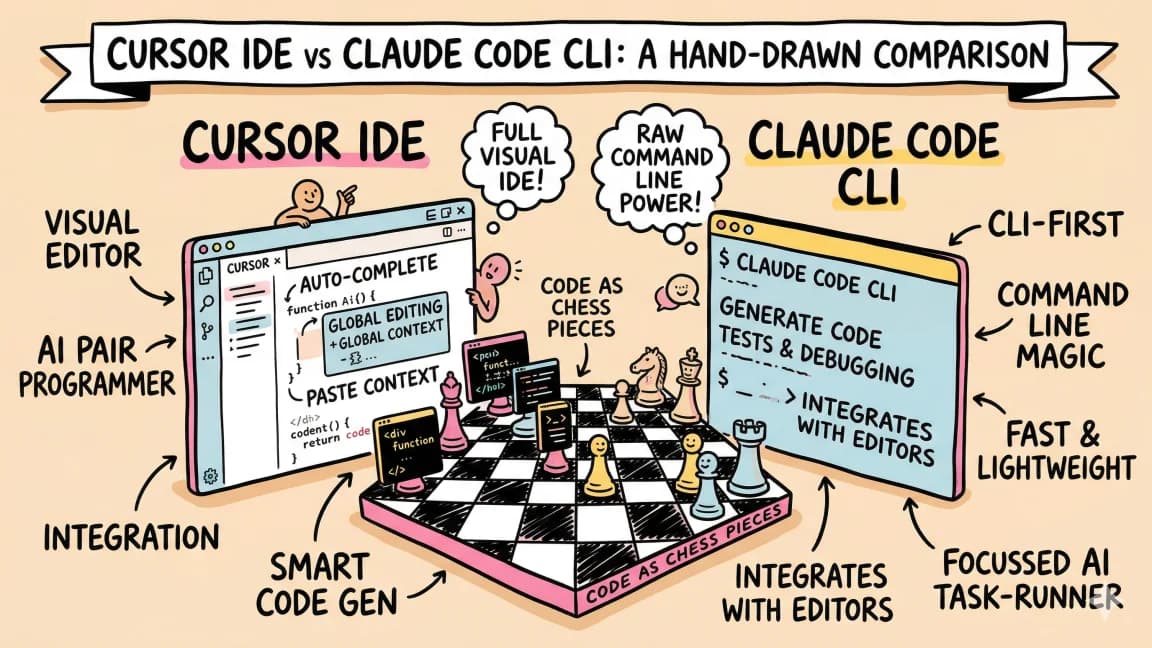
Cursor vs Claude Code in 2026 - Which Should You Use?
A detailed comparison of Cursor and Claude Code from someone who uses both daily. When to use each, how they differ, and...

8 min read
AI Coding
The 10 Best AI Coding Tools in 2026
From terminal agents to cloud IDEs - these are the AI coding tools worth using for TypeScript development in 2026.

15 min read
AI Coding
Every AI Coding Tool Compared: The 2026 Matrix
12 AI coding tools across 4 architecture types, compared on pricing, strengths, weaknesses, and best use cases. The defi...

5 min read
Cursor
Cursor vs Codex: IDE Agent vs Terminal and Cloud Agent for TypeScript
Cursor is editor-first. Codex is terminal, cloud, and PR-first. Here is when to use each for TypeScript projects.

12 min read
AI Coding
AI Coding Tools Pricing Comparison 2026
Complete pricing breakdown for every major AI coding tool. Claude Code, Cursor, Copilot, Windsurf, Codex, Augment, and m...
Build with the member tools

Get Smarter About AI Dev
New tutorials, open-source projects, and deep dives on coding agents - delivered weekly.
One email per weekReal code, not theoryFree forever