The Next.js AI App Stack for 2026
TL;DR
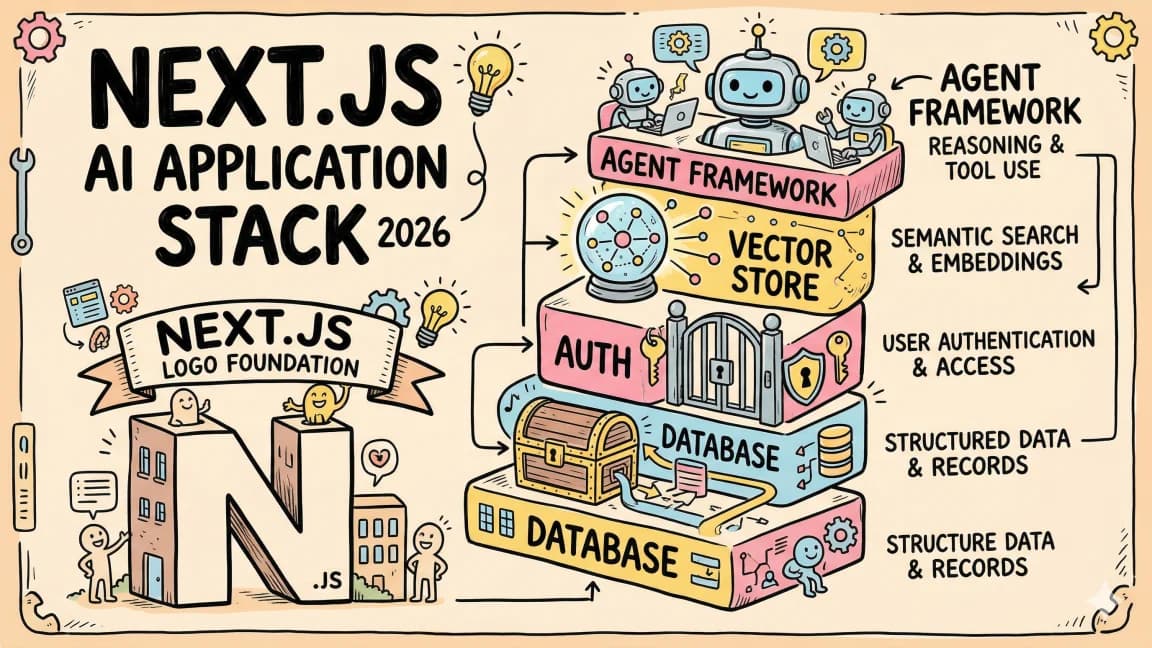
The definitive full-stack setup for building AI-powered apps in 2026. Next.js 16, Vercel AI SDK, Convex, Clerk, and Tailwind - why each piece matters and how they fit together.
| Official Sources | |
|---|---|
| Next.js Documentation | App Router, Server Components, streaming |
| Vercel AI SDK Docs | Streaming, tool use, structured output |
| Convex Documentation | Reactive database, server functions, schema |
| Clerk Documentation | Authentication, middleware, user management |
| Tailwind CSS Docs | Utility-first CSS framework |
| Anthropic TypeScript SDK | Claude API integration |
Building an AI-powered application in 2026 means making dozens of technology decisions before you write a line of product code. Authentication. Database. State management. Streaming. Deployment. Each choice compounds - pick wrong and you spend weeks fighting infrastructure instead of shipping features.
This is the stack that eliminates those decisions. It is what we use for every new AI app at Developers Digest, and it is the fastest path from idea to production for TypeScript developers building with LLMs.
The Stack at a Glance#
| Layer | Technology | Role |
|---|---|---|
| Framework | Next.js 16 | App Router, React Server Components, server actions |
| AI | Vercel AI SDK | Streaming, tool use, structured output, multi-provider |
| Backend | Convex | Reactive database, server functions, real-time subscriptions |
| Auth | Clerk | Authentication, user management, organization support |
| Styling | Tailwind CSS | Utility-first CSS, design tokens, responsive by default |
| Deployment | Vercel | Zero-config deploys, edge functions, preview URLs |
Every piece is TypeScript-native. Every piece has a free tier generous enough to build and launch. And every piece integrates with the others without adapter code or compatibility layers.
Why Next.js 16#
Next.js 16 brings React 19 and the mature App Router. For AI apps specifically, three features matter:
Server Components reduce client bundle size. Most AI app logic - calling models, processing results, querying databases - happens on the server. Server Components let you keep that logic server-side without shipping it to the browser. Your client bundle stays small even as your AI features grow complex.
Server Actions simplify mutations. Instead of creating API routes for every operation, you define server actions as async functions with "use server". The framework handles the network layer. For AI apps, this means form submissions, user preference updates, and credit deductions are all simple function calls.
Streaming is first-class. Next.js supports streaming responses natively. When the AI SDK streams tokens from a model, they flow through the framework's streaming infrastructure directly to the client. No custom SSE setup. No WebSocket servers. The framework handles backpressure, buffering, and error recovery.
TypeScript
// app/api/chat/route.ts
import { streamText } from "ai";
import { anthropic } from "@ai-sdk/anthropic";

export async function POST(req: Request) {
  const { messages } = await req.json();

  const result = streamText({
    model: anthropic("claude-sonnet-4-20250514"),
    messages,
  });

  return result.toDataStreamResponse();
}
That is a complete streaming AI endpoint. Five lines of application code. The rest is handled by the framework and the SDK.
Vercel AI SDK: The AI Layer#
The Vercel AI SDK is what makes TypeScript the best language for AI applications. It provides a unified interface across every major model provider - Anthropic, OpenAI, Google, Mistral, and any OpenAI-compatible endpoint.
The core functions you use daily:
TypeScript
import { streamText, generateText, generateObject, streamObject } from "ai";
streamText- stream model responses token by tokengenerateText- get a complete response in one shotgenerateObject- force the model to return typed, schema-validated JSONstreamObject- stream structured data as it generates
For AI apps, the SDK's tool system is particularly valuable. You define tools with Zod schemas, and the model calls them during its reasoning loop:
TypeScript
import { streamText, tool } from "ai";
import { anthropic } from "@ai-sdk/anthropic";
import { z } from "zod";

const result = streamText({
  model: anthropic("claude-sonnet-4-20250514"),
  messages,
  tools: {
    lookupUser: tool({
      description: "Look up a user by email address",
      parameters: z.object({
        email: z.string().email(),
      }),
      execute: async ({ email }) => {
        const user = await db.query.users.findFirst({
          where: (users, { eq }) => eq(users.email, email),
        });
        return user ?? { error: "User not found" };
      },
    }),
    createInvoice: tool({
      description: "Create a new invoice for a user",
      parameters: z.object({
        userId: z.string(),
        amount: z.number().positive(),
        description: z.string(),
      }),
      execute: async ({ userId, amount, description }) => {
        const invoice = await db.mutation.invoices.create({
          userId,
          amount,
          description,
          status: "pending",
        });
        return invoice;
      },
    }),
  },
  maxSteps: 5,
});
The maxSteps parameter turns a simple chat into an agent that can look up users, create invoices, and chain those operations together. The model decides the control flow. Your code defines the capabilities.
On the frontend, the useChat hook from @ai-sdk/react handles message state, streaming, loading indicators, and error handling:
TypeScript
"use client";
import { useChat } from "@ai-sdk/react";

export function AIChat() {
  const { messages, input, handleInputChange, handleSubmit, isLoading } =
    useChat();

  return (
    <div>
      {messages.map((m) => (
        <div key={m.id}>
          <strong>{m.role}:</strong> {m.content}
        </div>
      ))}
      <form onSubmit={handleSubmit}>
        <input
          value={input}
          onChange={handleInputChange}
          disabled={isLoading}
        />
      </form>
    </div>
  );
}
One hook. Full chat functionality. The SDK negotiates the streaming protocol between your route handler and the client component.
Convex: The Reactive Backend#
Traditional databases require you to poll for updates or set up WebSocket infrastructure for real-time features. Convex eliminates both. It is a reactive backend where queries automatically re-run when underlying data changes.
For AI apps, this matters in three ways:
Real-time chat history. When your AI generates a response, it gets saved to Convex. Every client subscribed to that conversation sees the update instantly. No manual invalidation. No refetching.
Background processing. Convex actions run server-side and can call external APIs (like LLM providers) without blocking the client. Start a long-running AI generation, and the client receives updates as they happen.
Schema-first design. Convex uses TypeScript schemas that generate full type safety from database to UI:
TypeScript
// convex/schema.ts
import { defineSchema, defineTable } from "convex/server";
import { v } from "convex/values";

export default defineSchema({
  conversations: defineTable({
    userId: v.string(),
    title: v.string(),
    createdAt: v.number(),
  }).index("by_user", ["userId"]),

  messages: defineTable({
    conversationId: v.id("conversations"),
    role: v.union(v.literal("user"), v.literal("assistant")),
    content: v.string(),
    toolCalls: v.optional(v.array(v.object({
      name: v.string(),
      args: v.any(),
      result: v.optional(v.any()),
    }))),
    createdAt: v.number(),
  }).index("by_conversation", ["conversationId"]),

  usage: defineTable({
    userId: v.string(),
    tokens: v.number(),
    model: v.string(),
    timestamp: v.number(),
  }).index("by_user", ["userId"]),
});
Queries are reactive by default:
TypeScript
// convex/conversations.ts
import { query } from "./_generated/server";
import { v } from "convex/values";

export const list = query({
  args: { userId: v.string() },
  handler: async (ctx, { userId }) => {
    return await ctx.db
      .query("conversations")
      .withIndex("by_user", (q) => q.eq("userId", userId))
      .order("desc")
      .take(50);
  },
});
On the client, useQuery subscribes to this data and re-renders when it changes:
TypeScript
"use client";
import { useQuery } from "convex/react";
import { api } from "@/convex/_generated/api";

export function ConversationList({ userId }: { userId: string }) {
  const conversations = useQuery(api.conversations.list, { userId });

  if (!conversations) return <div>Loading...</div>;

  return (
    <ul>
      {conversations.map((c) => (
        <li key={c._id}>{c.title}</li>
      ))}
    </ul>
  );
}
No fetch calls. No cache invalidation. No stale data. When a new conversation gets created anywhere - from the UI, from a server action, from a background job - every client sees it immediately.
From the archive
OpenAI Codex: Terminal and Cloud AI Coding Agent
Mar 19, 2026 • 5 min read
OpenAI vs Anthropic in 2026 - Models, Tools, and Developer Experience
Mar 19, 2026 • 18 min read
Prompt Engineering for AI Coding Tools
Mar 19, 2026 • 9 min read
Open Source Has a Bot Problem: Prompt Injection in Contributing.md
Mar 19, 2026 • 8 min read
Clerk: Authentication Without the Pain#
Clerk provides authentication, user management, and organization support with pre-built UI components. For AI apps, the important thing is that it integrates cleanly with both Next.js and Convex without custom middleware.
Setup is minimal. Install the package, add your keys, wrap your app:
TypeScript
// app/layout.tsx
import { ClerkProvider } from "@clerk/nextjs";

export default function RootLayout({
  children,
}: {
  children: React.ReactNode;
}) {
  return (
    <ClerkProvider>
      <html>
        <body>{children}</body>
      </html>
    </ClerkProvider>
  );
}
Protect routes with middleware:
TypeScript
// middleware.ts
import { clerkMiddleware, createRouteMatcher } from "@clerk/nextjs/server";

const isProtectedRoute = createRouteMatcher(["/dashboard(.*)", "/api/chat(.*)"]);

export default clerkMiddleware(async (auth, req) => {
  if (isProtectedRoute(req)) {
    await auth.protect();
  }
});

export const config = {
  matcher: ["/((?!.*\\..*|_next).*)", "/", "/(api|trpc)(.*)"],
};
Access the user in server components and route handlers:
TypeScript
import { auth } from "@clerk/nextjs/server";

export async function POST(req: Request) {
  const { userId } = await auth();

  if (!userId) {
    return new Response("Unauthorized", { status: 401 });
  }

  // userId is available for your AI route handler
  // Use it to scope conversations, track usage, enforce limits
}
Clerk's free tier supports thousands of monthly active users. For AI apps that charge per-use, you are unlikely to hit paid tiers until the product has meaningful revenue.
Tailwind: Styling That Scales#
Tailwind CSS is the styling layer because it eliminates the context-switching between component code and separate stylesheets. For AI applications, where you are iterating on chat interfaces, loading states, and data visualizations, keeping styles co-located with markup matters.
The combination with AI coding tools is particularly strong. Claude Code and Cursor generate Tailwind classes accurately because the utility-first approach is predictable and well-represented in training data. Tell Claude Code to "add a chat bubble component with a subtle shadow and rounded corners" and it produces correct Tailwind on the first try.
TypeScript
function ChatBubble({ role, content }: { role: string; content: string }) {
  return (
    <div
      className={`max-w-[80%] rounded-2xl px-4 py-3 ${
        role === "user"
          ? "ml-auto bg-black text-white"
          : "mr-auto bg-gray-100 text-gray-900"
      }`}
    >
      <p className="text-sm leading-relaxed whitespace-pre-wrap">{content}</p>
    </div>
  );
}
For AI-specific UI patterns - streaming text indicators, tool call visualizations, token usage meters - Tailwind's utility classes let you prototype quickly without fighting CSS specificity or naming conventions.
Project Structure#
Here is how a production AI app looks with this stack:
Code
my-ai-app/
  app/
    layout.tsx              # ClerkProvider + ConvexProvider
    page.tsx                # Landing page
    dashboard/
      page.tsx              # Main app (protected)
      chat/
        [id]/page.tsx       # Individual conversation
    api/
      chat/route.ts         # AI streaming endpoint
      webhooks/
        clerk/route.ts      # Clerk webhook handler
        stripe/route.ts     # Payment webhooks
  components/
    ChatInterface.tsx       # useChat + message rendering
    ConversationList.tsx    # useQuery for conversations
    UsageMeter.tsx          # Token usage display
  convex/
    schema.ts               # Database schema
    conversations.ts        # Conversation queries/mutations
    messages.ts             # Message queries/mutations
    usage.ts                # Usage tracking
    ai.ts                   # Background AI actions
  lib/
    ai.ts                   # Model configuration, system prompts
    tools.ts                # Agent tool definitions
  middleware.ts             # Clerk auth middleware
  .env.local                # API keys (never committed)
  CLAUDE.md                 # AI coding agent instructions
The CLAUDE.md file at the root is key. It tells Claude Code how this project works - the stack, conventions, and rules. When you use Claude Code to add features or fix bugs, it reads this file first and follows your project's patterns. Use the CLAUDE.md Generator to create one for your project.
The .env Generator can scaffold your environment variables file with the right keys for each service in the stack.
Wiring It All Together#
The integration points between these tools are where the stack proves its value. Here is how a complete request flows through the system:
- User sends a message in the chat UI (
useChatfrom AI SDK) - Request hits
app/api/chat/route.ts, authenticated by Clerk middleware - Route handler calls
streamTextwith the user's messages and agent tools - Tools query Convex for user data, conversation history, or domain-specific information
- AI response streams back to the client via the AI SDK protocol
- A Convex mutation saves the message to the database
- Every client subscribed to this conversation sees the update in real time
TypeScript
// app/api/chat/route.ts - the complete handler
import { streamText, tool } from "ai";
import { anthropic } from "@ai-sdk/anthropic";
import { auth } from "@clerk/nextjs/server";
import { ConvexHttpClient } from "convex/browser";
import { api } from "@/convex/_generated/api";
import { z } from "zod";

const convex = new ConvexHttpClient(process.env.NEXT_PUBLIC_CONVEX_URL!);

export async function POST(req: Request) {
  const { userId } = await auth();
  if (!userId) return new Response("Unauthorized", { status: 401 });

  const { messages, conversationId } = await req.json();

  const result = streamText({
    model: anthropic("claude-sonnet-4-20250514"),
    system: "You are a helpful assistant with access to the user's data.",
    messages,
    tools: {
      getUserProfile: tool({
        description: "Get the current user's profile information",
        parameters: z.object({}),
        execute: async () => {
          return await convex.query(api.users.getProfile, { userId });
        },
      }),
      searchConversations: tool({
        description: "Search the user's past conversations",
        parameters: z.object({
          query: z.string().describe("Search term"),
        }),
        execute: async ({ query }) => {
          return await convex.query(api.conversations.search, {
            userId,
            query,
          });
        },
      }),
    },
    maxSteps: 5,
    onFinish: async ({ text }) => {
      // Save the assistant's response to Convex
      await convex.mutation(api.messages.create, {
        conversationId,
        role: "assistant",
        content: text,
      });
    },
  });

  return result.toDataStreamResponse();
}
This is a production-ready AI endpoint. Authentication, streaming, tool use, and persistence - all in one file, all fully typed.
Deployment#
Vercel deploys Next.js apps with zero configuration. Push to main, and your app is live. Preview deployments on every PR. Environment variables managed in the dashboard.
Terminal
# Initial setup
npx vercel link
vercel env add ANTHROPIC_API_KEY
vercel env add CLERK_SECRET_KEY
vercel env add NEXT_PUBLIC_CONVEX_URL

# Deploy
git push origin main
# Vercel handles the rest
Convex deploys separately but just as simply:
Terminal
npx convex deploy
The Convex deployment is independent of your Vercel deployment. Database schema changes, server functions, and indexes deploy to Convex's infrastructure. Your Next.js app connects to Convex via the URL in your environment variables.
Cost at Scale#
One reason this stack works for indie developers and small teams is the cost structure:
- Vercel: Free tier covers hobby projects. Pro at $20/month for production.
- Convex: Free tier includes generous usage. Scales with your database size.
- Clerk: Free for thousands of MAUs. Paid tiers start at $25/month.
- Tailwind: Open source. Free.
- AI API costs: This is your real expense. Claude Sonnet runs roughly $3 per million input tokens and $15 per million output tokens. For a typical chat app, that is pennies per conversation.
Your total infrastructure cost before AI API usage is effectively zero on free tiers. The only variable cost that scales with users is the LLM inference. This means your margin is almost entirely determined by how much you charge versus how many tokens each user consumes.
Frequently Asked Questions#
What is the best stack for AI apps?#
For TypeScript developers, the combination of Next.js, Vercel AI SDK, Convex, and Clerk provides the fastest path from idea to production. Next.js handles the web layer with streaming support. The AI SDK provides a unified interface for calling any model provider. Convex gives you a reactive database with real-time subscriptions. Clerk handles authentication. All four are TypeScript-native and have generous free tiers.
Is Next.js good for AI apps?#
Yes. Next.js is the leading framework for AI-powered web applications because of three features: Server Components keep AI logic server-side without shipping it to the browser, server actions simplify mutations to simple function calls, and first-class streaming support means model responses flow to the client without custom SSE or WebSocket infrastructure. The App Router architecture maps cleanly to AI application patterns.
What database should I use for AI apps?#
Convex is the recommended choice for AI applications because its reactive queries automatically update the UI when data changes. When an AI generates a response and saves it, every connected client sees the update instantly without polling or manual cache invalidation. For simpler needs, Neon (serverless Postgres) or Supabase work well and offer standard SQL with generous free tiers.
How much does it cost to run an AI app?#
Infrastructure costs are effectively zero on free tiers (Vercel, Convex, Clerk all offer generous free plans). Your real expense is LLM API usage. Claude Sonnet costs roughly $3 per million input tokens and $15 per million output tokens, which translates to pennies per conversation for a typical chat application. Total cost scales linearly with user activity, making margins almost entirely a function of pricing versus token consumption.
Do I need a backend framework?#
No. With Next.js server actions and route handlers, you do not need a separate backend framework like Express or Fastify. Server actions handle mutations as async functions. Route handlers serve your AI streaming endpoints. Convex handles database operations and background jobs. The entire backend runs inside your Next.js application with full TypeScript type safety from database to UI.
What's Next#
This stack is a starting point, not a ceiling. From here, common additions include:
- Payments: Stripe or Autumn for subscription billing and usage-based pricing
- Background jobs: Convex cron jobs for scheduled AI processing
- MCP servers: Connect your agent to external services via Model Context Protocol
- Multi-agent systems: Spawn specialized sub-agents for complex tasks
The foundation does not change. Next.js handles the web layer. The AI SDK handles model interaction. Convex handles data. Clerk handles users. Everything else plugs in around these four pillars.
For deeper dives into each piece: the Vercel AI SDK guide covers streaming, tools, and structured output in detail. The Claude Code guide shows how to use AI to build with this stack faster. And the courses section has hands-on projects that walk through building complete AI applications from scratch.
Read next
Vercel AI SDK: Build Streaming AI Apps in TypeScript
The AI SDK is the fastest way to add streaming AI responses to your Next.js app. Here is how to use it with Claude, GPT, and open source models.
5 min readThe Agentic Development Tech Stack for 2026
Coding changed more in the past two years than in the previous decade. We moved from manual typing to autocomplete, then to multi-file edits.
12 min readHow to Build AI Agents in TypeScript
A practical guide to building AI agents with TypeScript using the Vercel AI SDK. Tool use, multi-step reasoning, and real patterns you can ship today.
10 min readShare
Developers Digest
Technical content at the intersection of AI and development. Building with AI agents, Claude Code, and modern dev tools - then showing you exactly how it works.
300+ videos30K+ GitHub stars850+ articles
Try These Tools
Related Tools
AI FrameworksEssential

Vercel AI SDK
The TypeScript toolkit for building AI apps. Unified API across OpenAI, Anthropic, Google. Streaming, tool calling, stru...
View ToolInfrastructurePopular
Vercel
Deployment platform behind Next.js. Git push to deploy. Edge functions, image optimization, analytics. Free tier is gene...
View ToolInfrastructureThis Site

Clerk
Drop-in auth for React/Next.js. Pre-built sign-in UI, session management, user profiles, org management. This site uses...
View ToolInfrastructure

Sentry
Error monitoring and performance tracing with release tracking, session replay, and first-class Next.js support.
View ToolRelated Videos
Build AI Podcasts from Any Site: Full-Stack Guide with Firecrawl, ElevenLabs & Next.js
Creating an AI-Enhanced Podcast Web App: Comprehensive Tutorial Repo: https://github.com/developersdigest/llm-podcast-engine You can obtain these API keys from the following sources: ...
Video·

Build an AI Device with Groq, Llama 3, OpenAI, TTS, Whisper, Vision, Vercel AI SDK & Next.js
Repo: https://git.new/ai-pin Building an AI Assistant similar to the Humane AI Pin, the Rabbit R1 with Advanced Functionality from Scratch This video details the process of creating an AI...
Video·

Build a Next.JS Answer Engine with Vercel AI SDK, Groq, Mistral, Langchain, OpenAI, Brave & Serper
Building a Perplexity Style LLM Answer Engine: Frontend to Backend Tutorial This tutorial guides viewers through the process of building a Perplexity style Large Language Model (LLM) answer...
Video·
Related Posts

5 min read
Vercel AI SDK
Vercel AI SDK: Build Streaming AI Apps in TypeScript
The AI SDK is the fastest way to add streaming AI responses to your Next.js app. Here is how to use it with Claude, GPT,...

12 min read
AI
The Agentic Development Tech Stack for 2026
Coding changed more in the past two years than in the previous decade. We moved from manual typing to autocomplete, then...

10 min read
AI Agents
How to Build AI Agents in TypeScript
A practical guide to building AI agents with TypeScript using the Vercel AI SDK. Tool use, multi-step reasoning, and rea...

5 min read
LangChain
LangChain vs Vercel AI SDK: Which TypeScript AI Framework Should You Use?
Two popular frameworks for building AI apps in TypeScript. Here is when to use each and why most Next.js developers shou...

14 min read
Claude Code
How to Use Claude Code with Next.js
A practical guide to using Claude Code in Next.js projects. CLAUDE.md config for App Router, common workflows, sub-agent...
6 min read
AI Agents
AI Agents Explained: A TypeScript Developer's Guide
AI agents use LLMs to complete multi-step tasks autonomously. Here is how they work and how to build them in TypeScript.
Build with the member tools

Get Smarter About AI Dev
New tutorials, open-source projects, and deep dives on coding agents - delivered weekly.
One email per weekReal code, not theoryFree forever