Vercel AI SDK: Build Streaming AI Apps in TypeScript

TL;DR
The AI SDK is the fastest way to add streaming AI responses to your Next.js app. Here is how to use it with Claude, GPT, and open source models.
Official Sources#
| Resource | Link |
|---|---|
| AI SDK Documentation | sdk.vercel.ai/docs |
| AI SDK Core Reference | sdk.vercel.ai/docs/ai-sdk-core |
| AI SDK UI Reference | sdk.vercel.ai/docs/ai-sdk-ui |
| Provider Registry | sdk.vercel.ai/providers |
| GitHub Repository | github.com/vercel/ai |
| npm Package | npmjs.com/package/ai |
What Is the AI SDK?#
The Vercel AI SDK is a TypeScript library for building AI-powered applications. It provides a unified interface for calling language models, streaming their responses, using tools, and generating structured output. You write one set of functions. Swap providers by changing a single import.
The SDK is split into two packages. AI SDK Core (ai) handles server-side model calls, tool execution, and structured generation. AI SDK UI (@ai-sdk/react, @ai-sdk/svelte, @ai-sdk/vue) provides frontend hooks for chat interfaces, completions, and streaming state management.
The library is framework-agnostic on the server side, but it works best with Next.js App Router. Server actions, route handlers, and React Server Components all integrate cleanly.
Streaming in Three Lines#
The simplest way to call a model and stream the response:
TypeScript
import { streamText } from "ai";
import { anthropic } from "@ai-sdk/anthropic";

const result = streamText({
  model: anthropic("claude-sonnet-4-20250514"),
  prompt: "Explain TypeScript generics in two sentences.",
});

for await (const chunk of result.textStream) {
  process.stdout.write(chunk);
}
That is all it takes. streamText returns a StreamTextResult with a textStream async iterable. Each chunk arrives as the model generates it. No manual SSE parsing. No ReadableStream wiring.
For a Next.js route handler, return the stream directly:
TypeScript
import { streamText } from "ai";
import { openai } from "@ai-sdk/openai";

export async function POST(req: Request) {
  const { messages } = await req.json();

  const result = streamText({
    model: openai("gpt-4o"),
    messages,
  });

  return result.toDataStreamResponse();
}
On the frontend, the useChat hook handles everything:
TypeScript
"use client";
import { useChat } from "@ai-sdk/react";

export default function Chat() {
  const { messages, input, handleInputChange, handleSubmit } = useChat();

  return (
    <div>
      {messages.map((m) => (
        <div key={m.id}>
          <strong>{m.role}:</strong> {m.content}
        </div>
      ))}
      <form onSubmit={handleSubmit}>
        <input value={input} onChange={handleInputChange} />
      </form>
    </div>
  );
}
The hook manages message history, loading state, error handling, and abort control. It connects to your /api/chat route handler automatically.
Tool Use#
Tools let the model call functions you define. The SDK handles the full loop: the model decides to call a tool, your function executes, and the result feeds back into the conversation.
TypeScript
import { streamText, tool } from "ai";
import { anthropic } from "@ai-sdk/anthropic";
import { z } from "zod";

const result = streamText({
  model: anthropic("claude-sonnet-4-20250514"),
  prompt: "What is the weather in San Francisco?",
  tools: {
    getWeather: tool({
      description: "Get the current weather for a location",
      parameters: z.object({
        city: z.string().describe("The city name"),
      }),
      execute: async ({ city }) => {
        // Call your weather API here
        return { temperature: 62, condition: "Foggy", city };
      },
    }),
  },
  maxSteps: 5,
});
The parameters field uses Zod schemas. The SDK converts these to JSON Schema for the model and validates the response before calling execute. Type safety flows from the schema definition through to the function arguments.
maxSteps controls how many tool-call/result rounds the model can perform before returning. Set it to 1 for single-shot tool use, or higher for multi-step reasoning where the model chains multiple tool calls together.
Tools work with streaming too. The useChat hook on the frontend renders tool invocations and results as part of the message stream, so you can show real-time progress as tools execute.
From the archive
Vibe Coding in 2026: Build Fast Without Losing the Plot
Mar 19, 2026 • 10 min read
Web Dev Arena: How to Test AI Coding Models on Real Frontend Work
Mar 19, 2026 • 8 min read
What Is Claude Code? The Complete Guide for 2026
Mar 19, 2026 • 15 min read
What Is MCP (Model Context Protocol)? A TypeScript Developer's Guide
Mar 19, 2026 • 5 min read
Structured Output#
Sometimes you want the model to return data, not prose. generateObject enforces a Zod schema on the output:
TypeScript
import { generateObject } from "ai";
import { openai } from "@ai-sdk/openai";
import { z } from "zod";

const { object } = await generateObject({
  model: openai("gpt-4o"),
  schema: z.object({
    name: z.string(),
    ingredients: z.array(z.string()),
    prepTimeMinutes: z.number(),
    steps: z.array(z.string()),
  }),
  prompt: "Generate a recipe for chocolate chip cookies.",
});

console.log(object.name);
// "Classic Chocolate Chip Cookies"
console.log(object.ingredients);
// ["2 1/4 cups flour", "1 tsp baking soda", ...]
The return type is fully typed. object.name is a string, object.ingredients is string[]. No casting, no runtime checks. If the model returns something that does not match the schema, the SDK retries automatically.
There is also streamObject for streaming structured data as it generates:
TypeScript
import { streamObject } from "ai";
import { anthropic } from "@ai-sdk/anthropic";
import { z } from "zod";

const result = streamObject({
  model: anthropic("claude-sonnet-4-20250514"),
  schema: z.object({
    summary: z.string(),
    keyPoints: z.array(z.string()),
    sentiment: z.enum(["positive", "negative", "neutral"]),
  }),
  prompt: "Analyze this customer review: ...",
});

for await (const partial of result.partialObjectStream) {
  console.log(partial);
  // { summary: "The cust..." }
  // { summary: "The customer enjoyed...", keyPoints: ["Fast shipping"] }
  // ...progressively more complete
}
Each iteration yields a partial object that grows as the model generates more tokens. This is powerful for UIs where you want to show fields as they appear.
Multi-Provider Support#
The SDK supports every major provider through a consistent interface. Install the provider package, import it, and pass the model to any function:
TypeScript
import { generateText } from "ai";
import { anthropic } from "@ai-sdk/anthropic";
import { openai } from "@ai-sdk/openai";
import { google } from "@ai-sdk/google";
import { mistral } from "@ai-sdk/mistral";

// Same function signature, different providers
const claudeResult = await generateText({
  model: anthropic("claude-sonnet-4-20250514"),
  prompt: "Hello from Claude",
});

const gptResult = await generateText({
  model: openai("gpt-4o"),
  prompt: "Hello from GPT",
});

const geminiResult = await generateText({
  model: google("gemini-2.5-pro"),
  prompt: "Hello from Gemini",
});

const mistralResult = await generateText({
  model: mistral("mistral-large-latest"),
  prompt: "Hello from Mistral",
});
Every provider supports the same core functions: generateText, streamText, generateObject, streamObject. Tools and structured output work across all of them. The model interface is standardized, so switching providers is a one-line change.
For open source models, use the OpenAI-compatible provider pointed at your inference server:
TypeScript
import { createOpenAI } from "@ai-sdk/openai";

const ollama = createOpenAI({
  baseURL: "http://localhost:11434/v1",
  apiKey: "ollama",
});

const result = await generateText({
  model: ollama("llama3.1"),
  prompt: "Running locally with Ollama",
});
This works with Ollama, vLLM, LM Studio, or any OpenAI-compatible endpoint. Your application code stays identical regardless of whether the model runs in the cloud or on your machine.
Putting It All Together#
Here is a complete Next.js route handler that combines streaming, tools, and multi-step reasoning:
TypeScript
import { streamText, tool } from "ai";
import { anthropic } from "@ai-sdk/anthropic";
import { z } from "zod";

export async function POST(req: Request) {
  const { messages } = await req.json();

  const result = streamText({
    model: anthropic("claude-sonnet-4-20250514"),
    system: "You are a helpful coding assistant. Use tools when needed.",
    messages,
    tools: {
      searchDocs: tool({
        description: "Search documentation for a framework or library",
        parameters: z.object({
          query: z.string().describe("The search query"),
          framework: z.string().describe("The framework name"),
        }),
        execute: async ({ query, framework }) => {
          // Your search implementation
          return { results: [`${framework}: ${query} - found 3 matches`] };
        },
      }),
      runCode: tool({
        description: "Execute a TypeScript code snippet",
        parameters: z.object({
          code: z.string().describe("TypeScript code to execute"),
        }),
        execute: async ({ code }) => {
          // Your sandbox execution
          return { output: "Executed successfully", code };
        },
      }),
    },
    maxSteps: 10,
  });

  return result.toDataStreamResponse();
}
The model can search documentation, run code, and chain those operations together across multiple steps. The frontend receives a single stream with text, tool calls, and tool results interleaved. The useChat hook handles all of it.
Why TypeScript Matters Here#
The AI SDK is TypeScript-first in a way that actually changes how you build. Zod schemas for tools and structured output mean your AI inputs and outputs have the same type guarantees as the rest of your application. Refactor a tool's parameters and TypeScript catches every call site. Change a structured output schema and the compiler tells you where the UI needs to update.
This is the direction AI application development is heading. Not string templates and JSON parsing, but typed interfaces with compile-time safety.
Start Building#
Install the SDK and a provider:
Install
npm install ai @ai-sdk/anthropic @ai-sdk/openai zodSet your API key:
Terminal
export ANTHROPIC_API_KEY="your-key"
Run the three-line streaming example from earlier. Then add useChat on the frontend. Then add a tool. Each step builds on the last, and the SDK handles the complexity underneath.
For a deeper look at AI frameworks and how the AI SDK compares, read the AI agent frameworks comparison, then check out the frameworks overview on SubAgent.
Frequently Asked Questions#
What is the Vercel AI SDK?#
The Vercel AI SDK is a TypeScript library for building AI-powered applications. It provides a unified interface for calling language models from multiple providers (Anthropic, OpenAI, Google, Mistral), streaming responses, executing tools, and generating structured output with Zod schema validation. It consists of a core server-side package (ai) and frontend hooks (@ai-sdk/react).
Is the AI SDK free?#
Yes, the AI SDK itself is open source and free to use. You only pay for the underlying model API calls from providers like Anthropic or OpenAI. The SDK does not add any cost on top of your provider usage. Install it with npm install ai and the provider package for your model of choice.
Does the AI SDK work with Claude?#
Yes. Install the @ai-sdk/anthropic provider package and pass anthropic("claude-sonnet-4-20250514") or any other Claude model to any SDK function. The SDK supports all Claude features including streaming, tool use, structured output, and multi-step reasoning via maxSteps.
What is the difference between AI SDK and LangChain?#
The AI SDK is focused on TypeScript-first model interaction with strong typing, streaming primitives, and React hooks for building UIs. LangChain is a broader framework with chains, memory, and retrieval abstractions. The AI SDK is lighter and more composable for web applications, while LangChain provides more pre-built patterns for complex agent architectures. Many developers use the AI SDK for application-layer code and LangChain for backend orchestration.
How do I add streaming to my Next.js app?#
Create a route handler that calls streamText() and returns result.toDataStreamResponse(). On the frontend, use the useChat hook from @ai-sdk/react, which handles message state, streaming display, and error handling automatically. The hook connects to your route handler and renders tokens as they arrive. See the Next.js AI App Stack guide for the complete setup.
Read next
The Next.js AI App Stack for 2026
The definitive full-stack setup for building AI-powered apps in 2026. Next.js 16, Vercel AI SDK, Convex, Clerk, and Tailwind - why each piece matters and how they fit together.
12 min readHow to Build AI Agents in TypeScript
A practical guide to building AI agents with TypeScript using the Vercel AI SDK. Tool use, multi-step reasoning, and real patterns you can ship today.
10 min readWhat is RAG? Retrieval Augmented Generation Explained
How RAG works, why it matters, and how to implement it in TypeScript. The technique that lets AI models use your data without fine-tuning.
8 min readShare
Developers Digest
Technical content at the intersection of AI and development. Building with AI agents, Claude Code, and modern dev tools - then showing you exactly how it works.
300+ videos30K+ GitHub stars850+ articles
Related Tools
AI FrameworksEssential

Vercel AI SDK
The TypeScript toolkit for building AI apps. Unified API across OpenAI, Anthropic, Google. Streaming, tool calling, stru...
View ToolAI Frameworks

Instructor
Structured data extraction from any LLM using Pydantic models. Automatic retries, validation, and streaming. 3M+ monthly...
View ToolAI FrameworksAgent UI

CopilotKit
Frontend stack for agent-native apps. React hooks, prebuilt copilot UI, AG-UI runtime, frontend tools, shared state, and...
View ToolAI Frameworks

Mastra
TypeScript-first AI agent framework. Agents, tools, memory, workflows, RAG, evals, tracing, MCP, and production deployme...
View ToolRelated Guides
Guide
Building Your First MCP Server
Step-by-step guide to building an MCP server in TypeScript - from project setup to tool definitions, resource handling, testing, and deployment.
AI AgentsGuide
MCP Servers Explained
What MCP servers are, how they work, and how to build your own in 5 minutes.
AI AgentsGuide
Auto Memory - Claude Code
Automatic session-to-session memory of build commands, errors, and learnings.
Claude CodeRelated Videos
Build an AI Device with Groq, Llama 3, OpenAI, TTS, Whisper, Vision, Vercel AI SDK & Next.js
Repo: https://git.new/ai-pin Building an AI Assistant similar to the Humane AI Pin, the Rabbit R1 with Advanced Functionality from Scratch This video details the process of creating an AI...
Video·
Build a Next.JS Answer Engine with Vercel AI SDK, Groq, Mistral, Langchain, OpenAI, Brave & Serper
Building a Perplexity Style LLM Answer Engine: Frontend to Backend Tutorial This tutorial guides viewers through the process of building a Perplexity style Large Language Model (LLM) answer...
Video·
ChatHN: Next.JS, OpenAI Functions, Vercel AI SDK
In this video I will show you how to get up and running in just a few minutes with getting a Next.js chatbot that leverages the brand new vercel ai sdk as well as the OpenAI SDK. Huge shout...
Video·
Related Posts
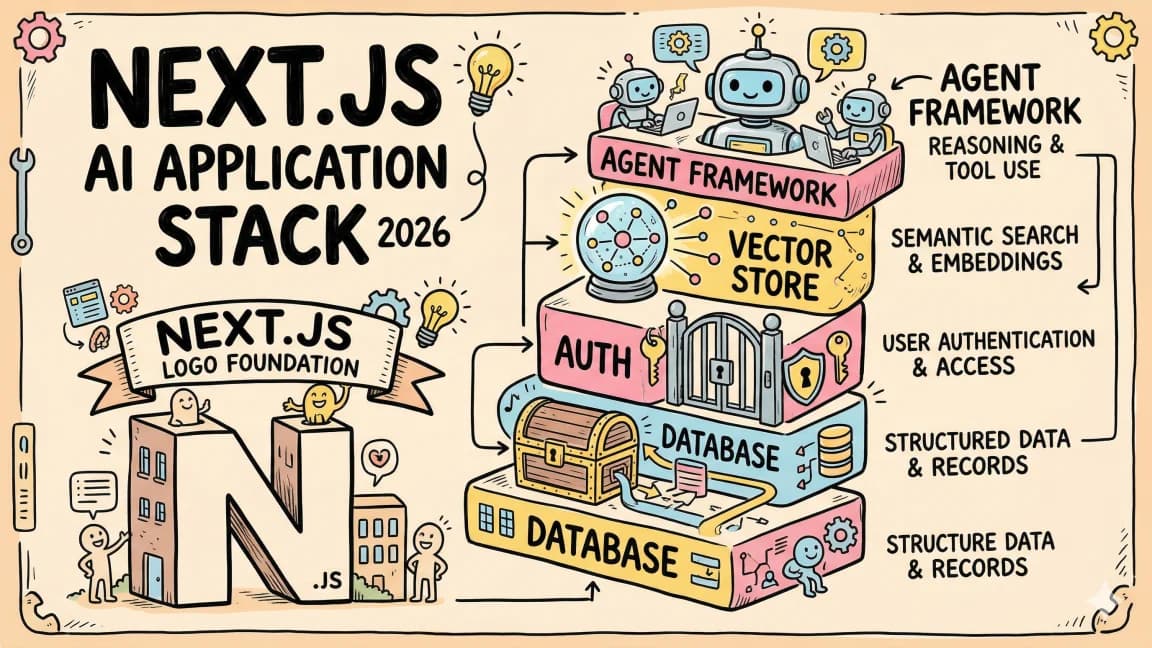
12 min read
Next.js
The Next.js AI App Stack for 2026
The definitive full-stack setup for building AI-powered apps in 2026. Next.js 16, Vercel AI SDK, Convex, Clerk, and Tail...

10 min read
AI Agents
How to Build AI Agents in TypeScript
A practical guide to building AI agents with TypeScript using the Vercel AI SDK. Tool use, multi-step reasoning, and rea...
8 min read
RAG
What is RAG? Retrieval Augmented Generation Explained
How RAG works, why it matters, and how to implement it in TypeScript. The technique that lets AI models use your data wi...
6 min read
AI Agents
AI Agents Explained: A TypeScript Developer's Guide
AI agents use LLMs to complete multi-step tasks autonomously. Here is how they work and how to build them in TypeScript.

5 min read
LangChain
LangChain vs Vercel AI SDK: Which TypeScript AI Framework Should You Use?
Two popular frameworks for building AI apps in TypeScript. Here is when to use each and why most Next.js developers shou...

14 min read
Claude Code
How to Use Claude Code with Next.js
A practical guide to using Claude Code in Next.js projects. CLAUDE.md config for App Router, common workflows, sub-agent...
Build with the member tools

Get Smarter About AI Dev
New tutorials, open-source projects, and deep dives on coding agents - delivered weekly.
One email per weekReal code, not theoryFree forever