Web Dev Arena: How to Test AI Coding Models on Real Frontend Work
TL;DR
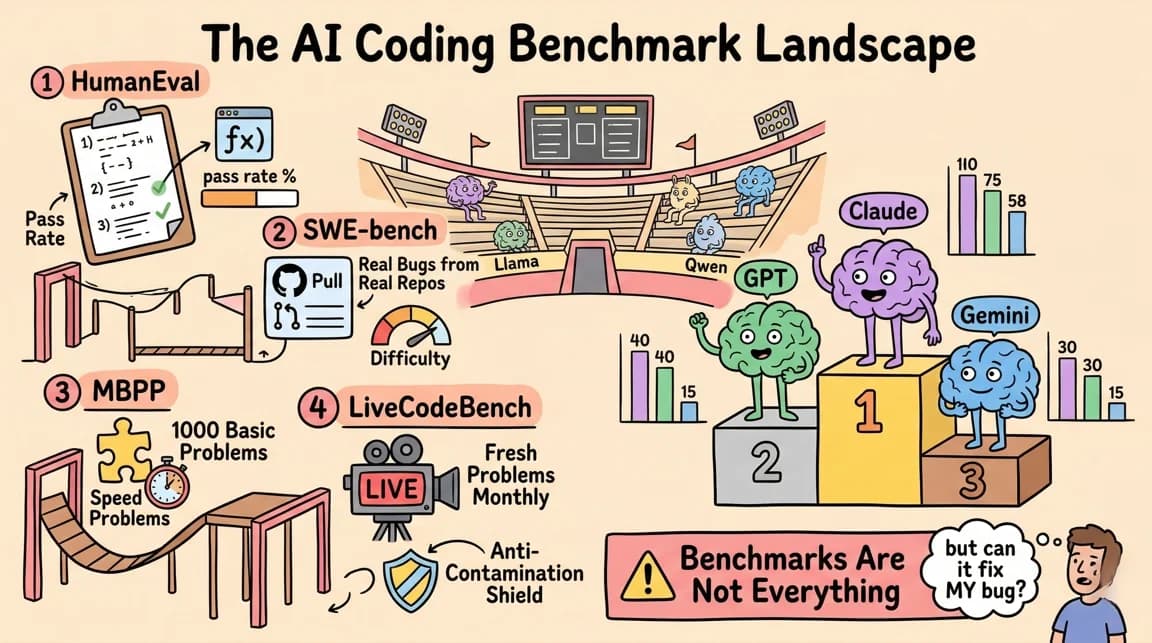
Benchmarks are useful, but frontend work fails in places leaderboards barely measure. Here is how Web Dev Arena turns AI model comparison into a practical UI evaluation workflow.
Every AI coding model has a benchmark score. That score can be useful, but it rarely answers the question frontend teams actually ask: what happens when the model has to build a real interface that a human can click, resize, inspect, and maintain?
SWE-bench Verified is valuable because it measures real GitHub issue resolution. Terminal-Bench is valuable because it tests agents inside terminal workflows. But neither benchmark is designed to judge whether a generated product UI has good spacing, accessible controls, responsive layout, stable state, and interactions that feel finished.
That is the gap behind Web Dev Arena. Same prompt, different models, live output. Instead of reading a leaderboard and guessing how it maps to frontend work, you can compare generated apps side by side.
Last updated: June 24, 2026
This refresh also changes the framing. The interesting part is not whether one model "wins" a fixed set of toy prompts. The interesting part is what a repeatable frontend eval should measure, especially as tools like Claude Code, Cursor, Codex, Kimi, Droid, and MiniMax start acting less like autocomplete and more like autonomous builders.
Why Benchmarks Are Not Enough#
Most coding benchmarks reward a narrow success condition: did the patch pass tests, did the agent solve the issue, did it complete the shell task, did the final answer match the judge's expectation. That is the right shape for many backend and systems tasks.
Frontend work has extra failure modes.
A generated UI can compile and still be bad. It can meet the written prompt and still feel cheap. It can render correctly on desktop and collapse on mobile. It can pass a unit test while the focus state is invisible, the card layout jumps on hover, or the modal traps keyboard users.
That is why frontend evals need visual and interaction receipts. If you are comparing AI coding tools, start with the broader AI coding tools matrix, then run your own task set with screenshots, DOM checks, accessibility checks, and human review. Model choice is only one layer of the workflow.
What Web Dev Arena Tests#
The arena uses simple, direct tasks:
- A playable game with score state and restart behavior
- A todo app with drag-to-reorder interactions
- A split-pane markdown editor
- A weather dashboard with animated states
- A SaaS landing page constrained by a design system
- 3D scenes where camera controls, frame rate, and object placement matter
Each model gets the same instruction pattern: generate a complete, self-contained HTML file with inline CSS and JavaScript. No build system. No framework rescue. The result is rendered in an iframe so the output can be clicked, resized, and compared directly.
That constraint is intentionally blunt. In production, you would use Next.js, React, Tailwind, a component system, tests, and linting. For evaluation, a single-file output strips the task down to raw taste, structure, and execution. Can the model plan the interface, implement state, and respect constraints without a scaffold doing half the work?
For a more production-shaped workflow, pair this with how to coordinate multiple AI agents and parallel coding agents merge discipline. The arena tells you what the model produces alone. Your actual system still needs review, merge policy, and rollback.
From the archive
What Is Claude Code? The Complete Guide for 2026
Mar 19, 2026 • 15 min read
What Is MCP (Model Context Protocol)? A TypeScript Developer's Guide
Mar 19, 2026 • 5 min read
What is RAG? Retrieval Augmented Generation Explained
Mar 19, 2026 • 8 min read
Windsurf vs Cursor: Which AI IDE for TypeScript Developers?
Mar 19, 2026 • 6 min read
The Signals That Matter#
Completion rate is the weakest useful signal. It tells you whether the model produced something, not whether you should trust the result.
The stronger signals are more specific.
Layout stability. Does the UI hold together on narrow screens, wide screens, and content changes? Good outputs use stable dimensions, sensible grid constraints, and responsive rules. Weak outputs rely on lucky desktop proportions.
Interaction depth. Does the app include the obvious states a user expects? A todo list should support editing, completion, deletion, persistence, and drag feedback. A game should have start, pause, reset, score, and game-over states. The best AI outputs infer those states from the product shape.
Design-system obedience. If the prompt specifies black borders, cream background, pill buttons, and restrained accent colors, does the model follow it? Constraint adherence matters because real teams already have design systems. A model that invents a new aesthetic every run creates review debt.
Accessibility basics. Buttons should be buttons, controls should have labels, focus should be visible, contrast should work, and keyboard paths should exist. AI-generated UIs often look impressive in screenshots while quietly failing here.
Code maintainability. The final HTML matters, but so does the structure. Are state transitions readable? Are event handlers clear? Is the CSS organized enough that another agent or human can revise it? This connects directly to agent evals needing baseline receipts: the output needs evidence, not vibes.
Public Leaderboards Still Help#
Public benchmarks should not be dismissed. They are useful for eliminating weak options and spotting model families that are improving quickly.
SWE-bench gives a grounded signal for repository issue resolution. Terminal-Bench gives a grounded signal for shell-native agent work. Public WebDev-style leaderboards, including WebDev Arena from the LM Arena ecosystem, help because they move evaluation closer to generated web apps instead of pure code patches.
But leaderboard results are still abstractions. They compress many prompts, judges, and review assumptions into a rank. That compression is useful for discovery. It is not enough for adoption.
The right workflow is:
- Use leaderboards to pick a shortlist.
- Use pricing and context limits to remove tools that do not fit your budget. The AI coding tools pricing comparison is the fastest internal starting point.
- Run your own Web Dev Arena-style prompts against your real UI constraints.
- Review screenshots, interaction video, accessibility, code structure, and diff size.
- Save the winning prompts, outputs, and review notes as a repeatable eval fixture.
That last step is where most teams stop too early. A one-off comparison is interesting. A repeatable eval fixture becomes infrastructure.
The Frontend Evals I Would Run Today#
If I were choosing an AI coding model for a frontend-heavy team today, I would not start with "build a landing page." I would start with five tasks that represent recurring product work.
A dense settings page. This tests forms, grouping, validation states, disabled states, and layout hierarchy.
A responsive data table. This tests sorting, filtering, empty states, horizontal overflow, and mobile fallback.
A multi-step modal flow. This tests state machines, back/next behavior, keyboard handling, and error recovery.
A design-system migration. Give the model an existing component and a design contract. The task is to preserve behavior while changing visual primitives.
A bug-fix plus polish task. Give it a broken UI with overlapping text, missing focus states, and unstable spacing. This is often more revealing than greenfield generation.
Those tasks mirror what actually drains engineering time. They also expose whether the model is merely good at first drafts or genuinely useful inside an iterative workflow. For model-level context, compare Claude vs GPT for coding, Codex vs Claude Code, and Gemini CLI for large-context coding.
What The Arena Has Taught Me#
The biggest lesson is that frontend quality is multi-dimensional. A model can produce beautiful static composition and weak interactions. Another can write clean state logic but bland UI. Another can follow the design system but forget mobile. The winner changes depending on what you value.
That makes the evaluation question more practical:
- If your team ships internal tools, weight forms, tables, keyboard support, and maintainability.
- If your team ships marketing pages, weight visual hierarchy, responsive layout, and design-system adherence.
- If your team ships product prototypes, weight speed, interaction completeness, and editability.
- If your team runs many autonomous agents, weight consistency, diff size, and recovery from partial failures.
This is also why long-running agents need harnesses. The model's raw output matters, but the surrounding harness decides whether that output becomes a product, a mess, or a useful intermediate draft.
The Takeaway#
Web Dev Arena is not a replacement for SWE-bench, Terminal-Bench, or public leaderboards. It is the missing local layer between abstract benchmark scores and real frontend adoption.
Use public benchmarks to shortlist. Use Web Dev Arena-style tasks to inspect the outputs. Use your own design system, your own workflows, and your own review criteria before changing tools.
The best AI coding model for frontend work is not always the model with the highest benchmark score. It is the model whose failures you can see, measure, and route through a workflow that keeps the product quality bar intact.
Frequently Asked Questions#
What is Web Dev Arena?#
Web Dev Arena is a side-by-side evaluation setup for AI-generated frontend work. Each model receives the same prompt, produces a self-contained web app, and the outputs are rendered so you can inspect design quality, responsiveness, interactions, and code structure.
How is Web Dev Arena different from SWE-bench?#
SWE-bench focuses on resolving real GitHub issues in existing repositories. Web Dev Arena focuses on generated frontend experiences. It is less about patch correctness and more about whether the resulting UI is usable, polished, responsive, and maintainable.
Should I trust public AI coding leaderboards?#
Use them for shortlisting, not final adoption. Public leaderboards are useful directional signals, but your team still needs task-specific evals based on your own design system, codebase, review process, and budget.
What should a frontend AI eval include?#
A useful frontend eval should include screenshots, responsive checks, keyboard and focus checks, interaction testing, code review, and repeatable prompts. Completion alone is not enough.
Sources#
Read next
The 10 Best AI Coding Tools in 2026
From terminal agents to cloud IDEs - these are the AI coding tools worth using for TypeScript development in 2026.
8 min readClaude vs GPT for Coding: Which Model Writes Better TypeScript?
Claude vs GPT for real TypeScript work: benchmarks, pricing, model families, and the practical differences that matter when picking a coding model.
9 min readEvery AI Coding Tool Compared: The 2026 Matrix
12 AI coding tools across 4 architecture types, compared on pricing, strengths, weaknesses, and best use cases. The definitive comparison matrix for 2026.
15 min readShare
Developers Digest
Technical content at the intersection of AI and development. Building with AI agents, Claude Code, and modern dev tools - then showing you exactly how it works.
300+ videos30K+ GitHub stars850+ articles
Try These Tools
Related Tools
AI Coding

Aider
Open-source AI pair programming in your terminal. Works with any LLM - Claude, GPT, Gemini, local models. Git-aware ed...
View ToolAI CodingOpen source

OpenCode
Open-source AI coding agent for terminal, desktop, and IDE. Works with 75+ LLM providers including Claude, GPT, Gemini,...
View ToolAI Coding
C
Conductor
Mac app for running parallel Claude Code, Codex, and Cursor agents in isolated workspaces. Watch every agent work at onc...
View ToolAI CodingEssential

Cursor
AI-native code editor forked from VS Code. Composer mode rewrites multiple files at once. Tab autocomplete predicts your...
View ToolApps from Developers Digest
Developer Tools
Agent Hub
Every coding agent in one window. Stop alt-tabbing between Claude, Codex, and Cursor.
View AppDirectories
AI Models
Pick a model in 30 seconds. Built for the answer, not the marketing.
View AppDeveloper ToolsIn Progress
Agent Benchmark Lab
Compare AI coding agents on reproducible tasks with scored, shareable runs.
View AppRelated Guides
Guide
Run AI Models Locally with Ollama and LM Studio
Install Ollama and LM Studio, pull your first model, and run AI locally for coding, chat, and automation - with zero cloud dependency.
Getting StartedGuide
Migrating from Cursor to Claude Code
A concrete step-by-step guide to moving your development workflow from Cursor to Claude Code - settings, rules, keybindings, and the habits that transfer.
Getting StartedGuide
Interactive Mode - Claude Code
Real-time prompt loop with history, completions, and multiline input.
Claude CodeRelated Videos

OpenAI's GPT 5.4 in 10 Minutes: 1M Context, Computer Use, Coding Gains, Benchmarks & Pricing
The video reviews OpenAI’s newly released GPT 5.4, highlighting access tiers (GPT 5.4 Thinking in ChatGPT Plus/Teams/Pro/Enterprise and GPT 5.4 in the $200/month tier) and API availability. It covers
Video·
Vibe Coding with Wispr Flow and Cursor
Sign-up for Wispr Flow here: https://dub.sh/dd-wispr In this video, I introduce you to 'vibe coding,' a new trend coined by Andrej Karpathy. I'll walk you through how to leverage Wispr Flow...
Video·
Augment Code: Developer AI for Real World Work
In this video, I'll dive into: Augment Code. I'll run several tests on a complex repository, including solving a tricky bug and adding a new feature, to see how each tool performs. Augment...
Video·
Related Posts

8 min read
AI Coding
The 10 Best AI Coding Tools in 2026
From terminal agents to cloud IDEs - these are the AI coding tools worth using for TypeScript development in 2026.

9 min read
Claude
Claude vs GPT for Coding: Which Model Writes Better TypeScript?
Claude vs GPT for real TypeScript work: benchmarks, pricing, model families, and the practical differences that matter w...
15 min read
AI Coding
Every AI Coding Tool Compared: The 2026 Matrix
12 AI coding tools across 4 architecture types, compared on pricing, strengths, weaknesses, and best use cases. The defi...

14 min read
Claude Code
How to Use Claude Code with Next.js
A practical guide to using Claude Code in Next.js projects. CLAUDE.md config for App Router, common workflows, sub-agent...

12 min read
AI Coding
AI Coding Tools Pricing Comparison 2026
Complete pricing breakdown for every major AI coding tool. Claude Code, Cursor, Copilot, Windsurf, Codex, Augment, and m...
12 min read
AI Coding
AI Coding Tools Pricing Comparison 2026
Complete pricing breakdown for every major AI coding tool. Claude Code, Cursor, Copilot, Windsurf, Codex, Augment, and m...
Build with the member tools

Get Smarter About AI Dev
New tutorials, open-source projects, and deep dives on coding agents - delivered weekly.
One email per weekReal code, not theoryFree forever