LLM Routers Compared: LiteLLM vs Portkey vs OpenRouter in 2026
TL;DR
LiteLLM vs Portkey vs OpenRouter compared for production AI apps: cost tracking, fallbacks, caching, and load balancing, plus when to use each router.
Last updated: June 24, 2026
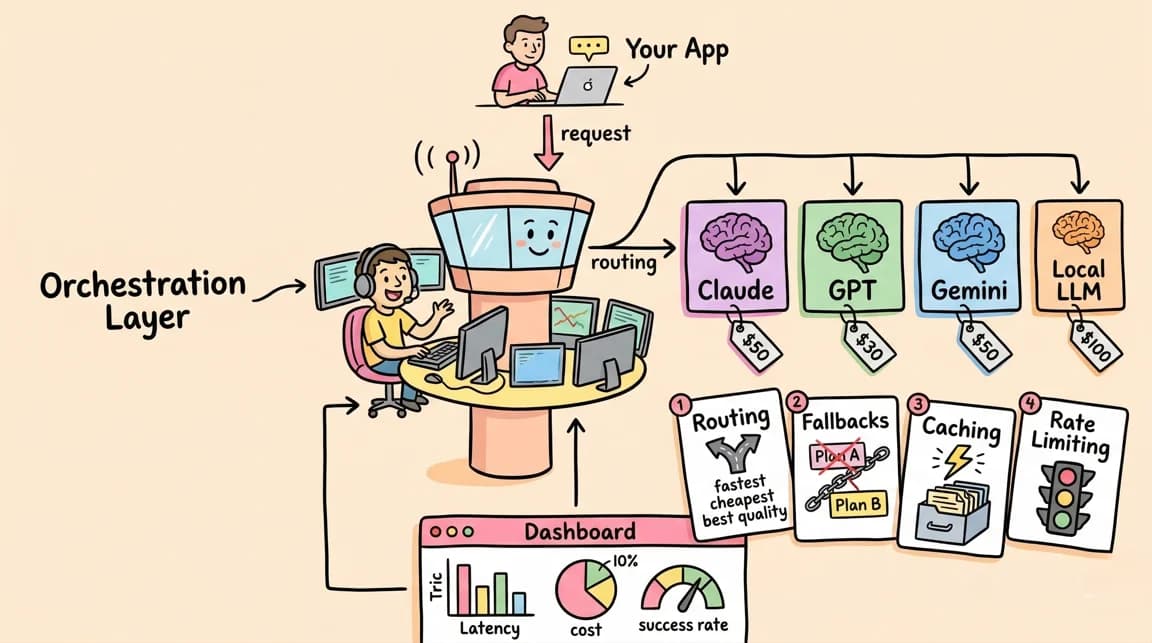
LLM costs add up. A single agent workflow hitting Claude Opus can burn through API credits faster than most teams expect. The standard response is model routing - picking the right model for each task, falling back when providers fail, and tracking spend across projects.
Three tools dominate this space: LiteLLM, Portkey, and OpenRouter. They solve similar problems differently. Here is when to use each.
If you want the higher-level infrastructure view first, read Models.dev makes model routing feel like infrastructure and AI model routing as the orchestration layer. If you already know you need practical configs, jump to model routing recipes that cut AI spend.
The Core Problem#
Every production AI application eventually needs:
- Multi-provider access - using Claude for reasoning, GPT for specific tasks, open-source models for cost-sensitive work
- Fallbacks - when OpenAI is down, route to Anthropic; when that fails, route to Azure
- Cost tracking - knowing how much each feature, user, or project is actually spending
- Load balancing - distributing requests across rate limits and quotas
- Caching - not paying twice for identical prompts
You can build this yourself. Most teams eventually wish they had not.
The newer term to watch is AI gateway. A router usually decides where a model request goes. A gateway often adds auth, observability, rate limits, caching, policy, and billing control around that route. LiteLLM, Portkey, OpenRouter, Vercel AI Gateway, and Envoy AI Gateway overlap because production teams increasingly want both surfaces in one place.
LiteLLM: Open-Source Proxy Server#
LiteLLM is a Python SDK and proxy server that gives you an OpenAI-compatible interface to 100+ LLM providers. You deploy it yourself - either as a library in your code or as a standalone proxy server.
How It Works#
Configure models in YAML:
model_list:
  - model_name: gpt-4
    litellm_params:
      model: openai/gpt-4
      api_key: os.environ/OPENAI_API_KEY
    tpm: 40000
    rpm: 500

  - model_name: gpt-4  # Same name = fallback
    litellm_params:
      model: azure/gpt-4
      api_key: os.environ/AZURE_API_KEY
      api_base: os.environ/AZURE_API_BASE
    tpm: 80000
    rpm: 800

router_settings:
  routing_strategy: usage-based-routing
  fallbacks: [{"gpt-4": ["azure/gpt-4"]}]

litellm_settings:
  num_retries: 3
  request_timeout: 10
  context_window_fallbacks: [{"gpt-4": ["gpt-3.5-turbo-16k"]}]
Then call it like OpenAI:
from openai import OpenAI

client = OpenAI(
    api_key="your-litellm-key",
    base_url="http://localhost:4000"
)

response = client.chat.completions.create(
    model="gpt-4",
    messages=[{"role": "user", "content": "Hello"}]
)
Routing Strategies#
LiteLLM supports multiple routing approaches:
- simple-shuffle - round-robin across deployments
- usage-based-routing - weighted by TPM/RPM capacity
- latency-based - prefer faster providers
- lowest-cost - route to cheapest available
Cost Tracking#
The proxy logs spend per request and aggregates by model, user, or team. You get visibility into which workflows are expensive before the bill arrives.
When to Use LiteLLM#
LiteLLM fits teams that:
- Want full control over their infrastructure
- Need to self-host for compliance or security
- Are comfortable deploying and maintaining a proxy server
- Want to modify the routing logic (it's open source)
The tradeoff is operational overhead. You deploy it, monitor it, and scale it yourself.
LiteLLM is strongest when model routing is part of your platform engineering layer. Pair it with a registry or pricing source, then write the routing policy like infrastructure. That is the same pattern behind Envoy AI Gateway 1.0: the router becomes shared production plumbing, not an SDK detail buried in one app.
Portkey: Enterprise Gateway#
Portkey is a managed AI gateway focused on enterprise features - guardrails, semantic caching, and observability. It started as a hosted service and later open-sourced the gateway component.
How It Works#
Portkey uses a configuration-based approach with nested strategies:
import { Portkey } from 'portkey-ai';

const config = {
  strategy: {
    mode: 'loadbalance'
  },
  targets: [
    {
      virtual_key: process.env.ANTHROPIC_VIRTUAL_KEY,
      weight: 0.5,
      override_params: {
        model: 'claude-3-opus-20240229'
      }
    },
    {
      strategy: {
        mode: 'fallback'
      },
      targets: [
        { virtual_key: process.env.OPENAI_VIRTUAL_KEY },
        { virtual_key: process.env.AZURE_VIRTUAL_KEY }
      ],
      weight: 0.5
    }
  ]
};

const portkey = new Portkey({
  apiKey: process.env.PORTKEY_API_KEY,
  config
});

const response = await portkey.chat.completions.create({
  messages: [{ role: 'user', content: 'Hello' }],
  model: 'gpt-4'
});
Semantic Caching#
Portkey can cache semantically similar prompts, not just exact matches. This saves money when users ask slight variations of the same question:
{
  "cache": { "mode": "semantic" },
  "strategy": { "mode": "fallback" },
  "targets": [
    { "provider": "openai", "api_key": "..." },
    { "provider": "anthropic", "api_key": "..." }
  ]
}
Guardrails#
The enterprise focus shows in features like:
- Input/output validation
- PII detection and redaction
- Content filtering
- Token budget enforcement
When to Use Portkey#
Portkey fits teams that:
- Need enterprise compliance features
- Want semantic caching out of the box
- Prefer managed infrastructure
- Have budget for a commercial solution
- Need detailed observability without building it
The tradeoff is cost. Hosted Portkey is not free. The open-source gateway provides fallbacks and routing but not all enterprise features.
Portkey is strongest when the buying question is not only "which model is cheapest?" but "who can prove what happened?" That matters for regulated apps, internal copilots, and customer-facing workflows where guardrails, audit trails, and budget enforcement are part of the product requirement.
OpenRouter: Unified API Service#
OpenRouter is a hosted service that provides access to hundreds of models through a single API endpoint. You do not deploy anything - you use their API like you would use OpenAI's, but with access to models from every provider.
How It Works#
OpenRouter acts as a marketplace and router. You make API calls to OpenRouter, and they route to the underlying provider:
from openai import OpenAI

client = OpenAI(
    api_key="your-openrouter-key",
    base_url="https://openrouter.ai/api/v1"
)

response = client.chat.completions.create(
    model="anthropic/claude-3-opus",  # Use any provider
    messages=[{"role": "user", "content": "Hello"}]
)
Model Fallbacks#
OpenRouter supports automatic fallbacks:
from livekit.plugins import openai

llm = openai.LLM.with_openrouter(
    model="openai/gpt-4o",
    fallback_models=[
        "anthropic/claude-sonnet-4",
        "openai/gpt-5-mini",
    ],
)
Or in their SDK:
const result = openrouter.callModel({
  models: ['anthropic/claude-sonnet-4.5', 'openai/gpt-5.2', 'google/gemini-pro'],
  input: 'Hello!',
});
Price-Based Routing#
OpenRouter's default routing strategy prioritizes lowest-cost providers:
- Filter for stable providers
- Select from lowest-cost candidates
- Weight by inverse square of price
- Use remaining providers as fallbacks
You pay OpenRouter's price per model, which includes their margin. For some models, they add to the base price. For others, they offer competitive rates because of volume agreements.
When to Use OpenRouter#
OpenRouter fits teams that:
- Want the simplest possible integration (one API key)
- Need access to many models without managing credentials
- Do not want to deploy any infrastructure
- Are okay with routing decisions being made by OpenRouter
The tradeoff is less control. You cannot customize routing logic, caching behavior, or fallback strategies beyond what OpenRouter provides. You also depend on their uptime.
OpenRouter is strongest when exploration speed matters more than owning the control plane. For a deeper OpenRouter-specific setup path, read OpenRouter in 2026: review, setup, and when model routing pays.
Comparison Matrix#
| Feature | LiteLLM | Portkey | OpenRouter |
|---|---|---|---|
| Deployment | Self-hosted | Hosted or self-hosted | Hosted only |
| Open source | Yes (MIT) | Gateway yes, hosted no | No |
| Provider count | 100+ | 1600+ | Hundreds |
| Fallbacks | Yes, configurable | Yes, nested strategies | Yes, model list |
| Load balancing | Yes, multiple strategies | Yes, weighted | Yes, price-based |
| Semantic caching | No (simple caching only) | Yes | No |
| Cost tracking | Yes, per-request | Yes, with observability | Yes, dashboard |
| Guardrails | No | Yes | No |
| Custom routing | Full control | Config-based | Limited |
| Pricing | Free (self-hosted) | Free tier + paid | Per-token markup |
Decision Framework#
Choose LiteLLM when:#
- You have DevOps capacity to run a proxy server
- You need full control over routing logic
- Compliance requires self-hosting
- You want to avoid per-request fees
- You are comfortable with Python/YAML configuration
Choose Portkey when:#
- You need enterprise features (guardrails, compliance, auditing)
- Semantic caching provides meaningful cost savings
- You want detailed observability without building it
- You have budget for a commercial product
- Your team prefers managed infrastructure
Choose OpenRouter when:#
- You want the simplest integration path
- Managing API keys across providers is too much overhead
- You need access to niche or new models quickly
- Routing decisions do not need customization
- You are okay paying a margin for convenience
Hybrid Approaches#
Some teams combine these tools:
- LiteLLM + models.dev: Use the models.dev registry to populate LiteLLM config with current model capabilities and pricing
- OpenRouter for exploration, LiteLLM for production: Test with OpenRouter's broad access, then move critical paths to self-hosted LiteLLM for cost control
- Portkey for enterprise, direct APIs for simple cases: Route production through Portkey, but hit Claude/GPT directly for low-volume internal tools
Cost Reality Check#
The hidden cost in LLM routing is not the router - it is poor model selection.
A router that sends every request to Claude Opus when Haiku would suffice costs 30x more. A router without fallbacks loses availability when a single provider has issues. A router without cost tracking surprises you at month end.
The right tool is the one that makes model selection explicit and cost tracking automatic. Whether that is a self-hosted proxy, a managed gateway, or a unified API depends on your team's operational capacity and compliance requirements.
This is also why the routing conversation belongs next to pricing. A routing layer without current model prices is a fancy failover proxy. Tie it to AI coding tools pricing reality and actual usage reports before calling it an optimization.
The Take#
Model routing is infrastructure now. As AI applications mature, the question shifts from "which model do I use?" to "how do I use the right model for each request, with fallbacks, at predictable cost?"
LiteLLM gives you full control and zero marginal cost, but requires operational investment.
Portkey provides enterprise-grade features and observability, but requires budget.
OpenRouter offers maximum simplicity and model access, but abstracts away control.
Pick based on your constraints. The wrong answer is not picking one at all.
Official Sources#
| Source | What it covers |
|---|---|
| LiteLLM Documentation | Unified API for 100+ LLMs, proxy server setup, routing strategies, fallbacks, and cost tracking |
| LiteLLM GitHub | Open-source codebase with 22k+ stars, provider implementations, and configuration examples |
| Portkey AI Gateway | Enterprise gateway with guardrails, semantic caching, and observability features |
| Portkey Gateway GitHub | Open-source gateway supporting 1600+ models with fallbacks and load balancing |
| OpenRouter Documentation | Unified API for hundreds of models with automatic fallbacks and cost-based routing |
| OpenRouter Pricing | Model-specific pricing with provider comparison and availability status |
| Vercel AI Gateway | Managed gateway pattern for model access, observability, and provider routing |
Frequently Asked Questions#
What is an LLM router and why do I need one?#
An LLM router is a proxy layer that sits between your application and LLM providers. It handles multi-provider access (using Claude, GPT, and open-source models through one interface), automatic fallbacks when providers fail, cost tracking across projects, and load balancing across rate limits. You need one when your AI application grows beyond a single model - which happens faster than most teams expect.
How does LiteLLM differ from using OpenAI's API directly?#
LiteLLM wraps 100+ LLM providers in an OpenAI-compatible interface. Instead of managing separate SDKs and API keys for each provider, you configure models in YAML and call them through one endpoint. LiteLLM also adds fallbacks, retries, cost tracking, and routing strategies that the native APIs do not provide. You deploy it yourself, which means operational overhead but no per-request fees.
Is Portkey worth the cost over free alternatives?#
Portkey's value depends on whether you need its enterprise features. Semantic caching can reduce costs significantly for applications with similar queries. Guardrails (PII detection, content filtering, token budgets) matter for regulated industries. Observability surfaces are more polished than what you would build on LiteLLM. If you do not need these features, LiteLLM or OpenRouter may be more cost-effective.
Does OpenRouter add significant cost compared to direct provider APIs?#
OpenRouter adds a margin to most model prices, but the markup varies. For some models, they offer competitive rates due to volume agreements. For others, you pay 10-20% more than direct access. The tradeoff is simplicity - one API key, one billing relationship, access to hundreds of models. Calculate whether that convenience is worth the margin for your usage volume.
Can I use multiple routers together?#
Yes. Common patterns include using OpenRouter for exploration and model testing, then moving production traffic to self-hosted LiteLLM for cost control. Some teams route enterprise traffic through Portkey for compliance while keeping internal tools on direct APIs. The models.dev registry can populate any router's configuration with current model specs.
How do fallbacks actually work in production?#
Fallback behavior varies by router. LiteLLM lets you define fallback chains per model name and configure retries, timeouts, and context-window-specific fallbacks. Portkey supports nested fallback strategies with weighted load balancing. OpenRouter accepts an array of models and tries each in order. The key is testing fallbacks before you need them - a misconfigured fallback that fails silently costs more than no fallback at all.
What about latency overhead from routing layers?#
Self-hosted routers (LiteLLM) add minimal latency - typically single-digit milliseconds. Hosted services (Portkey, OpenRouter) add network round-trip time to their servers, usually 20-50ms depending on your location. For most LLM applications, this is negligible compared to model inference time. For latency-critical paths, self-hosting or direct provider access is preferable.
Should I build my own router instead?#
Building a basic proxy is straightforward. Building one with proper fallbacks, retries, cost tracking, rate limit handling, caching, and observability takes months. Most teams underestimate the maintenance burden - every provider API change, new model release, or pricing update requires attention. Use an existing router unless you have specific requirements that none of them satisfy.
Worth re-reading with September's news in hand: TypeSafe Jev shows that decision-shaped jobs may not need a string model at all, which is the strongest argument yet for routing by task shape rather than by model.
Sources#
Get the next comparison like this in your inbox
One email a week on AI Infrastructure and the rest of the AI dev stack. Free.
Read next on AI coding tools
Models.dev Makes Model Routing Feel Like Infrastructure
The models.dev project is trending because AI teams need one boring source of truth for model specs, pricing, context windows, modalities, and tool support.
7 min readModel Routing Recipes: Practical Config Patterns to Cut AI Spend
Model routing recipes with paste-ready OpenRouter and LiteLLM configs for task tiers, fallback chains, cost ceilings and cache-aware routing that cut AI spend.
11 min readAI Model Routing: Why the Orchestration Layer Is the Next Big Play Next to the Labs
AI model routing and orchestration decide which model handles which task. How routing differs from orchestration, and practical ways to cut your model spend.
12 min readNew here? Start with
Technical content at the intersection of AI and development. Building with AI agents, Claude Code, and modern dev tools - then showing you exactly how it works.