Migrating from Windsurf to Claude Code: The Practical 2026 Guide
TL;DR
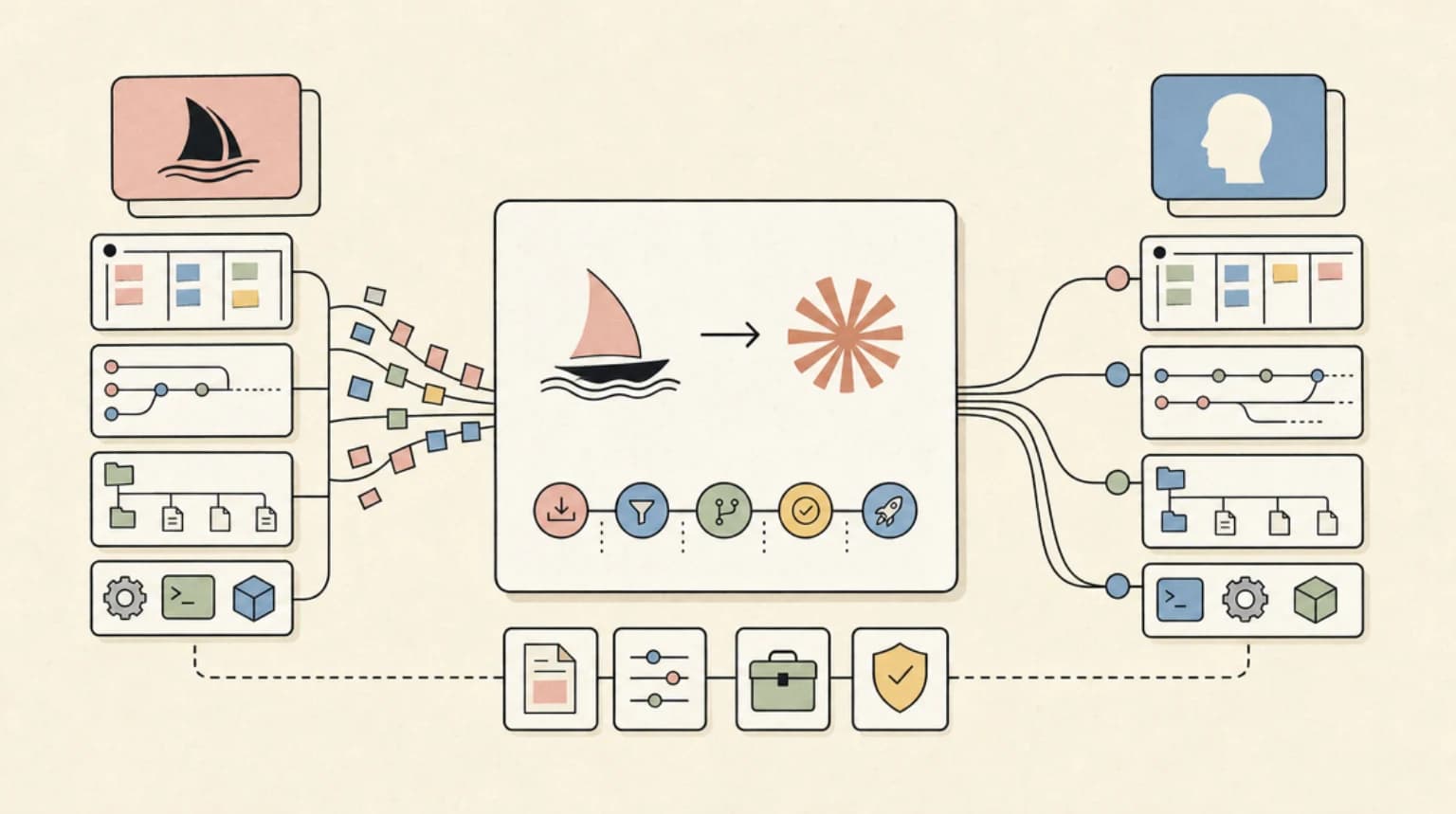
Migrating from Windsurf to Claude Code - map Cascade, rules, Flows and MCP servers to Claude Code equivalents, then follow a day-by-day migration plan.
If you opened windsurf.com recently, you were redirected to devin.ai. The product you knew as Windsurf is now called Devin Desktop, owned by Cognition - the company behind the Devin AI agent. The rebrand is the final chapter of a messy 2025: OpenAI agreed to acquire Windsurf for $3 billion, that deal collapsed, Google stepped in to license the underlying models and hire away the founders, and Cognition acquired what remained of the company and its user base.
That is a lot of ownership chain for a tool you rely on every day. If you are evaluating whether to stay or move, this guide maps your Windsurf muscle memory to Claude Code and gives you a concrete day-one migration plan.
Last updated: June 10, 2026
Why developers are moving now#
The Windsurf-to-Devin-Desktop transition is largely cosmetic for now - your plan, extensions, and settings carry over automatically. But three things are prompting developers to look elsewhere:
Ownership uncertainty. Even with the rebrand settled, Windsurf's model layer was licensed to Google. The product roadmap is now split between Cognition's agent-first vision and a legacy IDE user base that signed up for a coding assistant, not a fleet-management dashboard.
Philosophy drift. Windsurf's Cascade was built around an IDE-native, context-aware flow. Devin Desktop is repositioning the whole product toward managing teams of agents. If you want an IDE companion, the product is evolving away from you.
Headless and automation gaps. Claude Code ships a first-class CLI that you can pipe, script, and drop into CI. Windsurf has always been primarily a GUI tool. If your workflow is moving toward terminal-first or automated code review, that gap matters.
What maps to what#
| Windsurf concept | Claude Code equivalent |
|---|---|
| Cascade (agentic flow) | Default claude session in terminal or VS Code extension |
| .windsurfrules | CLAUDE.md (project root or ~/.claude/CLAUDE.md for global) |
| Windsurf Rules (global) | ~/.claude/CLAUDE.md |
| Flows (saved prompt sequences) | Skills - reusable slash commands in ~/.claude/skills/ |
| MCP servers | MCP servers (same protocol, same config format) |
| Supercomplete (Tab autocomplete) | No native equivalent (see "What you lose" below) |
| Spaces (shared agent context) | Subagents + worktrees via the Agent SDK |
| Extensions marketplace | VS Code extensions work in the Claude Code VS Code extension |
The MCP story is the smoothest part of the migration. Both tools use the same Model Context Protocol, so your existing MCP server configs (Slack, Linear, Notion, Sentry, etc.) transfer without changes.
Step-by-step migration plan#
Day 1: Install and orient#
Install Claude Code with one command:
curl -fsSL https://claude.ai/install.sh | bash
On macOS you can also use Homebrew:
brew install --cask claude-code
Then open any project and run claude. You will be prompted to log in with your Anthropic account. The VS Code extension is available by searching "Claude Code" in the Extensions view (Cmd+Shift+X).
You need a Claude subscription. The Pro plan ($20/month) covers most individual use. Max ($200/month) matches what power users spend on Windsurf Pro and adds higher rate limits and extended context.
Day 2: Port your .windsurfrules to CLAUDE.md#
Windsurf's .windsurfrules file is the closest thing to CLAUDE.md. The format differs - CLAUDE.md is plain markdown prose rather than a structured rules file - but the intent is the same: tell the tool how to behave in your project.
Copy the substance of your .windsurfrules into a CLAUDE.md at your project root. Example translation:
.windsurfrules (before)
language: TypeScript
framework: Next.js
test_command: pnpm test
avoid: any types
CLAUDE.md (after)
## Project conventions

- TypeScript only. Never use `any` - use `unknown` and narrow properly.
- Framework is Next.js 15 with the App Router.
- Run tests with `pnpm test`. Always run tests before committing.
- Prefer server components by default; add `"use client"` only when needed.
Prose instructions tend to work better than structured key-value pairs because they give Claude the reasoning behind the rule, not just the rule itself.
For global rules that apply across all projects, add them to ~/.claude/CLAUDE.md.
Day 3: Migrate MCP servers#
Find your Windsurf MCP config - it lives in your Windsurf/Devin Desktop settings. Claude Code reads MCP config from ~/.claude/mcp.json (global) or .claude/mcp.json (per-project). The format is identical to what Windsurf uses, so you can copy server entries directly.
{
  "mcpServers": {
    "linear": {
      "command": "npx",
      "args": ["-y", "@linear/mcp-server"]
    }
  }
}
Day 4: Build your first skill#
Windsurf Flows let you save and replay prompt sequences. Claude Code has Skills - markdown files with structured frontmatter that become slash commands. If you had a flow for "review this PR" or "write tests for this module," convert it to a skill:
---
name: review-pr
description: Review the current diff for bugs and style issues
---

Review the staged diff. Check for: correctness bugs, missing error handling,
type safety issues, and anything that diverges from CLAUDE.md conventions.
Output a bulleted list of findings with file and line references.
Save it to ~/.claude/skills/commands/review-pr.md and run it with /review-pr.
Week 1: Keybindings and team rollout#
Claude Code keybindings are configured in ~/.claude/keybindings.json. The defaults are minimal - Escape to interrupt, Enter to submit. If you had Windsurf-specific keyboard shortcuts you relied on, map them here.
For team rollout, commit a CLAUDE.md to the repo. Every developer who runs claude in that repo will pick up the same instructions automatically. Ship the project-level .claude/mcp.json and any skills in .claude/skills/ through the same repo, and your whole team gets a consistent Claude Code setup on first use.
What you lose#
Tab autocomplete. Windsurf's Supercomplete is genuinely good - it predicts multi-line edits and context-aware completions inline. Claude Code has no equivalent. If you spend a lot of time in the editor doing incremental edits, you will feel this gap. The VS Code extension handles inline diffs and completions for changes Claude suggests, but it does not do speculative Tab-to-accept autocomplete the way Supercomplete does. Cursor or Copilot can fill this role alongside Claude Code if you need it.
IDE-native UX. Windsurf built a full IDE from a VS Code fork. Claude Code lives either in your terminal or as an extension inside an existing editor. The experience is more composable but less integrated. You will not get the unified agent panel, Kanban view, or Spaces that Devin Desktop is building toward.
JetBrains parity. Windsurf has a mature JetBrains plugin. Claude Code's JetBrains integration is newer and has fewer features. If your team is on IntelliJ or PyCharm, verify the plugin covers your workflow before committing.
What you gain#
Subagents and parallel execution. Claude Code can spawn multiple agents that work on different parts of a task simultaneously. One agent writes tests, another fixes the bug, a third updates the docs - all in parallel. This is a qualitative shift in how you structure larger tasks.
Hooks. Hooks let you run shell commands before or after Claude Code actions. Auto-format on every file write. Run lint before every commit. Post a Slack message when a session ends. This is automation-level control that Windsurf never offered.
Headless mode. claude -p "..." runs a single task non-interactively. Pipe logs into it, run it in GitHub Actions, chain it with other CLI tools. Your AI coding tool becomes a composable Unix citizen.
Skills system. Packaging workflows as versioned, commitable slash commands is something Windsurf flows could not do cleanly. Skills live in your repo and your team uses them via /skill-name.
Stable ownership. Anthropic is an independent company with a clear mission. The model powering Claude Code is the same model Windsurf was mostly using anyway (HN threads from May 2025 noted that most Windsurf agents were running Claude under the hood).
Cost comparison#
| Plan | Windsurf / Devin Desktop | Claude Code |
|---|---|---|
| Free | Free (limited) | No standalone free tier; Claude.ai free includes limited Code access |
| Individual | $20/month (Pro) | $20/month (Claude Pro) |
| Power user | $200/month (Max) | $200/month (Claude Max) |
| Teams | $80/month + $40/month per full seat | Included in Pro/Max; no separate team SKU |
| Enterprise | Custom | Custom via Anthropic Console |
The individual tiers are price-matched at $20 and $200. Where Windsurf charges a separate team seat fee on top of a base price, Claude Code rolls team access into individual subscriptions with no per-seat overhead for small teams.
When to stay on Windsurf / Devin Desktop#
The migration is not right for everyone. Stay if:
- You depend on Supercomplete Tab autocomplete as part of your daily flow. There is no equivalent in Claude Code today.
- Your team is on JetBrains and the Claude Code plugin does not yet cover your use cases.
- You are already invested in the Devin agent ecosystem and want the Spaces / multi-agent management features Cognition is building.
- You prefer an all-in-one GUI over a terminal-first tool.
The Windsurf-to-Claude-Code migration is worth the switch if you write automation, work across repos, run tasks in CI, or want a tool that composes cleanly with the rest of your shell workflow. If you live in the IDE and want an autocomplete-heavy experience, wait for the Claude Code Tab feature or combine Claude Code with a dedicated autocomplete tool.
FAQ#
Is Windsurf shutting down?#
No. Windsurf has been rebranded as Devin Desktop under Cognition's ownership. The product is still active, your existing plan and settings carry over automatically, and Cognition has committed to maintaining the IDE. The underlying model layer is now licensed from Google rather than running Codeium's own models.
Can I use Claude Code inside VS Code instead of switching editors?#
Yes. Claude Code has a first-class VS Code extension that adds inline diffs, conversation history, and @-mentions directly in the editor. You do not need to leave VS Code. Install it from the Extensions marketplace by searching "Claude Code."
Do my Windsurf MCP servers work with Claude Code?#
In most cases, yes. Both tools implement the Model Context Protocol with the same config format. Copy your MCP server entries from Windsurf's settings into ~/.claude/mcp.json and they should work without modification.
What is the Claude Code equivalent of .windsurfrules?#
CLAUDE.md is the direct equivalent. Place it in your project root for per-project instructions, or at ~/.claude/CLAUDE.md for global defaults that apply across all projects. Write it as plain markdown prose rather than structured key-value rules - Claude reads it as context at the start of every session.
Continue Reading#
- Composio CLI: Connect OpenClaw and Claude Code to 1,000+ Apps
- Cursor vs Devin Desktop (formerly Windsurf): The 2026 IDE Agent Decision
- Multi-Agent CLI Orchestration Tools Compared: Agent-Manager, Pane, and Golutra in 2026
Sources#
- windsurf.com - redirects to devin.ai; product is now Devin Desktop under Cognition ownership (fetched June 10, 2026)
- devin.ai - current Windsurf / Devin Desktop product page and pricing (fetched June 10, 2026)
- Hacker News: "OpenAI reaches agreement to buy Windsurf for $3B" - acquisition timeline and community analysis (via HN Algolia API, fetched June 10, 2026)
- code.claude.com/docs/en/overview - Claude Code feature overview, installation, and capabilities (fetched June 10, 2026)
Get the next deep dive like this in your inbox
One email a week on claude-code and the rest of the AI dev stack. Free.
Read next on Cursor
Claude Fable 5 Access After the June 22 Deadline: Where Things Stand
Claude Fable 5 access after the June 22 free window closed on Pro, Max, Team and Enterprise plans: what credits cost now and how to control Fable 5 spend.
6 min readMigrating to Claude Fable 5: The Practical Guide
Migrating to Claude Fable 5 from Opus 4.8 or older models - every breaking change, what to delete from your code, and the prompt audit to run before switching.
9 min readCodex vs Claude Code in 2026: Which AI Coding Agent Should You Use?
Codex vs Claude Code in 2026: pick Claude Code for ambiguous multi-file work with skills and MCP, or Codex for well-scoped tasks and strong defaults.
12 min readNew here? Start with
Technical content at the intersection of AI and development. Building with AI agents, Claude Code, and modern dev tools - then showing you exactly how it works.