VS Code Copilot Co-Author Attribution: The Real Problem Is Workflow Consent
TL;DR
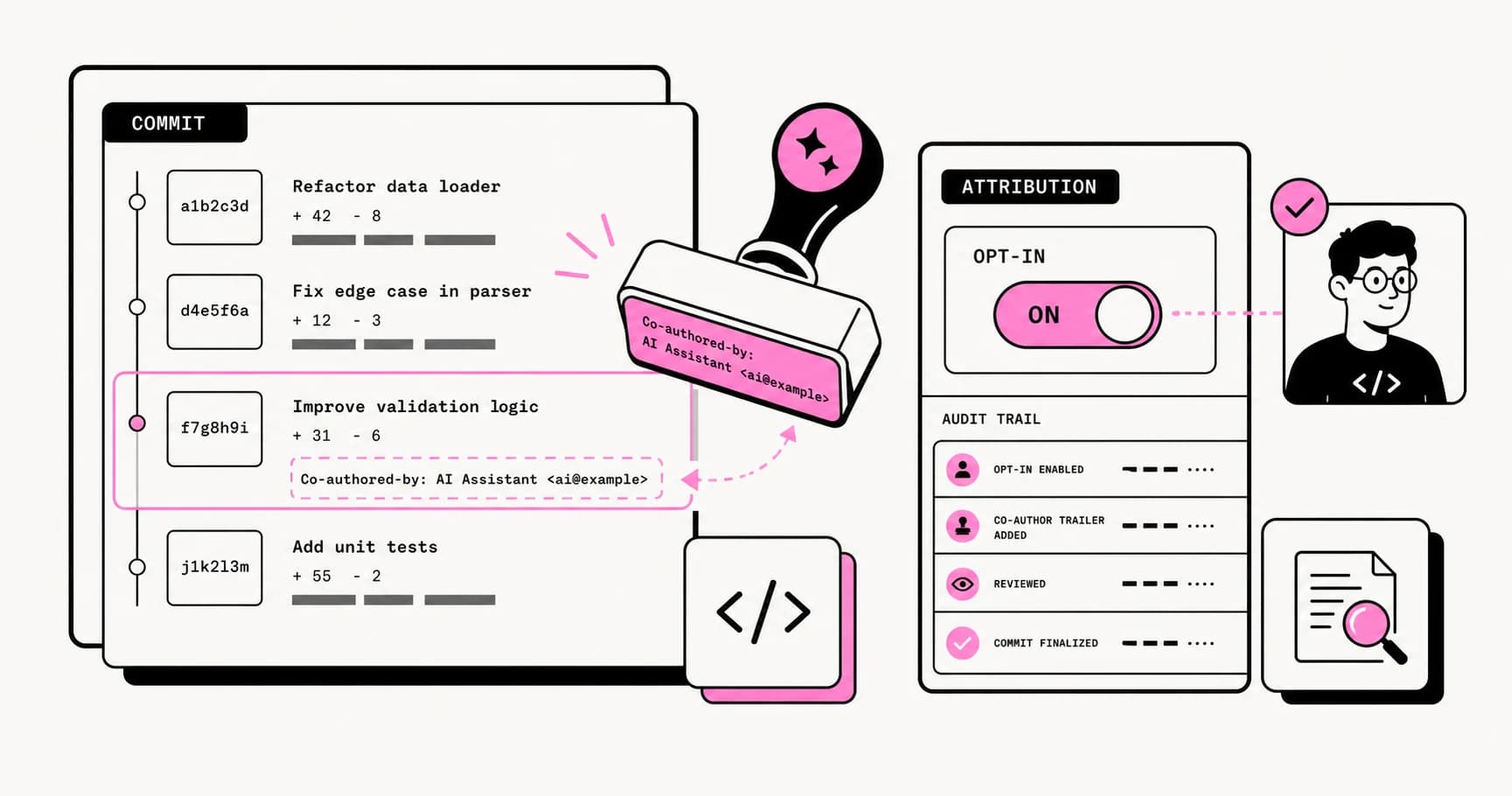
VS Code 1.118 makes Copilot a Git co-author by default for chat and agent commits. The argument is not really about one trailer line. It is about consent, audit signals, and who controls developer workflow metadata.
Direct answer
VS Code Copilot Co-Author Attribution: The Real Problem Is Workflow Consent
VS Code 1.118 makes Copilot a Git co-author by default for chat and agent commits. The argument is not really about one trailer line. It is about consent, audit signals, and who controls developer workflow metadata.
Best for
Developers comparing real tool tradeoffs before choosing a stack.
Covers
Verdict, tradeoffs, pricing signals, workflow fit, and related alternatives.
Official Sources#
Primary documentation and community discussion on VS Code's AI co-author attribution setting.
| Resource | Link |
|---|---|
| VS Code 1.118 Release Notes | code.visualstudio.com/updates/v1_118 |
| VS Code Source Control Docs | code.visualstudio.com/docs/sourcecontrol/staging-commits |
| GitHub PR: Enable AI Co-Author Default | github.com/microsoft/vscode/pull/310226 |
| GitHub Copilot Documentation | docs.github.com/en/copilot |
| Git Trailers Documentation | git-scm.com/docs/git-interpret-trailers |
| Hacker News Discussion | news.ycombinator.com/item?id=47989883 |
VS Code 1.118 shipped a small source-control default with a much bigger trust problem.
The official VS Code 1.118 release notes say Git AI co-authoring is now enabled by default for chat and agent workflows. When Copilot changes files, VS Code can automatically add Copilot as a co-author on the commit. The source-control docs explain the underlying setting, git.addAICoAuthor, and the available modes: off, chatAndAgent, and all.
That sounds tidy. It is just a Co-authored-by: trailer.
But the reaction on Hacker News, Reddit, and GitHub-adjacent forums is not really about one line of commit metadata. Developers are arguing about who gets to write into the permanent record of a repo, whether AI usage should be disclosed, and whether a tool default should silently become team policy.
This is a good argument to have because every coding agent is about to run into the same boundary.
For the broader Copilot platform shift, read GitHub Copilot Coding Agent and CLI. For the workflow-trust layer behind this story, pair it with The Agent Reliability Cliff and What Hacker News Gets Right About AI Coding Agents.
What Actually Changed#
VS Code introduced the setting earlier with off as the default. In 1.118, the release notes say the default is enabled for chat and agent workflows. The behavior applies when Copilot makes changes to files and the commit is created through VS Code's built-in Git flow.
The docs matter because the scope is narrower than some angry summaries imply:
offadds no AI co-author trailer.chatAndAgentadds the trailer for Copilot Chat or agent-mode generated code.allextends the behavior to inline completions.- Commits made outside VS Code, such as from the command line, do not get this trailer from VS Code.
The practical fix is simple:
JSON
{
  "git.addAICoAuthor": "off"
}
That solves the local annoyance. It does not solve the policy question.
Why Developers Are Mad#
Git history is not decorative UI.
Commit metadata feeds code review, blame, release notes, compliance systems, security audits, dashboards, and future debugging. Once a default tool setting writes into that layer, it stops being a personal preference and starts acting like workflow policy.
That is why this landed badly. Developers are not only objecting to AI attribution. Some people actively want AI-generated work labeled. The deeper objection is that the default changed in a place where the user expected authorship and commit hygiene to remain under their control.
There are three separate concerns getting mashed together:
- Authorship: Should an AI tool be listed as a co-author at all?
- Disclosure: Should commits disclose when agent-generated code was involved?
- Consent: Who gets to decide the default for that disclosure?
The third one is the real issue.
If a team requires AI attribution, that should be explicit. If a team bans AI attribution in commit trailers and tracks usage elsewhere, that should also be explicit. A surprise editor default is the worst possible place to make the decision.
From the archive
Warp Open Sourced the Terminal. The Real Story Is Agent Operations
May 2, 2026 • 8 min read
12 Tools in One Night: An Honest Overnight Agent Report
Apr 29, 2026 • 11 min read
Agent Architecture: Building Multi-Step AI Workflows That Survive Production
Apr 29, 2026 • 11 min read
OpenAI Agents SDK Evolution: What Ships in Production
Apr 29, 2026 • 10 min read
The Best Case for AI Attribution#
There is a real argument for labeling agent-written commits.
AI-generated changes often need different review pressure. A reviewer might want to inspect edge cases more closely, ask for stronger tests, or look for familiar failure modes: broad refactors, invented APIs, missing migrations, fake confidence, or accidental changes outside the requested scope.
Attribution can also help teams measure what is happening:
- Which commits were mostly agent-generated?
- Which tools produce reviewable diffs?
- Which workflows save time?
- Which agents create cleanup work?
- Which models are safest for high-risk files?
That is useful operational data. In the same way AI coding tools pricing is shifting from sticker price to usage accounting, agent productivity will shift from vibes to accepted-change telemetry.
There is also precedent for structured trailers. Open-source projects already use trailers like Reviewed-by, Signed-off-by, Co-authored-by, and Reported-by. The idea that Git metadata can carry workflow signals is not new.
So the pro-attribution case is not silly. The weak version is "the AI deserves credit." The strong version is "reviewers and teams need machine-readable provenance signals."
That distinction matters.
The Best Case Against It#
The counterargument is also strong: tools are not authors.
Developers already use compilers, IDEs, formatters, linters, autocomplete, generators, snippets, Stack Overflow, docs, and internal templates. We do not list all of them as co-authors. The human who chooses, reviews, commits, and ships the change owns the outcome.
That ownership point is not philosophical fluff. It is the accountability model software teams actually use.
If a production bug ships, the answer cannot be "Copilot co-authored it." The responsible party is the human and organization that accepted the change. A trailer that makes accountability feel shared with a vendor-owned tool can muddy the signal instead of clarifying it.
The other problem is false precision. A commit may include:
- one AI-written helper function
- one human refactor
- one generated test
- one manual bug fix
- one agent-suggested commit message
Flattening all of that into a co-author trailer can imply more certainty than the tool really has. If multiple agents touched the code, the tool that happened to run the commit command may get the attribution even if another model did the meaningful work.
That is not provenance. That is accidental bookkeeping.
The Better Pattern: Policy Before Metadata#
The right answer is not "always add AI co-author trailers" or "never disclose AI use."
The right answer is: teams should choose the attribution layer deliberately.
For small personal repos, a VS Code setting is probably enough. If you like the signal, leave it on. If you hate it, turn it off.
For teams, decide this in the repo:
Markdown
## AI attribution policy

- Humans remain accountable for every commit they push.
- AI-generated code must be reviewed to the same standard as human code.
- We do not use `Co-authored-by` trailers for AI tools.
- Significant agent-generated work should be disclosed in the PR description under "AI assistance".
- Agent sessions that modify security, auth, billing, or data migrations require extra review.
Or choose the opposite:
Markdown
## AI attribution policy

- Commits with substantial agent-generated code should include an AI provenance trailer.
- The trailer should name the tool only when it materially generated the committed diff.
- The PR description must still name the human owner and summarize verification.
- The human committer remains responsible for the final change.
Either policy is better than drift.
Mixed histories are the bad outcome: one developer commits through VS Code with the trailer, another uses the CLI without it, another disables the setting, another uses Claude Code, another uses Codex, and now the repo has a provenance signal nobody can interpret.
What I Would Do#
I would turn the VS Code default off for team repos unless the team has explicitly decided to use commit trailers as the AI provenance layer.
Then I would add AI disclosure to the pull request template instead.
PRs are a better place for this signal because they can carry context:
- which tool was used
- what it was asked to do
- which files it touched
- what the human changed afterward
- what tests were run
- where the reviewer should be skeptical
A commit trailer can say an AI touched the work. A PR section can explain how.
For agent-heavy teams, go further. Store session logs, prompts, tool traces, and model metadata in the agent system itself. Link the useful audit artifact from the PR. Do not try to stuff the whole provenance story into one Git footer.
That is also the lesson from agent reliability work: serious agent workflows need verification artifacts, not just generated output.
The Bigger Product Lesson#
AI coding tools are moving from helpers to actors.
That means defaults matter more. A default that edits code is one thing. A default that edits workflow metadata is another. A default that writes into PR descriptions, commit messages, authorship fields, issue comments, or release notes is operating in the social layer of software development.
That layer is sensitive because it encodes trust.
This is where the Hacker News skepticism is useful. Developers are not rejecting attribution because they want to hide AI use. Many are rejecting vendor-controlled attribution because they want the human workflow boundary to stay clear.
Copilot, Claude Code, Codex, Cursor, and every other agent platform should treat this as a design rule:
AI tools can suggest workflow metadata, but they should not silently claim workflow identity.
Make it visible. Make it configurable. Let teams set policy. Keep the human accountable.
That is how AI attribution becomes useful instead of becoming another reason developers distrust the tools.
FAQ#
How do I turn off Copilot co-author attribution in VS Code?#
Add this to your VS Code settings:
JSON
{
  "git.addAICoAuthor": "off"
}
The official VS Code source-control docs list the supported values as off, chatAndAgent, and all.
Does this affect command-line Git commits?#
VS Code's docs say the trailer is added only when committing from inside VS Code. Commits made with external Git tools or the command line do not include the trailer from this VS Code feature.
Should AI-generated code be disclosed?#
Often yes, but disclosure should be policy-driven. For most teams, a PR template or agent-session log is clearer than a blanket co-author trailer because it explains what the tool did and what the human verified.
Is Copilot legally an author?#
This post is not legal advice. In practical engineering terms, the human and organization accepting the change remain accountable for the code. Teams with compliance requirements should decide the policy with legal and security stakeholders rather than inheriting an editor default.
Read next
GitHub Copilot Coding Agent and CLI: Why GitHub Is Back in the Agent Race
GitHub Copilot is moving from autocomplete into asynchronous coding agents, terminal workflows, MCP, skills, and model choice. Here is what changed in 2026.
8 min readGitHub Copilot in 2026: Still Worth It for TypeScript Developers?
Copilot has 77M users but the competition has changed. Here is how it works in 2026, what Copilot Workspace adds, and whether it is still the best choice.
5 min readThe Agent Reliability Cliff: Why Your 10-Step Chain Only Succeeds 20% of the Time
The math of agent pipelines is brutal. 85% reliability per step compounds to about 20% at 10 steps. Here is why long chains collapse in production, and the six patterns the field has converged on to fight the decay.
9 min readShare
Developers Digest
Technical content at the intersection of AI and development. Building with AI agents, Claude Code, and modern dev tools - then showing you exactly how it works.
300+ videos30K+ GitHub stars850+ articles
Try These Tools
Related Tools
AI Coding328K views

GitHub Copilot
The original AI coding assistant. 77M+ developers. Inline completions in VS Code and JetBrains. Copilot Workspace genera...
View ToolAI CodingEssential

Cursor
AI-native code editor forked from VS Code. Composer mode rewrites multiple files at once. Tab autocomplete predicts your...
View ToolAI CodingAgent

OpenAI Codex
OpenAI's coding agent for terminal, cloud, IDE, GitHub, Slack, and Linear workflows. Reads repos, edits files, runs comm...
View ToolAI Coding
C
Continue.dev
Open-source AI code assistant for VS Code and JetBrains. Bring your own model - local or API. Tab autocomplete, chat,...
View ToolApps from Developers Digest
Developer ToolsIn Progress
Agent Workflow Hub
Queue and organize repeatable agent workflows before they become production automations.
View AppDeveloper Tools
Agent Hub
Every coding agent in one window. Stop alt-tabbing between Claude, Codex, and Cursor.
View AppDeveloper ToolsIn Progress
Skill Builder
Turn a one-liner into a working Claude Code skill. From idea to installed in a minute.
View AppRelated Guides
Guide
Interactive Mode - Claude Code
Real-time prompt loop with history, completions, and multiline input.
Claude CodeGuide
Claude Code Setup Guide
Configure Claude Code for maximum productivity -- CLAUDE.md, sub-agents, MCP servers, and autonomous workflows.
AI AgentsGuide
Claude Code Complete Course
A complete, citation-backed Claude Code course with setup, prompting systems, MCP, CI, security, cost controls, and capstone workflows.
ai-developmentRelated Videos
Streamline Your Git Workflow with GitKraken and Claude Code
Try out GitKraken here: https://gitkraken.cello.so/myw3K67IkCr to get 50% GitKraken Pro. In this video, we explore GitKraken, a robust Git GUI that not only visualizes your Git repository...
Video·
Augment Code: Developer AI for Real World Work
In this video, I'll dive into: Augment Code. I'll run several tests on a complex repository, including solving a tricky bug and adding a new feature, to see how each tool performs. Augment...
Video·
ChatGPT Desktop Can Now Access VS Code, Xcode, Terminal & iTerm2
New ChatGPT Feature: Seamlessly Integrate with VS Code and Terminal on macOS Learn The Fundamentals Of Becoming An AI Engineer On Scrimba; https://v2.scrimba.com/the-ai-engineer-path-c02v?via=deve...
Video·
Related Posts
8 min read
GitHub Copilot
GitHub Copilot Coding Agent and CLI: Why GitHub Is Back in the Agent Race
GitHub Copilot is moving from autocomplete into asynchronous coding agents, terminal workflows, MCP, skills, and model c...
5 min read
GitHub Copilot
GitHub Copilot in 2026: Still Worth It for TypeScript Developers?
Copilot has 77M users but the competition has changed. Here is how it works in 2026, what Copilot Workspace adds, and wh...

9 min read
AI Agents
The Agent Reliability Cliff: Why Your 10-Step Chain Only Succeeds 20% of the Time
The math of agent pipelines is brutal. 85% reliability per step compounds to about 20% at 10 steps. Here is why long cha...

11 min read
AI Coding
What Hacker News Gets Right About AI Coding Agents in 2026
Hacker News keeps arguing about Claude Code, Codex, skills, MCP, and orchestration. Under the noise, the same four truth...

12 min read
AI Coding
AI Coding Tools Pricing Comparison 2026
Complete pricing breakdown for every major AI coding tool. Claude Code, Cursor, Copilot, Windsurf, Codex, Augment, and m...

8 min read
AI Security
Open Source Has a Bot Problem: Prompt Injection in Contributing.md
AI coding agents now read repository docs, config, issues, and comments before opening pull requests. That turns CONTRIB...
Build with the member tools

Get Smarter About AI Dev
New tutorials, open-source projects, and deep dives on coding agents - delivered weekly.
One email per weekReal code, not theoryFree forever