Mastra vs CopilotKit vs LangGraph: Build the Same Agent App Three Ways
TL;DR
A practical field note on where Mastra, CopilotKit, and LangGraph fit when you are building the same agent-native product interface.
Most agent framework comparisons are too abstract.
They compare feature checklists, GitHub stars, and code snippets in isolation. That is useful for orientation, but it does not answer the product question:
If I am building one real agent app, where does each framework belong?
So here is the field-note version. Take the same product brief and build it three ways: Mastra-first, CopilotKit plus Mastra, and LangGraph plus CopilotKit.
The short answer:
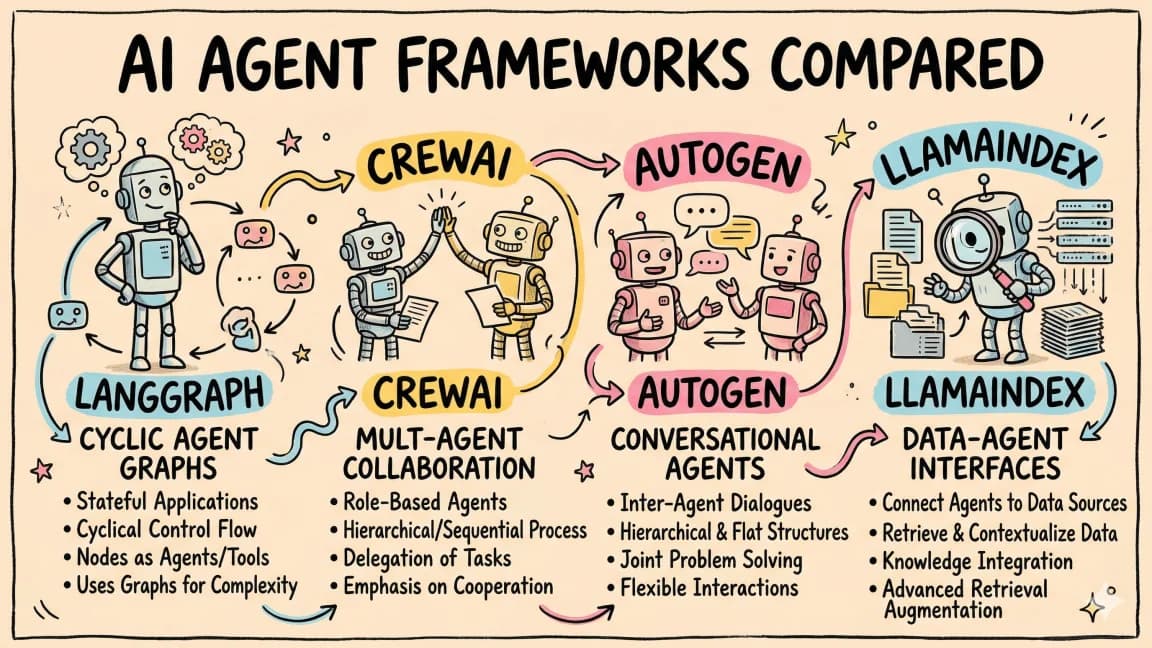
- Use Mastra when the hard part is backend agent logic, TypeScript workflows, tools, memory, RAG, evals, and production traces.
- Use CopilotKit when the hard part is putting the agent inside the application UI with shared state, frontend tools, generative UI, and human approvals.
- Use LangGraph when the hard part is explicit graph control, durable execution, interrupts, and stateful workflow debugging.
These are not clean substitutes. They sit at different layers of the stack.
Official Sources#
| Source | What it clarifies |
|---|---|
| Mastra agents | Agents with memory, tools, MCP, logging, tracing, evals, model routing, and guardrails |
| Mastra workflows | Sequential, parallel, branching, looping, persistent, and observable workflow execution |
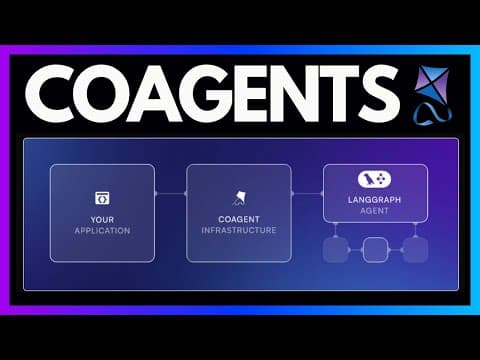
| CopilotKit architecture | The three-layer stack: React frontend, app-server runtime, and AG-UI-compatible agent backend |
| CopilotKit with Mastra | How Mastra agents become user-facing through CopilotKit and AG-UI |
| CopilotKit shared state for Mastra | Two-way state sync between app UI and Mastra agent state |
| LangGraph reference | Durable execution, memory, human-in-the-loop control, and LangSmith debugging |
| LangGraph interrupts | Pausing graph execution for external input and resuming from persisted state |
Last updated: May 30, 2026. Agent frameworks are changing quickly. Treat this as a decision map, then check the docs before you commit to an implementation.
The Same Product Brief#
Imagine a customer success dashboard with an embedded account agent.
The agent needs to:
- read the current account, plan, tickets, invoices, and product usage,
- answer questions about risk and renewal readiness,
- search internal docs and prior support threads,
- draft a renewal plan,
- ask for approval before sending anything,
- update the dashboard as it works,
- leave a trace of what it did and why.
That is enough complexity to expose the real architectural split.
If you only need a chat box that answers questions, almost any AI SDK can work. If the agent touches product state, user actions, workflows, and durable business logic, the framework choice matters.
Build 1: Mastra-First#
The Mastra-first version treats the agent as backend product infrastructure.
The core app shape looks like this:
Next.js app
  |
  +-- API route or server action
        |
        +-- Mastra agent
              |
              +-- tools: account lookup, ticket search, invoice fetch
              +-- memory: account context and prior conversations
              +-- workflows: risk analysis, renewal plan, approval routing
              +-- evals and traces: output quality and run history
This is the right starting point if your team is TypeScript-heavy and the agent logic belongs beside the rest of the product backend.
Mastra's advantage is that the boring parts of production agents are part of the framework vocabulary. Agents can call tools and MCP servers. Workflows can be sequential, parallel, branching, or looping. State can persist across long-running work. Traces, logs, and evals are not afterthoughts.
For the customer success agent, a Mastra workflow might look like:
load account
  -> fetch recent tickets and usage
  -> run risk assessment
  -> branch:
       high risk: draft escalation plan
       medium risk: draft renewal checklist
       low risk: summarize account health
  -> suspend for human approval
  -> execute approved action
That is a workflow, not just a prompt.
The weak spot is the user experience layer. Mastra can power the agent, but you still need to decide how the dashboard shows state, tool calls, approvals, intermediate artifacts, and user edits. A plain chat route works for simple products. It is not enough for an agent that should collaborate with a user inside a dashboard.
Use Mastra-first when:
- the agent mostly runs in the backend,
- the product is already TypeScript and Node-based,
- you need workflows, tools, memory, RAG, evals, and observability in one stack,
- the UI can be custom-built or does not need rich agent collaboration yet.
Do not pick Mastra just because "agent framework" sounds bigger. If your only job is a single streamed model call with one tool, it is probably more framework than you need.
Build 2: CopilotKit Plus Mastra#
The CopilotKit plus Mastra version keeps Mastra as the backend agent system and uses CopilotKit as the product interface layer.
The stack looks like this:
React dashboard
  |
  +-- CopilotKit UI primitives and hooks
        |
        +-- Copilot runtime in the app server
              |
              +-- AG-UI stream
                    |
                    +-- Mastra agent and workflows
This is the most natural default for a TypeScript SaaS product.
Mastra owns the agent's reasoning, tools, workflows, state, and production behavior. CopilotKit owns the app-facing interaction model: chat, sidebar, headless hooks, frontend tools, shared state, generative UI, and human-in-the-loop controls.
The important distinction is that CopilotKit is not replacing the backend orchestrator. It is making the agent legible and controllable inside the product.
For the customer success dashboard, CopilotKit gives the agent a way to:
- see the currently selected account,
- stream progress into the dashboard,
- render a risk table or renewal plan as UI,
- call frontend actions such as opening a ticket drawer,
- pause for approval before updating CRM data,
- keep user edits and agent state synchronized.
That changes the product feel. The agent stops being a disconnected assistant and becomes part of the workspace.
This also matches CopilotKit's official architecture: frontend components and hooks talk to a runtime mounted in your app server, and the runtime talks to any AG-UI-compatible backend. Mastra is one of those backends.
Use CopilotKit plus Mastra when:
- you are building a real product UI, not just a backend job,
- the agent needs to see and change application state,
- users need approval checkpoints,
- the UI should render agent progress and outputs as real components,
- your backend agent logic is TypeScript-friendly.
This is the stack I would reach for first for dashboards, editors, internal tools, support consoles, and workflow apps where the agent must collaborate with a person on screen.
Build 3: LangGraph Plus CopilotKit#
The LangGraph plus CopilotKit version moves the backend workflow into a graph runtime and keeps CopilotKit as the product interface layer.
The stack looks like this:
React dashboard
  |
  +-- CopilotKit UI and runtime
        |
        +-- AG-UI adapter
              |
              +-- LangGraph agent
                    |
                    +-- graph state
                    +-- nodes and conditional edges
                    +-- checkpointer
                    +-- interrupts
This is the right shape when the backend flow is the hard part.
LangGraph gives you explicit graph structure. You define state, nodes, edges, conditional routes, persistence, and human-in-the-loop interruption points. If the product needs to resume from failures, inspect state, branch repeatedly, and debug the path an agent took, LangGraph is strong.
For the customer success agent, the graph might have nodes like:
load_context
  -> classify_account_risk
  -> route:
       missing_data -> request_more_context
       high_risk -> prepare_escalation
       renewal_ready -> draft_renewal_plan
  -> interrupt_for_approval
  -> execute_action
  -> write_audit_summary
The graph structure is more verbose than a simple agent, but it gives you inspection points that matter in complex systems. The checkpointer is not just a cache. It is how the workflow knows where it paused and how it resumes.
CopilotKit matters here because LangGraph alone does not solve the application UI. The graph can be perfect and still feel like a terminal process if the frontend cannot show state, accept approvals, render generated UI, and expose browser-side tools.
Use LangGraph plus CopilotKit when:
- the workflow has many branches or loops,
- human approval is core to the flow,
- you need durable execution and checkpointing,
- the backend team is comfortable with LangGraph's graph model,
- debugging state transitions matters more than minimizing boilerplate.
For teams already deep in Python and LangChain, this is often the most mature path. For TypeScript-first teams, weigh that maturity against the cost of running a separate agent service.
Decision Table#
| Product constraint | Best fit |
|---|---|
| TypeScript backend agent with tools, memory, RAG, workflows, evals, and traces | Mastra |
| Agent embedded in a React product with state sync, frontend tools, and approvals | CopilotKit |
| TypeScript product UI plus TypeScript agent backend | CopilotKit plus Mastra |
| Complex graph with checkpointing, interrupts, and explicit branches | LangGraph plus CopilotKit |
| Quick app assistant before the backend agent architecture is decided | CopilotKit built-in agent |
| Backend-only scheduled agent job | Mastra or LangGraph, depending on workflow complexity |
| Python-heavy team already using LangChain or LangSmith | LangGraph |
| Product team wants a dashboard agent users can steer and inspect | CopilotKit plus a real backend framework |
My Default Stack#
If I were starting a new agent-native SaaS feature today, I would default to:
CopilotKit for the product UI
Mastra for the TypeScript agent backend
OpenTelemetry or framework traces for run visibility
Evals before expanding the tool surface
Human approval before side effects
That default is not because Mastra is universally better than LangGraph. It is because many SaaS teams already ship TypeScript, Next.js, and React. Keeping the backend agent in that world reduces integration drag.
I would switch to LangGraph when the flow itself becomes the product: long-running workflows, many branches, strict checkpoints, complicated retries, or a team that already has LangGraph and LangSmith operating discipline.
The mistake is picking a framework before naming the layer that hurts.
If the pain is stateful backend execution, pick the backend framework. If the pain is the agent being trapped outside your UI, pick the app-facing layer. If the pain is graph control, pick the graph runtime.
Practical Architecture Rules#
1. Do not make CopilotKit your whole backend plan#
CopilotKit is strongest at the product interface and runtime bridge. It can get you moving quickly, but durable backend work still needs a place to live.
For a serious workflow, pair it with Mastra, LangGraph, or another backend that can own agent state, tool policy, persistence, and observability.
2. Do not use LangGraph to hide an unclear product#
LangGraph is excellent when the process has a real structure. It is not a cure for vague requirements.
If you cannot describe the states, branches, and approval points, drawing a graph will mostly formalize confusion.
3. Do not use Mastra when an SDK call is enough#
Mastra is valuable when you need the agent system around the call: workflows, memory, tools, RAG, evals, traces, and deployment patterns.
If the feature is "summarize this page," start smaller.
4. Put approval at the boundary, not at the vibe layer#
Agent applications fail when approvals are vague.
Define which tool calls require user approval, what data is shown before approval, what gets logged, and how rollback works. This matters whether the backend is Mastra or LangGraph.
5. Treat shared state as a product primitive#
The best agent apps do not ask the model to infer what the user is seeing. They expose application state deliberately.
That is why CopilotKit's shared state pattern matters. The agent and the UI can stay on the same page without turning the whole app into prompt text.
FAQ#
Is CopilotKit an agent framework?#
Not in the same sense as Mastra or LangGraph. CopilotKit is the frontend and runtime layer for agent-native apps. It connects a React application to an AG-UI-compatible agent backend and gives you UI primitives, shared state, frontend tools, generative UI, and human-in-the-loop patterns.
Should I use Mastra or LangGraph?#
Use Mastra when you want a TypeScript-native agent backend with agents, workflows, memory, tools, RAG, evals, tracing, and MCP support. Use LangGraph when explicit graph execution, checkpointing, interrupts, and graph-level debugging are the main requirement.
Can I use Mastra and CopilotKit together?#
Yes. That is one of the cleanest pairings. Mastra owns the backend agent and workflows. CopilotKit exposes that agent to the product UI through AG-UI, shared state, frontend tools, and human approval flows.
Can I use LangGraph and CopilotKit together?#
Yes. Use LangGraph for the backend graph and CopilotKit for the user-facing app layer. This is especially useful when the graph needs to pause for approval or stream state into a dashboard.
What should I build first?#
Build the smallest vertical slice that includes the real risk: one tool, one state object, one approval, one trace, and one UI surface that shows what the agent is doing. If that slice feels awkward, the framework choice is probably exposing a real architectural mismatch.
Bottom Line#
The useful comparison is not "which framework wins?"
The useful comparison is:
Which layer is each tool responsible for?
Mastra is a TypeScript agent backend. CopilotKit is the agent UX and runtime bridge. LangGraph is a graph execution runtime. The best product architecture may use more than one of them.
For a TypeScript SaaS app with an embedded agent, start with CopilotKit plus Mastra. For a workflow where graph control is the product, use LangGraph plus CopilotKit. For backend-only agent jobs, use Mastra or LangGraph without pretending every agent needs a chat sidebar.
Continue Reading#
- AI Agent Frameworks Compared - LangGraph, CrewAI, Mastra, CopilotKit, AutoGen and Claude Code side by side
- Build an AI Agent Web App with LangGraph and CopilotKit
- Convex vs Supabase for AI Apps
- Deno Desktop Lets You Build Native Apps with TypeScript
Get the next comparison like this in your inbox
One email a week on AI Agents and the rest of the AI dev stack. Free.
Read next on AI coding tools
The Model, IDE, CLI, and Agent Framework Changes That Actually Matter
The AI coding market is noisy. The changes that matter are easier to spot when you separate model capability, editor loops, terminal agents, background agents, agent frameworks, UI layers, context, security, and cost.
10 min readMastra for Durable TypeScript Agents: Where It Fits and Where It Does Not
Mastra is the strongest fit when a TypeScript product needs agents, workflows, memory, tools, MCP, evals, and traces in one backend layer. It is not the right answer for every chat feature.
8 min readWhen CopilotKit Is the UI Layer, Not the Agent Framework
CopilotKit is strongest when you treat it as the product-facing agent UI layer: chat surfaces, frontend tools, shared state, generative UI, and human approval around a backend agent.
8 min readNew here? Start with
Technical content at the intersection of AI and development. Building with AI agents, Claude Code, and modern dev tools - then showing you exactly how it works.