When CopilotKit Is the UI Layer, Not the Agent Framework
TL;DR
CopilotKit is strongest when you treat it as the product-facing agent UI layer: chat surfaces, frontend tools, shared state, generative UI, and human approval around a backend agent.
Most CopilotKit confusion comes from putting it in the wrong bucket.
If you compare it to Mastra, LangGraph, CrewAI, or the OpenAI Agents SDK as if all five are interchangeable backend orchestrators, the comparison gets muddy fast. The broader agent framework comparison guide is the decision map; this piece is the product-interface field note.
CopilotKit can run with built-in agents. It can connect to backend frameworks. It can expose frontend tools. But the place where it is most opinionated is the product surface:
the agent is not beside the app
the agent is inside the app
That is the useful mental model.
Use Mastra, LangGraph, CrewAI, or a custom server when you need durable agent logic. Use CopilotKit when you need that agent to collaborate with a user in a real interface: sidebar, editor, dashboard, approval card, generative UI panel, shared state, and tool-call rendering.
The Sources Worth Reading#
| Source | What it clarifies |
|---|---|
| CopilotKit docs | CopilotKit describes itself as the frontend stack for agentic UX: chat components, headless UI, generative UI, and any AG-UI-compatible backend. |
| CopilotKit v2 API reference | The v2 surface centers on CopilotKit, CopilotChat, CopilotSidebar, CopilotPopup, useFrontendTool, useAgentContext, and related hooks. |
| CopilotKit frontend tools | Frontend tools let an agent read or change React state, call browser APIs, trigger UI updates, and interact with the live frontend environment. |
| CopilotKit generative UI | Generative UI lets agents render real UI components, tool-call cards, state views, reasoning views, or sandboxed UI from an MCP server. |
| CopilotKit with Mastra | The official integration says the quiet part loudly: bring Mastra agents to users with CopilotKit via AG-UI. |
| Mastra agents | Mastra agents focus on memory, tools, MCP, logging, tracing, evals, workflows, and deployment. |
Last updated: May 30, 2026. The APIs are moving quickly, so check the docs before copying code into production.
The Take#
CopilotKit is not the whole agent app.
It is the layer that makes an agent feel native to the app.
That sounds subtle, but it changes the architecture. The backend agent decides, searches, plans, calls durable tools, persists memory, and leaves traces. CopilotKit handles the user-facing loop: what the user sees, what state the agent can read, which frontend actions it can take, and where a human can interrupt.
The clean split looks like this:
React app
  |
  +-- CopilotKit UI layer
        |
        +-- chat/sidebar/popup
        +-- shared app-agent state
        +-- frontend tools
        +-- generative UI
        +-- human approval UI
        |
        +-- AG-UI runtime connection
              |
              +-- Mastra, LangGraph, CrewAI, Pydantic AI, or custom agent
That is why "CopilotKit vs Mastra" is usually the wrong question.
The better question is:
Where does the agent think?
Where does the user collaborate with it?
Mastra is a strong answer to the first question for TypeScript teams. CopilotKit is a strong answer to the second.
What CopilotKit Is Great At#
CopilotKit shines when the agent needs to operate in the same interface as the user.
Examples:
- a support console where the agent drafts replies and updates case fields,
- a CRM dashboard where the agent explains renewal risk and asks before changing status,
- a research workspace where the agent streams sources into a canvas,
- a code review tool where the agent renders findings as editable cards,
- a design tool where the agent can update component state directly,
- an ops dashboard where the agent proposes a deploy and waits for approval.
In those products, a disconnected chat box is not enough. The agent needs access to current UI state. It needs visible tool calls. It needs components, not just markdown. It needs approval affordances close to the action.
That is the CopilotKit lane.
The v2 docs make this clear. You wrap the app in a CopilotKit provider, render a chat primitive like CopilotChat, CopilotSidebar, or CopilotPopup, and register hooks that expose state, tools, UI renderers, and human-in-the-loop controls.
The important hook is not magic. It is a product contract.
import { useFrontendTool } from "@copilotkit/react-core/v2";
import { z } from "zod";

function AccountDashboard() {
  useFrontendTool({
    name: "markAccountAtRisk",
    description: "Mark the current account as at risk after the user approves.",
    parameters: z.object({
      reason: z.string(),
      severity: z.enum(["low", "medium", "high"]),
    }),
    handler: async ({ reason, severity }) => {
      await updateAccountRisk({ reason, severity });
      return `Marked account as ${severity} risk.`;
    },
  });

  return <Dashboard />;
}
The agent can now act inside the UI, but the product still owns the boundary. You decide which tools exist, what arguments are valid, what gets rendered, and what requires approval.
What CopilotKit Is Not#
CopilotKit is not where I would put all durable business process.
Do not use the frontend layer as the only source of truth for:
- long-running jobs,
- workflow retries,
- account-level memory,
- billing mutations,
- background sync,
- cross-user coordination,
- production audit trails,
- multi-step backend orchestration,
- security policy enforcement.
Those belong in the backend. That backend might be Mastra, LangGraph, Vercel AI SDK, OpenAI Agents SDK, or a small custom service.
The reason is boring: the browser is a user session, not your control plane.
Frontend tools are powerful because they sit near the user. They are dangerous if you confuse that nearness with authority. A tool that changes local filters or updates a draft card is different from a tool that refunds a payment or changes a production deploy.
Use CopilotKit to render and mediate. Use backend agent infrastructure to persist, retry, validate, and audit.
The Mastra Pairing#
Mastra plus CopilotKit is the cleanest example of this split.
Mastra gives a TypeScript team the backend vocabulary: agents, typed tools, workflows, memory, RAG, MCP, evals, logs, traces, and deployment. CopilotKit gives the user-facing vocabulary: chat components, shared state, frontend tools, generative UI, human approval, and AG-UI connectivity.
The official CopilotKit Mastra docs describe this as bringing Mastra agents to users with CopilotKit via AG-UI. That sentence is basically the architecture.
For a customer success product:
Mastra owns:
- load account data
- retrieve tickets and docs
- run renewal-risk workflow
- score output quality
- store run trace
- expose the agent over AG-UI

CopilotKit owns:
- sidebar conversation
- current account context
- progress cards
- renewal-plan preview
- approve/send UI
- frontend-only UI changes
This is more practical than trying to make one framework do every job.
If the product is mostly a backend automation, start with Mastra and add a custom UI later.
If the product is mostly an interactive workspace, start with CopilotKit and connect the simplest backend that can do the work.
If both are hard, treat them as separate layers from day one.
The LangGraph Pairing#
LangGraph plus CopilotKit follows the same pattern, but the backend center of gravity changes.
Use LangGraph when the important thing is explicit graph control: loops, branches, interrupts, persisted state, replay, and graph debugging. Use CopilotKit when that graph needs to show progress, expose state, and let a user steer it inside a React app.
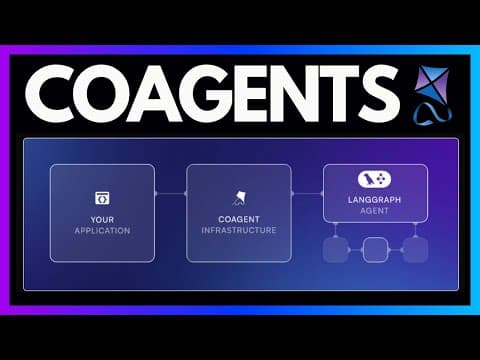
The existing LangGraph and CopilotKit tutorial is the concrete version: LangGraph owns the research workflow. CopilotKit bridges it into the frontend so the user can watch resources, progress, and report state updates in real time.
Again, the split matters:
LangGraph: durable state machine
CopilotKit: product interface for the state machine
When I Would Reach For CopilotKit First#
Start with CopilotKit when the product requirement sounds like this:
- "The agent should live in the dashboard."
- "Users need to approve the action before it runs."
- "The agent should update the canvas as it works."
- "The agent needs to read the current UI state."
- "Tool calls should render as cards, not raw JSON."
- "We need the same backend agent surfaced in multiple app views."
- "The UX matters as much as the reasoning loop."
In those cases, a pure backend framework leaves you with a lot of frontend plumbing. CopilotKit gives you the primitives earlier.
When I Would Not#
I would not start with CopilotKit if the first problem is:
- a nightly research job,
- a durable batch workflow,
- a multi-agent backend pipeline,
- a CLI-only coding harness,
- a RAG service with no interactive UI,
- an internal automation that writes to systems without human collaboration.
Those are backend-agent problems. You can still add CopilotKit later if the automation becomes a user-facing product surface.
The Product Test#
Ask one question:
Does the agent need to collaborate with the user inside the product UI?
If yes, CopilotKit belongs in the architecture conversation early.
If no, keep the stack smaller. Use Mastra, LangGraph, Vercel AI SDK, or a direct model call until the product actually needs an agent-native interface.
Framework choices get easier when you stop asking which tool is "the agent framework" and start assigning layers:
- backend reasoning,
- workflow durability,
- memory,
- tool access,
- observability,
- UI state,
- approval UI,
- generative rendering.
CopilotKit belongs in the last three, and sometimes in the bridge between them and the backend.
That is not a smaller role. It is the part users actually touch.
FAQ#
Is CopilotKit a replacement for Mastra, LangGraph, or CrewAI?#
No. CopilotKit is a frontend layer for agentic UX - chat surfaces, frontend tools, shared state, and generative UI. Mastra, LangGraph, and CrewAI are backend orchestrators that handle reasoning, memory, and durable workflows. See the agent framework comparison guide for how the categories map against each other, and the dedicated Mastra vs CopilotKit vs LangGraph breakdown for a head-to-head.
Can CopilotKit connect to any backend agent framework?#
Yes, through AG-UI. The official CopilotKit docs describe it as compatible with any AG-UI-compliant backend, which includes Mastra, LangGraph, and custom implementations built on the OpenAI Agents SDK or the Vercel AI SDK.
Should durable business logic ever live in CopilotKit's frontend tools?#
No. Frontend tools are for actions that sit near the user - updating drafts, filters, or local UI state. Long-running jobs, retries, billing mutations, and audit trails belong in backend agent infrastructure. The agent reliability cliff piece covers why pushing durability into the frontend session breaks down at scale.
When does a project not need CopilotKit at all?#
If the workload is a nightly research job, a CLI-only coding harness, or a backend automation with no human-in-the-loop step, start with a plain agent architecture instead and add a UI layer later if the automation becomes user-facing.
Get the next deep dive like this in your inbox
One email a week on AI Agents and the rest of the AI dev stack. Free.
Read next on AI coding tools
Mastra vs CopilotKit vs LangGraph: Build the Same Agent App Three Ways
A practical field note on where Mastra, CopilotKit, and LangGraph fit when you are building the same agent-native product interface.
9 min readMastra for Durable TypeScript Agents: Where It Fits and Where It Does Not
Mastra is the strongest fit when a TypeScript product needs agents, workflows, memory, tools, MCP, evals, and traces in one backend layer. It is not the right answer for every chat feature.
8 min readBuild an AI Agent Web App with LangGraph and CopilotKit
Wire a Python LangGraph agent into a Next.js frontend using CopilotKit's co-agent architecture. Full walkthrough covering the graph, search nodes, streaming state, and the React UI.
14 min readNew here? Start with
Technical content at the intersection of AI and development. Building with AI agents, Claude Code, and modern dev tools - then showing you exactly how it works.