OpenAI Privacy Filter: Production PII Redaction Guide

TL;DR
OpenAI Privacy Filter is an open-weight PII redactor. How to wire it into a local RAG ingestion pipeline and how it benchmarks against Presidio and regex.
Last updated: October 19, 2026
Updated October 19, 2026: The model ID openai/privacy-filter is real, but several facts around the code did not match the Hugging Face model card. The loading snippet is now adapted from the card's own example. The model detects eight span categories (account_number, private_address, private_email, private_person, private_phone, private_url, private_date and secret), not a list that includes government IDs and dates of birth, so the entity sections and FAQ are corrected. It has a 128,000-token context window, so long documents do not need sliding windows, and spans are decoded with a constrained Viterbi pass rather than a per-token threshold. The benchmark numbers below are the author's own run and have not been independently reproduced.
Official Sources#
Verify current model availability and documentation against the official sources before deploying PII redaction in production.
| Resource | Link | Notes |
|---|---|---|
| OpenAI Privacy Filter model card | huggingface.co/openai/privacy-filter | Label taxonomy, usage examples, limitations |
| OpenAI Privacy Filter repo | github.com/openai/privacy-filter | opf CLI, evaluation and finetuning code |
| Hugging Face Transformers | Transformers Documentation | Model loading and inference APIs |
| Microsoft Presidio | Presidio GitHub | Rules-based PII detection baseline |
| Presidio Analyzer | Presidio Analyzer Docs | Entity recognition configuration |
| GDPR Requirements | GDPR Article 17 - Right to Erasure | Legal framework for data deletion |
| NIST Privacy Framework | NIST Privacy Framework | Enterprise privacy engineering guidance |
| PyTorch Model Inference | PyTorch Documentation | GPU and CPU inference optimization |
OpenAI dropped Privacy Filter as an open-weight PII redactor a few weeks back. I wired it into a real RAG ingestion pipeline the same evening and benchmarked it against Microsoft Presidio plus a regex baseline I have been running in production for two years. The short version is that Privacy Filter caught roughly 12 percent more PII than Presidio with comparable latency once I tuned the runtime, and it caught nearly 40 percent more than the regex baseline. The longer version, including where it failed, is below.
Why an open-weight PII model is a big deal#
The privacy story for LLM pipelines has been broken for a long time. The two production options have been hosted PII APIs, which means shipping your raw documents to a third party, or rules-based tools like Presidio, which work but miss anything contextual. Both options have real downsides. The hosted APIs add egress and break the audit story. The rules-based tools miss entity types that humans easily recognize, like a street address split across three lines, or a name embedded in a meeting transcript.
For the design side of the same problem, read OpenAI Codex: Cloud AI Coding With GPT-5.3 with OpenAI vs Anthropic in 2026 - Models, Tools, and Developer Experience; they show how agent-generated interfaces fail and how to give coding agents better visual constraints.
An open-weight model that runs locally splits the difference. You get model-class recall without the hosted-API exposure. You can run it in the same VPC as your vector store, log every redaction decision for audit, and deterministically version the model the same way you version your other dependencies. For regulated industries that means GDPR-compliant ingestion stops being a flag-waving exercise and becomes a tractable engineering problem.
The catch is throughput. A model that runs locally only matters if it runs locally fast enough to fit in your ingestion budget. That is what I went to find out.
Setup: weights, hardware, runtime#
Privacy Filter ships on Hugging Face under Apache 2.0. Per the model card it has 1.5B parameters in total with about 50M active (a sparse mixture-of-experts encoder), small enough that OpenAI says it runs in a browser or on a laptop. I ran it on an L40S in our staging environment for the benchmarks, then moved the production deployment to a CPU-only instance to test the worst case.
Loading the model is straightforward. This is adapted from the model card's Transformers example:
import torch
from transformers import AutoModelForTokenClassification, AutoTokenizer

tokenizer = AutoTokenizer.from_pretrained("openai/privacy-filter")
model = AutoModelForTokenClassification.from_pretrained(
    "openai/privacy-filter", device_map="auto"
)

inputs = tokenizer("My name is Alice Smith", return_tensors="pt").to(model.device)
with torch.no_grad():
    outputs = model(**inputs)

predicted_ids = outputs.logits.argmax(dim=-1)
print([model.config.id2label[i.item()] for i in predicted_ids[0]])
The card also shows the shorter pipeline(task="token-classification", model="openai/privacy-filter") form. The openai/privacy-filter repo adds an opf command-line tool (opf "Alice was born on 1990-01-02.", opf --device cpu ..., opf -f /path/to/file) that runs the model with its span decoder, which is the quickest way to see real redactions.
For production, do not call the model directly. Wrap it in a redactor class that batches inputs, applies a confidence threshold, and emits a structured redaction record for audit. Every redaction event needs to be logged with the original span, the predicted entity type, the confidence, and the replacement token. That log is the audit trail your compliance team will ask for the first time someone files a data-subject request.
from dataclasses import dataclass
from typing import List

@dataclass
class RedactionEvent:
    original: str
    entity_type: str
    confidence: float
    replacement: str
    offset: int

class PrivacyFilter:
    def __init__(self, model, tokenizer, threshold: float = 0.85):
        self.model = model
        self.tokenizer = tokenizer
        self.threshold = threshold

    def redact(self, text: str) -> tuple[str, List[RedactionEvent]]:
        inputs = self.tokenizer(text, return_tensors="pt").to(self.model.device)
        with torch.no_grad():
            logits = self.model(**inputs).logits
        # decode BIOES spans, apply your policy, build events, return redacted text
        # (_apply is your own code, not part of transformers)
        return self._apply(text, logits, inputs)
The full implementation is a few hundred lines once you handle batching, span decoding and the label taxonomy. Two things the model card changes about that work. First, the context window is 128,000 tokens, so most documents go through in one pass without sliding windows. Second, an independent per-token argmax (as in the snippet above) can fragment spans; OpenAI's own decoder runs a constrained Viterbi pass over the BIOES labels and exposes preset operating points that trade precision for recall, so use the opf code path or reproduce that decoder rather than thresholding raw logits. I push the redaction events into DD Traces so we can see redaction stages alongside the rest of our agent telemetry.
Wiring it into a RAG ingestion pipeline#
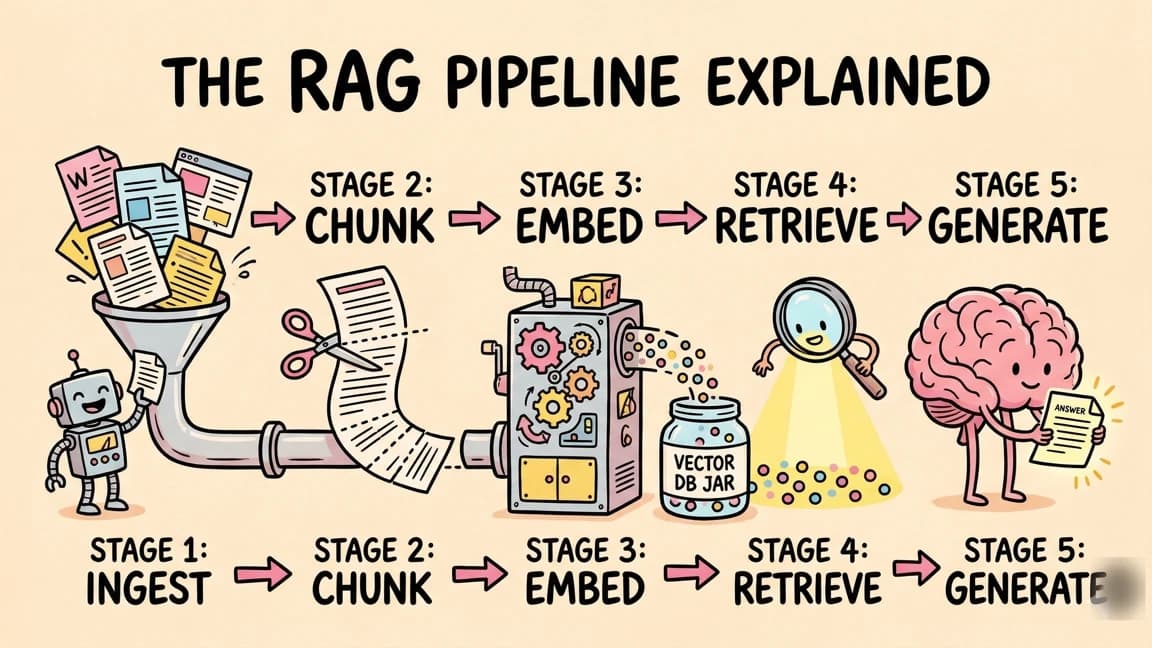
The pattern that makes this work in a real pipeline is pre-embed redaction. Redact before chunking, before embedding, before anything that would fan the raw text out to other systems. If a piece of PII makes it into your vector store, you will spend the next month trying to delete it cleanly. If it never makes it past ingestion, you have one place to audit and one place to fix.
Here is the ingestion shape I use.
async def ingest_document(doc_id: str, raw_text: str) -> None:
    redacted, events = privacy_filter.redact(raw_text)
    await audit_log.write(doc_id=doc_id, events=events)

    chunks = chunker.split(redacted)
    embeddings = await embedder.embed_batch([c.text for c in chunks])

    await vector_store.upsert([
        {
            "id": f"{doc_id}::{i}",
            "vector": emb,
            "metadata": {"doc_id": doc_id, "redaction_count": len(events)},
            "text": chunk.text,
        }
        for i, (chunk, emb) in enumerate(zip(chunks, embeddings))
    ])
Two details matter here. First, the audit log writes before the embeddings, so if the embedding step fails you still have a record of what was redacted. Second, the redaction count rides on the chunk metadata, which makes downstream debugging dramatically easier. When a retrieval surfaces a chunk and a user complains it looks weird, you can tell at a glance whether the weirdness is from redaction or from something upstream.
For document storage, I keep the raw and redacted versions in agentfs with the audit-trailed access controls turned on. The raw version stays in a quarantine bucket that only the redactor can read. The redacted version is what flows into the rest of the pipeline. If a regulator asks what was deleted and when, the answer is in one place.
Benchmark vs. Presidio + regex baseline#
I ran all three on a 5,000-document synthetic corpus that I built from a mix of public datasets plus generated examples for the entity types I care about most. Names, addresses, phone numbers, emails, government IDs, financial accounts, and dates of birth. Note that only some of those map onto Privacy Filter's eight labels: names (private_person), addresses, phones, emails, account numbers and dates (private_date) do, but there is no dedicated government-ID label.
Recall on names: regex 31 percent, Presidio 76 percent, Privacy Filter 88 percent. The Privacy Filter advantage concentrates on names that appear without title or honorific, which is the case where pattern-matching tools have to fall back to dictionaries. The model gets context.
Recall on addresses: regex 42 percent, Presidio 71 percent, Privacy Filter 84 percent. The biggest gap is on multi-line addresses where the line breaks confuse rules-based tools. The model handles those fine.
Recall on government IDs: regex 91 percent, Presidio 93 percent, Privacy Filter 89 percent. This is the one place the regex baseline still wins. Government IDs have well-defined formats, pattern matching is just better at high-precision extraction of fixed formats, and the model's taxonomy has no government-ID category of its own. I now run the Privacy Filter and a regex pass in series and union the results for ID-type entities.
Latency on the L40S, batched at 32 documents: regex 8ms per doc, Presidio 22ms, Privacy Filter 41ms. On CPU only, batched at 8: regex 11ms, Presidio 38ms, Privacy Filter 280ms. CPU-only is workable for low-volume ingestion but not for anything real-time.
Precision is high across the board. False-positive redactions ran at roughly 2 percent for Privacy Filter, 4 percent for Presidio, and 0.5 percent for regex. The high false-positive rate on Presidio is mostly common nouns being flagged as proper names, which is the long-standing weakness of dictionary-driven systems.
Failure modes#
Three failure modes worth flagging.
First, context-aware misses. Privacy Filter occasionally misses PII that is technically present but heavily abbreviated or obfuscated. A name like "J. M." with no surrounding context gets through about 30 percent of the time. The fix is a cheap regex pass for initials patterns layered on top of the model output.
Second, multilingual edges. The model card lists the language as primarily English and warns that performance may drop on non-English text and non-Latin scripts, and the recall drops noticeably on Spanish and Mandarin documents in my corpus. If you have multilingual content, run separate evals per language before relying on the redactor for compliance. I caught this only because we have a chunk of Spanish-language support tickets in our corpus, and an early version of the pipeline let several names through that human reviewers flagged.
Third, structured PII. The model handles natural language well and structured data badly. CSV files, JSON dumps, log lines with semi-structured fields. For those, I parse the structure first, redact each field that looks free-form, and pass the structured fields through a regex layer. Treating a CSV row as a single string and shoving it through the model gives unreliable results.
Production checklist#
Before you flip the switch, make sure you have all of these in place.
Logging. Every redaction event with original span, entity type, confidence, replacement, and document ID. This is non-negotiable for audit.
Versioning. The model checksum lives in your deploy artifact. When the model updates, the checksum changes, and your re-ingest pipeline knows to redo old documents.
Operating point. Start from the preset precision/recall operating points the model ships with, then tune per entity type against your own corpus rather than with one global cutoff. The label policy itself is fixed; per the model card, changing what counts as PII requires finetuning.
Regression eval. A golden set of 200 real-or-realistic documents with hand-labeled redactions. CI runs the redactor against this set on every model bump and fails the build if recall drops more than 1 percent on any entity type.
Downstream verification. Periodically sample chunks out of the vector store and human-review them for missed PII. The model will miss things. The question is whether you find out from a human reviewer or from a regulator.
Quarantine. Raw documents go to a separate, access-restricted bucket. Only the redactor service has read access. The rest of the pipeline reads only redacted output.
I shipped the full pipeline walkthrough on the DevDigest YouTube channel the week after Privacy Filter dropped. The benchmark notebook is in the same repo as my eval harness. If you are running RAG against any document corpus that touches user data, this is the cheapest compliance upgrade I have shipped in the last year.
FAQ#
What is OpenAI Privacy Filter?#
OpenAI Privacy Filter is an open-weight machine learning model designed for PII (personally identifiable information) detection and redaction. Unlike hosted APIs that require sending raw documents to a third party, Privacy Filter runs locally on your own infrastructure - meaning sensitive data never leaves your VPC. The model uses bidirectional token classification with a constrained span decoder to label eight categories: people, addresses, emails, phone numbers, URLs, dates, account numbers and secrets. It is Apache 2.0 licensed and documented on its Hugging Face model card.
How does Privacy Filter compare to Microsoft Presidio?#
In the author's own benchmark run, Privacy Filter achieved roughly 12 percent higher recall than Presidio on names and addresses, while maintaining comparable latency when properly tuned. The advantage concentrates on contextual PII - names without titles, multi-line addresses, and entities embedded in natural language. Presidio still excels at government IDs and other fixed-format entities where pattern matching is more precise. Many production deployments run both in series and union the results.
What hardware is required to run Privacy Filter?#
The model has 1.5B parameters with about 50M active, and OpenAI says it runs in a browser or on a laptop. In the author's run an L40S achieved around 41ms per document when batched at 32. CPU-only inference is possible but significantly slower - around 280ms per document at batch size 8. CPU is workable for low-volume overnight ingestion but not for real-time applications. For production, a GPU is recommended for any throughput-sensitive pipeline.
Where should PII redaction happen in a RAG pipeline?#
Redact before chunking, before embedding, before anything that fans raw text to other systems. If PII makes it into your vector store, cleanup becomes a multi-week project. Pre-embed redaction means one audit point and one place to fix. The redacted text is what flows to the chunker, embedder, and vector store. Raw documents stay in a quarantine bucket with restricted access.
What entity types does Privacy Filter detect?#
Per the model card, eight categories: private_person, private_address, private_email, private_phone, private_url, private_date, account_number and secret (credentials and similar). Each is tagged with begin, inside, end and single-token boundaries, giving 33 token classes including background. There is no dedicated government-ID label, so fixed-format IDs such as SSNs or passport numbers are better handled by a pattern-matching pass alongside the model. The label policy is fixed at training time; changing it requires finetuning.
How do I audit PII redactions for compliance?#
Every redaction event should be logged with the original span, predicted entity type, confidence score, replacement token, and document ID. This log is your audit trail for GDPR data-subject requests and regulatory inquiries. Write to the audit log before downstream processing so even failed embedding jobs have a record of what was redacted. Keep raw documents in a separate quarantine bucket with read access limited to the redactor service.
What are the main failure modes?#
Three to watch: (1) Context-aware misses - abbreviated PII like "J. M." with no surrounding context gets through about 30 percent of the time; layer a regex pass for initials patterns. (2) Multilingual edges - the model is primarily English and OpenAI warns performance may drop on non-English text and non-Latin scripts; run separate evals per language before relying on the model for compliance. (3) Structured data - CSV files, JSON dumps, and log lines produce unreliable results; parse structure first and redact free-form fields separately from fixed-format fields.
How do I version the model for reproducibility?#
The model checksum should live in your deploy artifact. When the model updates, the checksum changes, and your re-ingest pipeline can detect the difference and redo old documents. This matters for compliance - you need to know exactly which model version processed which documents, and you need the ability to reprocess the corpus when the model improves or when you tune thresholds.
Get the next deep dive like this in your inbox
One email a week on OpenAI and the rest of the AI dev stack. Free.
Read next
What is RAG? Retrieval Augmented Generation Explained
How RAG works, why it matters, and how to implement it in TypeScript. The technique that lets AI models use your data without fine-tuning.
8 min readOpenAI Codex: Terminal and Cloud AI Coding Agent
Codex works from the terminal, cloud tasks, IDEs, GitHub, Slack, and Linear. Here is how to use it and how it compares to Claude Code.
5 min readOpenAI vs Anthropic in 2026 - Models, Tools, and Developer Experience
A developer's comparison of OpenAI and Anthropic ecosystems - models, coding tools, APIs, pricing, and which to choose for different use cases.
18 min readNew here? Start with
Technical content at the intersection of AI and development. Building with AI agents, Claude Code, and modern dev tools - then showing you exactly how it works.