303 AI Skills for 12 Careers: The Free Directory

TL;DR
A free directory of 303 packaged agent workflows covers 12 careers - from contract review for lawyers to candidate scoring for recruiters.
Official Sources#
| Resource | What it covers |
|---|---|
| Claude Code Skills Documentation | Skill architecture, installation, configuration, and custom skill development |
| Claude Code Overview | Agentic coding assistant capabilities and workflows |
| Claude Computer Use | Screen control agents for visual interface automation |
| Cursor Documentation | IDE-integrated AI coding features and Composer workflows |
| OpenAI Codex Documentation | Codex CLI, IDE extension, and cloud agent environment |
AI Skills Are Not Just for Engineers Anymore#
The first wave of AI agent skills belonged to developers. Code review, test generation, deployment automation. Engineers built the tools, engineers used the tools. That made sense at the time.
That time is over.
The same architecture that makes a code review skill work - a structured loop of reasoning, tool use, and verification - applies to any knowledge work that follows a repeatable pattern. And most knowledge work does. Lawyers review contracts. Marketers audit SEO performance. Recruiters screen resumes. Finance analysts model projections. Every one of these tasks is a sequence of steps that an agent skill can learn, execute, and improve on.
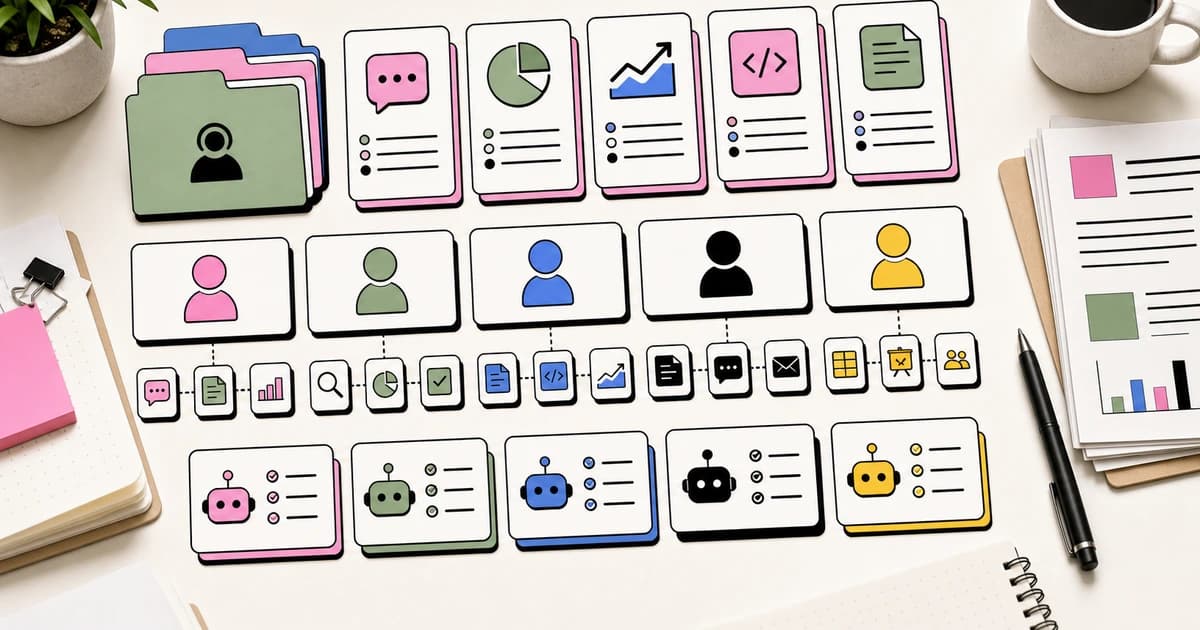
The AI Skills Directory now catalogs 303 skills across 12 professional careers. Not generic chatbot prompts. Not "use AI to brainstorm." These are packaged, multi-step workflows designed for specific professional tasks, built for tools like Claude Code, Cursor, Codex, and Computer Use agents.
All completely free. No account required.
This post walks through what is actually available, with concrete examples from four careers that represent different kinds of knowledge work. Then we will cover starter kits, Computer Use skills, and how to get running in under five minutes.
What Makes a Skill Different From a Prompt#
Before diving into careers, it is worth understanding why skills exist at all.
A prompt is a one-shot instruction. "Review this contract" or "Write me an SEO report." The quality depends entirely on how much context you provide in that single message. You are doing the work of specifying the domain, the format, the criteria, and the data source every time.
A skill is a pre-configured workflow. It already knows the domain context. It chains multiple steps together - read the input, analyze it against specific criteria, format the output for the profession, run validation checks. Configuration happens once. Execution happens every time you trigger it.
The difference matters most for recurring tasks. The first time you review a contract, a detailed prompt might work fine. The 50th time, you want a skill that already knows your firm's standard positions, your preferred clause language, and your memo format.
Software Engineer: Where Skills Started#
Engineering skills are the most mature category in the directory, and they show what the other professions are building toward.
Code Review is the flagship. It runs five parallel agents against a pull request, each checking a different dimension: code quality, test coverage, error handling, type safety, and simplification opportunities. Every finding gets a confidence score to filter false positives. The output is a structured review, not a wall of text.
claude install anthropics/claude-code/code-review
Web App Testing generates integration tests, end-to-end flows, and accessibility checks. It reads your existing test files to match the style, so the generated tests look like a human on your team wrote them.
Security Guidance is the skill that catches the things developers forget - secrets in environment files, SQL injection patterns, insecure default configurations. It runs as part of the development workflow, not as an afterthought before release.
The Full Stack Engineer Kit bundles eight skills into a single starter kit: frontend design, code review, testing, API integration, database management, CI/CD configuration, security, and documentation. Install it once and you have coverage across every layer of the stack.
What makes these skills more useful than running the same checks manually is consistency. A human reviewer drifts after reviewing 800 lines. The code review skill applies the same criteria to line 1 and line 800.
Marketer: From SEO Audits to Full Campaign Pipelines#
Marketing produces enormous volumes of content and analysis. Most of it follows patterns that repeat weekly. Skills turn those patterns into one-click workflows.
SEO Content Writer does not just suggest keywords. It reads your existing page, checks keyword density against target terms, evaluates heading structure, analyzes internal linking, compares meta descriptions to competitors ranking in the top 10, and outputs a prioritized list of specific changes. Not "improve your headings" but "move the primary keyword from H3 to H1, add two internal links to the pricing comparison page, rewrite the meta description to include the long-tail variant that ranks position 4." The AI coding tools pricing pages are the kind of cluster this workflow should strengthen.
Keyword Researcher maps keyword opportunities by analyzing search volume, difficulty, intent, and your current rankings. It clusters related terms and identifies gaps where competitors rank but you do not.
Email Campaign Builder generates campaign sequences from a brief - subject lines, body copy, CTA variations, and send timing recommendations. It applies your brand voice guidelines so every email sounds like your team wrote it.
Analytics Reporter connects to your performance data and produces the weekly marketing report that someone on the team used to build manually in a spreadsheet. Same format, same KPIs, fraction of the time.
The Marketing Automation Kit bundles six skills: SEO content, email campaigns, social scheduling, ad copy, analytics reporting, and keyword research. The benefit statement from the directory says it plainly: "Run a full marketing engine that would normally require a team of three." That is not hyperbole. These are the tasks that fill a marketing coordinator's entire week.
Lawyer: Contract Review That Remembers Your Standards#
Legal work is high-stakes information processing with strict formatting requirements. Agent skills are a natural fit because they combine the pattern-matching strengths of language models with the consistency that legal work demands.
Contract Reviewer is the skill that demonstrates the gap between a prompt and a skill most clearly. A prompt says "review this contract." The skill reads the full document, extracts every clause, compares each one against your firm's standard positions, and flags deviations in liability caps, IP assignment, termination windows, and governing law. The output is a memo listing every non-standard clause with the recommended alternative from your clause library.
The critical difference: the skill has your firm's standard positions embedded in its configuration. It does not suggest generic legal language. It suggests the exact language your firm prefers, because you configured it once.
Compliance Checker maps document contents against regulatory requirements - GDPR data handling, SOC 2 controls, industry-specific regulations. It identifies gaps and produces a checklist of remediation items.
Privacy Policy Generator produces privacy policies that match your actual data practices, not boilerplate. It reads your application's data flows and generates policy language that reflects what you actually collect, process, and store.
NDA Drafter generates non-disclosure agreements from deal parameters - parties, scope, duration, jurisdiction - using your firm's preferred template structure.
The Legal Assistant Kit bundles five skills: contract review, compliance checking, privacy policy generation, license analysis, and NDA drafting. Setup takes three minutes. The benefit: "Handle routine legal work in seconds instead of billable hours."
This is not about replacing lawyers. It is about handling the routine work faster so lawyers spend their time on judgment calls, client strategy, and the work that actually requires a JD.
Recruiter: Screening at Scale Without Losing Signal#
Recruiting is pattern matching. Read a resume, match it against requirements, decide whether to advance. Repeat 50 times per role. The repetition is exactly where skills deliver.
Resume Screener reads each resume against the actual job description - not a paraphrase, the real document. It extracts relevant experience, maps it to specific requirements (years of experience, technologies, leadership signals), and outputs a ranked shortlist with a one-paragraph rationale for each candidate. No-hire recommendations include the specific gap so the recruiter can override if the gap does not matter for this role.
The consistency advantage is significant. Human reviewers drift after the 15th resume. They give more attention to the first batch and less to the last. A skill applies the same criteria to candidate 1 and candidate 50.
Job Description Writer generates role descriptions from a brief, matching your company's voice and including the requirements that actually matter for the role. It avoids the common failure modes of AI-generated job posts - the vague qualifications, the contradictory seniority signals, the missing compensation ranges.
Interview Question Generator produces structured interview questions mapped to specific competencies. Behavioral questions, technical scenarios, and culture-fit assessments, all tied back to the role requirements.
Onboarding Builder creates onboarding workflows - first day through first 90 days - with milestones, check-in cadences, and training sequences customized to the role and team.
The HR and Recruiting Kit bundles five skills: job descriptions, resume screening, interview questions, onboarding flows, and performance reviews. The benefit: "Fill roles faster with consistent, bias-aware hiring workflows."
Starter Kits: Curated Bundles for Day One#
One of the most useful features of the directory is starter kits. Instead of browsing 303 skills and figuring out which ones matter for your role, pick the kit for your career and install everything at once.
There are 12 starter kits, one per career:
- Next.js SaaS Kit - frontend design, optimization, database, testing, deployment (Software Engineer)
- Full Stack Engineer Kit - 8 skills covering every layer of the stack (Software Engineer)
- Security Audit Kit - vulnerability scanning, secrets detection, GDPR compliance (Software Engineer)
- Marketing Automation - SEO, email, social, ad copy, analytics, keywords (Marketing Manager)
- Legal Assistant - contracts, compliance, privacy policies, licenses, NDAs (Lawyer)
- Sales Accelerator - outreach, proposals, lead research, CRM, battlecards (Sales Rep)
- HR and Recruiting Kit - job descriptions, screening, interviews, onboarding (Recruiter)
- Data Science Kit - cleaning, SQL, charts, ETL pipelines, ML models (Data Scientist)
- DevOps Essentials - Kubernetes, CI/CD, monitoring, Terraform, cost optimization (DevOps Engineer)
- Research Assistant - literature reviews, fact-checking, market research, patents (Researcher)
- Financial Analyst Kit - financial models, invoices, expenses, tax, board reports (Finance)
- Content Creator Kit - blogs, video scripts, newsletters, repurposing, courses (Content Creator)
Each kit lists its included skills, difficulty level, setup time, and a one-line benefit statement. Most kits take three to five minutes to set up. The directory page shows exactly what you are installing before you commit.
The kits are opinionated. They represent a specific workflow, not every possible workflow. That is the point. If you are a marketer starting with AI skills for the first time, the Marketing Automation kit gives you a curated starting point rather than a menu of 303 options.
Computer Use Skills: The New Frontier#
The newest category in the directory is Computer Use skills - agents that can see your screen, click buttons, fill forms, and navigate applications visually.
This matters because not every workflow has an API. Your company's legacy HR portal does not have one. The government compliance website does not have one. The vendor invoice system definitely does not have one. Computer Use skills bridge that gap by interacting with applications the same way you do - through the interface.
Browser Automation navigates websites, interacts with UI elements, fills forms, and extracts structured data. It handles JavaScript-rendered pages, dynamic content, and multi-step flows that would break traditional scraping tools.
Form Filler reads form fields, matches them to your structured data, handles dropdowns and checkboxes, and submits. Recruiters use it for application tracking systems. Sales reps use it for CRM data entry. Anyone who manually copies data between systems can use it.
Visual QA navigates your application, takes screenshots at key states, and compares them against baselines. It catches the visual regressions that unit tests miss - the button that shifted 3 pixels, the text that overflows its container on mobile.
Computer Use skills are newer and still maturing. They are slower than API-based skills because they work through screenshots rather than direct data access. But for workflows that require interacting with applications that have no API, they are the only option that does not involve a human clicking through forms manually.
The directory currently lists over 20 Computer Use skills, and the category is growing faster than any other.
Getting Started in Five Minutes#
Here is the practical path from reading this post to running your first skill.
Step 1: Browse the directory. Go to skills.developersdigest.tech. Use the career filter to narrow to your profession. Browse the skills that match your daily work.
Step 2: Pick a starter kit or individual skill. If you are new to AI skills, start with the starter kit for your career. It bundles the highest-impact skills into a single install. If you already know what you need, grab individual skills.
Step 3: Install. Each skill shows its install command. For Claude Code skills:
claude install anthropics/skills/contract-reviewer
For Cursor, Codex, and other harnesses, the directory shows the appropriate setup method for each.
Step 4: Configure. Some skills work immediately. Others benefit from configuration - your firm's clause library for contract review, your brand voice for content skills, your code conventions for engineering skills. The skill's page in the directory explains what to configure.
Step 5: Run. Trigger the skill in your normal workflow. Most skills activate through slash commands or natural language descriptions. The first run will show you the output format and where the skill fits into your process.
The skills that deliver the most value are the ones that automate a task you do weekly. Contract review for lawyers. Resume screening for recruiters. PR review for developers. SEO audits for marketers. Start with the recurring task that takes the most time. Automate that one first. Then expand.
The Broader Shift#
What the directory reveals is not just a collection of tools. It is a pattern. Every profession that involves processing information - reading documents, comparing data, generating reports, checking for patterns - is getting a skill layer.
The 303 skills in the directory today will be 500 by the end of the year. The 12 career categories will expand. The starter kits will get more specific - not just "Legal Assistant" but "M&A Due Diligence Kit" and "Patent Prosecution Kit."
This is the same trajectory that happened with SaaS. First, general tools. Then vertical tools. Then vertical tools so specific they replace entire workflow segments. AI skills are following the same path, just faster.
The directory is free. The skills are free. The only cost is the compute to run them, and for most skills that is a few cents per execution. The question is not whether AI skills will change how your profession works. The question is whether you start using them now or six months from now when everyone else already has.
Browse the full directory at skills.developersdigest.tech.
What to Read Next#
- AI Skills for Every Career - deep dive into all 12 career categories
- Claude Computer Use - how screen-control agents work under the hood
- AI Agents Explained - the architecture behind agent skills
- Best AI Coding Tools in 2026 - the developer-focused tool landscape
Related apps#
- Skills Directory - Every AI skill for every knowledge worker - browse 150+ skills.
- Skill Builder - Build, test, and iterate agent skills from the terminal. Create Claude Code skills with interview or one-liner.
FAQ#
What are AI skills and how are they different from prompts?#
AI skills are pre-configured, multi-step workflows that already know the domain context and chain multiple steps together - reading input, analyzing against specific criteria, formatting output for your profession, and running validation checks. Unlike prompts which require you to specify domain, format, criteria, and data source every time, skills configure those settings once and execute consistently. The difference matters most for recurring tasks - the 50th contract review benefits from a skill that already knows your firm's standard positions and memo format.
What professions are covered in the AI Skills Directory?#
The directory covers 12 professional careers: Software Engineer, Marketing Manager, Lawyer, Sales Rep, Recruiter, Data Scientist, DevOps Engineer, Researcher, Finance professional, Content Creator, HR professional, and more. Each career has curated starter kits and individual skills designed for profession-specific tasks - from code review for engineers to contract analysis for lawyers to resume screening for recruiters.
How long does it take to set up AI skills?#
Most starter kits take three to five minutes to set up. Individual skills vary - some work immediately after installation while others benefit from configuration like adding your firm's clause library for contract review or your brand voice guidelines for content skills. The directory shows exact setup time for each skill and starter kit.
What are Computer Use skills and when should I use them?#
Computer Use skills are agents that see your screen, click buttons, fill forms, and navigate applications visually. Use them when workflows lack APIs - legacy HR portals, government compliance websites, vendor invoice systems. They are slower than API-based skills because they work through screenshots, but for workflows requiring interaction with applications that have no API, they are the only option that does not involve manual clicking.
Are the AI skills in the directory free?#
Yes, the directory and all skills are completely free with no account required. The only cost is the compute to run them - typically a few cents per execution depending on the AI provider (Claude, OpenAI, etc.). Skills work with tools like Claude Code, Cursor, Codex, and Computer Use agents.
What starter kit should I choose if I am new to AI skills?#
Choose the starter kit for your career - there are 12 kits, one per profession. If you are a marketer, start with Marketing Automation (SEO, email, social, analytics, keywords). If you are a recruiter, start with HR and Recruiting Kit (job descriptions, screening, interviews, onboarding). The kits bundle the highest-impact skills into a single install, giving you a curated starting point rather than 303 options to evaluate.
Can AI skills replace professionals like lawyers or recruiters?#
No. AI skills handle routine, repeatable work faster so professionals spend their time on judgment calls, client strategy, and work that requires expertise. Contract Reviewer flags non-standard clauses against your firm's positions - but a lawyer decides whether the deviation matters for this deal. Resume Screener ranks candidates consistently - but a recruiter decides whether a flagged gap disqualifies someone. Skills augment professional work, they do not replace it.
How do I install an AI skill from the directory?#
Browse skills.developersdigest.tech, filter by your career, and copy the install command shown on each skill's page. For Claude Code skills: claude install anthropics/skills/[skill-name]. For Cursor, Codex, and other harnesses, the directory shows the appropriate setup method. Configure any profession-specific settings (clause libraries, brand voice, code conventions), then trigger the skill through slash commands or natural language.
Related#
- Subscribe to DevDigest on YouTube for hands-on walkthroughs
Continue Reading#
Get the next deep dive like this in your inbox
One email a week on AI Skills and the rest of the AI dev stack. Free.
Read next on Cursor
AI Skills for Every Career: Agents and Knowledge Work
AI agent skills are not just for developers. Here is how 12 professions use packaged AI workflows to do better knowledge work.
12 min readClaude Computer Use: AI That Controls Your Desktop
Anthropic's computer use feature lets Claude see your screen, move the cursor, click, and type. Here is how it works, when to use it, and how to set it up.
6 min readThe 10 Best AI Coding Tools in 2026
From terminal agents to cloud IDEs - these are the AI coding tools worth using for TypeScript development in 2026.
8 min readNew here? Start with
Technical content at the intersection of AI and development. Building with AI agents, Claude Code, and modern dev tools - then showing you exactly how it works.