ChatGPT Tasks: Scheduled AI Agents Inside ChatGPT
TL;DR
OpenAI added scheduled tasks and reminders to ChatGPT, turning it from a chat interface into something closer to a personal AI agent.
| Official Sources | |
|---|---|
| ChatGPT Tasks - OpenAI Help | Official guide to scheduled tasks and reminders |
| ChatGPT Overview | Product page with feature overview |
| OpenAI Blog | Announcements and feature releases |
| ChatGPT Release Notes | Changelog with task feature rollout |
| OpenAI API Reference | Developer documentation for building on OpenAI |
OpenAI quietly released one of the most important features ChatGPT has received in months: the ability to schedule reminders and recurring tasks. On the surface, it looks like a simple addition. Set a reminder, get a notification. But underneath, this is OpenAI laying the groundwork for AI agents that take action on your behalf at specific times, without you being in the conversation.
The feature shipped as part of GPT-4o with scheduled tasks. You describe what you want in natural language, set a time or interval, and ChatGPT handles the rest. When the task fires, you get a notification. Click it, and you open a conversation thread with the results.
How Scheduled Tasks Work#
The setup is straightforward. You type something like "send me the latest AI news at 8:00 AM" and ChatGPT creates a recurring task. When 8:00 AM arrives, the model runs a search query using its web search capabilities, gathers the latest results, and assembles them into a conversation. You receive a notification, click through, and see a curated AI news briefing with sources.
For model-selection context, compare this with OpenAI Codex: Cloud AI Coding With GPT-5.3 and Codex vs Claude Code in April 2026: Which Agent for Which Job; model quality matters most when it is tied to a concrete coding workflow.
The scheduling interface uses natural language entirely. You do not need to configure cron expressions or fill out forms. Say "8:00 AM and 5:00 PM" and it sets two daily triggers. Say "every 3 months" and it creates a quarterly reminder. The model interprets your intent and translates it into a schedule.
Once a task is created, you can manage it through the tasks panel. Click the three dots menu, and you see all scheduled and completed tasks. Each one can be edited, paused, or deleted. The edit modal lets you change the task name, instructions, and schedule. You can toggle whether it repeats and adjust the timing.
Practical Use Cases#
Daily News Briefings#
The most obvious application is automated research at regular intervals. Ask ChatGPT to send you industry news every morning, and it acts as a personalized news aggregator. Because it uses the same search infrastructure as ChatGPT's web search, the results include sources and are formatted the same way as a manual search query.
This is more useful than a traditional RSS feed or news app because you can customize the scope with natural language. "Send me AI infrastructure news, but only funding rounds over $50M and new model releases" is a perfectly valid task description. The model will filter and curate based on your specific criteria.
Weather Updates#
A simple but practical example: "Send me the weather every morning at 7 AM." The model pulls current weather data and delivers a brief summary. It is not going to replace a dedicated weather app, but it demonstrates the pattern. You can ask for any information that ChatGPT can retrieve through search, delivered on a schedule you define.
Fitness and Health#
One of the more interesting applications is personalized workout planning. Ask ChatGPT to "send me a workout plan every day at 8 PM using dumbbells and a stationary bike" and you get a unique, varied plan each day. Because ChatGPT maintains context about your preferences across the conversation, the plans can build on each other over time.
This starts to challenge dedicated fitness apps. The advantage of a general-purpose AI over a specialized app is flexibility. You can dump in information mid-workout - "I just did 3 sets of 12 at 30 pounds on overhead press" - and the model adjusts future recommendations accordingly. You could even use voice mode to have it coach you through exercises in real time.
Creative Content Generation#
You can schedule creative outputs too. "Generate a children's bedtime story about dragons every night at 9 PM" produces a new story with an AI-generated image each evening. Add instructions like "also write a script for the story" and you get both visual and narrative content on a recurring basis.
With OpenAI's audio generation capabilities evolving, it is easy to imagine this extending to audio stories, personalized podcasts, or daily creative writing prompts delivered at whatever time suits your routine.
Price Monitoring and Research#
One of the most forward-looking examples from the announcement: "Research the best price on furnace filters every 3 months and have one delivered to my door." This does not work today. ChatGPT can research the prices, but it cannot execute a purchase. However, the task infrastructure is clearly designed to support this kind of workflow once the agent capabilities expand.
The model interpreted this request as: find a furnace filter, search for the best price, and notify when there is a good deal. The notification step works now. The purchase step is what is coming next.
Where This Is Heading#
Sam Altman published a blog post around the same time stating that 2025 could see the first AI agents "join the workforce and materially change the output of companies." The tasks feature is the foundation for that vision.
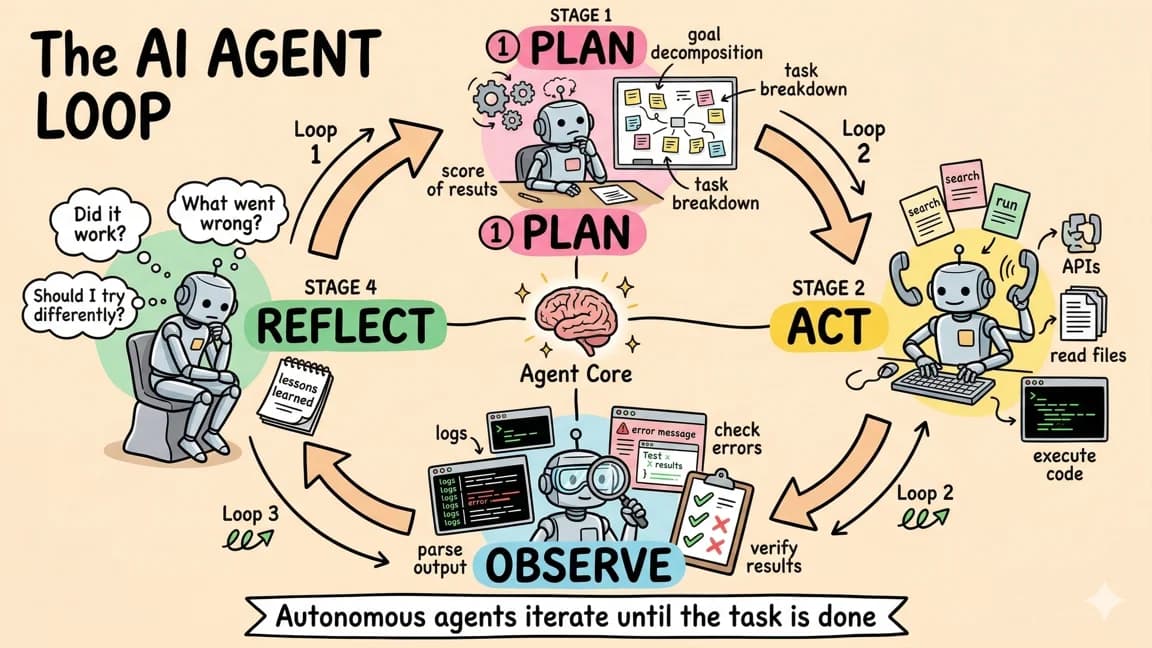
Today, the tasks are observe-and-notify. The model watches for something, gathers information, and tells you about it. The next step is observe-and-act. The model watches for something, gathers information, and takes action on your behalf. The infrastructure for scheduling, notifications, and task management is already built. What remains is expanding the model's ability to interact with external services.
Consider the progression:
- Search and report (available now) - "Tell me the AI news every morning"
- Monitor and alert (available now) - "Let me know when GPU prices drop below $X"
- Monitor and act (coming) - "When GPU prices drop below $X, buy one from the cheapest vendor"
- Multi-step workflows (coming) - "Every quarter, research the best deals on home supplies, compare against my past purchases, and order anything that is a better deal than what I paid last time"
Each step requires the model to have more agency - more ability to interact with the outside world. OpenAI has already shipped Operator (their web browsing agent) and Deep Research (their research agent). Tasks is the scheduling layer that connects these capabilities to recurring workflows.
The Notification System#
At launch, the notification system had some limitations. Tasks delivered results through the ChatGPT conversation interface. You receive an email notification with a preview and a link back to the conversation thread. The desktop and mobile apps were installed during testing, but push notifications were not consistently firing.
This is expected for a beta feature. Push notifications on mobile are essential for this to feel like a true personal assistant rather than an email subscription service. The infrastructure is clearly designed for it, and consistent push notification support would make a significant difference in the day-to-day utility of scheduled tasks.
Tasks vs. Dedicated Apps#
The emergence of scheduled AI tasks raises an interesting question about the future of specialized applications. Consider fitness apps, news aggregators, weather apps, recipe planners, and budget trackers. Each of these exists because they solve a specific problem with a purpose-built interface. But a general-purpose AI that can take instructions in natural language and deliver results on a schedule competes with all of them simultaneously.
The advantage of specialized apps is their refined UI, hardware integration (like Apple Health syncing for fitness), and deep domain knowledge baked into the product. The advantage of ChatGPT tasks is flexibility. You can combine any number of capabilities into a single workflow without switching between apps. "Check the weather, then suggest an outfit, then add my commute time to my calendar" is one task description that would require three separate apps otherwise.
In practice, specialized apps will not disappear. They offer things that a chat-based interface cannot - real-time heart rate monitoring, interactive maps, collaborative editing. But the simple, information-retrieval-and-action category of apps faces genuine disruption from AI agents that can do the same thing through natural language.
What Developers Should Pay Attention To#
For developers building products on top of OpenAI's platform, the tasks feature signals that the API will eventually support scheduled and recurring agent interactions. This opens up new application patterns:
- Monitoring services that use LLM reasoning to interpret unstructured data (news, social media, forum posts) and deliver structured alerts
- Workflow automation where the scheduling and routing logic is described in natural language rather than configured through a visual builder
- Personal assistants that maintain long-running context across scheduled interactions, building up a knowledge base about the user's preferences and history over time
The key technical detail is that each task fires within a conversation thread. This means the model has access to the full conversation history when executing a scheduled task. Over time, this creates a rich context about what the user has asked for, what results have been delivered, and how preferences have evolved. That context is what separates a scheduled search query from a genuine personal assistant.
Current Limitations#
The feature is still in beta, and several limitations are worth noting:
- No action execution - Tasks can search and report but cannot take actions like making purchases, sending emails to third parties, or modifying external services.
- Notification reliability - Push notifications are inconsistent across platforms. Email notifications work but add friction to the experience.
- No integration layer - Tasks operate within ChatGPT's existing capabilities (search, code execution, image generation). There is no way to connect them to external APIs, databases, or services yet.
- Rate limits - Like all ChatGPT features, tasks are subject to rate limits based on your subscription tier.
These are solvable limitations, and most of them are likely on OpenAI's roadmap. The foundation is solid. The question is how quickly the execution capabilities expand to match the scheduling infrastructure that is already in place.
Frequently Asked Questions#
What are ChatGPT Tasks?#
ChatGPT Tasks is a scheduling feature that lets you set reminders and recurring automations using natural language. You describe what you want and when, and ChatGPT runs the task at the specified time - searching the web, generating content, or gathering information - then notifies you with the results. It turns ChatGPT from a reactive chat interface into a proactive personal assistant that takes action on a schedule.
How do I create a scheduled task in ChatGPT?#
Type your request in natural language with a time specification. Examples: "Send me the top AI news every morning at 8 AM" or "Remind me to review my budget every Sunday at 6 PM." ChatGPT interprets your intent and creates the recurring schedule. You can manage, edit, pause, or delete tasks through the tasks panel in the three-dot menu.
Is ChatGPT Tasks available on the free plan?#
ChatGPT Tasks is available to ChatGPT Plus, Pro, and Team subscribers. The feature requires GPT-4o and is not available on the free tier. Rate limits may apply based on your subscription level, so heavy users of scheduled tasks should consider the Pro plan for higher limits.
Can ChatGPT Tasks take actions like sending emails or making purchases?#
Not yet. Currently, tasks are limited to observe-and-notify workflows. ChatGPT can search the web, generate content, and deliver results to you, but it cannot execute external actions like sending emails, making purchases, or modifying services. However, with OpenAI's Operator (web browsing agent) and the expanding ChatGPT Agent capabilities, action execution is coming.
How does ChatGPT Tasks compare to traditional automation tools like Zapier?#
ChatGPT Tasks uses natural language instead of visual workflow builders or API configurations. You describe what you want in plain English rather than connecting triggers and actions. The tradeoff is flexibility versus precision: traditional automation tools offer fine-grained control over exactly what happens, while ChatGPT Tasks is more conversational but less deterministic. For simple, information-retrieval tasks, ChatGPT is faster to set up.
Does ChatGPT remember context across scheduled tasks?#
Yes. Each task runs within a conversation thread, so the model has access to the full history of that task's previous executions. Over time, this creates context about your preferences, past results, and how you have refined requests. This is what separates scheduled AI tasks from simple cron jobs - the model learns and adapts based on accumulated conversation history.
What are the best use cases for ChatGPT Tasks?#
The strongest use cases are daily news briefings (industry news, market updates, competitor monitoring), recurring research (price tracking, quarterly reviews), and personalized content generation (workout plans, meal suggestions, creative writing prompts). Tasks work best for information gathering and curation rather than complex multi-step workflows that require external integrations.
How reliable are ChatGPT Tasks notifications?#
Email notifications work consistently and include a preview with a link back to the conversation. Push notifications on mobile and desktop have been less consistent, especially during the beta period. For time-sensitive tasks, check your email as the primary notification channel. OpenAI is actively improving the push notification infrastructure.
Watch the Video#
Get the next deep dive like this in your inbox
One email a week on OpenAI and the rest of the AI dev stack. Free.
Read next on AI coding tools
ChatGPT Agent: OpenAI's Operator Meets Deep Research
OpenAI has merged its browsing capabilities with deep research into a single agent that can take action on the web, generate spreadsheets and slide decks, and handle complex multi-step tasks from sta...
7 min readChatGPT Atlas: OpenAI's Built-In Web Browser
OpenAI has entered the browser wars with ChatGPT Atlas, a web browser that embeds ChatGPT directly into the browsing experience. This is not a simple sidebar addition or extension - Atlas reimagines ...
3 min readOpenAI Deep Research: The AI Agent That Does Your Homework
OpenAI's Deep Research is an AI agent inside ChatGPT that plans and executes multi-step research workflows, browsing dozens of websites and producing cited reports in minutes instead of hours.
7 min readNew here? Start with
Technical content at the intersection of AI and development. Building with AI agents, Claude Code, and modern dev tools - then showing you exactly how it works.