ChatGPT Agent: OpenAI's Operator Meets Deep Research
TL;DR
OpenAI has merged its browsing capabilities with deep research into a single agent that can take action on the web, generate spreadsheets and slide decks, and handle complex multi-step tasks from sta...
Official Sources#
| Resource | Link |
|---|---|
| ChatGPT Overview | openai.com/chatgpt |
| ChatGPT Pricing | openai.com/chatgpt/pricing |
| ChatGPT Help Center | help.openai.com |
| ChatGPT Rate Card | help.openai.com/articles/11481834 |
| ChatGPT Release Notes | help.openai.com/release-notes |
| OpenAI Blog | openai.com/blog |
OpenAI has merged its web browsing capabilities with deep research into a single product: the ChatGPT Agent. This is a combination of what Operator could do - interacting with websites, clicking buttons, filling forms - with the synthesis and analytical depth of deep research. The result is an agent that can handle complex, multi-step tasks from start to finish.
What It Does#
The ChatGPT Agent can both research and act. Previous iterations forced a choice: use deep research for information synthesis, or use Operator for website interactions. The agent combines both capabilities into a unified workflow.
For model-selection context, compare this with OpenAI Codex: Cloud AI Coding With GPT-5.3 and OpenAI vs Anthropic in 2026 - Models, Tools, and Developer Experience; the useful question is not only benchmark quality, but where the model fits in a real developer workflow.
Practical examples of what this enables:
- Calendar intelligence - "Look at my upcoming client meetings and brief me based on recent news about each company"
- Meal planning - "Plan ingredients for a keto breakfast for the week and add them to my grocery list"
- Competitive analysis - "Analyze our top three competitors and create a slide deck comparing their pricing, features, and market positioning." For a real pricing reference, use the AI coding tools pricing guide.
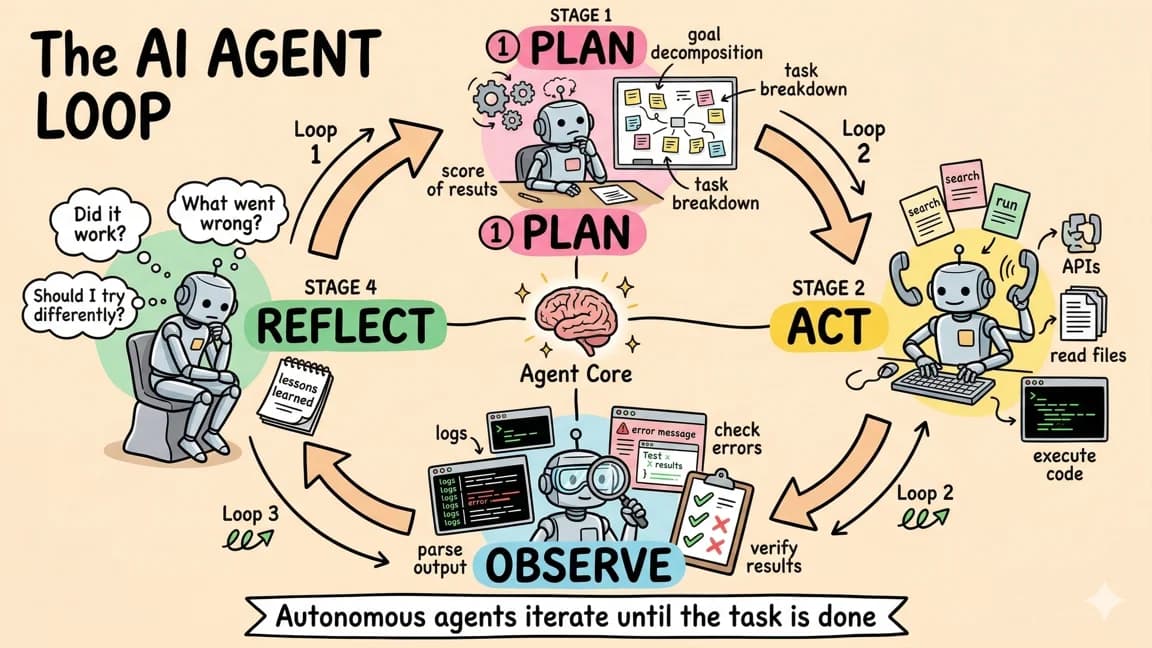
The agent handles these by spawning browsing sessions, synthesizing information from multiple sources, and producing structured output - whether that is a spreadsheet, a PowerPoint presentation, or a formatted summary.
The Dual Browser Architecture#
Under the hood, the ChatGPT Agent operates with two distinct browsing modes. The first is a text browser that handles standard web searches and page summarization. It can read PDFs, parse article content, and extract data from structured pages. This is the research side of the equation.
The second is an interactive browser that activates when actions are required. If the agent needs to click through a checkout flow, fill out a reservation form, or navigate a multi-step process that requires real browser interactions, it switches to a full visual browser session. You can watch it navigate in real time.
The visual UI shows which tools the agent is using at any given moment. You see it switch between searching, reading, summarizing, and interacting - creating a fluid workflow that adapts to whatever the task demands.
Output Capabilities#
Beyond text responses, the agent generates structured artifacts:
Spreadsheets - The agent can create Excel files from research data. Ask it to compile a comparison of SaaS tools with pricing, features, and user ratings, and it outputs a formatted spreadsheet you can download and use directly.
Slide Decks - PowerPoint generation is built in. The agent researches a topic, structures the information into slides with appropriate visuals, and delivers a presentation-ready file. This is not placeholder content with bullet points - the slides include sourced data and formatted layouts.
Recurring Tasks - You can schedule the agent to run automatically at specified intervals. A morning news digest, a weekly financial summary of specific stocks, or a daily competitor monitoring report can all run on their own schedule.
Benchmark Performance#
The benchmarks reveal why OpenAI felt confident shipping this as a distinct product rather than an incremental update.
Humanity's Last Exam scores 41.6%, surpassing Grok 4's previous leading result. What makes this benchmark particularly interesting is the progression chart. OpenAI plots results from O3 with no tools through ChatGPT Agent with browsing, computer use, and terminal access. The trend is clear: equipping models with more capabilities produces compounding improvements, similar to how a human with access to a calculator, reference books, and the internet would outperform one working from memory alone.
Frontier Math and DSBench (data science task benchmarking) also show state-of-the-art results. The DSBench numbers are particularly relevant because they test agents on realistic data analysis and modeling workflows - the kinds of tasks the ChatGPT Agent is explicitly designed for.
SpreadsheetBench is a newer benchmark that evaluates agents on spreadsheet manipulation tasks. ChatGPT Agent scores 45.7% with XLSX access, compared to a human baseline of 71.3%. Not parity, but a substantial jump from where these capabilities stood even months ago.
WebArena measures agentic browser use, and results show the gap between AI browser agents and human web navigation continuing to close. Combined with the BrowseComp leap from 55.5% (deep research) to 68.9% (ChatGPT Agent), the data suggests that merging research and action capabilities produces more than the sum of its parts.
Investment Banking Modeling benchmarks also showed major gains over O3, which just months ago was the state-of-the-art model. The speed of progression in these specialized financial analysis tasks underscores how quickly the field is advancing.
Safety and Control Considerations#
OpenAI emphasizes that users remain in control throughout any agent session. You can interrupt at any point - useful when the agent approaches sensitive actions like entering payment information or navigating to websites you have not authorized.
This is a real consideration, not just a disclaimer. The agent operates in a new browsing paradigm where an AI is actively navigating the web and potentially interacting with forms and services on your behalf. Being mindful about what information the agent has access to - credit card details, login credentials, personal data - is important as this modality matures.
Pricing and Availability#
The rollout follows OpenAI's tiered approach:
| Tier | Price | Agent Messages/Month |
|---|---|---|
| Pro | $200/mo | 400 |
| Plus | $20/mo | 40 |
| Team | Varies | Rolling out |
Pro and Team members get access first, with Plus users following within days. The rate limits are notable: even at the $200 tier, you get 400 agent messages per month, which means roughly 13 per day. For the Plus tier, 40 messages per month translates to about one or two per day - enough to test the capabilities but not enough to make it a daily workhorse.
Recurring Tasks and Automation#
One of the more practical features is the ability to schedule recurring agent tasks. You can configure the agent to run specific workflows on a schedule:
- Daily morning briefing - "Every morning at 8am, summarize the top AI news from the past 24 hours and email me a digest"
- Weekly financial report - "Every Friday, compile a report on these five stocks including price movements, analyst sentiment, and relevant news"
- Competitor monitoring - "Every Monday, check our three main competitors for pricing changes, new feature announcements, or blog posts"
This moves the ChatGPT Agent from a reactive tool (you ask, it answers) to a proactive system that delivers value without requiring your attention. The scheduled tasks run in the background and deliver results to your inbox or ChatGPT conversation history.
For anyone who has built similar automation with tools like Zapier or custom scripts, the appeal is obvious: natural language configuration instead of workflow builders and API integrations.
Limitations to Consider#
The 40 messages per month on the Plus tier is the most significant practical constraint. That is roughly one agent task per day, which means you need to be deliberate about what you ask the agent to handle. Complex multi-step tasks that would normally take several back-and-forth messages count against this quota.
The agent also inherits the limitations of web browsing AI. Sites with aggressive bot detection, CAPTCHA challenges, or complex authentication flows can trip up the interactive browser. Login-gated content remains tricky unless you are already authenticated in the session.
Response time varies significantly based on task complexity. A simple web search and summary might complete in under a minute. A comprehensive competitive analysis with spreadsheet output could take several minutes as the agent navigates multiple sites, synthesizes information, and generates structured output.
What This Means for Developers#
The ChatGPT Agent represents a convergence pattern we are seeing across the industry: the merging of research, reasoning, and action into unified agent experiences. Google, Anthropic, and xAI are all moving in similar directions.
For developers building AI-powered applications, the key takeaway is the tool-use architecture. Models equipped with browsing, terminal access, and structured output capabilities consistently outperform models running in isolation. This validates the agent framework approach - not just for end-user products like ChatGPT, but for developer tooling where AI agents coordinate multiple capabilities to accomplish complex tasks.
The benchmark trends also reinforce something practitioners have observed: the gap between AI capabilities and human performance on complex, real-world tasks is closing faster than most people expected, particularly when agents have access to the right tools.
For teams evaluating whether to build their own agent systems or leverage platforms like ChatGPT Agent, the calculus depends on control requirements. If you need deterministic behavior, custom tool integrations, and fine-grained control over the agent's decision-making process, building your own agent stack remains the better path. If you need general-purpose research and action capabilities without the engineering overhead, the ChatGPT Agent provides a ready-made solution that is improving rapidly.
Frequently Asked Questions#
What is the ChatGPT Agent?#
ChatGPT Agent is OpenAI's unified agentic product that combines Operator's web browsing and interaction capabilities with Deep Research's synthesis and analysis features. It can navigate websites, click buttons, fill forms, conduct multi-source research, and generate structured outputs like spreadsheets and slide decks - all within a single workflow. The agent handles complex multi-step tasks autonomously while allowing users to interrupt and maintain control throughout.
How much does ChatGPT Agent cost?#
ChatGPT Agent is available on Pro ($200/month with 400 agent messages) and Plus ($20/month with 40 agent messages) tiers. Pro users get roughly 13 agent tasks per day, while Plus users get about 1-2 per day. Team pricing varies. These limits apply to agent-specific tasks that involve browsing, research, and action - standard ChatGPT conversations do not count against these quotas.
What can ChatGPT Agent create?#
ChatGPT Agent can generate spreadsheets (Excel files with formatted data and analysis), slide decks (PowerPoint presentations with sourced content and visuals), structured reports, and detailed research summaries. It combines information from multiple web sources and formats output into professional, downloadable files rather than just text responses.
How does ChatGPT Agent browse the web?#
The agent uses a dual browser architecture. A text browser handles standard searches, reads PDFs, and extracts data from web pages for research tasks. An interactive visual browser activates when the agent needs to click through flows, fill forms, or navigate multi-step processes. Users can watch the interactive browser work in real time and interrupt at any point.
Can I schedule ChatGPT Agent to run automatically?#
Yes. ChatGPT Agent supports recurring tasks that run on schedules you define. Examples include daily news digests, weekly financial reports, or regular competitor monitoring. Scheduled tasks run in the background and deliver results via email or your ChatGPT conversation history - moving the agent from reactive to proactive automation.
What are ChatGPT Agent's limitations?#
The main constraints are rate limits (40 messages/month on Plus, 400 on Pro), varying response times for complex tasks, and standard web browsing limitations. Sites with aggressive bot detection, CAPTCHAs, or complex authentication can challenge the agent. Login-gated content requires existing authentication in the session. Complex multi-step tasks may take several minutes to complete.
How does ChatGPT Agent compare to building custom AI agents?#
ChatGPT Agent provides ready-made research and action capabilities without engineering overhead, making it ideal for general-purpose tasks. Custom agent stacks are better when you need deterministic behavior, specific tool integrations, or fine-grained control over decision-making. For most users needing web research and structured outputs, ChatGPT Agent handles the complexity; for developers building specialized applications, custom agents offer more control.
Is ChatGPT Agent safe to use with sensitive information?#
OpenAI emphasizes user control - you can interrupt sessions at any time, especially before sensitive actions like entering payment information. However, the agent navigates websites and potentially interacts with forms on your behalf. Be mindful about what credentials, financial details, or personal data the agent can access. Treat it with the same caution you would give to any tool that browses the web with your information.
Watch the Video#
Continue Reading#
- OpenAI Deep Research: The AI Agent That Does Your Homework
- OpenAI Dots: Always-On Agents Need a Control Plane - where approvals, permissions and sandboxes sit once ChatGPT runs as a long-running work agent
Get the next deep dive like this in your inbox
One email a week on OpenAI and the rest of the AI dev stack. Free.
Read next
OpenAI Dots: Always-On Agents Need a Control Plane
OpenAI Dots turns ChatGPT into a long-running work agent. The useful developer question is not whether it is cute, but where approvals, permissions, and sandboxes sit.
7 min readChatGPT Atlas: OpenAI's Built-In Web Browser
OpenAI has entered the browser wars with ChatGPT Atlas, a web browser that embeds ChatGPT directly into the browsing experience. This is not a simple sidebar addition or extension - Atlas reimagines ...
3 min readGPT-5: OpenAI's Most Capable Model
GPT-5 introduces a fundamentally different approach to inference. Instead of forcing developers to manually configure reasoning parameters, the model operates as a unified system with real-time rou...
7 min readNew here? Start with
Technical content at the intersection of AI and development. Building with AI agents, Claude Code, and modern dev tools - then showing you exactly how it works.