OpenAI Deep Research: The AI Agent That Does Your Homework
TL;DR
OpenAI's Deep Research is an AI agent inside ChatGPT that plans and executes multi-step research workflows, browsing dozens of websites and producing cited reports in minutes instead of hours.
| Official Sources | |
|---|---|
| ChatGPT Deep Research | Official OpenAI help article on Deep Research capabilities |
| OpenAI Blog | Product announcements and research updates |
| ChatGPT Overview | ChatGPT product page and feature list |
| OpenAI Pricing | ChatGPT Plus and Pro subscription pricing |
| OpenAI API Documentation | Developer documentation for API access |
| O3 Model Card | Technical details on the O3 reasoning model |
May 2026 Update: Deep Research has evolved significantly since this article was published. Key changes include: upgraded to O3 and O3-mini models with 40% faster reasoning and 50% lower hallucination rates (6% vs 12%); new pricing tiers with Free (5 reports/month), Plus (50/month included with ChatGPT Plus), and Pro (200/month at $200/mo with API access); batch processing API for Pro users; multi-format exports (PDF, Markdown, JSON, Google Docs, Notion); and full integration with ChatGPT Agent for automatic research routing. The original analysis below remains relevant for understanding the core product design.
What Deep Research Actually Does#
OpenAI's Deep Research is their second AI agent after Operator, and it solves a specific problem: turning a research question into a comprehensive, cited report without you doing any of the legwork. You type a query, it asks clarifying questions to make sure it understands the scope, and then it disappears for 5 to 30 minutes while it browses the web, reads pages, gathers data, and assembles everything into a structured report.
For model-selection context, compare this with OpenAI Codex: Cloud AI Coding With GPT-5.3 and OpenAI vs Anthropic in 2026 - Models, Tools, and Developer Experience; the useful question is not only benchmark quality, but where the model fits in a real developer workflow.
This is not a chatbot response dressed up as research. The agent plans a multi-step workflow, visits dozens of websites, extracts relevant information from each, and synthesizes it into something that reads like a professional research brief. Every claim gets a citation. Every source is listed at the bottom.
The Model Behind It#
Deep Research runs on an optimized version of OpenAI's O3 model, specifically tuned for web browsing and data analysis. At the time of launch, this was the first publicly available model where developers could access the full O3, not just the O3-mini variants that had been released days earlier.
The O3 optimization matters because Deep Research needs to reason about what to search for, evaluate whether the information it found actually answers the question, and decide when to backtrack and try a different approach. This is where the agent behavior shines. Traditional web search tools hit a page, extract some text, and move on. Deep Research reads a page, determines if the content is useful, and adjusts its strategy in real time.
The model also includes a code interpreter. If your research involves data-heavy questions, it can create visualizations, plot charts, and embed them directly in the report. It handles images and PDFs found on web pages too, pulling data from documents the same way a human researcher would.
How the Research Process Works#
The workflow follows a clear pattern:
- You submit a query with optional file attachments for additional context.
- The agent asks clarifying questions to narrow the scope before it starts.
- It begins browsing and you can watch the progress as it searches different websites and gathers details step by step.
- It compiles the report with a sidebar summarizing the research and all cited sources.
The entire process is asynchronous. You submit the request, do something else, and come back when it is done. Reports include tables, formatted sections, reference links, and embedded visualizations when the data calls for it.
One detail from the announcement that stood out: the agent does not just march forward blindly. It backtracks and reacts to real-time information when necessary. If it starts down a path that diverges from the original question, it corrects course. This was a known problem with earlier research tools where you would let them loose, come back 20 minutes later, and find they had wandered off-topic entirely.
Quality Compared to Standard ChatGPT#
OpenAI published direct comparisons between GPT-4o and Deep Research given the same prompts. The difference is stark.
Take a UX design query: "Find evidence that shows buttons with icons and labels are more usable than buttons without labels or labels without icons." GPT-4o returns a brief answer with minimal detail. Deep Research returns a multi-page report citing specific user studies, with references at the bottom.
The business research examples follow the same pattern. Ask Deep Research for a market analysis and you get detailed tables, specific metrics, and sourced data points. Ask GPT-4o and you get a competent but surface-level summary.
The gap is not about the underlying model intelligence. It is about time. Deep Research spends minutes reading and cross-referencing sources. A standard ChatGPT response fires back in seconds based on training data. The research agent trades speed for thoroughness.
Benchmarks: Humanity's Last Exam#
OpenAI included Deep Research in the Humanity's Last Exam benchmark, which was created specifically because existing benchmarks were becoming saturated with models approaching perfect scores. The test consists of 3,000 questions across 100 subjects, from linguistics to rocket science to ecology.
Deep Research scored 25.3% accuracy. For context, O1 scored 9.1% and O3-mini (high mode) scored 13.3%. The benchmark is intentionally difficult, designed to remain challenging as models improve. The significant gap between Deep Research and the base models suggests that the browsing and extended thinking time genuinely improves the quality of answers on hard questions.
The broader insight: the more time Deep Research spends browsing and reasoning about what it reads, the better it performs. This is the fundamental design tradeoff. It is not optimized for speed. It is optimized for depth and accuracy.
Who This Is For#
OpenAI positioned Deep Research for intensive knowledge workers across several domains:
- Finance - market research, competitive analysis, investment due diligence
- Science - literature reviews, methodology comparisons, experiment design research
- Policy - regulatory landscape analysis, impact assessments, cross-jurisdiction comparisons
- Engineering - technology evaluation, architecture research, standards compliance
They also mentioned consumer use cases like shopping research: finding the best appliances, comparing cars, or evaluating furniture options where you would normally spend hours reading reviews and spec sheets.
The common thread is tasks where thoroughness matters more than speed. If you need a quick answer, regular ChatGPT is fine. If you need a researched, cited, comprehensive answer, Deep Research is the better tool.
Pricing and Availability at Launch#
At launch, Deep Research was available exclusively to ChatGPT Pro subscribers at $200 per month, with a limit of 100 queries per month. That works out to $2 per research query. Plus and Team users were next in line, with Enterprise after that.
OpenAI mentioned plans for a faster, more cost-effective version powered by a smaller model that would still provide high-quality results, with significantly higher rate limits for all paid users. They also hinted at future integrations with subscription-based and internal data sources, expanding what the agent can access beyond the public web.
At $2 per query, the value calculation is straightforward. If a single Deep Research report saves you 30 minutes to an hour of manual research, and your time is worth more than $2 to $4 per hour, the tool pays for itself. For professionals in finance, law, or consulting where research is a core part of the workflow, the math is obvious.
How Deep Research Compares to Manual Research#
The time savings across different disciplines are significant. What would take a human researcher hours of searching, reading, cross-referencing, and writing gets compressed into minutes. The output is not perfect. OpenAI acknowledged that the model can still hallucinate facts, and there may be minor formatting issues. But the baseline quality is high enough that the report serves as a strong first draft rather than something you need to verify from scratch.
The real workflow improvement is not just speed. It is the breadth of coverage. A human researcher gets tired. They check 10 sources, maybe 20 if they are thorough. Deep Research can crawl through dozens of websites, read hundreds of pages, and synthesize it all without fatigue or attention drift.
Consider a practical scenario. You are evaluating three database solutions for a new project. Manual research means opening tabs, reading documentation, searching for comparison posts, checking benchmark data, reading user reviews, and eventually synthesizing it into a recommendation. That process takes 2 to 4 hours if done thoroughly. Deep Research handles the same task in under 30 minutes and produces a formatted report with every source cited.
The output is not a replacement for expert judgment. You still need domain knowledge to evaluate whether the report's conclusions make sense. But it eliminates the most time-consuming part of the process: the gathering and initial synthesis of information from dozens of sources.
Limitations to Keep in Mind#
Deep Research is not without constraints. The model can hallucinate facts, especially when sources conflict or when information is sparse. OpenAI was upfront about this at launch.
The 5 to 30 minute wait time is a real tradeoff. If you need quick answers to simple questions, standard ChatGPT is faster and more appropriate. Deep Research is designed for complex queries where thoroughness matters more than speed.
At launch, it was also limited to publicly accessible web content. Internal documents, subscription-based research databases, and private repositories were all out of reach. OpenAI mentioned future plans to expand data source access, but the initial version could only browse what was freely available online.
The 100 queries per month limit on the Pro plan means you need to be intentional about what you send to Deep Research. Burning a query on something you could have answered with a quick web search wastes one of your monthly allocations.
The Competitive Landscape#
Deep Research launched into a market where AI-assisted research was already gaining traction. Perplexity had established itself as the default AI search tool. Google was building similar capabilities into Gemini. Various startups were exploring agentic research workflows.
What set Deep Research apart was the depth of output. Perplexity excels at quick, sourced answers to factual questions. Deep Research excels at comprehensive reports that synthesize information across many sources. They serve different needs. A quick factual lookup is a Perplexity query. A thorough market analysis is a Deep Research task.
The use of the O3 model as the reasoning backbone also gave Deep Research a capability advantage over competitors using lighter models. The extended thinking time combined with web browsing created outputs that genuinely resembled professional research reports, not just aggregated search results with citations.
The Bigger Picture#
Deep Research represents a specific bet on the future of AI agents: give a model more time to think and act, and the quality of output improves dramatically. This is the opposite of the speed race that dominates most LLM development. While other companies optimize for faster token generation, OpenAI built a product that deliberately takes 5 to 30 minutes to produce a result.
The approach makes sense for knowledge work where accuracy matters more than latency. You do not need your market research report in 2 seconds. You need it to be right. Deep Research trades one for the other, and for the right use cases, that tradeoff is exactly correct.
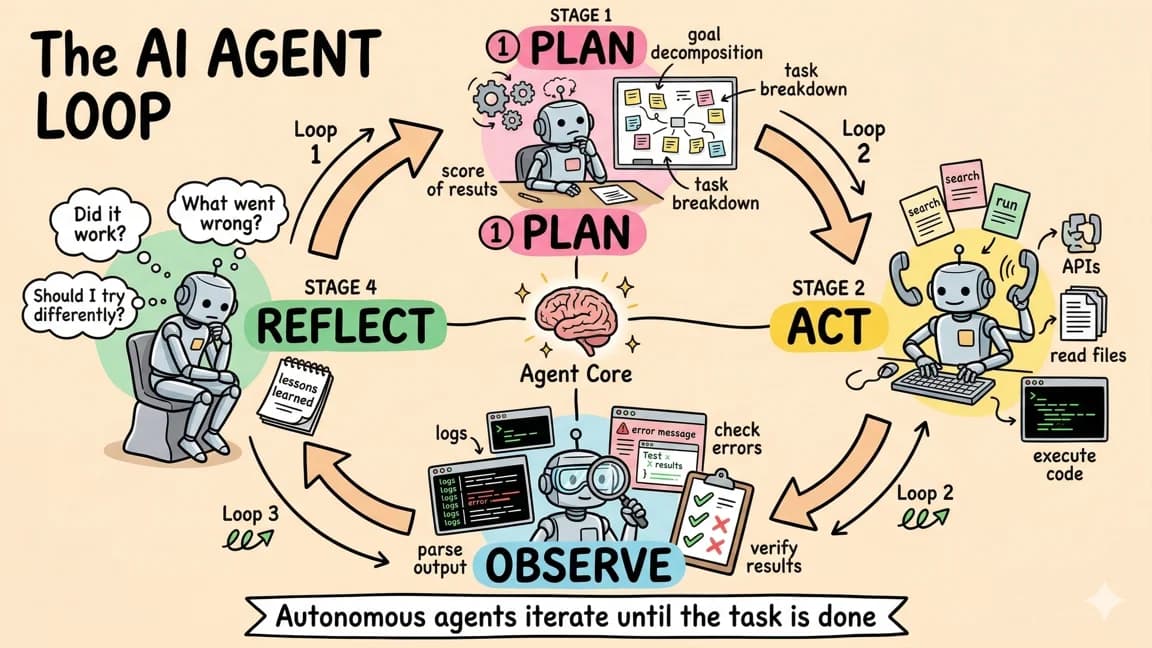
The broader implication is that AI agents are moving beyond simple question-and-answer interactions. Deep Research is not a chatbot. It is a tool that takes a goal, plans an approach, executes multiple steps, and delivers a finished product. That pattern of goal-oriented, multi-step execution is the foundation of every agent framework being built today. OpenAI just made it accessible to anyone with a ChatGPT subscription.
Frequently Asked Questions#
What is OpenAI Deep Research?#
Deep Research is an AI agent built into ChatGPT that autonomously plans and executes multi-step research workflows. You ask a question, it clarifies the scope, then browses dozens of websites over 5 to 30 minutes to produce a comprehensive, cited report. It runs on OpenAI's O3 model optimized for web browsing and data analysis.
How much does Deep Research cost in 2026?#
Deep Research now has three tiers: Free (5 reports per month), Plus (50 reports per month, included with ChatGPT Plus), and Pro (200 reports per month at $200/month with API access and 20k word limits). The Pro tier also includes batch processing for up to 100 research queries at once.
How is Deep Research different from Perplexity?#
Perplexity is optimized for quick, sourced answers to factual questions - it responds in seconds. Deep Research is optimized for comprehensive reports that synthesize information across many sources - it takes 5 to 30 minutes. Use Perplexity for quick lookups, Deep Research for thorough market analysis, literature reviews, or competitive research.
Does Deep Research work with ChatGPT Agent?#
Yes, fully integrated since March 2026. ChatGPT automatically routes research-heavy queries to Deep Research when appropriate. You can also explicitly request a Deep Research report within ChatGPT. The standalone Deep Research tool remains available for power users who want more control over research workflows.
Can Deep Research access internal documents or subscription databases?#
At launch, Deep Research was limited to publicly accessible web content. OpenAI has since expanded capabilities, but access to subscription-based research databases and private repositories varies by enterprise agreement. For most users, Deep Research browses public web content only.
How accurate is Deep Research?#
OpenAI reports a 6% hallucination rate with O3 models, down from 12% at launch. Every claim includes a citation so you can verify sources. For high-stakes decisions, treat Deep Research output as a strong first draft that benefits from expert review rather than an authoritative final answer.
What export formats does Deep Research support?#
Deep Research reports can be exported as PDF, Markdown, JSON, and directly integrated with Google Docs or Notion. The Pro tier includes additional formatting options and report versioning to compare research results over time.
When should I use Deep Research instead of regular ChatGPT?#
Use Deep Research when you need thoroughness over speed: market analysis, competitive research, literature reviews, technology evaluations, or any question where you would normally spend hours reading and cross-referencing sources. Use regular ChatGPT for quick answers, brainstorming, or tasks where you do not need cited sources from the live web.
Get the next deep dive like this in your inbox
One email a week on OpenAI and the rest of the AI dev stack. Free.
Read next on AI coding tools
ChatGPT Agent: OpenAI's Operator Meets Deep Research
OpenAI has merged its browsing capabilities with deep research into a single agent that can take action on the web, generate spreadsheets and slide decks, and handle complex multi-step tasks from sta...
7 min readAI Agents Explained: A TypeScript Developer's Guide
AI agents use LLMs to complete multi-step tasks autonomously. Here is how they work and how to build them in TypeScript.
6 min readGPT-5: OpenAI's Most Capable Model
GPT-5 introduces a fundamentally different approach to inference. Instead of forcing developers to manually configure reasoning parameters, the model operates as a unified system with real-time rou...
7 min readNew here? Start with
Technical content at the intersection of AI and development. Building with AI agents, Claude Code, and modern dev tools - then showing you exactly how it works.