Hermes Agent Guide (2026): What It Is, Local Setup With Ollama, Skills, and Hermes vs OpenClaw

TL;DR
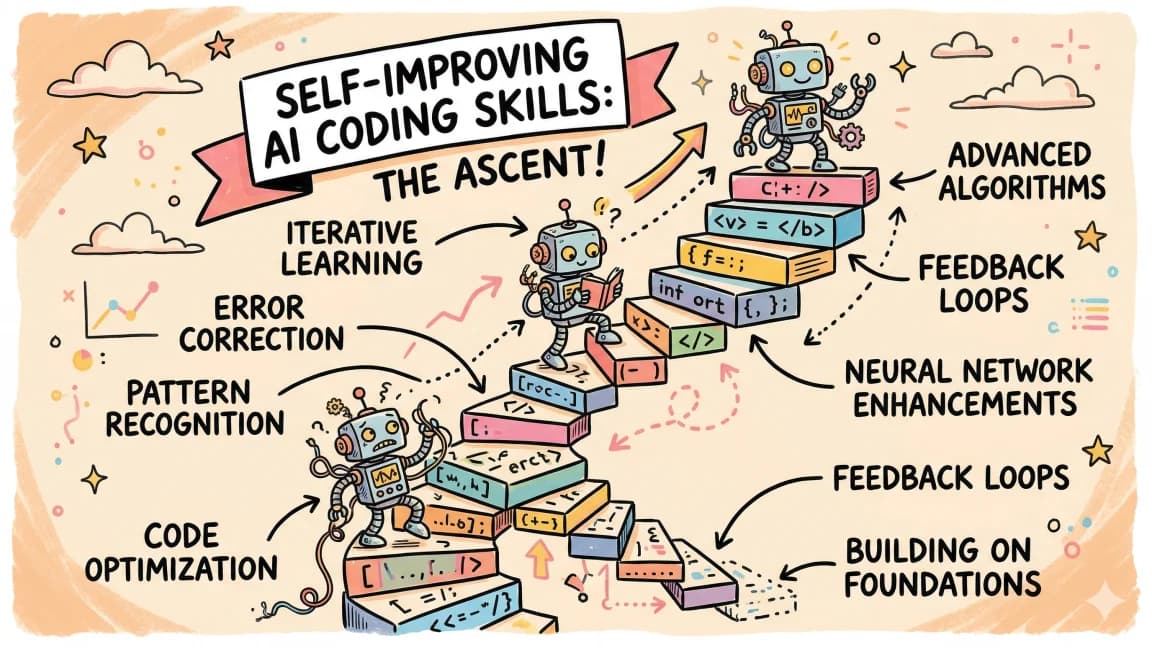
Hermes Agent is Nous Research's MIT-licensed, self-improving AI agent: it writes and refines its own skills, keeps memory across sessions, and talks to you from the terminal or Telegram, Discord, and Slack.
Hermes Agent is an open-source (MIT) personal AI agent from Nous Research that runs on your machine or server, works with any model provider including a local Ollama server, and improves itself by writing reusable skills from the tasks it completes. You install it with one command, point it at a model with hermes model, and talk to it from a terminal UI or from Telegram, Discord, Slack, WhatsApp, Signal, and more through a single gateway process. Compared with OpenClaw, Hermes leans harder on the self-improving learning loop and research tooling, while OpenClaw leans on channel breadth and native apps; Hermes can import an OpenClaw setup with hermes claw migrate.
Last updated: September 28, 2026. Commands, requirements, and repo stats below were checked against the Hermes Agent GitHub repository and official docs on that date. The latest release at the time of writing is Hermes Agent v0.21.5 (v2026.9.24), published September 24, 2026.
Official Sources#
| Resource | Link | Last verified |
|---|---|---|
| Hermes Agent repository | github.com/NousResearch/hermes-agent | September 28, 2026 |
| Hermes Agent docs | hermes-agent.nousresearch.com/docs | September 28, 2026 |
| Quickstart | Getting started | September 28, 2026 |
| Providers (including Ollama) | LLM and model providers | September 28, 2026 |
| Skills system | Skills docs | September 28, 2026 |
| OpenClaw repository | github.com/openclaw/openclaw | September 28, 2026 |
What Hermes Agent is#
The README describes Hermes as "the self-improving AI agent built by Nous Research" with "a built-in learning loop." Concretely, that loop has four parts: it creates skills after complex tasks, refines those skills while using them, keeps agent-curated memory with periodic nudges to persist what it learned, and searches its own past sessions for cross-session recall.
Around that core, the feature list is broad:
| Capability | What the docs say |
|---|---|
| Interfaces | A classic CLI, a newer TUI (hermes --tui), Hermes Desktop, and a messaging gateway |
| Messaging | Telegram, Discord, Slack, WhatsApp, Signal, and Email from one gateway process |
| Models | Any provider: Nous Portal, OpenRouter, OpenAI, Anthropic, your own endpoint, and many more; switch with hermes model |
| Execution | Seven terminal backends: local, Docker, SSH, Singularity, Modal, Daytona, and Vercel Sandbox |
| Automation | Built-in cron scheduler with delivery to any connected platform |
| Delegation | Isolated subagents for parallel workstreams |
| Extensibility | MCP servers, 40+ tools organized into toolsets, skills compatible with the agentskills.io standard |
| Research | Batch trajectory generation and compression for training tool-calling models |
The project is popular in its own right: the GitHub API reported 249,675 stars on September 28, 2026, and the repository is MIT licensed and written primarily in Python.
We covered one slice of this earlier: Hermes Agent gaining Vercel AI Gateway and Sandbox backends, which is the right read if you want hosted model routing and cloud microVM execution. This guide goes the other direction - everything on your own hardware.
Install Hermes Agent#
The one-line installer from the README covers Linux, macOS, and WSL2:
curl -fsSL https://hermes-agent.nousresearch.com/install.sh | bash
source ~/.zshrc    # or ~/.bashrc
hermes             # start chatting
On native Windows, run iex (irm https://hermes-agent.nousresearch.com/install.ps1) in PowerShell. The installer handles Python 3.14, Node.js, npm, ripgrep, and FFmpeg for you. On macOS and Windows the quickstart recommends the Hermes Desktop installer, which sets up both the CLI and the desktop app.
The commands you will use most:
hermes setup        # full setup wizard
hermes model        # choose provider and model
hermes tools        # enable or disable toolsets
hermes gateway      # start the messaging gateway
hermes doctor       # diagnose issues
hermes update       # update to the latest version
hermes setup offers three modes on a fresh install: Quick Setup through a Nous Portal subscription, Full Setup where you bring your own keys, and Blank Slate, which starts with only a provider, file operations, and the terminal toolset enabled. Secrets go to ~/.hermes/.env and everything else to ~/.hermes/config.yaml.
Run Hermes fully local with Ollama#
This is the setup most people searching for "Hermes agent Ollama" want: no API keys, no tokens leaving your machine. The providers docs treat local Ollama as a custom OpenAI-compatible endpoint.
Step 1: pull a model and start Ollama. The docs use Qwen 2.5 Coder 32B as the example:
ollama pull qwen2.5-coder:32b
OLLAMA_CONTEXT_LENGTH=64000 ollama serve
The OLLAMA_CONTEXT_LENGTH variable is not optional in practice. Hermes "requires at least 64,000 tokens of context for agent use with tools," and smaller windows are rejected at startup. Ollama does not use a model's full context by default: per the docs, machines with less than 24 GB of VRAM default to 4,096 tokens, 24 to 48 GB to 32,768, and 48 GB or more to 256,000. The docs call this "the #1 source of confusion" when pairing Ollama with Hermes, because you cannot set context length through the OpenAI-compatible API; it must be set server-side or in a Modelfile.
If you run Ollama under systemd, set it there instead:
sudo systemctl edit ollama.service
# Add: Environment="OLLAMA_CONTEXT_LENGTH=64000"
sudo systemctl daemon-reload && sudo systemctl restart ollama
Or bake it into a model so it persists:
echo -e "FROM qwen2.5-coder:32b\nPARAMETER num_ctx 64000" > Modelfile
ollama create qwen2.5-coder-64k -f Modelfile
Step 2: point Hermes at it. Run hermes model, choose "Custom endpoint (self-hosted / VLLM / etc.)", enter http://localhost:11434/v1, skip the API key, and enter your model name. Or write the config directly:
# ~/.hermes/config.yaml
model:
  default: qwen2.5-coder:32b
  provider: custom
  base_url: http://localhost:11434/v1
  context_length: 64000
Step 3: verify. Run ollama ps and check the CONTEXT column shows your configured value, then start hermes and give it a small task.
If your GPU cannot hold a model that size, the docs describe Ollama Cloud as a first-class provider (ollama-cloud, authenticated with OLLAMA_API_KEY) that serves the same open-weight catalog without local hardware. For picking a runtime in the first place, our Ollama vs LM Studio vs vLLM vs llama.cpp comparison covers the tradeoffs.
How Hermes skills work#
Skills are where Hermes differs most from a plain chat agent. Per the skills docs, skills are on-demand knowledge documents that follow a progressive disclosure pattern, and they are compatible with the agentskills.io open standard. That means a SKILL.md you wrote for another agent can often work here too.
Where they live. Everything goes in ~/.hermes/skills/: bundled skills copied at install, hub-installed skills, and skills the agent writes itself. You can also point Hermes at shared folders such as ~/.agents/skills with skills.external_dirs in config.yaml.
How they load. The agent first sees only a compact list of skill names and descriptions, then loads a full skill with skill_view when it needs it, and individual reference files only on demand. That keeps the token cost of a large skill library low. If you want the background on why that matters, see Skills Delivered Over MCP: Progressive Disclosure.
How you use them. Call a skill as a slash command, and stack several in one message:
/github-pr-workflow /test-driven-development fix issue #123 and open a PR
How you get more. Browse and install from the hub, with a security scan on install:
hermes skills browse
hermes skills search kubernetes
hermes skills install official/security/1password
How Hermes writes its own. Beyond creating skills automatically after complex tasks, the /learn command turns material into a skill on request: a local SDK folder, a docs page, "how I just deployed the staging server," or a whole book, which becomes a knowledge-base skill with one distilled reference file per chapter. The agent saves the result through its skill_manage tool, and you can gate those writes behind an approval setting if you do not want the agent editing skills unsupervised.
The same idea exists in other agents; we wrote about self-improving skills in Claude Code. Hermes simply makes the loop a first-class, default behavior.
Hermes Agent vs OpenClaw#
OpenClaw is the other giant in open-source personal agents, and the two are frequently compared. For a full introduction, read our What Is OpenClaw guide. Here is how they line up on facts from each project's official repository, checked September 28, 2026:
| Hermes Agent | OpenClaw | |
|---|---|---|
| Maintainer | Nous Research | OpenClaw Foundation, an independent 501(c)(3) |
| Primary language | Python | TypeScript |
| License | MIT | See repository |
| GitHub stars (Sep 28, 2026) | 249,675 | 390,702 |
| Latest release | v0.21.5 (Sep 24, 2026) | 2026.9.6 (Sep 23, 2026) |
| Install | curl -fsSL https://hermes-agent.nousresearch.com/install.sh | bash | curl -fsSL https://openclaw.ai/install.sh | bash or npm install -g openclaw@latest |
| Messaging | Telegram, Discord, Slack, WhatsApp, Signal, Email | Discord, iMessage, Slack, Teams, Telegram, WhatsApp, and 20+ more |
| Native apps | Hermes Desktop (macOS, Windows), Android via Termux | macOS, iOS, Android, Windows, Linux |
| Models | Any provider via hermes model, including local Ollama | Models and agent harnesses (Claude, Codex, local models) as swappable plugins |
| Execution isolation | Seven terminal backends including Docker, SSH, Modal, Daytona, Vercel Sandbox | Tools run on the host for the main session unless you configure sandboxing |
| Signature idea | Closed learning loop: self-written, self-improving skills | Runs everywhere you chat; no paid tier, hosted service, or token |
How to choose:
- Pick Hermes if you want the agent to get measurably better at your recurring tasks, want many isolation backends for running commands, or you are a Python shop that might contribute. The research tooling (trajectory generation and compression) also makes it the natural choice if you train tool-calling models.
- Pick OpenClaw if you want the widest set of chat channels and polished native apps across desktop and mobile, or you prefer a TypeScript codebase.
- Try both if you are unsure: Hermes ships a migration path.
hermes claw migrateimports your SOUL.md persona, MEMORY.md and USER.md memories, user-created skills (into~/.hermes/skills/openclaw-imports/), command allowlist, messaging settings, allowlisted API keys, and optionally AGENTS.md. Run it with--dry-runfirst to preview.
If you already use OpenClaw alongside Claude Code, our Composio CLI guide shows how to connect both to external apps.
Security basics before you leave it running#
Hermes is designed to run unattended, so treat it like any always-on process with shell access. The docs list command approval, DM pairing, and container isolation as the core controls. The practical defaults:
- Start with
hermes setupin Blank Slate mode if you want nothing enabled beyond files and terminal, then opt in to tools withhermes tools. - Move command execution off your laptop with
hermes config set terminal.backend docker(one of the seven documented backends). - Keep secrets in
~/.hermes/.env, which is wherehermes config setwrites them automatically. - Turn on the skill write-approval gate if you do not want the agent editing its own skills without review.
FAQ#
What is Hermes Agent?#
Hermes Agent is an open-source, MIT-licensed AI agent from Nous Research. It runs in your terminal, desktop, or chat apps, works with any model provider, and has a built-in learning loop that creates and refines reusable skills and keeps memory across sessions.
Can Hermes Agent run fully locally with Ollama?#
Yes. Configure Ollama as a custom endpoint at http://localhost:11434/v1 with no API key, either through hermes model or in ~/.hermes/config.yaml. Set Ollama's context to at least 64,000 tokens with OLLAMA_CONTEXT_LENGTH=64000, because Hermes rejects smaller windows and Ollama defaults to as little as 4,096 tokens on GPUs under 24 GB.
Why does Hermes say my Ollama context is too small?#
Hermes needs at least 64,000 tokens of context for tool use. Ollama picks a default based on VRAM rather than the model's maximum, and the context cannot be changed through the OpenAI-compatible API. Set it server-side with OLLAMA_CONTEXT_LENGTH or in a Modelfile with PARAMETER num_ctx 64000, then confirm with ollama ps.
Is Hermes Agent free?#
The software is free and MIT licensed. You pay only for the model you use: nothing extra with a local Ollama model, provider rates with an API key, or a subscription if you choose Nous Portal, which bundles 300+ models and tool backends.
How do Hermes skills differ from Claude Code skills?#
Both use SKILL.md files with progressive disclosure, and Hermes is compatible with the agentskills.io standard. The difference is initiative: Hermes creates skills automatically after complex tasks and refines them during use, and its /learn command turns docs, folders, or a finished workflow into a skill on request.
Hermes Agent vs OpenClaw: which is better?#
Neither is strictly better. Hermes focuses on a self-improving learning loop, many execution backends, and research tooling, and is written in Python. OpenClaw focuses on reaching you in 20+ chat channels and native apps and is written in TypeScript. Hermes can import an OpenClaw setup with hermes claw migrate, so trying both is low-risk.
Continue Reading#
- Hermes Agent Gains Vercel AI Gateway and Sandbox Backends - the hosted counterpart to this local setup
- What Is OpenClaw? (2026 Guide) - the other major open-source personal agent
- Ollama vs LM Studio vs vLLM vs llama.cpp - choosing a local runtime for agents
- MCP Servers vs Agent Skills - when to extend an agent with each
Sources#
- NousResearch/hermes-agent on GitHub - README, install commands, feature list, OpenClaw migration, latest release (fetched September 28, 2026)
- GitHub API: hermes-agent and openclaw - star counts, license, primary language (fetched September 28, 2026)
- Hermes Agent Quickstart - setup modes, config storage, TUI (fetched September 28, 2026)
- Hermes Agent: LLM and Model Providers - Ollama local and cloud setup, context length requirements (fetched September 28, 2026)
- Hermes Agent: Skills System - skill locations, progressive disclosure,
/learn, hub commands, external directories (fetched September 28, 2026) - openclaw/openclaw on GitHub - description, channels, install, foundation, latest release (fetched September 28, 2026)
Get the next comparison like this in your inbox
One email a week on Hermes Agent and the rest of the AI dev stack. Free.
Read next on local and open-weight models
Hermes Agent Gains Vercel AI Gateway and Sandbox Backends: The Agent Stack Goes Plug-and-Play
Vercel added Hermes Agent to AI Gateway and made Vercel Sandbox a terminal backend for the open-source agent. Hermes is now fully BYO: your own model routing through 200+ models at no markup, and your own cloud microVM for every agent command. Here is what that unlocks and why the agent control plane is consolidating.
5 min readOllama vs LM Studio vs vLLM vs llama.cpp: Picking a Local Runtime for Coding Agents
A fair, sourced comparison of the four runtimes developers reach for when they want a coding agent talking to a model on their own hardware instead of an API: Ollama's convenience, LM Studio's GUI, vLLM's throughput, and llama.cpp's control. What each is actually for, and which to pick.
10 min readSelf-Improving Skills: Claude Code That Learns From Every Session
Claude Code skills can now reflect on sessions, extract corrections, and update themselves with confidence levels. Your agent gets smarter every time you use it.
7 min readNew here? Start with
Technical content at the intersection of AI and development. Building with AI agents, Claude Code, and modern dev tools - then showing you exactly how it works.