Open-Source MCP Servers Worth Installing in 2026
TL;DR
The MCP ecosystem crossed 22,000 servers in early 2026. Most are noise.
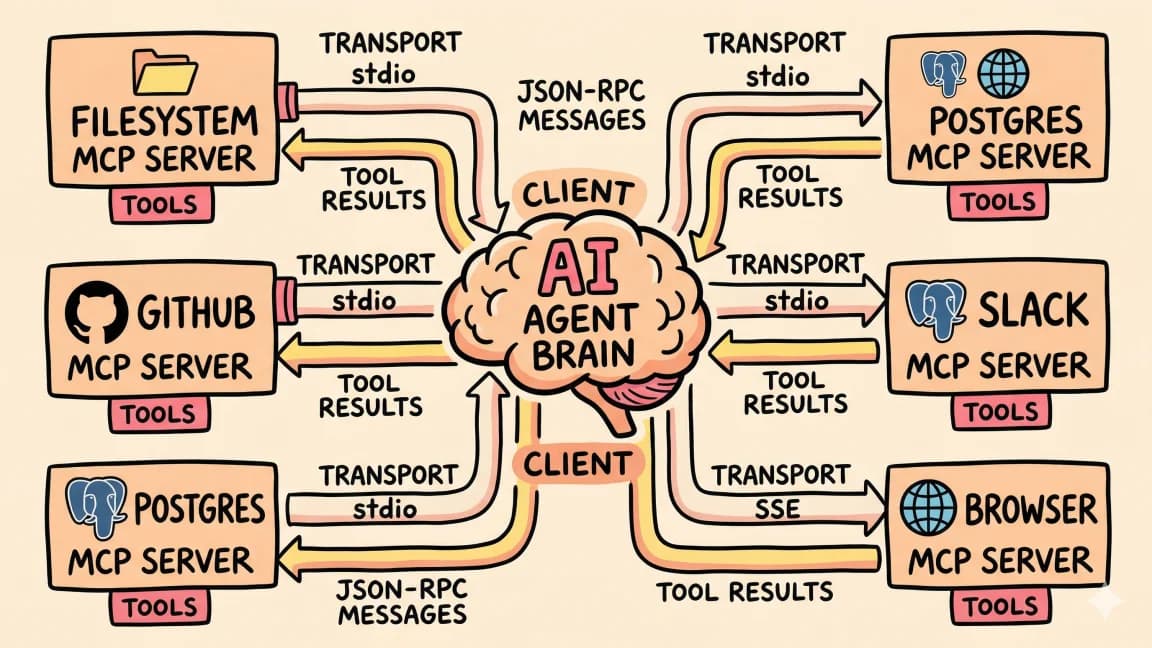
The Glama registry passed 22,000 MCP servers in March 2026. The Anthropic SDKs cross 97 million monthly downloads. Every cloud vendor, every database, every CMS, every observability tool has shipped or is shipping an MCP server. The ecosystem has gone from "promising idea" to "default integration layer for AI agents" in eighteen months.
Most of those 22,000 servers should not be on your machine. They are demos, personal projects, half-finished experiments, or duplicates of better servers. The list below is the opposite. These are the open-source MCP servers we install on every new development environment in 2026, in the order we install them, with the configuration we actually use.
If you are new to MCP, start with what an MCP server is and how to use MCP servers in practice. This post assumes you already have an mcp.json and want to know what to put in it. For the opinionated five-server shortlist, see the servers that survive every config reset.
For an interactive way to assemble your config without copy-paste errors, the DD MCP Config Generator lets you toggle servers on and pastes a complete file in your clipboard.
The Format#
Every server below is open source. Closed-source servers (Stripe MCP, Linear MCP, official Slack) are excluded even when they are excellent, because the point of this list is what you can run, fork, audit, and self-host. Each entry includes:
- What it does in one sentence
- Why it matters
- Working configuration block
Configurations are in the standard MCP format that Claude Code, Cursor, Windsurf, Codex, and most other clients consume. If your client uses a different schema, the same command and args apply.
1. Filesystem#
The foundation. Read, write, search, and list files inside whitelisted directories. Without this, your agent is blind outside the current chat context.
{
  "filesystem": {
    "command": "npx",
    "args": [
      "-y",
      "@modelcontextprotocol/server-filesystem",
      "/Users/you/Developer",
      "/Users/you/Documents/notes"
    ]
  }
}
Whitelist explicitly. Do not point it at your home directory unless you understand the implications. This is the highest-leverage server on the list and the one most likely to leak data if misconfigured.
2. GitHub#
The single most-installed MCP server of 2026, and for good reason. Every coding workflow eventually needs to read issues, file PRs, look at CI logs, or browse a teammate's branch. The official GitHub MCP server removes the copy-paste-between-terminal-and-browser tax entirely.
{
  "github": {
    "command": "docker",
    "args": [
      "run", "-i", "--rm",
      "-e", "GITHUB_PERSONAL_ACCESS_TOKEN",
      "ghcr.io/github/github-mcp-server"
    ],
    "env": {
      "GITHUB_PERSONAL_ACCESS_TOKEN": "ghp_..."
    }
  }
}
The docker variant is what GitHub officially ships. There is also a remote SaaS version at https://api.githubcopilot.com/mcp/ if you would rather not run Docker. For local development the container is fine and the audit trail is cleaner.
Use a fine-grained token. Most workflows do not need full repo write access. Read-only on issues, PRs, and code is enough for 90 percent of use cases.
3. Playwright#
Browser automation that an agent can actually use. Playwright MCP exposes navigate, click, fill, screenshot, and accessibility-tree primitives in a way that lets a model debug a page visually instead of guessing from HTML.
{
  "playwright": {
    "command": "npx",
    "args": ["@playwright/mcp@latest"]
  }
}
This is the server we reach for when an agent says "I cannot reproduce the bug." Hand it the URL, give it a Playwright MCP, and watch it click through the failing flow on its own. Pair with our writeup on Claude Code Chrome automation for the full pattern.
4. Postgres#
Read-only Postgres access. Schema inspection, sample queries, foreign key traversal, all the things you would do manually when debugging a data issue.
{
  "postgres": {
    "command": "npx",
    "args": [
      "-y",
      "@modelcontextprotocol/server-postgres",
      "postgresql://readonly:password@localhost:5432/mydb"
    ]
  }
}
Use a read-only credential. Production data should be a snapshot or staging clone, not the live database. The temptation to give the agent write access will not end well; resist it.
5. Sequential Thinking#
A tiny but disproportionately useful server. It exposes a structured "step through this problem" tool that encourages the model to plan before executing on hard tasks. Net effect: better outputs on multi-step refactors and architecture work.
{
  "sequential-thinking": {
    "command": "npx",
    "args": ["-y", "@modelcontextprotocol/server-sequential-thinking"]
  }
}
Costs almost nothing to run. Quietly improves quality on roughly the right kinds of tasks. Always installed.
6. Fetch#
HTTP fetch and HTML-to-markdown conversion for any URL. Use cases: reading API documentation, pulling RFC text into a thinking session, checking a status page during incident response.
{
  "fetch": {
    "command": "npx",
    "args": ["-y", "@modelcontextprotocol/server-fetch"]
  }
}
Lighter than Playwright. Use this for "read this static page" tasks and Playwright for "click through this app" tasks.
7. Prometheus#
Query Prometheus metrics and let the agent reason about your monitoring data. The server exposes range queries, instant queries, and metadata, so an agent can answer "did latency spike at 3am?" without you context-switching to Grafana.
{
  "prometheus": {
    "command": "uvx",
    "args": ["mcp-server-prometheus"],
    "env": {
      "PROMETHEUS_URL": "https://prom.internal.example.com"
    }
  }
}
This is one of the servers that turns an AI coding tool into something closer to a co-located SRE. When the agent can read metrics, it can debug production issues from the same prompt where it writes the fix.
8. ClickHouse#
For teams running ClickHouse - analytics workloads, OLAP, observability backends - the official ClickHouse MCP exposes schema inspection and query capabilities. Drop-in replacement for the manual clickhouse-client workflow.
{
  "clickhouse": {
    "command": "uvx",
    "args": ["mcp-clickhouse"],
    "env": {
      "CLICKHOUSE_HOST": "your-cluster.clickhouse.cloud",
      "CLICKHOUSE_USER": "readonly",
      "CLICKHOUSE_PASSWORD": "secret",
      "CLICKHOUSE_SECURE": "true"
    }
  }
}
If you are on Postgres, skip this and use server number 4. If you are on ClickHouse, this is the upgrade path. Same shape, different engine.
9. genai-toolbox (Database Multitool)#
Google's open-source genai-toolbox is the highest-starred database MCP server on GitHub at over 15,000 stars. It is one server that speaks to many databases - Postgres, MySQL, BigQuery, AlloyDB, Spanner, Cloud SQL - through a single config file.
# tools.yaml
sources:
  prod-postgres:
    kind: postgres
    host: 127.0.0.1
    port: 5432
    database: app
    user: readonly
    password: ${POSTGRES_RO_PASSWORD}

tools:
  list-orders:
    kind: postgres-sql
    source: prod-postgres
    description: List recent orders by customer
    parameters:
      - name: customer_id
        type: integer
    statement: SELECT * FROM orders WHERE customer_id = $1 ORDER BY created_at DESC LIMIT 50
Run with:
toolbox --tools-file tools.yaml --port 5000
Then add it to your client config:
{
  "toolbox": {
    "command": "npx",
    "args": ["-y", "@modelcontextprotocol/server-fetch", "http://localhost:5000/mcp"]
  }
}
This is the right answer for teams who want explicit, parameterized, audited database access rather than raw SQL execution. You define the queries an agent is allowed to run; it cannot improvise outside that menu.
10. Memory#
Persistent key-value memory across sessions. The agent can remember preferences, project conventions, and prior decisions without you re-explaining every time.
{
  "memory": {
    "command": "npx",
    "args": ["-y", "@modelcontextprotocol/server-memory"]
  }
}
Lightweight, local, no server required. The official implementation stores to a file you can inspect and edit. Pairs naturally with Claude Code skills for compounding context.
11. Time#
Self-explanatory. The agent gets reliable access to "what time is it" and timezone math. Trivial to install, surprisingly useful when an agent is reasoning about logs, schedules, or anything time-sensitive.
{
  "time": {
    "command": "uvx",
    "args": ["mcp-server-time"]
  }
}
You will not believe how many bugs stem from agents inventing timestamps. Install this and stop worrying about it.
12. Context7#
Live, version-accurate documentation for any library, framework, or SDK, injected on demand. This is the fix for the single worst failure mode of AI coding: confidently wrong API syntax from stale training data.
{
  "context7": {
    "command": "npx",
    "args": ["-y", "@upstash/context7-mcp"]
  }
}
Open source (MIT) and maintained by Upstash. Ask the agent how to configure Next.js 16 middleware or a new Tailwind utility and Context7 returns the relevant section of the current docs instead of whatever shipped a year ago. It works best when the query is specific: "Next.js 16 App Router middleware matcher" beats "Next.js." The free tier has per-day quotas; log in to raise them if you hammer it inside long sessions.
13. Sentry#
Read recent issues, stack traces, and event details from Sentry. Lets an agent triage production errors as the first step of fixing them, without you screenshotting the dashboard into chat.
{
  "sentry": {
    "command": "uvx",
    "args": ["mcp-server-sentry"],
    "env": {
      "SENTRY_AUTH_TOKEN": "sntrys_...",
      "SENTRY_ORG": "your-org"
    }
  }
}
This is one of those servers where the value compounds. Once your agent can read Sentry, "what is the most common production error this week" becomes a one-line prompt instead of a dashboard pilgrimage.
14. Confluent Kafka#
For teams running Kafka, the official Confluent MCP server exposes topic listing, message browsing, and cluster metadata. Useful for debugging streaming pipelines without context-switching to a Kafka UI.
{
  "confluent": {
    "command": "uvx",
    "args": ["mcp-confluent"],
    "env": {
      "CONFLUENT_BOOTSTRAP_SERVERS": "pkc-xxxxx.us-east-1.aws.confluent.cloud:9092",
      "CONFLUENT_API_KEY": "...",
      "CONFLUENT_API_SECRET": "..."
    }
  }
}
Niche but high-leverage for the teams that need it. If you do not run Kafka, skip.
15. ArcadeDB#
Multi-model database (graph, document, key-value, time-series, vector) that ships a built-in MCP server. The right pick for agents that need to traverse relationships across heterogeneous data without writing five different queries against five different stores.
{
  "arcadedb": {
    "command": "uvx",
    "args": ["mcp-arcadedb"],
    "env": {
      "ARCADEDB_URL": "http://localhost:2480",
      "ARCADEDB_DATABASE": "graph"
    }
  }
}
This is the one to install if you are starting a greenfield project that is going to need both graph traversal and vector similarity in the same agent reasoning step. For existing Postgres or ClickHouse stacks, stay there.
What We Did Not Include#
A few servers commonly recommended elsewhere that we removed from our default config in 2026:
- Slack: The official open-source server is now archived. The Slack-recommended path is closed source. If you want Slack from agents in 2026, use Zapier or build a tiny custom server.
- Generic SQL execution servers: Replaced by the toolbox pattern (server 9). Defining the queries an agent can run is safer than letting it write arbitrary SQL.
The MCP ecosystem moves fast. Servers we loved six months ago are now archived; servers we did not know about in January are now in our default config. Re-evaluate twice a year.
Watch the Setup End to End#
A walkthrough of installing all 15 servers from scratch on a clean machine, with the agent driving the install:
Subscribe to Developers Digest on YouTube for new MCP roundups every quarter.
How to Roll This Out#
A practical sequence:
- Start with servers 1, 2, 3, 5, 6, 10, and 12 (filesystem, GitHub, Playwright, sequential-thinking, fetch, memory, and Context7). That is the universal baseline.
- Add the database server that matches your stack (4, 8, or 9).
- Add observability (Prometheus, Sentry) once your agent starts being asked production questions.
- Add specialized servers (Confluent, ArcadeDB) only when the use case is real, not speculative.
Avoid the temptation to install all 15 on day one. Each server adds tools the model has to choose between. Past about 50 tools, model confusion becomes measurable. Curate aggressively.
For the curated short list with detailed reviews and decision criteria, see our 15 best MCP servers post and the MCP server ecosystem developer's guide. When you are ready to assemble your config, the DD MCP Config Generator is the fastest way to get from selection to a working file.
The Direction of Travel#
The interesting question is not which 15 servers to install today. It is what the ecosystem looks like in eighteen months. The signal so far: every infrastructure tool that is going to matter eventually ships a first-party MCP server. Companies that resist will be replaced by competitors who do. The protocol has won.
That means the real skill in 2026 and beyond is not picking servers. It is composing them. An agent with filesystem plus GitHub plus Playwright plus Postgres plus Sentry can do an enormous amount of operational and engineering work without ever needing a human to glue tools together. The 15 servers above are not the destination. They are the launchpad.
FAQ#
Which MCP servers should I install first?#
Start with the universal baseline: filesystem, GitHub, Playwright, sequential-thinking, fetch, memory, and Context7. Add a database server that matches your stack next, then observability servers like Prometheus and Sentry once your agent starts answering production questions. See how to use MCP servers in practice for the setup basics.
Are open-source MCP servers safe to run locally?#
Most are, but access scope matters more than the server itself. Whitelist filesystem directories explicitly, use read-only credentials for Postgres and ClickHouse, and use fine-grained tokens for GitHub. The MCP server ecosystem developer's guide covers the broader security model.
Why was Slack left off this list?#
The official open-source Slack server is now archived, and the Slack-recommended path is closed source. It was removed from the default config in 2026 in favor of Zapier or a small custom server for Slack.
Is there a shorter list if 15 servers is too many?#
Yes. For an opinionated five-server shortlist, see 271 MCP Servers: The Top 5 That Matter, and for a curated ranked list with reviews, see the 15 best MCP servers.
Get the next deep dive like this in your inbox
One email a week on MCP and the rest of the AI dev stack. Free.
Read next on Cursor
Best MCP Servers in 2026: The Developer Shortlist
A practical ranked list of MCP servers worth installing first for Claude Code, Cursor, Copilot, Codex, and OpenCode: GitHub, Filesystem, Context7, Playwright, Postgres, Sentry, Supabase, Notion, Slack, and more.
10 min read271 MCP Servers Exist. These 5 Actually Make Claude Code Better.
Most MCP servers are noise. After shipping 24 apps with Claude Code, these are the five I reach for every time.
11 min readHow to Use MCP Servers: The Complete Guide
MCP servers connect AI agents to databases, APIs, and tools through a standard protocol. Here is how to configure and use them with Claude Code and Cursor.
11 min readNew here? Start with
Technical content at the intersection of AI and development. Building with AI agents, Claude Code, and modern dev tools - then showing you exactly how it works.