CC Switch Guide: Manage Claude Code and Codex Providers From One App (2026)
TL;DR
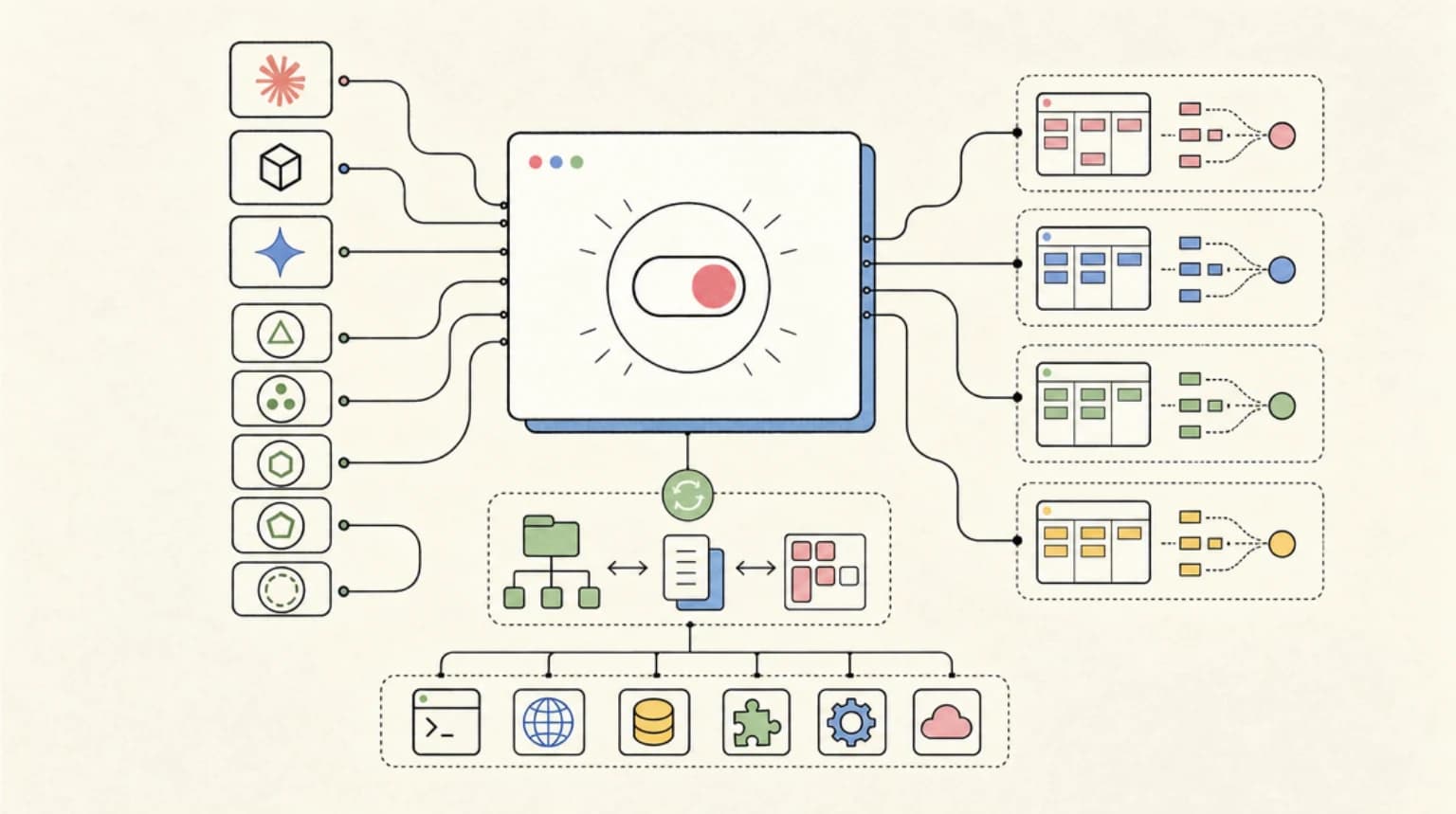
CC Switch is an open-source desktop app that switches API providers for Claude Code, Codex, Gemini CLI and seven other agents in one click, and syncs MCP servers, skills, and prompts between them.
CC Switch is a free, MIT-licensed desktop app (Windows, macOS, Linux) that manages the config files for Claude Code, Codex, Gemini CLI, and seven other coding agents from one window. You add API providers once, switch between them in a click or from the system tray, and sync the same MCP servers and skills into every tool instead of hand-editing JSON and TOML. Install it on a Mac with brew install --cask cc-switch; the only official site is ccswitch.io and the source is farion1231/cc-switch.
Last updated: September 28, 2026. Everything below was checked against the CC Switch README, the v3.20.4 release (published September 22, 2026), and the Homebrew cask on that date.
The "cc switch" and "ccswitch" searches spiked this year for both Claude Code and Codex, and the reason is simple: most developers now run more than one agent, and every agent keeps its own config format. If you are still deciding between the two agents themselves, read Codex vs Claude Code first. This post assumes you use both, or want to.
CC Switch at a Glance#
| Question | Answer (verified September 28, 2026) |
|---|---|
| What is it? | A desktop config manager for AI coding agents |
| Repo | farion1231/cc-switch, about 138k stars when we checked |
| License | MIT |
| Latest release | v3.20.4 (September 22, 2026) |
| Built with | Tauri 2 |
| Platforms | Windows 10+, macOS 12+, Linux (glibc 2.35+ and WebKitGTK 4.1) |
| Supported agents | Claude Code, Claude Desktop, Codex, Gemini CLI, Grok Build, OpenCode, OpenClaw, Hermes, Pi, MiniMax Code |
| Price | Free |
| Data location | ~/.cc-switch/ (SQLite database, backups, logs) |
What Problem CC Switch Solves#
Claude Code reads ~/.claude/settings.json. Codex reads ~/.codex/config.toml per the Codex config docs. Gemini CLI has its own files. Each also has its own instruction file (CLAUDE.md, AGENTS.md, GEMINI.md) and its own MCP server list.
That is fine with one agent and one account. It gets painful when you:
- Switch between an official subscription login and an API key or gateway
- Want the same MCP servers and skills in Claude Code and Codex without maintaining two copies
- Want to see token usage and spend across agents in one place
CC Switch's pitch, from its README: pick a preset, enter your key, switch in one click, "without losing your existing configuration."
Install CC Switch#
macOS (Homebrew):
brew install --cask cc-switch
Upgrade later with brew upgrade --cask cc-switch. The README says macOS builds are code-signed and notarized, and the download is a Universal build for Apple Silicon and Intel.
Windows: download the .msi installer or the portable .zip from the Releases page. ARM64 builds are available.
Arch Linux: paru -S cc-switch-bin
Other Linux: .deb, .rpm, or .AppImage from the Releases page.
Headless servers: CC Switch itself needs a desktop. For SSH boxes the README points to the community-maintained CC Switch CLI (brew install cc-switch-cli), which shares the same ~/.cc-switch data directory. It is a separate project that can lag the desktop app.
On first launch, CC Switch imports your existing Claude Code, Codex, Gemini CLI, and Grok Build config as a provider named default, and adds an official provider for each tool. So nothing you had set up disappears.
Setup: Your First Provider Switch#
The basic loop from the README's Quick Start:
- Add a provider. Click the
+button, choose one of the 90+ presets (the README lists AWS Bedrock and NVIDIA NIM among them) or create a custom config, and enter your key. - Switch. Select the provider and click Enable, or click the provider name in the system tray. Tray switching works for Claude Code, Codex, Gemini CLI, and Grok Build.
- Let it take effect. Claude Code hot-switches with no restart. Codex, Gemini CLI, and Grok Build need a terminal or CLI restart. Claude Desktop needs a full quit and reopen.
- Go back to official login any time. Switch to the built-in official provider (for example "Claude Official" or "OpenAI Official"), restart the tool, and run its login flow:
/loginin Claude Code orcodex loginfor Codex.
The detail that makes this safe to adopt: switching replaces only key fields - endpoint, key, model, and API protocol (plus reasoning effort for Codex). Your plugins, hooks, permissions, MCP servers, and comments stay where they are. Before CC Switch first rewrites a config file, it backs up the original to ~/.cc-switch/backups/live-first-write/.
One gotcha from the FAQ: if you change the model inside the tool (with /model in Claude Code, for example), that choice lasts until your next switch. The saved provider's model wins after that. Edit the provider in CC Switch if you want a model to stick.
Using CC Switch Across Claude Code and Codex#
This is where most of the search interest is. Three features matter.
1. Shared MCP servers and skills#
Open MCP Management, add a server once (from a template, custom config, or by importing an existing one), then toggle which tools it syncs to. Skills work the same way: Skills > Discover Skills searches the skills.sh directory or GitHub repos, and installs to the tools you pick via symlinks or copies. You can optionally store skills in ~/.agents/skills.
Because Claude Code and Codex both follow the Agent Skills format, one skill folder can serve both. That is the main reason to use CC Switch even if you never change providers. For choosing which skills to sync, see our Claude Code skills and plugins hub.
2. Per-tool prompt files#
The Prompts panel keeps a Markdown library per tool and writes the active one to CLAUDE.md for Claude Code or AGENTS.md for Codex. The file's existing content is saved back to the library first, so enabling a prompt does not destroy what was there. Prompts are deliberately per-tool, not shared.
3. Projects#
On the Claude Code or Codex page, the project switcher saves the current provider, MCP servers, skills, and prompt files as a named project. Switching projects swaps the whole setup at once, which is handy if one client repo needs an enterprise gateway and your side project uses a personal subscription.
Optional: local routing between API formats#
CC Switch can run a local router (default http://127.0.0.1:15721) that converts between Anthropic Messages, OpenAI Chat Completions, OpenAI Responses, and Gemini formats. That is what lets Claude Code talk to an OpenAI-format endpoint or Codex talk to an Anthropic-format one. Turn it on under Settings > Routing > Local Routing, then enable it per tool. The project has step-by-step guides for using GPT models in Claude Code and using Claude models in Codex.
Two caveats straight from the docs: official providers such as "Claude Official" cannot go through local routing (Codex's OpenAI Official is the exception), and when routing is on your tool's config holds only the local address and a PROXY_MANAGED placeholder key while the real credentials live in CC Switch. For the broader tradeoffs of pointing Claude Code at a non-Anthropic backend, our model gateway tradeoffs post is the companion read. Claude Code's own LLM gateway docs explain the ANTHROPIC_BASE_URL variable this approach relies on.
Usage and Cost Tracking#
Even without routing, CC Switch scans each tool's local session logs and shows requests, tokens, cache hit rate, and spend by provider and model. Provider cards and the tray can show subscription quotas and balances for supported providers, and you can set custom per-model prices. If you are trying to keep Claude Code and Codex costs visible side by side, this is a free way to do it; pair it with our AI coding tools pricing comparison for the plan-level numbers.
Should You Use CC Switch?#
| You are... | Verdict |
|---|---|
| Using Claude Code and Codex daily, want shared MCP and skills | Yes, this is the core use case |
| Switching between a personal subscription and a work API key or gateway | Yes, projects and one-click switching save real time |
| Using one agent with one login | Probably not; the tool's own settings are enough |
| On a headless server | Use the separate CC Switch CLI, or manage config files directly |
| In an org with managed settings for Claude Code | Check with your admin first; managed settings may override what CC Switch writes |
Safety Notes Before You Add Providers#
CC Switch is a config manager, and it is transparent about what it writes. The providers you point it at are a separate decision.
- Be careful with third-party relays. The README carries a long list of sponsor relay services advertising steep discounts on Claude and GPT access. We have not evaluated any of them, and a relay sees every prompt and every line of code you send. For work code, stick to first-party APIs, your cloud provider (Bedrock, Vertex, Foundry), or a gateway your company runs.
- Check vendor terms before reusing subscriptions. CC Switch's beta OAuth center can sign in to ChatGPT, GitHub Copilot, and xAI accounts and use those subscriptions as providers in other tools. The README itself warns this "may violate the vendor's terms of service." Read the terms before you rely on it.
- Download only from the official sources. The README calls ccswitch.io "the only official website." Use it, the GitHub Releases page, or Homebrew.
FAQ#
What is CC Switch?#
CC Switch is an open-source, MIT-licensed desktop app that manages API providers, MCP servers, skills, and prompt files for Claude Code, Codex, Gemini CLI, and seven other AI coding agents. It switches providers in one click without touching your plugins, hooks, or permissions.
Is CC Switch a real, official tool?#
It is a real open-source project maintained on GitHub at farion1231/cc-switch, with an official site at ccswitch.io and a Homebrew cask. It is not made by Anthropic or OpenAI.
How do I install CC Switch on Mac?#
Run brew install --cask cc-switch, or download the .dmg from the GitHub Releases page. macOS 12 or later is required.
Does CC Switch work with Codex?#
Yes. It switches Codex providers, supports tray switching, syncs MCP servers and skills, manages AGENTS.md prompts, tracks usage, and can save Codex projects. Codex needs a terminal or CLI restart after a provider switch.
Will CC Switch overwrite my Claude Code settings?#
No. It replaces only provider fields such as endpoint, key, and model. Plugins, hooks, permissions, MCP servers, and your own environment variables stay in place, and the original file is backed up to ~/.cc-switch/backups/live-first-write/ before the first rewrite.
How do I switch back to my Claude subscription?#
Select the built-in "Claude Official" provider in CC Switch, restart Claude Code, and run /login. Official providers cannot be selected while local routing is on, so turn routing off first if you enabled it.
Is there a command-line version of CC Switch?#
The desktop app needs a graphical interface. The community-maintained CC Switch CLI offers a terminal UI and command mode, installs with brew install cc-switch-cli, and shares the same data directory.
Sources#
All fetched September 28, 2026:
- farion1231/cc-switch README - features, Quick Start, FAQ, supported tools, safety notes
- CC Switch v3.20.4 release - latest version and date
- Homebrew cask: cc-switch - cask token and version 3.20.4
- CC Switch routing guide: GPT in Claude Code
- CC Switch routing guide: Claude in Codex
- Codex docs: Config basics -
~/.codex/config.tomllocation - Claude Code docs: LLM gateway -
ANTHROPIC_BASE_URL
Continue Reading#
- Codex vs Claude Code - pick your primary agent before you manage two
- Best Claude Code Skills and Plugins in 2026 - what to sync once CC Switch is set up
- Model Routing Strategies for Cost-Effective Coding - when routing between models actually saves money
- Free Claude Code Model Gateways: The Tradeoffs - what you give up behind a gateway
- The OpenAI Codex Guide - getting the most out of Codex itself
Get the next deep dive like this in your inbox
One email a week on Claude Code and the rest of the AI dev stack. Free.
Read next on Claude Code
Codex vs Claude Code in 2026: Which AI Coding Agent Should You Use?
Pick Claude Code for ambiguous, multi-file work you want to plan, extend with skills and MCP, and orchestrate across agents. Pick Codex for well-scoped tasks, strong defaults, and one ChatGPT subscription for chat and code. GPT-6, Opus 5.5, and pricing verified September 28, 2026.
12 min readBest Claude Code Skills and Plugins in 2026: Where to Find, Install, and Choose Them
The Claude Code skills and plugins hub: what skills are, where to find them (Anthropic's official marketplace, anthropics/skills, top GitHub repos), how the plugin marketplace works, the Superpowers methodology plugin, exact install commands, and the picks worth your context budget.
14 min readFree Claude Code Is Really a Model Gateway Bet
The trending Free Claude Code repo is not just about avoiding API bills. It points at a bigger developer-tool pattern: model gateways for AI coding agents.
7 min readTechnical content at the intersection of AI and development. Building with AI agents, Claude Code, and modern dev tools - then showing you exactly how it works.