The DevDigest App Ecosystem
TL;DR
A tour of every app and tool in the Developers Digest network - from AI model comparisons to cron job scheduling.
Last updated: March 22, 2026
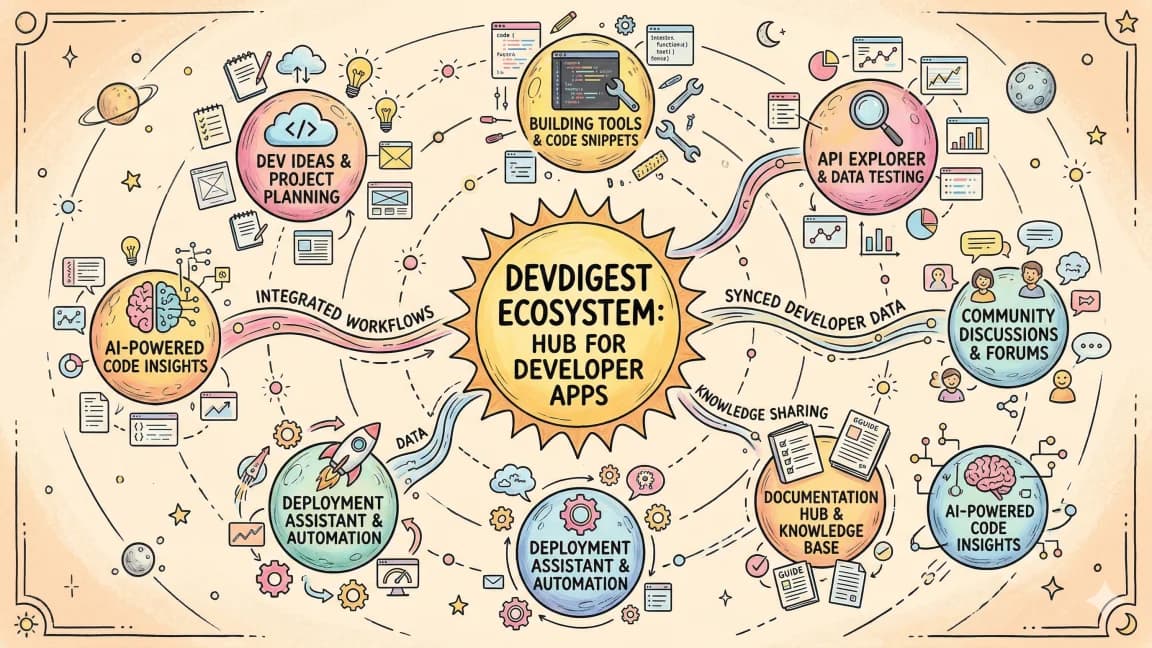
Developers Digest is not just one site. It is a network of focused products, each aimed at a specific workflow. If you only need a map, the curated list lives on the main site at developersdigest.tech/apps. Below is what each property is for, in one pass.
For broader context, pair this with Every AI Coding Tool Compared: The 2026 Matrix and What Is an AI Coding Agent? The Complete 2026 Guide; those companion pieces show where this fits in the wider AI developer workflow.
Main site (developersdigest.tech) is the editorial and toolkit hub: blog posts, guides, the tools directory, courses, projects, and the free in-browser utilities (JSON formatter, cron builder, diff viewer, and the rest). Use it when you want long-form explanations, search, or a single place to explore everything.
AI Models at subagent.developersdigest.tech tackles model overload. It lines up 210+ AI models with pricing, context limits, capabilities, and benchmarks so you can compare providers without rebuilding your own spreadsheet every quarter.
CLI Tools at clis.developersdigest.tech is a directory of 50+ developer CLIs. Search and filter when you need the right command-line tool for a job but do not want to dig through GitHub stars alone.
Demos at demos.developersdigest.tech is where live playgrounds live, including AI model demos and Web Dev Arena. Reach for it when READMEs are not enough and you want to click before you install.
Cron at cron.developersdigest.tech is a visual dashboard for scheduling and monitoring cron jobs, with natural-language scheduling, failure alerts, and team-oriented workflows. It is built for anyone who has outgrown a single crontab on one server.
ContentCal at contentcal.developersdigest.tech is an AI-assisted social scheduler: draft content, plan a calendar, and publish across platforms from one flow instead of juggling separate compose UIs.
Fit at fit.developersdigest.tech is fitness tracking driven by natural-language logging, so quick notes turn into structured history without fighting rigid forms after every session.
Agent Hub at agenthub.developersdigest.tech is a desktop control panel for AI coding: run Claude, Codex, Gemini, and many harnesses from one app instead of bouncing between disconnected installers and terminals.
DD CLI at cli.developersdigest.tech is the DevDigest command-line entry point: install tools, manage configs, and automate repetitive setup from the shell.
Pick the surfaces that match how you work (research, shipping, ops, content, or health), and keep the main site bookmarked for the narrative and the full toolkit index.
FAQ#
Where can I see a curated list of every DevDigest app?#
The main site has a maintained directory at developersdigest.tech/apps. It links out to every property described here, kept current as new tools ship.
What is the difference between AI Models and CLI Tools?#
AI Models at subagent.developersdigest.tech compares 210+ models across pricing, context limits, and benchmarks, while CLI Tools at clis.developersdigest.tech is a searchable directory of 50+ developer command-line tools. One compares model providers, the other compares CLIs. For a deeper look at coding-agent options specifically, see Every AI Coding Tool Compared.
What does Agent Hub do that a terminal cannot?#
Agent Hub at agenthub.developersdigest.tech is a desktop control panel that runs Claude, Codex, Gemini, and other coding harnesses from one app, so you are not switching between separate installers and terminal windows. The AI coding agent guide covers how these harnesses fit into a broader workflow.
Is Cron meant to replace a single server's crontab?#
Yes, that is the use case it targets. Cron at cron.developersdigest.tech adds a visual dashboard, natural-language scheduling, and failure alerts for anyone who has outgrown managing jobs on one crontab.
Continue Reading#
Get the next deep dive like this in your inbox
One email a week on DevDigest and the rest of the AI dev stack. Free.
Read next
Build Log: Adding Product Paths to a Content Site Without Making It Salesy
Build log on adding pricing, Pro, apps, sponsor, hiring, consulting, and newsletter paths to a content site, with an anti-salesy checklist for each page.
8 min readBuild Log: How I Shipped a Tool Directory That Feeds Search, Compare, and RSS
How one DevDigest tool registry feeds tool pages, category filters, compare routes, RSS, JSON APIs, search, and sitemap discovery, and what not to automate.
9 min readBuild Log: Turning the DevDigest Blog Into an Agent Content System
How the DevDigest blog became an agent content system: posts, tags, RSS, search, llms.txt, and content expansion reports, plus what not to automate blindly.
9 min readNew here? Start with
Technical content at the intersection of AI and development. Building with AI agents, Claude Code, and modern dev tools - then showing you exactly how it works.